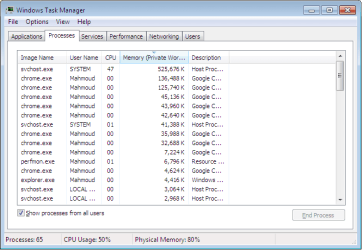
Very high memory (and sometimes CPU) usage by svchost.exe: up to 1 GB

mahmoud

New member
Local time
12:42 PM
Messages
10
Hi everyone

I have been experiencing some really annoying problem since I switched from XP to Seven on my Dell Vostro 1500 laptop. I had BSODs often, and also VERY high memory and cpu usage by svchost.exe.
I tried to install another windows 7 and I still have the same problems. I also still have the XP, and while it has gotten relatively slow, it works fine, without any of these problems.
I have attached a snapshot of Taskmanager.

Any thoughts?
Thanks
 

Attachments

  • SVCHOST.png
    SVCHOST.png
    13.7 KB · Views: 53

My Computer My Computer

At a glance

Winows 7 Ultimate 32bitIntel Core 2 Duo 2G2 GNvidia Gforce 8400?
Computer type
Laptop
Computer Manufacturer/Model Number
Dell
OS
Winows 7 Ultimate 32bit
CPU
Intel Core 2 Duo 2G
Memory
2 G
Graphics Card(s)
Nvidia Gforce 8400?
Antivirus
Avast
Browser
Chrome
Can't tell what's running under svchost from your screenshot. Add the PID column:

Windows Task Manager 1.jpg

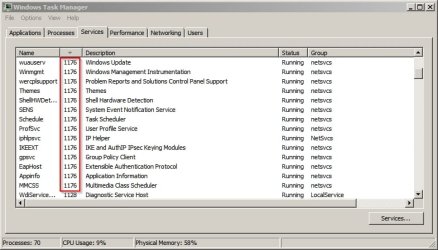
Then check the PID against the svchost instance with the same PID in the services tab.

Windows Task Manager 2.jpg
 

My Computer My Computer

At a glance

Microsoft Windows 7 Home Premium 64-bit 7601 ...AMD C-60 APU with Radeon(tm) HD Graphics4.00 GBAMD Radeon HD 6290 Graphics
Computer type
Laptop
Computer Manufacturer/Model Number
ASUS
OS
Microsoft Windows 7 Home Premium 64-bit 7601 Multiprocessor Free Service Pack 1
CPU
AMD C-60 APU with Radeon(tm) HD Graphics
Motherboard
ASUSTeK COMPUTER INC. X501U
Memory
4.00 GB
Graphics Card(s)
AMD Radeon HD 6290 Graphics
Sound Card
(1) AMD High Definition Audio Device (2) Realtek High Defi
Screen Resolution
1366 x 768 x 32 bits (4294967296 colors) @ 60 Hz
Hard Drives
Hitachi HTS545050A7E380 SATA Disk Device
Antivirus
Comodo CIS & FW, SecureAplus App Whitelisting, Threatfire
Browser
Cyberfox 64bit, Opera 64bit, Airfox
Other Info
Spy-The-Spy, HitmanPro.Alert, Norton Connect Safe, MJRegWatcher, BitDefender TrafficLight, Voodoo Shield, Zemana AntiMalware
Hi Callender, and thanks for the reply.
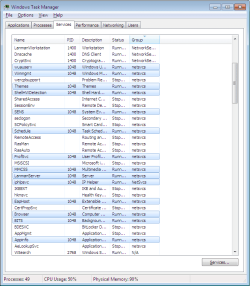
I did that, and the PID was 1048, as you can see in the attached picture.

Cheers
 

Attachments

  • SVCHOST2.png
    SVCHOST2.png
    27.5 KB · Views: 1

My Computer My Computer

At a glance

Winows 7 Ultimate 32bitIntel Core 2 Duo 2G2 GNvidia Gforce 8400?
Computer type
Laptop
Computer Manufacturer/Model Number
Dell
OS
Winows 7 Ultimate 32bit
CPU
Intel Core 2 Duo 2G
Memory
2 G
Graphics Card(s)
Nvidia Gforce 8400?
Antivirus
Avast
Browser
Chrome
Okay - next time it happens try stopping the Background Intelligent Transfer Service (BITS) service and the Windows Update service (wuauserv)

Start > Run then type

services.msc

Press Enter.

Stop both services - if Windows Update service doesn't stop try restsring and stopping BITS then stop Windows Update.

Then check memory usage. If it's dropped back to normal then you've got a windows update issue.
 

My Computer My Computer

At a glance

Microsoft Windows 7 Home Premium 64-bit 7601 ...AMD C-60 APU with Radeon(tm) HD Graphics4.00 GBAMD Radeon HD 6290 Graphics
Computer type
Laptop
Computer Manufacturer/Model Number
ASUS
OS
Microsoft Windows 7 Home Premium 64-bit 7601 Multiprocessor Free Service Pack 1
CPU
AMD C-60 APU with Radeon(tm) HD Graphics
Motherboard
ASUSTeK COMPUTER INC. X501U
Memory
4.00 GB
Graphics Card(s)
AMD Radeon HD 6290 Graphics
Sound Card
(1) AMD High Definition Audio Device (2) Realtek High Defi
Screen Resolution
1366 x 768 x 32 bits (4294967296 colors) @ 60 Hz
Hard Drives
Hitachi HTS545050A7E380 SATA Disk Device
Antivirus
Comodo CIS & FW, SecureAplus App Whitelisting, Threatfire
Browser
Cyberfox 64bit, Opera 64bit, Airfox
Other Info
Spy-The-Spy, HitmanPro.Alert, Norton Connect Safe, MJRegWatcher, BitDefender TrafficLight, Voodoo Shield, Zemana AntiMalware
Callender

If it's dropped back to normal then you've got a windows update issue.
Confirmed, so it seems that I have a windows update issue. What should I do next? Should I just keep the windows update service stopped?
 

My Computer My Computer

At a glance

Winows 7 Ultimate 32bitIntel Core 2 Duo 2G2 GNvidia Gforce 8400?
Computer type
Laptop
Computer Manufacturer/Model Number
Dell
OS
Winows 7 Ultimate 32bit
CPU
Intel Core 2 Duo 2G
Memory
2 G
Graphics Card(s)
Nvidia Gforce 8400?
Antivirus
Avast
Browser
Chrome
My brother-in-law's PC is in the same state, it wasn't updated after SP1 by the way. And can't update due to thrashing of HDD and everything. Returns to usable state after disabling BITS and Windows Update services.

I will reinstall Windows and see if it will help installing the updates right after OS. This PC has 2 GB RAM and 64-bit OS anyway, will change to 32bit.

The MS KB (can't remember the number) didn't help.
 

My Computer My Computer

At a glance

Windows 7 Ultimate x64 SP1AMD Phenom 2 1090T2x8GB Kingston HyperX Fury Black 1600Mhz Unga...MSI GTX 970 Gaming 4G
Computer type
PC/Desktop
Computer Manufacturer/Model Number
Custom Build
OS
Windows 7 Ultimate x64 SP1
CPU
AMD Phenom 2 1090T
Motherboard
Gigabyte GA-890FXA-UD5
Memory
2x8GB Kingston HyperX Fury Black 1600Mhz Unganged
Graphics Card(s)
MSI GTX 970 Gaming 4G
Sound Card
Realtek On-Board HD 7.1 Audio / Logitech G35
Monitor(s) Displays
3xAcer GD245HQ
Screen Resolution
1920x1080
Hard Drives
Samsung 850 Pro 512GB SSD - OS /
WD Caviar Black SATA 3 - 1 TBx2 - Dynamic RAID 0 /
WD Caviar Green SATA 2 - 640GBx2 - Dynamic RAID 0 /
WD Caviar Green SATA 2 - 640GB - Internal Backup /
Seagate Barracude SATA 3 - 3TB - External Backup/ Sync
PSU
HighPower 1000W
Case
Cooler Master HAF 932
Cooling
Noctua NH-D14
Keyboard
Logitech G19
Mouse
Logitech G500
Internet Speed
100/4 Mbit Cable (100GB quota)
Antivirus
ZoneAlarm Extreme Security / MBAM Pro / MBAE Free / SAS Free
Browser
IE 11 - Firefox - Chrome
Other Info
Logitech F710/ G27/ G940/ Z5500 // TrackIR 5 // Nvidia 3D Surround Vision
Okay - if you want a fix it's long winded and you could end up going round and round in circles with the same issue for a few hours.

However - here's my best attempt at explaining it.

Important: Make a system image backup. Do not go ahead without one!

Reset Internet Explorer to default settings. Control Panel > Internet Options > Advanced > Reset

Reboot when it's been reset.

Switch to default Hosts file if you're using a modified Hosts file.

Microsoft has the very powerful Fix It Tool 50202 that completely reinstalls Windows Update components. It's hard to find so here's a direct download link:

hxxps://www.winhelp.us/files/MicrosoftFixit50202.msi

Run aggressive options.

Disconnect your network adapter.

Reboot.

Make sure that you have at least 10% free space on your windows partition.

Run the following commands from an elevated command prompt. You'll need to eanble copy/ paste. You also need to run Powershell for some of the commands and exit Powershell to run others.


Modified version from Brink's tutorial:

Code:
:: Created by: Shawn Brink
:: [url]http://www.sevenforums.com[/url]
:: Tutorial: [url]http://www.sevenforums.com/tutorials/91738-windows-update-reset.html[/url]


net stop bits
net stop wuauserv
net stop appidsvc
net stop cryptsvc
Ipconfig /flushdns

del /f /q "%ALLUSERSPROFILE%\Application Data\Microsoft\Network\Downloader\qmgr*.dat"
del /f /s /q %SystemRoot%\SoftwareDistribution\*.* 
del /f /s /q %SystemRoot%\system32\catroot2\*.*
del /f /q %SystemRoot%\WindowsUpdate.log

[B]NOTE:[/B] Check manually that the above entries have been deleted. If not - force delete or delete on boot or unlock and delete. Just make sure that they're deleted.

Type Powershell and press Enter

sc.exe sdset bits D:(A;;CCLCSWRPWPDTLOCRRC;;;SY)(A;;CCDCLCSWRPWPDTLOCRSDRCWDWO;;;BA)(A;;CCLCSWLOCRRC;;;AU)(A;;CCLCSWRPWPDTLOCRRC;;;PU)
sc.exe sdset wuauserv D:(A;;CCLCSWRPWPDTLOCRRC;;;SY)(A;;CCDCLCSWRPWPDTLOCRSDRCWDWO;;;BA)(A;;CCLCSWLOCRRC;;;AU)(A;;CCLCSWRPWPDTLOCRRC;;;PU)

Exit Powershell (type Exit and press Enter)
The prompt should read: C:\Windows\System32>

regsvr32.exe /s atl.dll
regsvr32.exe /s urlmon.dll
regsvr32.exe /s mshtml.dll
regsvr32.exe /s shdocvw.dll
regsvr32.exe /s browseui.dll
regsvr32.exe /s jscript.dll
regsvr32.exe /s vbscript.dll
regsvr32.exe /s scrrun.dll
regsvr32.exe /s msxml.dll
regsvr32.exe /s msxml3.dll
regsvr32.exe /s msxml6.dll
regsvr32.exe /s actxprxy.dll
regsvr32.exe /s softpub.dll
regsvr32.exe /s wintrust.dll
regsvr32.exe /s dssenh.dll
regsvr32.exe /s rsaenh.dll
regsvr32.exe /s gpkcsp.dll
regsvr32.exe /s sccbase.dll
regsvr32.exe /s slbcsp.dll
regsvr32.exe /s cryptdlg.dll
regsvr32.exe /s oleaut32.dll
regsvr32.exe /s ole32.dll
regsvr32.exe /s shell32.dll
regsvr32.exe /s initpki.dll
regsvr32.exe /s wuapi.dll
regsvr32.exe /s wuaueng.dll
regsvr32.exe /s wuaueng1.dll
regsvr32.exe /s wucltui.dll
regsvr32.exe /s wups.dll
regsvr32.exe /s wups2.dll
regsvr32.exe /s wuweb.dll
regsvr32.exe /s qmgr.dll
regsvr32.exe /s qmgrprxy.dll
regsvr32.exe /s wucltux.dll
regsvr32.exe /s muweb.dll
regsvr32.exe /s wuwebv.dll
regsvr32 /s wudriver.dll

REG DELETE "HKLM\SOFTWARE\Microsoft\Windows\CurrentVersion\WindowsUpdate" /v SusClientId /f

netsh winsock reset
net start bits
net start wuauserv
net start appidsvc
net start cryptsvc

Type Powershell and press Enter.
bitsadmin.exe /reset /allusers

Type Exit then Exit and press Enter.

Reconfigure Windows Update settings.

Start > All Programs > Windows Update

Do not check for updates.

Reconnect your network adapter and reboot.

Wait 10 minutes and run a check for updates. Don't be surprised if memory usage is high the first time as checks are carried out.

If you still get a problem the next day (next windows update check) then try force reinstalling Windows Update Agent.

https://support.microsoft.com/en-us/kb/949104

Download the version for your OS and save it somewhere then:

Start> Run

then type

"Full PathTo\WindowsUpdateAgent-7.6-x64.exe" /wuforce

For 64bit windows

or

"Full PathTo\WindowsUpdateAgent-7.6-x32.exe" /wuforce

For 32bit windows

Replace "FullPathTo" with the actual path.

Reboot.

Reconfigure Windows Update settings again.

If there's still a problem run the script again.

If there's still a problem after that let us know.

 
Last edited:

My Computer My Computer

At a glance

Microsoft Windows 7 Home Premium 64-bit 7601 ...AMD C-60 APU with Radeon(tm) HD Graphics4.00 GBAMD Radeon HD 6290 Graphics
Computer type
Laptop
Computer Manufacturer/Model Number
ASUS
OS
Microsoft Windows 7 Home Premium 64-bit 7601 Multiprocessor Free Service Pack 1
CPU
AMD C-60 APU with Radeon(tm) HD Graphics
Motherboard
ASUSTeK COMPUTER INC. X501U
Memory
4.00 GB
Graphics Card(s)
AMD Radeon HD 6290 Graphics
Sound Card
(1) AMD High Definition Audio Device (2) Realtek High Defi
Screen Resolution
1366 x 768 x 32 bits (4294967296 colors) @ 60 Hz
Hard Drives
Hitachi HTS545050A7E380 SATA Disk Device
Antivirus
Comodo CIS & FW, SecureAplus App Whitelisting, Threatfire
Browser
Cyberfox 64bit, Opera 64bit, Airfox
Other Info
Spy-The-Spy, HitmanPro.Alert, Norton Connect Safe, MJRegWatcher, BitDefender TrafficLight, Voodoo Shield, Zemana AntiMalware
Back
Top