
- Local time
- 2:53 PM
- Messages
- 182
I have noticed one machine in our office has always had excessive fan noise, and when I looked into it further I found that one of the svchost.exe processes listed in Task Manager runs with at least 13% CPU usage at all times, constantly. Sometimes it's much higher. The CPU never gets down to an "idle" state with 98-99% resources available, like my machine and every other one I've seen does.
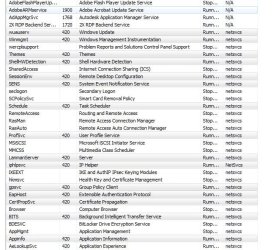
I checked the processes in use by that particular instance of svchost, and found the ones in the attached screen shot. I also ran a check with an updated Malwarebytes and it found nothing.
Any ideas? Is there anything on that list of services that should be disabled?
I checked the processes in use by that particular instance of svchost, and found the ones in the attached screen shot. I also ran a check with an updated Malwarebytes and it found nothing.
Any ideas? Is there anything on that list of services that should be disabled?
Attachments
My Computer
At a glance
Windows 7 Professional x64Core i7-4790K Devil's Canyon Quad Core 4.0 GHzG.SKILL Ripjaws X Series 32 GB DDR3-1866 (4x ...EVGA (nVIDIA) GTX 960 4 GB GDDR5
- Computer type
- PC/Desktop
- Computer Manufacturer/Model Number
- Custom-built PC workstation
- OS
- Windows 7 Professional x64
- CPU
- Core i7-4790K Devil's Canyon Quad Core 4.0 GHz
- Motherboard
- ASUS Z97-E/USB3.1 ATX
- Memory
- G.SKILL Ripjaws X Series 32 GB DDR3-1866 (4x 8GB)
- Graphics Card(s)
- EVGA (nVIDIA) GTX 960 4 GB GDDR5
- Sound Card
- on-board
- Monitor(s) Displays
- 2x Dell Ultrasharp 24" U2415
- Screen Resolution
- 2x 1920x1200
- Hard Drives
- Crucial MX200 500GB 2.5" SSD SATA III 6 GB/sec
- PSU
- Rosewill Glacier 700M 700-watt
- Case
- Fractal Design Define R4 Silent PC mid-tower
- Cooling
- OEM PSU cooler, 3x 140mm case fans (2 intake, 1 exhaust)
- Keyboard
- Logitech
- Mouse
- Logitech
- Internet Speed
- 100+ Mbps
- Antivirus
- BitDefender
- Browser
- Firefox/Chrome


