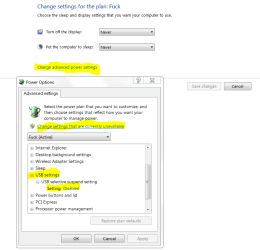
This is the default option, I don't know why. How do I get it to turn on with the press of a key or mouse click? The keyboard and mouse turn on when I click them but the PC remains shut off unless I press the power button, then it comes back from sleep mode like normal.
Any help is appreciated greatly!!
Any help is appreciated greatly!!
My Computer
- Computer type
- PC/Desktop
- Computer Manufacturer/Model Number
- Custom
- OS
- Windows 7 Professional 64 bit
- CPU
- Intel(R) Core(TM) i7-4790K CPU @ 4.00GHz
- Motherboard
- MSI Z97 GAMING 5 (MS-7917)
- Memory
- 16 GB Corsair Vengeance CMZ16GX3M2A1600C10
- Graphics Card(s)
- NVIDIA GeForce GTX 970
- Sound Card
- (1) NVIDIA High Definition Audio (2) Realtek High Definiti
- Monitor(s) Displays
- BenQ RL2455HM 60 Hz
- Screen Resolution
- 1080p
- Hard Drives
- (1) Crucial_CT256MX100SSD1 ATA Device (2) WDC WD1003FZEX-00MK2A0 ATA Device
- PSU
- Cooler Master V650 80+ Gold
- Case
- Raidmax Viper GX
- Cooling
- Corsair H100i 77.0 CFM Liquid CPU Cooler
- Keyboard
- Steelseries APEX
- Mouse
- Logitech G900
- Internet Speed
- Irrelevant
- Antivirus
- Avast
- Browser
- Firefox