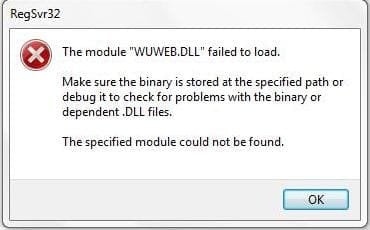
Updates Errors

xxcbzxx

New member
Local time
3:05 PM
Messages
11
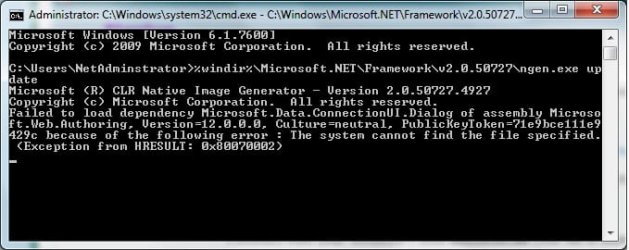
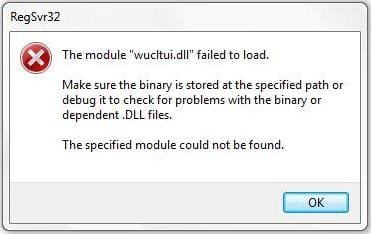
These errors arises as a result from Windows Update, several updates don't intend to install i.e VS SP1 2005 comprises the update error resulting many update downloads but not one is installed successfully.
Any tips on solving this nonsense issue?
>.<
 

Attachments
  • Error 1.jpg
    Error 1.jpg
    12.8 KB · Views: 8
  • Error 2.jpg
    Error 2.jpg
    12.7 KB · Views: 8
  • Update VS  2005 or 2008 same Error.jpg
    Update VS 2005 or 2008 same Error.jpg
    17.1 KB · Views: 11

My Computer

Computer Manufacturer/Model Number
Toshiba
OS
Windows 7 Ultimate 32 bit
Memory
1 GB
METHOD I
1.Run cmd.exe with administrative previlliges (righ click on cm.exe as admin) and type:

sfc /scannow

2.Reset WU components in aggressive mode http://support.microsoft.com/kb/971058

//note:ignore message about applies only for older systems.MS Fix work fine for Windows 7 too

METHOD II

1.Extract from your Win7 DVD mscoree.dll (this file is stored in \Windows\System32)

//see this tutorial how to do that:http://www.sevenforums.com/tutorials/42776-extract-files-windows-7-installation-dvd.html?ltr=E

2.Rename the file C:\Windows\system32\mscoree.dll
3.Copy extracted mscoree.dll to C:\Windows\system32

METHOD III

Run cmd.exe with administrative previlliges (right click on cmd.exe as admin) and type:

%windir%\Microsoft.NET\Framework\v2.0.50727\ngen.exe update

and wait for the moment
 
Last edited:

My Computer

Computer Manufacturer/Model Number
Custom made
OS
Windows 7 Professional x64 PL
CPU
AMD Athlon 4450e
Motherboard
Giga-Byte GA-MA69G-S3H
Memory
GoodRam DDR2 2x2048MB (FSB 800MHz)
Graphics Card(s)
nVidia GeForce 9600GT (G94-300) 1024 MB
Monitor(s) Displays
SAMSUNG SyncMaster HS2P301688
Hard Drives
Seagate ST3750330AS 750GB
PSU
Corsair 550W
Cooling
AeroCool ExtremeEngine 3T
If those pro commands don't do it, SysRestore before Updates and try Updates again.

If they again fail, SysRestore and see if you can do without them.

MS supports Updates via email link on WUD website.
 
METHOD I
1.Run cmd.exe with administrative previlliges (righ click on cm.exe as admin) and type:

sfc /scannow

2.Reset WU components in aggressive mode How do I reset Windows Update components?

//note:ignore message about applies only for older systems.MS Fix work fine for Windows 7 too

METHOD II

1.Extract from your Win7 DVD mscoree.dll (this file is stored in \Windows\System32)

//see this tutorial how to do that:http://www.sevenforums.com/tutorials/42776-extract-files-windows-7-installation-dvd.html?ltr=E

2.Rename the file C:\Windows\system32\mscoree.dll
3.Copy extracted mscoree.dll to C:\Windows\system32

METHOD III

Run cmd.exe with administrative previlliges (right click on cmd.exe as admin) and type:

%windir%\Microsoft.NET\Framework\v2.0.50727\ngen.exe update

and wait for the moment
This is what i recieved when using the second method...
 

Attachments

  • New Bitmap Image.jpg
    New Bitmap Image.jpg
    34 KB · Views: 63

My Computer

Computer Manufacturer/Model Number
Toshiba
OS
Windows 7 Ultimate 32 bit
Memory
1 GB

My Computer

Computer Manufacturer/Model Number
Custom made
OS
Windows 7 Professional x64 PL
CPU
AMD Athlon 4450e
Motherboard
Giga-Byte GA-MA69G-S3H
Memory
GoodRam DDR2 2x2048MB (FSB 800MHz)
Graphics Card(s)
nVidia GeForce 9600GT (G94-300) 1024 MB
Monitor(s) Displays
SAMSUNG SyncMaster HS2P301688
Hard Drives
Seagate ST3750330AS 750GB
PSU
Corsair 550W
Cooling
AeroCool ExtremeEngine 3T

My Computer

Computer Manufacturer/Model Number
Custom made
OS
Windows 7 Professional x64 PL
CPU
AMD Athlon 4450e
Motherboard
Giga-Byte GA-MA69G-S3H
Memory
GoodRam DDR2 2x2048MB (FSB 800MHz)
Graphics Card(s)
nVidia GeForce 9600GT (G94-300) 1024 MB
Monitor(s) Displays
SAMSUNG SyncMaster HS2P301688
Hard Drives
Seagate ST3750330AS 750GB
PSU
Corsair 550W
Cooling
AeroCool ExtremeEngine 3T
Back
Top