Where are checkdisk/scandisk logs ?

trinaz

New member
Member
VIP
Local time
11:04 PM
Messages
477
Location
Phoenix
When you run checkdisk/scandisk upon a Win 7 Pro 64bit system reboot...is there a log of what was fixed/repaired and when would I find it ?

Thanks...
 

My Computer

Computer type
PC/Desktop
Computer Manufacturer/Model Number
Self built
OS
Windows 7 Pro 64bit SP1
CPU
AMD FX-6100 Six-Core Processor
Motherboard
M5A78L-M LX PLUS
Memory
2ea Corsair-1333MHz-PC3-10666-240-pin-CMX4GX3M1A1333C9
Graphics Card(s)
NVIDIA GeForce GT 630 - 1023MB (EVGA)
Sound Card
OnBoard Via High Def Audio
Monitor(s) Displays
Samsung 204B main - ASUS VS228 secondary
Screen Resolution
1920x1080 main - 1920x1080 secondary
Hard Drives
Samsung SSD 840 128GB Win7 Pro 64bit - Western Digital WDC 465GB - Seagate 640GB Sata B/U - Maxtor 500GB Sata B/U - Maxtor 200GB Sata
PSU
Antec 650 watt
Cooling
Multiple case fans
Keyboard
MS USB dual Wireless Keyboard - IntelliType Pro
Mouse
MS USB dual Wireless Mouse - IntelliPoint
Internet Speed
Cox Cable
Antivirus
Bitdefender IS 2014
Browser
FireFox Primary - IE 11
Other Info
Hauppaguge Win TV HVR-1250 (Model 22xxx, Hybrid ATSC/QAM)
Samsung HD103SI USB 1TB Desktop Drive - Backup & Disk Image storage
I believe they are on Event Log, under System logs. Most of Windows logs are reported there.
 

My Computer

OS
Windows 7 Ultimate x64 SP1 | OSX Lion 10.7 x64
CPU
Intel Core i5 750
Motherboard
Asus P7P55D LE
Memory
4x Corsair Value DDR-3 1333MHz 2Gb
Graphics Card(s)
Sapphire HD4850 512Mb HDMI+DVI+VGA
Sound Card
Sound Blaster Audigy 2 ZS Platinum
Monitor(s) Displays
Samsung Syncmaster 245BW
Screen Resolution
1920x1200
Hard Drives
Samsung Spinpoint 160Gb
Seagate Barracuda 200Gb
PSU
Seventeam 650W ATX 2.3
Case
Coolermaster Centurion 532
Cooling
Stock cooling system
Keyboard
Logitech G15 Gaming Keyboard
Mouse
Razer Deathadder
Internet Speed
10Mbit Down / 1Mbit Up ADSL2+M
Other Info
Apple AirPort Extreme 802.11n (single band)
1Tb External USB HDD (AEBS volume)
Linksys WAG120N ADSL2+ Modem/Router
if I remember try..

Go to Start > Run and type: eventvwr.msc /s , and hit enter.
When Event Viewer opens, click on "Application", then scroll
down to "Winlogon" and double-click on it. This is the log
created after running Checkdisk.
 

My Computer

OS
window's 7
CPU
core 2 quad
Motherboard
gigabyte
Memory
2gb corsair
Graphics Card(s)
ati hd4850
Monitor(s) Displays
lg
Screen Resolution
1600 X 900
Case
power logic
Other Info
none of the spec above is accurate
if I remember try..

Go to Start > Run and type: eventvwr.msc /s , and hit enter.
When Event Viewer opens, click on "Application", then scroll
down to "Winlogon" and double-click on it. This is the log
created after running Checkdisk.

In Event viewer, under Application logs, you need to double click on "wininit".

"Winlogon" is applicable for XP.
 

My Computer

Computer Manufacturer/Model Number
Too many to describe...
OS
Windows 7 x64 pro/ Windows 7 x86 Pro/ XP SP3 x86
if I remember try..

Go to Start > Run and type: eventvwr.msc /s , and hit enter.
When Event Viewer opens, click on "Application", then scroll
down to "Winlogon" and double-click on it. This is the log
created after running Checkdisk.

In Event viewer, under Application logs, you need to double click on "wininit".

"Winlogon" is applicable for XP.

Thanks for correcting me. I haven't try it on seven. the last time i check it on XP. Thanks again bill
 

My Computer

OS
window's 7
CPU
core 2 quad
Motherboard
gigabyte
Memory
2gb corsair
Graphics Card(s)
ati hd4850
Monitor(s) Displays
lg
Screen Resolution
1600 X 900
Case
power logic
Other Info
none of the spec above is accurate
if I remember try..

Go to Start > Run and type: eventvwr.msc /s , and hit enter.
When Event Viewer opens, click on "Application", then scroll
down to "Winlogon" and double-click on it. This is the log
created after running Checkdisk.

In Event viewer, under Application logs, you need to double click on "wininit".

"Winlogon" is applicable for XP.

Thanks for correcting me. I haven't try it on seven. the last time i check it on XP. Thanks again bill

Thanks guys...have a problem...can't find any "wininit" entries..also see 2 Application sections.

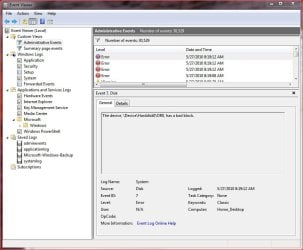
Can you be a little more specific on where to log for the scan disk log reports (log.jpg attached)?

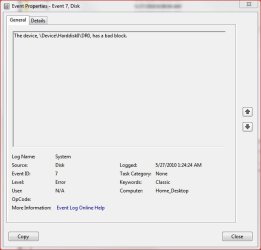
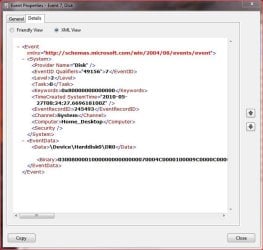
Also...can anyone explain further on what the attached errors mean and how to correct them if they are important ?

And....should/can I delete all entries in the events viewer so I can more accurately check on what going on from this time forward on an up to date manner ?

Thanks, Tim
 

Attachments

  • event2.jpg
    event2.jpg
    33.2 KB · Views: 244
  • log.jpg
    log.jpg
    79.9 KB · Views: 478
  • event11.jpg
    event11.jpg
    58.5 KB · Views: 201

My Computer

Computer type
PC/Desktop
Computer Manufacturer/Model Number
Self built
OS
Windows 7 Pro 64bit SP1
CPU
AMD FX-6100 Six-Core Processor
Motherboard
M5A78L-M LX PLUS
Memory
2ea Corsair-1333MHz-PC3-10666-240-pin-CMX4GX3M1A1333C9
Graphics Card(s)
NVIDIA GeForce GT 630 - 1023MB (EVGA)
Sound Card
OnBoard Via High Def Audio
Monitor(s) Displays
Samsung 204B main - ASUS VS228 secondary
Screen Resolution
1920x1080 main - 1920x1080 secondary
Hard Drives
Samsung SSD 840 128GB Win7 Pro 64bit - Western Digital WDC 465GB - Seagate 640GB Sata B/U - Maxtor 500GB Sata B/U - Maxtor 200GB Sata
PSU
Antec 650 watt
Cooling
Multiple case fans
Keyboard
MS USB dual Wireless Keyboard - IntelliType Pro
Mouse
MS USB dual Wireless Mouse - IntelliPoint
Internet Speed
Cox Cable
Antivirus
Bitdefender IS 2014
Browser
FireFox Primary - IE 11
Other Info
Hauppaguge Win TV HVR-1250 (Model 22xxx, Hybrid ATSC/QAM)
Samsung HD103SI USB 1TB Desktop Drive - Backup & Disk Image storage
1) I think the event viewer logs are created only when chkdsk runs at boot. Try scheduling chkdsk to run at boot, then check in the event viewer for the wininit entries. Also check entries under event id 1001.

2) You can also try running chkdsk from the command prompt in the Windows recovery environment (boot from win7 install dvd, then click through to the command prompt) and pipe the output to a text file. Within windows (on XP), I can type chkdsk X: /V /F > X:\chkdsklog.txt at the command prompt (where X: is a drive other than the syatem partition I am on now), and the chkdsk output gets saved to the to the text file I specified. But I am not sure what, if any switches work in the RE and whether the output can be piped.

Experiment and let us know.
 

My Computer

Computer Manufacturer/Model Number
Too many to describe...
OS
Windows 7 x64 pro/ Windows 7 x86 Pro/ XP SP3 x86
Back
Top