Problem with Windows Explorer crashing

Gwaihir

New member
It seems with my installation of Windows 7 Professional SP1 as soon as I manage to fix one problem it creates another.

It all started when I installed a copy of R3dfox as a trial in an attempt to resolve problems I've started to encounter with some websites no longer being compatible with the version of Firefox I use: 115.35.0esr (64-bit).

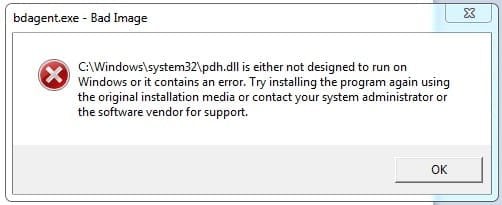
It might be a coincidence but I immediately started getting an error every time I booted the system. This flagged a problem with system file pdh.dll shown in the attached screenshot. Uninstalling R3dfox didn't fix it.

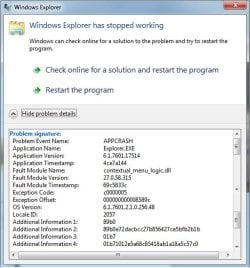
Having searched online for a solution I decided to try System Restore to a date before I installed R3dfox. This seemed to fix the error but now I'm having a problem with Windows Explorer crashing. This happens every time I try to right-click on anything. I've selected the option for Windows to search online for a solution - repeatedly - but this has not fixed it. The second attached screenshot shows the error information.

To complicate things further I had to uninstall Bitdefender before System Restore would work and now I haven't been able to re-install it. The installer doesn't work - nothing happens when I try to run it - and I'm wondering if that's related to the problem with Explorer.

If anyone has any ideas how to resolve this I'd be massively grateful as I'm currently tearing my hair out with this system.

Edit: Looks like the pdh.dll problem isn't fixed either after all so things are just going from bad to worse :( I've now discovered Explorer crashes if I try to empty the waste bin.
 

Attachments

  • bdagent.jpg
    bdagent.jpg
    31.3 KB · Views: 3
  • ExplorerStoppedWorking.jpg
    ExplorerStoppedWorking.jpg
    96.2 KB · Views: 2
Last edited:

My Computer

Computer type
PC/Desktop
Computer Manufacturer/Model Number
Home build
OS
Windows 7 Professional 64-bit SP1
CPU
Pentium Core i5-2500 3.3GHz
Motherboard
Gigabyte P61-USB3-B3
Memory
2 x 4GB DDR3 1333MHz
Graphics Card(s)
Asus GT440 1GB GDDR5
Sound Card
Realtek integrated sound
Monitor(s) Displays
LG L1942PE
Screen Resolution
1280 x 1024 @ 60Hz
Hard Drives
2 x 1TB Western Digital WD10EARS, 1 x 1TB Seagate ST1000DM010
PSU
EVGA 450BR
Case
Novatech Panther ATX
Cooling
Sharkoon Silent Eagle 1000 120mm in case rear extracting
Keyboard
Logitech K120
I see Bitdefender has favorable reviews, but also several potential conflicts with Windows 7. Browser problems being one of them. Uninstalling doesn't always remove all the associated files, nor does system restore always give you back the original system. If there are several issues present it could prove very difficult to get back to a reliable system. If you have a clean Image Backup that is a sure way of recovering, or if not, it might be easier to just do a fresh install to eliminate any conflicts or file corruption you may now have. Pete
 

My Computers

System One System Two

  • OS
    Windows 7 Home Premium 64 bit
  • Computer type
    PC/Desktop
Hi Pete, thanks for responding.

Taking the points you've raised in order:

I've been using Bitdefender for months and whilst I can see that it might interfere with some web pages I haven't had any other issues - until I installed R3dfox. That appears to have somehow corrupted the pdh.dll file.

I used Revo uninstaller to remove Bitdefender and it did, indeed, find a heap of stuff left over from the uninstaller but I used the most intensive scan so I'd like to think there's nothing left likely to cause problems. With Windows you can never be sure, though. To be honest I've never liked the Windows architecture. Where I used to work, in the very early days of personal computers almost everyone used Macs. The MACOS system always seemed to me to be a much better design. No ghastly registry, no horrible dlls. Each application had it's own settings file. You could wipe and replace the system without losing anything.

As it happens I do have an image backup created with Macrium Reflect from two years ago so may well resort to that. Even so System File Checker has been reporting corrupted files it can't repair for longer than that so it seems the recovery cache has also been corrupted for some considerable time.

After that I suppose the next resort is a repair install but I dread to think what can of worms that might open. Finally I can wipe the drive and install a completely new system then have to rebuild everything from scratch. I do hate Windows!!

I should mention I built the PC in 2011 so it's entirely possible the drives are starting to fail. Before I resort to using the backup image I might consider changing the system drive but I would need a bootable rescue disk with Reflect on it to do that.
 

My Computer

Computer type
PC/Desktop
Computer Manufacturer/Model Number
Home build
OS
Windows 7 Professional 64-bit SP1
CPU
Pentium Core i5-2500 3.3GHz
Motherboard
Gigabyte P61-USB3-B3
Memory
2 x 4GB DDR3 1333MHz
Graphics Card(s)
Asus GT440 1GB GDDR5
Sound Card
Realtek integrated sound
Monitor(s) Displays
LG L1942PE
Screen Resolution
1280 x 1024 @ 60Hz
Hard Drives
2 x 1TB Western Digital WD10EARS, 1 x 1TB Seagate ST1000DM010
PSU
EVGA 450BR
Case
Novatech Panther ATX
Cooling
Sharkoon Silent Eagle 1000 120mm in case rear extracting
Keyboard
Logitech K120
Try mounting the image in Macrium and see if the pdh.dll file is in the image.
If so then replace the bad file.
 

My Computer

Computer type
Laptop
Computer Manufacturer/Model Number
Dell Precision 15 7550 Workstation
OS
Windows 10 22H2 Pro
CPU
Intel(R) Xeon W-10885M
Motherboard
Dell
Memory
2x 32 GB DDR4 ECC memory (128 GB max)
Graphics Card(s)
Intel onboard GPU 1080p - Quadro RTX 5000 Max-Q GPU 4K
Hard Drives
500 GB Corsair T500 main M2 SSD
1 TB Intel storage M2 SSD (6 TB max)
Mouse
Logitech MX-25 Bluetooth
Internet Speed
slow
Antivirus
MS
Browser
Pale Moon 33.3.x x64 AVX2 build
I don't know how I'd do that. If I try to do anything with the file I get a pop-up denying access unless I have permission from Trustedinstaller.
 

My Computer

Computer type
PC/Desktop
Computer Manufacturer/Model Number
Home build
OS
Windows 7 Professional 64-bit SP1
CPU
Pentium Core i5-2500 3.3GHz
Motherboard
Gigabyte P61-USB3-B3
Memory
2 x 4GB DDR3 1333MHz
Graphics Card(s)
Asus GT440 1GB GDDR5
Sound Card
Realtek integrated sound
Monitor(s) Displays
LG L1942PE
Screen Resolution
1280 x 1024 @ 60Hz
Hard Drives
2 x 1TB Western Digital WD10EARS, 1 x 1TB Seagate ST1000DM010
PSU
EVGA 450BR
Case
Novatech Panther ATX
Cooling
Sharkoon Silent Eagle 1000 120mm in case rear extracting
Keyboard
Logitech K120
From my Win 7 64
Rename to pdh.dll
 

Attachments

My Computers

System One System Two

  • Computer type
    PC/Desktop
    Computer Manufacturer/Model Number
    custom build
    OS
    Windows 7 HP 64
    CPU
    i5 6600K - 800MHz to 4200MHz
    Motherboard
    GA-Z170-HD3P
    Memory
    4+4G GSkill DDR4 3000
    Graphics Card(s)
    IG - Intel 530
    Monitor(s) Displays
    Samsung 226BW
    Screen Resolution
    1680x1050
    Hard Drives
    (1) -1 SM951 – 128GB M.2 AHCI PCIe SSD drive for Windows 7 and Lubuntu
    (2) -1 WD SATA 3 - 1T for Data
    (3) -1 WD SATA 3 - 1T for backup
    PSU
    Thermaltake 450W TR2 gold
    Keyboard
    Old and good Chicony mechanical keyboard
    Mouse
    Logitech mX performance - 9 buttons (had to disable some)
    Internet Speed
    500Mb/s
    Browser
    Firefox 64
    Other Info
    TinyWall firewall
  • Computer type
    Laptop
    System Manufacturer/Model Number
    Asus Q550LF
    OS
    Windows 7 Pro
    CPU
    i7-4500U 800MHz to 3.0GHz
    Motherboard
    Asus Q550LF
    Memory
    (4+4)G DDR3 1600
    Graphics Card(s)
    IG intel 4400 + NVIDIA GeForce GT 745M
    Sound Card
    Realtek
    Monitor(s) Displays
    LG Display LP156WF4-SPH1
    Screen Resolution
    1920 x 1080
    Hard Drives
    BX500 120G SSD for Windows and programs +
    1T HDD for data
    Internet Speed
    500 Mb/s
    Browser
    Firefox
    Other Info
    TinyWall firewall
I don't know how I'd do that. If I try to do anything with the file I get a pop-up denying access unless I have permission from Trustedinstaller.

You would need to boot into something like Hirens Boot CD. Replace the file outside of windows.
If you wish to do that, I can upload a version that will run on Win 7. Let me know.
Bill
 

My Computer

Computer type
Laptop
Computer Manufacturer/Model Number
Dell Precision 15 7550 Workstation
OS
Windows 10 22H2 Pro
CPU
Intel(R) Xeon W-10885M
Motherboard
Dell
Memory
2x 32 GB DDR4 ECC memory (128 GB max)
Graphics Card(s)
Intel onboard GPU 1080p - Quadro RTX 5000 Max-Q GPU 4K
Hard Drives
500 GB Corsair T500 main M2 SSD
1 TB Intel storage M2 SSD (6 TB max)
Mouse
Logitech MX-25 Bluetooth
Internet Speed
slow
Antivirus
MS
Browser
Pale Moon 33.3.x x64 AVX2 build
Thanks for your help Bill. I actually decided to restore the image that I saved in Jan 2024 and that looks to have resolved everything. I've lost a few things from my desktop. Shortcuts I can easily replace but there were one or two desktop folders that had stuff in. Still, if the problems are fixed I can live with that.

Thanks also to Megahertz. Hopefully I won't need to try installing your copy of pdh.dll :-)

Edit: On the other hand maybe I will. I just had the same notification following the restoration. How is it possible that this file corruption persists after restoring an image from two years ago? :mad:

From what I've learned this file is not even that important. It only seems to be used to collate performance data. If only I could find out which process or service runs it I'd gladly just disable it.
 
Last edited:

My Computer

Computer type
PC/Desktop
Computer Manufacturer/Model Number
Home build
OS
Windows 7 Professional 64-bit SP1
CPU
Pentium Core i5-2500 3.3GHz
Motherboard
Gigabyte P61-USB3-B3
Memory
2 x 4GB DDR3 1333MHz
Graphics Card(s)
Asus GT440 1GB GDDR5
Sound Card
Realtek integrated sound
Monitor(s) Displays
LG L1942PE
Screen Resolution
1280 x 1024 @ 60Hz
Hard Drives
2 x 1TB Western Digital WD10EARS, 1 x 1TB Seagate ST1000DM010
PSU
EVGA 450BR
Case
Novatech Panther ATX
Cooling
Sharkoon Silent Eagle 1000 120mm in case rear extracting
Keyboard
Logitech K120
There might be a bug with the latest version. I would try their support forum. Issues . Eclipse-Community/r3dfox . GitHub You might also try installing with bit defender off. The last version I installed with 142 and I didn't have that problem (although I didn't have bit defender installed). As for the error search for cmd, right click and select run as administrator, then run the command sfc /scannow.
 

My Computers

System One System Two

There might be a bug with the latest version. I would try their support forum. Issues . Eclipse-Community/r3dfox . GitHub

Since R3dfox didn't resolve my main problem with website compatibility I don't intend to reinstall it.

As for the error search for cmd, right click and select run as administrator, then run the command sfc /scannow.
I've already tried that. System File Checker reports finding corrupted files but can't repair them. It's been like that for many years. It appears the recovery cache must also be corrupted.

Since restoring the image the system seems to be behaving itself again - apart from the issue with pdh.dll - so I'm leaving well alone for now.
 
Last edited:

My Computer

Computer type
PC/Desktop
Computer Manufacturer/Model Number
Home build
OS
Windows 7 Professional 64-bit SP1
CPU
Pentium Core i5-2500 3.3GHz
Motherboard
Gigabyte P61-USB3-B3
Memory
2 x 4GB DDR3 1333MHz
Graphics Card(s)
Asus GT440 1GB GDDR5
Sound Card
Realtek integrated sound
Monitor(s) Displays
LG L1942PE
Screen Resolution
1280 x 1024 @ 60Hz
Hard Drives
2 x 1TB Western Digital WD10EARS, 1 x 1TB Seagate ST1000DM010
PSU
EVGA 450BR
Case
Novatech Panther ATX
Cooling
Sharkoon Silent Eagle 1000 120mm in case rear extracting
Keyboard
Logitech K120
you also need to run Kb947821.... it will repair/clear errors that sfc scannow cannot
 

My Computer

Computer type
PC/Desktop
Computer Manufacturer/Model Number
medionl/Aspire 6930G/acer x55a
OS
W7 home premium 32bit/W7HP 64bit/w10 tp insider ring
CPU
E5300 dual core
Motherboard
medion MS7366
Memory
3gb
Graphics Card(s)
Nvidia Geforce 7100 Nforce 630i
Monitor(s) Displays
avixc
Internet Speed
n (isp resticted to 72)
Antivirus
mse/pands
Browser
palemoon
Other Info
Belkin Fd7050 n USB using Railink RT2870 drivers, more upto date
Back
Top