- Local time
- 2:28 PM
- Messages
- 16,790
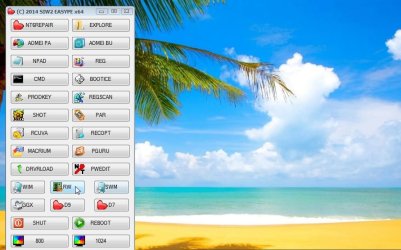
Big improvements for win 7 users in new versions of simple winpe maker (below). Much improved appearance and extra functions for handling wim and split wim files. Also made adjustments to cope with MS frequent updates to win8x.
It works on win 7/8/8.1
https://www.dropbox.com/s/v91sg0p87x2rxnw/REv21.zip?dl=0
USAGE
1. Download the bit version corresponding to your windows bit version.
2. Rt click the zip>properties>unblock.apply>ok.
3. Extract the zip, preferably onto your drive e.g. c:\RE64v7G will be the folder.
4. Rt click and run as admin on the RE64v7g-runmeasadmin.cmd
What it does:
1. It looks for winre.wim on your hard drive. ( Winre.wim is the guy you get from the F8 "Repair My Computer" option. It already contains the system recovery options, like startup repair, system restore, etc )
2. It mounts winre.wim and adds a few useful free tools and a menu.
3. It asks if you want to make a small download of ms tools and recuva. Only about 8mb. Recommend you say yes so they can be included as well.
4. It looks on your hard drive for the popular disk imaging and partitioning programs, if you have them, they will also be included.
5. It unmounts winre.wim and asks if you want to make an iso. The iso will support efi and bios boot on 64 bit win7 and on both bit versions win8x. It will be bios bootable if you are running 32 bit win7.
The whole process should only take about 1 1/2 to 2 minutes ( bit longer on 8x as it is slower)
You will end up with bootable winpe iso containing your imaging and partitioning program, windows recovery options, and several useful free tools.
These are the installed programs it will look for :
Imaging:
Aomei Backupper, Macrium reflect ( free or paid ), Paragon Backup and recovery Free ( OR any Paragon paid versions but you will need to browse for that ).
You will probably only have one of the above.
Partitioning:
Aomei partition Assistant ( free and paid versions), Partition Guru Pro ( you can install and run pguru pro unregistered - the data recovery does not work unregistered, but the partitioning functions do, it is very, very useful )
I recommend you install both of the above.
NOTE: 32 bit users only - it will also look for Partition Wizard and Todo Backup
It works on win 7/8/8.1
https://www.dropbox.com/s/v91sg0p87x2rxnw/REv21.zip?dl=0
USAGE
1. Download the bit version corresponding to your windows bit version.
2. Rt click the zip>properties>unblock.apply>ok.
3. Extract the zip, preferably onto your drive e.g. c:\RE64v7G will be the folder.
4. Rt click and run as admin on the RE64v7g-runmeasadmin.cmd
What it does:
1. It looks for winre.wim on your hard drive. ( Winre.wim is the guy you get from the F8 "Repair My Computer" option. It already contains the system recovery options, like startup repair, system restore, etc )
2. It mounts winre.wim and adds a few useful free tools and a menu.
3. It asks if you want to make a small download of ms tools and recuva. Only about 8mb. Recommend you say yes so they can be included as well.
4. It looks on your hard drive for the popular disk imaging and partitioning programs, if you have them, they will also be included.
5. It unmounts winre.wim and asks if you want to make an iso. The iso will support efi and bios boot on 64 bit win7 and on both bit versions win8x. It will be bios bootable if you are running 32 bit win7.
The whole process should only take about 1 1/2 to 2 minutes ( bit longer on 8x as it is slower)
You will end up with bootable winpe iso containing your imaging and partitioning program, windows recovery options, and several useful free tools.
These are the installed programs it will look for :
Imaging:
Aomei Backupper, Macrium reflect ( free or paid ), Paragon Backup and recovery Free ( OR any Paragon paid versions but you will need to browse for that ).
You will probably only have one of the above.
Partitioning:
Aomei partition Assistant ( free and paid versions), Partition Guru Pro ( you can install and run pguru pro unregistered - the data recovery does not work unregistered, but the partitioning functions do, it is very, very useful )
I recommend you install both of the above.
NOTE: 32 bit users only - it will also look for Partition Wizard and Todo Backup
Last edited:
My Computers
-
At a glance
7 X64i5 84002x8gb 3200mhz- Computer type
- PC/Desktop
- OS
- 7 X64
- CPU
- i5 8400
- Motherboard
- gigabyte b365m ds3h
- Memory
- 2x8gb 3200mhz
- Hard Drives
- various
- PSU
- pure power 11 400w cm
- Case
- Coolermaster
- Cooling
- cryorig m9i
-
At a glance
7x64g54008gb ddr4 2400- Computer type
- PC/Desktop
- OS
- 7x64
- CPU
- g5400
- Motherboard
- ga b365m ds3h
- Memory
- 8gb ddr4 2400
- PSU
- xfx pro 450w