- Local time
- 2:53 PM
- Messages
- 172
No joy I am afraid to say... the results are the same, this is what I have tried :
Paragon Hard Disk Manager 12 Suite v 10.1.19.16240.000 (Paid version, it does not detect this if installed along with the free)
Paragon-281-FRE_WinInstallx64_10.1.21.638_000 (this one is detected though and asked to be added)
If you have the paid Paragon installed by itself then it is detected and asked to be installed but as I said it never shows up in the menu...
If you install only the free version the results are exactly the same...
If you install BOTH of them together then only the free version is detected... end result though is the same, unable to launch from the WinPE menu and no trace of it on the .iso (that I can see at least)
reflect_setup_free_x86_x64 v 4.2.2525.0 (this is detected and asked to be added)
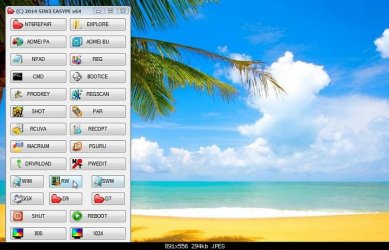
Macrium is detected and asked to be added it does show up on the menu ! but it wont launch still... I browsed for it within WinPE and tried to launch it from there and get this error msg:
msi.dll missing
Interestingly the image sizes have changed :
216,??? v19
219,710 v20
And v20 with 130 specific machine drivers installed :
392.360 with drivers
I thought I was worth a try doing a build including drivers just in case.... but nope exactly the same... Pretty sure the Macrium missing .dll is an easy enough fix for you mate, but not so sure about the Paragon software like I say it says its going to include it but there is no trace of it afterwards.... however with the x86 v19 everything gets installed and works correctly...
Any ideas ?
Paragon Hard Disk Manager 12 Suite v 10.1.19.16240.000 (Paid version, it does not detect this if installed along with the free)
Paragon-281-FRE_WinInstallx64_10.1.21.638_000 (this one is detected though and asked to be added)
If you have the paid Paragon installed by itself then it is detected and asked to be installed but as I said it never shows up in the menu...
If you install only the free version the results are exactly the same...
If you install BOTH of them together then only the free version is detected... end result though is the same, unable to launch from the WinPE menu and no trace of it on the .iso (that I can see at least)
reflect_setup_free_x86_x64 v 4.2.2525.0 (this is detected and asked to be added)
Macrium is detected and asked to be added it does show up on the menu ! but it wont launch still... I browsed for it within WinPE and tried to launch it from there and get this error msg:
msi.dll missing
Interestingly the image sizes have changed :
216,??? v19
219,710 v20
And v20 with 130 specific machine drivers installed :
392.360 with drivers
I thought I was worth a try doing a build including drivers just in case.... but nope exactly the same... Pretty sure the Macrium missing .dll is an easy enough fix for you mate, but not so sure about the Paragon software like I say it says its going to include it but there is no trace of it afterwards.... however with the x86 v19 everything gets installed and works correctly...
Any ideas ?
My Computer
At a glance
Windows 7 x64 SP1Intel4gbNvidia
- Computer type
- Laptop
- Computer Manufacturer/Model Number
- Sony
- OS
- Windows 7 x64 SP1
- CPU
- Intel
- Motherboard
- Sony
- Memory
- 4gb
- Graphics Card(s)
- Nvidia
- Hard Drives
- WD
- Internet Speed
- Dial up wasn't as bad as this !
- Antivirus
- Avast
- Browser
- Firefox