Please Recommend Best Free PDF Creator (Not Nitro/Primo)

woodbine

New member
Member
VIP
Local time
1:52 AM
Messages
178
Location
Bristol, UK
I'm after recommendations for a free PDF creator for my desktop pc. I have been happily using Nitro Primo to create PDFs, but it seems to have stopped working on my pc. For some reason, the print function won't work any more. I used to hit 'print', and Primo would open with a small window on my screen then create a PDF, but it stopped appearing. It even stopped being listed on 'Devices and Printers'. I don't have any printers attached to this pc.

System restore didn't work, nor did uninstalling Primo and re-installing the new Nitro Pro. Still refused to create PDFs.

So, I have given up on Nitro, and have started looking for another free PDF creator. Hopefully something not too complicated and the same type as Nitro that acts as a print driver. Thanks for any advice.

Edit - I have just tried re-installing the original Primo PDF creator and during install it said ' unable to install printer' - so it looks like there is something wrong with my pc that stops the printer element installing or working.
 
Last edited:

My Computer My Computer

At a glance

Windows 7 Home Premium 64 bit SP1Intel i3 5403GB DDR3SD
Computer type
PC/Desktop
Computer Manufacturer/Model Number
Acer Aspire Desktop M3910
OS
Windows 7 Home Premium 64 bit SP1
CPU
Intel i3 540
Memory
3GB DDR3SD
Monitor(s) Displays
LG Flatron L1960TR
Screen Resolution
1280x1024
Keyboard
Acer
Mouse
Genius
Antivirus
Avast (Free)
Browser
I E 11
I have Cute PDF. I'm very satisfied with it. It's been several years since I downloaded it, so I have no idea what may be happening with any newer versions.

As for why you are unable to reinstall Primo, perhaps a recently-installed Windows update is interfering with it.
 

My Computer My Computer

At a glance

Linux Mint 18.2 xfce 64-bit (VMWare host) / W...Haswell4 GB
Computer type
PC/Desktop
Computer Manufacturer/Model Number
Dell
OS
Linux Mint 18.2 xfce 64-bit (VMWare host) / Windows 8.1 Pro 32-bit (VMWare guest)
CPU
Haswell
Memory
4 GB
Monitor(s) Displays
Acer 23"
Screen Resolution
1920 x 1080
Hard Drives
Two hard drives, 1TB each: One for Linux, one for my data.
Keyboard
IBM Model M
Antivirus
Sophos (Linux), Trend Micro (Windows)
Browser
Firefox, Opera
Other Info
I use Samba to share my data drive with the other computers at my house and with my guest session in VMWare Workstation Player.
uninstall your programs and run sfc /scannow (w/reboot ). re-install and check.

(if no joy try Foxit)
 

My Computer My Computer

At a glance

Microsoft Windows 7 Home Premium 64-bit 7601 ...Pentium(R) Dual-Core CPU E5300 @ 2.60GHz6.00 GBIntel(R) G33/G31 Express Chipset Family
Computer type
PC/Desktop
Computer Manufacturer/Model Number
HP (HP-P6212F)
OS
Microsoft Windows 7 Home Premium 64-bit 7601 Multiprocessor Free Service Pack 1
CPU
Pentium(R) Dual-Core CPU E5300 @ 2.60GHz
Motherboard
PEGATRON CORPORATION Benicia
Memory
6.00 GB
Graphics Card(s)
Intel(R) G33/G31 Express Chipset Family
Sound Card
Realtek High Definition Audio
Monitor(s) Displays
24'' HP WS LCD
Screen Resolution
1920 x 1080 x 32 bits (4294967296 colors) @ 60 Hz
Hard Drives
(1) ATA Hitachi HDT72106 SCSI Disk Device (2) Generic- Compact Flash USB Device (3) Generic- MS/MS-Pro USB Device (4) Generic- SD/MMC USB Device (5) Generic- SM/xD-Picture USB Device (6) Verbatim STORE N GO USB Device
Keyboard
Logitech G510s
Mouse
Logitech Trackball M570
Antivirus
Microsoft Security Essentials / Malwarebytes
Browser
IE / Firefox / Chrome
Thanks to both for your answers. I think I have found the problem. I tried Jim Phelps' suggestion and tried to install Cute PDF. Like Primo PDF it failed to install because of the problem, but unlike Primo, it actually told me what the problem is.

Cute's installer came up with a pop up that told me to "Please start the print spooler service". Apparently it loads files to memory for later printing. As the PDF creators act as a print driver, the spooler is obviously not being started is making it impossible to save files to the printing memory.

So, I clicked CONTROL PANEL> ADMIN. TOOLS> SERVICES, and tried to re-start Print spooler, but says unable to re-start and error message 1068.

As I don't know what to do, I think I will start a new thread. Thanks to you both again.

EDIT - HAVE STARTED NEW THREAD IN DRIVERS -
Can't Re-start Print Spooler Service - Error 1068
 

My Computer My Computer

At a glance

Windows 7 Home Premium 64 bit SP1Intel i3 5403GB DDR3SD
Computer type
PC/Desktop
Computer Manufacturer/Model Number
Acer Aspire Desktop M3910
OS
Windows 7 Home Premium 64 bit SP1
CPU
Intel i3 540
Memory
3GB DDR3SD
Monitor(s) Displays
LG Flatron L1960TR
Screen Resolution
1280x1024
Keyboard
Acer
Mouse
Genius
Antivirus
Avast (Free)
Browser
I E 11
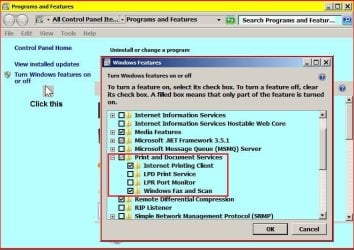
Hi woodbine, go to Programs and Features and follow as in my image.

RR.JPG
 

My Computer My Computer

At a glance

Win7 H.Prem. 32bit+SP1
Computer Manufacturer/Model Number
Look in my Signature.
OS
Win7 H.Prem. 32bit+SP1
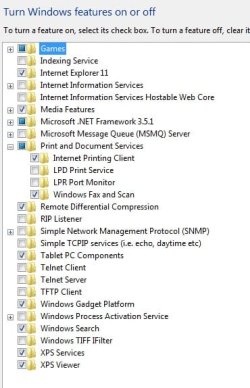
Hi Roderunner. Apologies for late reply. I have done as you said, and image is below. Not experienced enough myself to interpret the info in image. Many thanks for your help.
 

Attachments

  • Print Spooler Problem 2.jpg
    Print Spooler Problem 2.jpg
    35.9 KB · Views: 29

My Computer My Computer

At a glance

Windows 7 Home Premium 64 bit SP1Intel i3 5403GB DDR3SD
Computer type
PC/Desktop
Computer Manufacturer/Model Number
Acer Aspire Desktop M3910
OS
Windows 7 Home Premium 64 bit SP1
CPU
Intel i3 540
Memory
3GB DDR3SD
Monitor(s) Displays
LG Flatron L1960TR
Screen Resolution
1280x1024
Keyboard
Acer
Mouse
Genius
Antivirus
Avast (Free)
Browser
I E 11
HI woodbine, if you look at both images where it says 'Print and Document Services' mine has a tick yours has a Blue box that needs to be clicked/ticked. reboot after you have done it then try to print.
 

My Computer My Computer

At a glance

Win7 H.Prem. 32bit+SP1
Computer Manufacturer/Model Number
Look in my Signature.
OS
Win7 H.Prem. 32bit+SP1
Cute's installer came up with a pop up that told me to "Please start the print spooler service". Apparently it loads files to memory for later printing.

The print spooler is just the manager of the print jobs. It is used by all printer drivers as the normal way to send a print job. Its purpose is not to delay print jobs for later, but rather to make sure that they get printed.

The only reason it would be loading files for later printing is because it is unable to print them when it sends the print job. But the point is always to print them right away.
 

My Computer My Computer

At a glance

Linux Mint 18.2 xfce 64-bit (VMWare host) / W...Haswell4 GB
Computer type
PC/Desktop
Computer Manufacturer/Model Number
Dell
OS
Linux Mint 18.2 xfce 64-bit (VMWare host) / Windows 8.1 Pro 32-bit (VMWare guest)
CPU
Haswell
Memory
4 GB
Monitor(s) Displays
Acer 23"
Screen Resolution
1920 x 1080
Hard Drives
Two hard drives, 1TB each: One for Linux, one for my data.
Keyboard
IBM Model M
Antivirus
Sophos (Linux), Trend Micro (Windows)
Browser
Firefox, Opera
Other Info
I use Samba to share my data drive with the other computers at my house and with my guest session in VMWare Workstation Player.
HI woodbine, if you look at both images where it says 'Print and Document Services' mine has a tick yours has a Blue box that needs to be clicked/ticked. reboot after you have done it then try to print.

Tried clicking on that blue box, and it just goes blank. Presumably just one single left click? Whatever I try, it won't check like yours.
 
Last edited:

My Computer My Computer

At a glance

Windows 7 Home Premium 64 bit SP1Intel i3 5403GB DDR3SD
Computer type
PC/Desktop
Computer Manufacturer/Model Number
Acer Aspire Desktop M3910
OS
Windows 7 Home Premium 64 bit SP1
CPU
Intel i3 540
Memory
3GB DDR3SD
Monitor(s) Displays
LG Flatron L1960TR
Screen Resolution
1280x1024
Keyboard
Acer
Mouse
Genius
Antivirus
Avast (Free)
Browser
I E 11
The print spooler is just the manager of the print jobs. It is used by all printer drivers as the normal way to send a print job. Its purpose is not to delay print jobs for later, but rather to make sure that they get printed.

The only reason it would be loading files for later printing is because it is unable to print them when it sends the print job. But the point is always to print them right away.

Thanks for the explanation, MrPhelps. Looks like I misunderstood print spooler's function. Will get the hang of these things one day. :-)
 

My Computer My Computer

At a glance

Windows 7 Home Premium 64 bit SP1Intel i3 5403GB DDR3SD
Computer type
PC/Desktop
Computer Manufacturer/Model Number
Acer Aspire Desktop M3910
OS
Windows 7 Home Premium 64 bit SP1
CPU
Intel i3 540
Memory
3GB DDR3SD
Monitor(s) Displays
LG Flatron L1960TR
Screen Resolution
1280x1024
Keyboard
Acer
Mouse
Genius
Antivirus
Avast (Free)
Browser
I E 11
PDFCreator is an excellent virtual printer similar to Cute PDF (only better, in my not so humble opinion). It tkaes out put that normally goes to a printer and uses it to create the PDF. I use it mostly for online receipts that would have to be printed rather than downloaded.

For outright creation of most of my PDFs, I use LibreOffice Writer. It has a feature that allows a document to be exported directly to a PDF. There is even a feature that will embed the original Writer document in the PDF that makes future editing of the PDF easy to do within Writer.
 

My Computer My Computer

At a glance

Win 7 Ultimate 64 bitIntel i7-3930KKingston HyperX Genesis 32GB Kit (8x4GB Modul...MSI R7850 Twin Frozr 2GD5/OC Radeon HD 7850 2...
Computer type
PC/Desktop
Computer Manufacturer/Model Number
Custom Build
OS
Win 7 Ultimate 64 bit
CPU
Intel i7-3930K
Motherboard
ASUS P9X79 WS
Memory
Kingston HyperX Genesis 32GB Kit (8x4GB Modules) 1600MHz DDR
Graphics Card(s)
MSI R7850 Twin Frozr 2GD5/OC Radeon HD 7850 2GB 256-bit GDDR
Sound Card
Asus Xonar Essence STX
Monitor(s) Displays
3x Asus VG248QE 24", Vizio 32" TV
Screen Resolution
1920 x 1080, ?
Hard Drives
Samsung 128GB 840 Pro SSD (1),
Samsung 4TB 850 EVO SSDs (4)
Samsung 4TB 850 EVO SSDs (16) external backup drives used in 2.5" hot swap bays in the computer.
PSU
Corsair HX750w
Case
Antec Two Hundred v2 (modified)
Cooling
Cooler Master GeminII S524 120mm (fan replaced with a 140mm)
Keyboard
Logitech G510s
Mouse
Logitech M525 (two in use)
Internet Speed
=< 32Mbps down, 8Mbps up
Antivirus
AVAST!, MBAM, SAS, Spybot S&D (all but MBAM free) Glary Util
Browser
IE11
Other Info
LSI 9211-8i HBA card (8 SATA III ports), 2.5" & 3.5" Hot Swap Bays, HooToo HT-CR001 PCI-E to USB 3.0 Internal Hub + 6 Slot Card Reader, and LG Model CH12LS28 BD-ROM Optical Drive. Also, ScanSnap S1500 ADF duplexing scanner, Canon 9000F flat bed scanner, Corsair SP2500 2.1 speakers, Samsung CLP 415nw laser color printer, Cyberpower PP2200SW UPS
Hi Lady Fitzgerald. Thanks for the recommendations, I will look into them. However, I'm not sure I will be using any PDF creator any time soon, as I'm beginning to feel that the problem(s) my pc has may be unsolvable.

Hope I'm wrong.
 

My Computer My Computer

At a glance

Windows 7 Home Premium 64 bit SP1Intel i3 5403GB DDR3SD
Computer type
PC/Desktop
Computer Manufacturer/Model Number
Acer Aspire Desktop M3910
OS
Windows 7 Home Premium 64 bit SP1
CPU
Intel i3 540
Memory
3GB DDR3SD
Monitor(s) Displays
LG Flatron L1960TR
Screen Resolution
1280x1024
Keyboard
Acer
Mouse
Genius
Antivirus
Avast (Free)
Browser
I E 11
LibreOffice? Open Office?
 

My Computer My Computer

At a glance

Windows 7 Ultimate x64
Computer type
PC/Desktop
OS
Windows 7 Ultimate x64
Back
Top