
Run sndvol32.exe(Volume Control) on Windows 7 properly

Local time
1:33 AM
Messages
36
Location
Seoul, Korea
When I run XP's volume control aka sndvol32.exe, I only get two "Master Volume", and one "CD Audio" column, or when I run with XP compatibility mode, then I get two columns: Realtek HD Audio and Mic volume. Originally when I run it on XP, there are many volume controling column, such as Wave, SW synth, Video volume, Mic volume, and more. How can I get those columns on Windows 7?
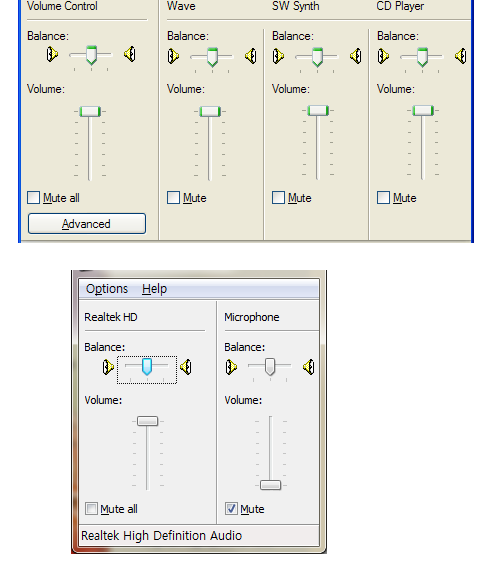
qLBmBdz.png
 

My Computer My Computer

At a glance

Windows 7
Computer type
PC/Desktop
OS
Windows 7
Internet Speed
Korean Speed

My Computer My Computer

At a glance

Win 10 x64, Linux Lite, Win 7 x64, BlackArch,...
Computer type
PC/Desktop
Computer Manufacturer/Model Number
HP Desktop & Compaq Laptop
OS
Win 10 x64, Linux Lite, Win 7 x64, BlackArch, & Kali
Hard Drives
Samsung 850 Pro 256Gb,
Hitachi HDD 1Tb,
Crucial MX SSD 250Gb
Segate 3Tb USB 3.0 Ext. Backup HDD
Internet Speed
150Mbps dn, 20Mbps up
Antivirus
Avast Free, Malwarebytes Anti-Exploit & Anti-Ransomware
Browser
Firefox, Chrome, Opera, & VPN
  • Like
Reactions: ADC
Back
Top