list of process running in my laptop...

prataptetali

New member
Local time
4:34 PM
Messages
10
hello everyone ...

i am using a HP tablet PC touchsmart TX2-1370 which came with windows 7 home premium edition 64 bit OS


recently i saw some processes running .. i am afraid is it virus or normal .. i didnt install any other operating system or dual boot ...


plz look at this and tell me ........

so please tell me ... am i wasting my ram on some useless processes ...

how to remove that processes named as *32

i am using norton internet security updated daily .. activated .. it is not detecting any virus ... and also scanning with C cleaner latest virus ...

please look at this image which i snipped it ..
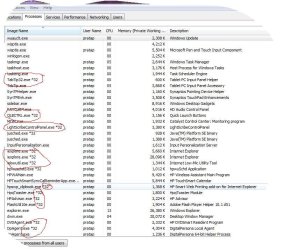
processes.JPG


thanks in advance for the help ..
 

My Computer My Computer

Computer Manufacturer/Model Number
HP TX2 - 1370
OS
windows7
CPU
AMD
Memory
4GB
Graphics Card(s)
ATI RADON HD 3200
Monitor(s) Displays
HD LED SCREEN MULTI TOUCH
Hard Drives
320 GB 7200 RPM
Ahhh, you got nothing to worry about mate, the *32 represents that it's a 32 bit application. Your running an x64/64bit Windows 7, hence why you see this, if you were running a x86/32bit Windows 7, you wouldn't see this, nor would you get a *64, because x86/32bit cannot run x64/64bit code.

Hope that explains it for you.
 

My Computer My Computer

Computer Manufacturer/Model Number
Custom Build
OS
W7 RTM Ultimate x64
CPU
Intel Q8400 @ 2.66GHZ
Motherboard
Gigabyte GA-EG45M-UD2H
Memory
4GB DDR2-800
Graphics Card(s)
Gainward GTS 450 GLH 1GB Edition
Sound Card
Integrated 8 Channel
Monitor(s) Displays
AOC 23.6 Inch Widescreen LCD
Screen Resolution
1920x1080
Hard Drives
Seagate 500GB Internal
Western Digital 1TB Internal

Hitachi 1TB External
PSU
Apevia Java Power 500W
Case
Cooler Master HAF 922 Black
Cooling
Stock Intel CPU Fan
Keyboard
HP SK-2960 Multimedia Keyboard
Mouse
Logitech M350 Wireless Gaming Mouse
Internet Speed
1.5MB
Not to worry,

You have a 64bit OS the *32 entries are where you have installed 32 bit applications.

If you want to check the actual *.exe then you can search-engine them or download a free 'process explorer' there are a few of them around.
 

My Computer My Computer

Computer Manufacturer/Model Number
Custom Hack job
OS
Windows 7 Ultimate 64 bit
CPU
Intel(R) Core(TM)2 Quad CPU Q8200 @ 2.33GHz
Motherboard
GigaByte EP45-UD3
Memory
8 GB Kingston
Graphics Card(s)
Nvidia GeForce 9600GT
Sound Card
Soundblaster Audigy
Monitor(s) Displays
AOC x2 22"
Hard Drives
2 x Samsung 500GB (RAID)
2 x Samsung 2TB
1 x WD Green 2TB
1 x Seagate 1TB
1 x Samsung 500GB
PSU
Thermaltake QFan 750W
Case
CM Scout Gaming
Cooling
Coolermaster V10
Keyboard
Microsoft Wireless Keyboard 1000
Mouse
Microsoft Wireless Optical 2000
Internet Speed
320
Other Info
Winfast PVR2000CP
LG DVD-RAM DVD/RW/DL Super Multi
Linksys WMP300Nx2 Wireless Adapter
Ahhh, you got nothing to worry about mate, the *32 represents that it's a 32 bit application. Your running an x64/64bit Windows 7, hence why you see this, if you were running a x86/32bit Windows 7, you wouldn't see this, nor would you get a *64, because x86/32bit cannot run x64/64bit code.

Hope that explains it for you.

lol... Two posts from NSW, Australia at the same time. Rare!
(south coast was quicker though...damn!) :D
 

My Computer My Computer

Computer Manufacturer/Model Number
Custom Hack job
OS
Windows 7 Ultimate 64 bit
CPU
Intel(R) Core(TM)2 Quad CPU Q8200 @ 2.33GHz
Motherboard
GigaByte EP45-UD3
Memory
8 GB Kingston
Graphics Card(s)
Nvidia GeForce 9600GT
Sound Card
Soundblaster Audigy
Monitor(s) Displays
AOC x2 22"
Hard Drives
2 x Samsung 500GB (RAID)
2 x Samsung 2TB
1 x WD Green 2TB
1 x Seagate 1TB
1 x Samsung 500GB
PSU
Thermaltake QFan 750W
Case
CM Scout Gaming
Cooling
Coolermaster V10
Keyboard
Microsoft Wireless Keyboard 1000
Mouse
Microsoft Wireless Optical 2000
Internet Speed
320
Other Info
Winfast PVR2000CP
LG DVD-RAM DVD/RW/DL Super Multi
Linksys WMP300Nx2 Wireless Adapter
Ahhh, you got nothing to worry about mate, the *32 represents that it's a 32 bit application. Your running an x64/64bit Windows 7, hence why you see this, if you were running a x86/32bit Windows 7, you wouldn't see this, nor would you get a *64, because x86/32bit cannot run x64/64bit code.

Hope that explains it for you.

lol... Two posts from NSW, Australia at the same time. Rare!
(south coast was quicker though...damn!) :D

Hahaha, ahh 2 aussie's is better then 1 ;)
 

My Computer My Computer

Computer Manufacturer/Model Number
Custom Build
OS
W7 RTM Ultimate x64
CPU
Intel Q8400 @ 2.66GHZ
Motherboard
Gigabyte GA-EG45M-UD2H
Memory
4GB DDR2-800
Graphics Card(s)
Gainward GTS 450 GLH 1GB Edition
Sound Card
Integrated 8 Channel
Monitor(s) Displays
AOC 23.6 Inch Widescreen LCD
Screen Resolution
1920x1080
Hard Drives
Seagate 500GB Internal
Western Digital 1TB Internal

Hitachi 1TB External
PSU
Apevia Java Power 500W
Case
Cooler Master HAF 922 Black
Cooling
Stock Intel CPU Fan
Keyboard
HP SK-2960 Multimedia Keyboard
Mouse
Logitech M350 Wireless Gaming Mouse
Internet Speed
1.5MB
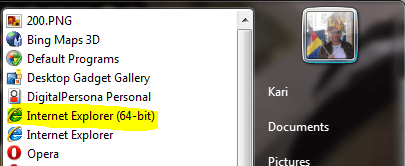
The process list looks totally normal to me. If a x64 system is running a 32-bit application or process, it is marked with *32. For example, you are using a 32-bit Internet Explorer which is OK because although IE8 64-bit works well it is still useless if you need flash, watching Youtube videos etc. A 64-bit flash-player does not exist yet and IE8 x64 can not use 32-bit flash-player, which is one of the most important reasons people are still using IE8 32-bit instead of IE8 64-bit.

You can see how the process list changes if you close the IE8 and open a 64-bit IE8. It's found in the Start Menu > All programs list, on top of it:

IEx64.PNG

Kari
 

My Computer My Computer

Computer type
Laptop
Computer Manufacturer/Model Number
HP ENVY 17-1150eg
OS
Windows 10 Pro x64 EN-GB
CPU
1.6 GHz Intel Core i7-720QM Processor
Memory
6 GB
Graphics Card(s)
ATI Mobility Radeon HD 5850 Graphics
Sound Card
Beats sound system with integrated subwoofer
Monitor(s) Displays
17" laptop display, 22" LED and 32" Full HD TV through HDMI
Screen Resolution
1600*900 (1), 1920*1080 (2&3)
Hard Drives
Internal: 2 x 500 GB SATA Hard Disk Drive 7200 rpm
External: 2TB for backups, 3TB USB3 network drive for media
Cooling
As Envy runs a bit warm, I have it on a Cooler Master pad
Keyboard
Logitech diNovo Media Desktop Laser (bluetooth)
Mouse
Logitech Performance Mouse MX
Internet Speed
50/10 Mbps VDSL
Antivirus
Windows Defender 4.3.9431.0
Browser
Maxthon 3.5.2., IE11
thankq all for your help .. i was very worried that i had some virus or malware in my laptop hece decided to restore my PC or format it ..


you all saved me a lot of time and and headache ....................
 

My Computer My Computer

Computer Manufacturer/Model Number
HP TX2 - 1370
OS
windows7
CPU
AMD
Memory
4GB
Graphics Card(s)
ATI RADON HD 3200
Monitor(s) Displays
HD LED SCREEN MULTI TOUCH
Hard Drives
320 GB 7200 RPM
Glad to be of assistance.
 

My Computer My Computer

Computer Manufacturer/Model Number
Custom Build
OS
W7 RTM Ultimate x64
CPU
Intel Q8400 @ 2.66GHZ
Motherboard
Gigabyte GA-EG45M-UD2H
Memory
4GB DDR2-800
Graphics Card(s)
Gainward GTS 450 GLH 1GB Edition
Sound Card
Integrated 8 Channel
Monitor(s) Displays
AOC 23.6 Inch Widescreen LCD
Screen Resolution
1920x1080
Hard Drives
Seagate 500GB Internal
Western Digital 1TB Internal

Hitachi 1TB External
PSU
Apevia Java Power 500W
Case
Cooler Master HAF 922 Black
Cooling
Stock Intel CPU Fan
Keyboard
HP SK-2960 Multimedia Keyboard
Mouse
Logitech M350 Wireless Gaming Mouse
Internet Speed
1.5MB
thankq all for your help .. i was very worried that i had some virus or malware in my laptop hece decided to restore my PC or format it ..


you all saved me a lot of time and and headache ....................

You're very welcome. Merry Xmas!
 

My Computer My Computer

Computer Manufacturer/Model Number
Custom Hack job
OS
Windows 7 Ultimate 64 bit
CPU
Intel(R) Core(TM)2 Quad CPU Q8200 @ 2.33GHz
Motherboard
GigaByte EP45-UD3
Memory
8 GB Kingston
Graphics Card(s)
Nvidia GeForce 9600GT
Sound Card
Soundblaster Audigy
Monitor(s) Displays
AOC x2 22"
Hard Drives
2 x Samsung 500GB (RAID)
2 x Samsung 2TB
1 x WD Green 2TB
1 x Seagate 1TB
1 x Samsung 500GB
PSU
Thermaltake QFan 750W
Case
CM Scout Gaming
Cooling
Coolermaster V10
Keyboard
Microsoft Wireless Keyboard 1000
Mouse
Microsoft Wireless Optical 2000
Internet Speed
320
Other Info
Winfast PVR2000CP
LG DVD-RAM DVD/RW/DL Super Multi
Linksys WMP300Nx2 Wireless Adapter
Just a tip: whenever you go to download new software, always check to see if there's a 64-bit version available. Many software companies these days release both a 32-bit and 64-bit version, and if there's a "default", it will most likely be the 32-bit version.
 

My Computer My Computer

OS
Windows 7 Ultimate 64-bit, Windows Server 2008
Back
Top