smadav 2012 appears to be one of many fake antivirus programs...
...but it is one that I've not seen or heard of until your post.
If you have installed it, here is one way to try and get rid of it:
How to Uninstall SmadAV Antivirus | Anvisoft
The installer is seen as an infection by TrendMicro-HouseCall via virustotal.com:
https://www.virustotal.com/file/28d...2b8b414053578b0bb22e4a874ab740956c1/analysis/
I've submitted the installer to Microsoft, but I doubt anything will come of that:
https://www.microsoft.com/security/...onId=e6be323e-898a-48fe-87eb-bb4a6267b498&n=1
I installed smadav 2012 into a W7 pro virtual machine to see how it would do against 10 pieces of malware that I've collected from computers that I've cleaned.
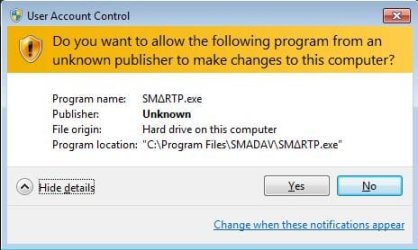
Just starting smadav 2012 gets me this:
And smadav 2012 did not detect any of the 10 pieces of malware as bad.
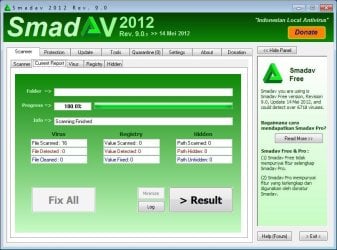
smadav 2012:
Does not offer a way to uninstall itself via the normal programs and features option.
So I looked in the Start menu, hoping that there was an uninstall option there...
...there was no entry at all on the Start menu to start or uninstall smadav 2012.
So I looked in the Program Files area where it was installed - no uninstaller there either.
Unlike many fake AV tools that I've tested, smadav 2012...
...does not install a service
...can easily be killed via task manager
(e.g. no service or other app watching to restart it)
(thus, not very good antivirus protection if smadav 2012 was real)
...does actually read files during its fake scan
...has a home page
...has a forum (down for maintenance

...has a facebook page
...has a twitter account
...accepts donations
(as opposed to demanding payment to cleanup fake infections)
...acts like a real antivirus tool in many ways
...has a convincing readme file (what I could read of it)
When I ask smadav 2012 to update itself, it tells me that it is already up to date and a few seconds later, it causes network traffic - connecting to its homepage. The same thing happens when I ask its "smart-updater" file to run, I'm told that I'm up to date prior to any network traffic.
So, smadav 2012 is either a horrible attempt at an antivirus program or it is a fake av tool seeking donations.
Explorer did crash while smadav 2012 was installed - but that could have been due to all of the tools that I had monitoring smadav's activity (or lack thereof).
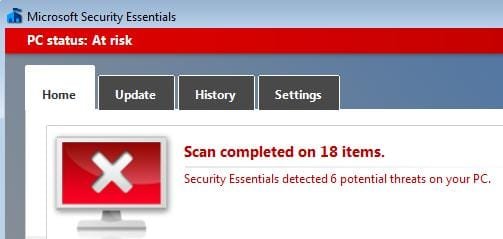
I stopped smadav, installed MSE and scanned the same 10 sets of files mentioned above:
Here are the details on just one of the files:
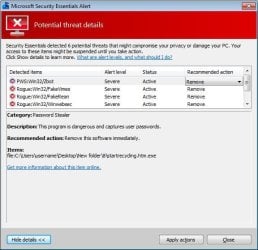
While MSE did remove all 10 pieces of malware, MSE did not prevent any of those 10 pieces from being installed in computers when they were new attacks. In other words, I get a call to clean a computer that was "protected" by MSE. I find the source of the infection and manually clean it up (keeping a copy of the files and submitting them to Microsoft). Eventually, MSE listed those files as bad and offered to clean them up as shown above.

