Solved Visible ports found?

M4dn3ss

New member
Power User
Local time
3:49 PM
Messages
126
Location
Melbourne, Australia
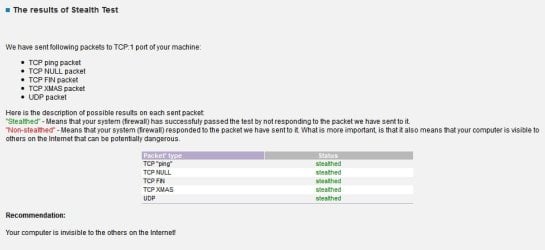
I ran a ShieldsUP firewall test (https://www.grc.com/x/ne.dll?bh0bkyd2) and it said that all my ports are stealthed.
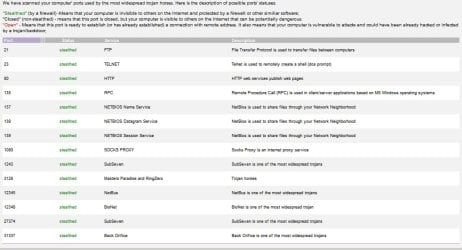
However, I ran the PC Flank port scanner (PC Flank: Make sure you're protected on all sides.) and it said "The test found visible port(s) on your system: 139"
The problem is, it doesn't tell me which ports they are, and I can't find any link to a detailed results page. Does anyone know how I can find out? 139 is a lot of ports to be visible, especially when the GRC test says it's all stealthed...
 

My Computer

Computer type
PC/Desktop
OS
Windows 7 Professional x64
CPU
Intel Core i5 4690K
Motherboard
Gigabyte Z97X Gaming-3
Memory
Corsair Vengeance 16GB DDR3-1600
Graphics Card(s)
Sapphire Radeon R9 290 Tri-X OC
Sound Card
ONBOARD SOUND :D
Monitor(s) Displays
Samsung S24A450BW
Screen Resolution
1920x1200 (16:10 forever)
Hard Drives
250GB Samsung 840 EVO + 2TB Seagate Barracudea
PSU
Fractal Design Newton R3 1000W
Case
Corsair Graphite 230T
Cooling
Cooler Master Hyper 212X
Keyboard
Logitech G710+, CM Storm TK
Mouse
Steelseries Rival
Internet Speed
Australian
Antivirus
Avast, because I'm cheap
Browser
All the browsers!
I don't believe that 139 means there are 139 ports, rather it is the port 139. This is nothing to actually be concerned about. A lot of times ISP have their own firewalls before you, which would block ports like 139 which is not used for legitimate purpose on the web.

Here is my advice. Don't concern yourself with scare-tactic web sites. Put your network behind a router.
 

My Computer

Computer type
PC/Desktop
Computer Manufacturer/Model Number
Alienware Aurora ALX R4
OS
Windows 10 Pro (x64)
CPU
Intel Core i7-3930K (3.2GHz - 4.5GHz)
Motherboard
Alienware Aurora-R4 x79
Memory
4x Samsung 4GB PC3-12800 DDR3 (16GB 1600MHz)
Graphics Card(s)
Nvidia Geforce GTX 690
Sound Card
SteelSeries Siberia Elite
Monitor(s) Displays
Dell UltraSharp U3011
Screen Resolution
2560x1600
Hard Drives
Samsung 850 Pro 256 GB, Seagate 1TB Desktop Hybrid HDD, 2x Western Digital 4TB Green HDD
PSU
875W Some Dell PSU <.<
Case
Alienware Aurora ALX
Cooling
Custom Liquid Cooling (EK CPU & GPU blocks) dual EK 480RAD
Keyboard
Logitech G710+ Mechanical
Mouse
Logitech G700s
Internet Speed
Verizon Fios (50 mbps average)
Other Info
Server: Intel NUC D54250WYK: i5-4250U, 16GB, 256 GB mSATA, Windows Server 2012 R2
OH
Silly me >_<

Thanks!
 

My Computer

Computer type
PC/Desktop
OS
Windows 7 Professional x64
CPU
Intel Core i5 4690K
Motherboard
Gigabyte Z97X Gaming-3
Memory
Corsair Vengeance 16GB DDR3-1600
Graphics Card(s)
Sapphire Radeon R9 290 Tri-X OC
Sound Card
ONBOARD SOUND :D
Monitor(s) Displays
Samsung S24A450BW
Screen Resolution
1920x1200 (16:10 forever)
Hard Drives
250GB Samsung 840 EVO + 2TB Seagate Barracudea
PSU
Fractal Design Newton R3 1000W
Case
Corsair Graphite 230T
Cooling
Cooler Master Hyper 212X
Keyboard
Logitech G710+, CM Storm TK
Mouse
Steelseries Rival
Internet Speed
Australian
Antivirus
Avast, because I'm cheap
Browser
All the browsers!
Port 139 is used for the built-in Windows file sharing, and is also a common source of security vulnerabilities if improperly exposed.

You must make a distinction if the port is exposed on the local network or to the internet. From your local network, it's a must to have the port open to allow file sharing and is common practice to leave it open, but never let it be exposed to internet, that's a real security threat and should never be open to the world.

Most likely, if you're behind a NAT router (which is quite common), plus some software firewall (even the Windows one suffices) you're already protected, as it's quite uncommon to leave this open to internet.
 

My Computer

Computer type
Laptop
Computer Manufacturer/Model Number
Toshiba Sattelite A665-S6092
OS
Windows 7 Ultimate x64
CPU
Intel Core i7-740QM
Memory
8 GB DDR3
Graphics Card(s)
NVIDIA GeForce 330GT
Screen Resolution
1366x768
Hard Drives
Samsung 840 SSD 500GB
1TB USB3 external HD
Cooling
Coolermaster Notepal U3 notebook cooling pad
Internet Speed
3mbps ASDL
Antivirus
ClamWin 0.98.7
Browser
Opera 12.17 x86 (main), Firefox 38 (sec), IE11 (last resort)
I have Windows Firewall + firewall notifier (better outbound protection) and also a NAT router, but how do I know if it's exposed to the internet?
 

My Computer

Computer type
PC/Desktop
OS
Windows 7 Professional x64
CPU
Intel Core i5 4690K
Motherboard
Gigabyte Z97X Gaming-3
Memory
Corsair Vengeance 16GB DDR3-1600
Graphics Card(s)
Sapphire Radeon R9 290 Tri-X OC
Sound Card
ONBOARD SOUND :D
Monitor(s) Displays
Samsung S24A450BW
Screen Resolution
1920x1200 (16:10 forever)
Hard Drives
250GB Samsung 840 EVO + 2TB Seagate Barracudea
PSU
Fractal Design Newton R3 1000W
Case
Corsair Graphite 230T
Cooling
Cooler Master Hyper 212X
Keyboard
Logitech G710+, CM Storm TK
Mouse
Steelseries Rival
Internet Speed
Australian
Antivirus
Avast, because I'm cheap
Browser
All the browsers!
Most likely it's blocked if you're behind a router. One possible way I like is to use a telnet command:

Code:
telnet 1.2.3.4 139

Put your current public IP there and the port you want to test. If it gives an error, it's blocked. Note that by default the telnet command is not installed in Win7, you must install it though Windows features => telnet client.
I think online scanners may do something like that to test open ports too.
 

My Computer

Computer type
Laptop
Computer Manufacturer/Model Number
Toshiba Sattelite A665-S6092
OS
Windows 7 Ultimate x64
CPU
Intel Core i7-740QM
Memory
8 GB DDR3
Graphics Card(s)
NVIDIA GeForce 330GT
Screen Resolution
1366x768
Hard Drives
Samsung 840 SSD 500GB
1TB USB3 external HD
Cooling
Coolermaster Notepal U3 notebook cooling pad
Internet Speed
3mbps ASDL
Antivirus
ClamWin 0.98.7
Browser
Opera 12.17 x86 (main), Firefox 38 (sec), IE11 (last resort)
It is already block. Routers block this port by default along with other non-internet routable protocols.
 

My Computer

Computer type
PC/Desktop
Computer Manufacturer/Model Number
Alienware Aurora ALX R4
OS
Windows 10 Pro (x64)
CPU
Intel Core i7-3930K (3.2GHz - 4.5GHz)
Motherboard
Alienware Aurora-R4 x79
Memory
4x Samsung 4GB PC3-12800 DDR3 (16GB 1600MHz)
Graphics Card(s)
Nvidia Geforce GTX 690
Sound Card
SteelSeries Siberia Elite
Monitor(s) Displays
Dell UltraSharp U3011
Screen Resolution
2560x1600
Hard Drives
Samsung 850 Pro 256 GB, Seagate 1TB Desktop Hybrid HDD, 2x Western Digital 4TB Green HDD
PSU
875W Some Dell PSU <.<
Case
Alienware Aurora ALX
Cooling
Custom Liquid Cooling (EK CPU & GPU blocks) dual EK 480RAD
Keyboard
Logitech G710+ Mechanical
Mouse
Logitech G700s
Internet Speed
Verizon Fios (50 mbps average)
Other Info
Server: Intel NUC D54250WYK: i5-4250U, 16GB, 256 GB mSATA, Windows Server 2012 R2
Hmm, wonder how PC Flank determined it was "open" then?
 

My Computer

Computer type
PC/Desktop
OS
Windows 7 Professional x64
CPU
Intel Core i5 4690K
Motherboard
Gigabyte Z97X Gaming-3
Memory
Corsair Vengeance 16GB DDR3-1600
Graphics Card(s)
Sapphire Radeon R9 290 Tri-X OC
Sound Card
ONBOARD SOUND :D
Monitor(s) Displays
Samsung S24A450BW
Screen Resolution
1920x1200 (16:10 forever)
Hard Drives
250GB Samsung 840 EVO + 2TB Seagate Barracudea
PSU
Fractal Design Newton R3 1000W
Case
Corsair Graphite 230T
Cooling
Cooler Master Hyper 212X
Keyboard
Logitech G710+, CM Storm TK
Mouse
Steelseries Rival
Internet Speed
Australian
Antivirus
Avast, because I'm cheap
Browser
All the browsers!
You sure the test said the ports were open? According to the test a port can be open, closed, stealth.
 

My Computer

Computer type
PC/Desktop
Computer Manufacturer/Model Number
Alienware Aurora ALX R4
OS
Windows 10 Pro (x64)
CPU
Intel Core i7-3930K (3.2GHz - 4.5GHz)
Motherboard
Alienware Aurora-R4 x79
Memory
4x Samsung 4GB PC3-12800 DDR3 (16GB 1600MHz)
Graphics Card(s)
Nvidia Geforce GTX 690
Sound Card
SteelSeries Siberia Elite
Monitor(s) Displays
Dell UltraSharp U3011
Screen Resolution
2560x1600
Hard Drives
Samsung 850 Pro 256 GB, Seagate 1TB Desktop Hybrid HDD, 2x Western Digital 4TB Green HDD
PSU
875W Some Dell PSU <.<
Case
Alienware Aurora ALX
Cooling
Custom Liquid Cooling (EK CPU & GPU blocks) dual EK 480RAD
Keyboard
Logitech G710+ Mechanical
Mouse
Logitech G700s
Internet Speed
Verizon Fios (50 mbps average)
Other Info
Server: Intel NUC D54250WYK: i5-4250U, 16GB, 256 GB mSATA, Windows Server 2012 R2
Sorry I meant "visible"; whatever that is exactly supposed to mean is beyond me
"The test found visible port(s) on your system: 139"
GRC reports that it's stealthed though.
 

My Computer

Computer type
PC/Desktop
OS
Windows 7 Professional x64
CPU
Intel Core i5 4690K
Motherboard
Gigabyte Z97X Gaming-3
Memory
Corsair Vengeance 16GB DDR3-1600
Graphics Card(s)
Sapphire Radeon R9 290 Tri-X OC
Sound Card
ONBOARD SOUND :D
Monitor(s) Displays
Samsung S24A450BW
Screen Resolution
1920x1200 (16:10 forever)
Hard Drives
250GB Samsung 840 EVO + 2TB Seagate Barracudea
PSU
Fractal Design Newton R3 1000W
Case
Corsair Graphite 230T
Cooling
Cooler Master Hyper 212X
Keyboard
Logitech G710+, CM Storm TK
Mouse
Steelseries Rival
Internet Speed
Australian
Antivirus
Avast, because I'm cheap
Browser
All the browsers!
I'm using Comodo Firewall to stealth ports and testing using PC Flank tests and GRC Shield's Up! tests gives different results. GRC shows all ports stealthed - PC Flank shows visible ports.

The solution that worked for me regarding Port 139 was to disable the NetBios Service then "Disable NetBIOS over TCP/IP" in the "WINS" tab as shown in the thread here:

Is it time to get rid of NetBIOS? - Wilders Security Forums

Another alternative is to try Windows Worms Doors Cleaner:

Windows Worms Doors Cleaner Free Download

You can get a list of open ports and use the program to block ports 135, 137, 139, 445.
 

Attachments

  • 2013-11-09 02_43_59-PC Flank_ Make sure you're protected on all sides.jpg
    2013-11-09 02_43_59-PC Flank_ Make sure you're protected on all sides.jpg
    60.9 KB · Views: 5
  • Flank_Stealth_Test.jpg
    Flank_Stealth_Test.jpg
    31.5 KB · Views: 3

My Computer

Computer type
Laptop
Computer Manufacturer/Model Number
ASUS
OS
Microsoft Windows 7 Home Premium 64-bit 7601 Multiprocessor Free Service Pack 1
CPU
AMD C-60 APU with Radeon(tm) HD Graphics
Motherboard
ASUSTeK COMPUTER INC. X501U
Memory
4.00 GB
Graphics Card(s)
AMD Radeon HD 6290 Graphics
Sound Card
(1) AMD High Definition Audio Device (2) Realtek High Defi
Screen Resolution
1366 x 768 x 32 bits (4294967296 colors) @ 60 Hz
Hard Drives
Hitachi HTS545050A7E380 SATA Disk Device
Antivirus
Comodo CIS & FW, SecureAplus App Whitelisting, Threatfire
Browser
Cyberfox 64bit, Opera 64bit, Airfox
Other Info
Spy-The-Spy, HitmanPro.Alert, Norton Connect Safe, MJRegWatcher, BitDefender TrafficLight, Voodoo Shield, Zemana AntiMalware
Back
Top