How to turn off ALL remote access apps & Services

JamesAndersonJr

Advanced User
Member
Local time
12:16 AM
Messages
12
Location
North Carolina
Hi,

I was wondering if someone here knew how to turn off ALL remote access applications and services (the ones for poeple to control your desktop, remote assistance, etc). I know Windows 7 calls itself "trying to make tech support easier" but I have very sensitive information on my computer and I don't want my computer sending out undisclosed guest invitations for anybody to use to connect to my computer and access my personal files. I don't even want tech support connecting without my consent.
I don't want remote assistance now, and probably never will. The only thing I want to stay on "remotely" is Windows error reporting.

Hope someone knows how to do this.:huh:
 

My Computer

Computer Manufacturer/Model Number
Custom Build (by me)
OS
Windows 7 Professional SP1 64-Bit
Use a good firewall with outbound control and encrypt your drive...
 

My Computer

Computer type
PC/Desktop
Computer Manufacturer/Model Number
LENOVO K450 @3.0GHZ
OS
64-bit Windows 8.1 Pro
CPU
Core(TM) i5 CPU 4330 Haswell @ 3.20GHz
Motherboard
LENOVO
Memory
12.00 GB
Graphics Card(s)
Intel(R) HD Graphics
Sound Card
Intel HD integtrated
Monitor(s) Displays
HP 25' ISP Monitor
Screen Resolution
1900/1020
Hard Drives
(1) ST1000DM003-1CH162 (2) Generic STORAGE DEVICE USB Device (3) Generic STORAGE DEVICE USB Device
Internet Speed
100mb down/10mb up
Hi,

I was wondering if someone here knew how to turn off ALL remote access applications and services (the ones for poeple to control your desktop, remote assistance, etc). I know Windows 7 calls itself "trying to make tech support easier" but I have very sensitive information on my computer and I don't want my computer sending out undisclosed guest invitations for anybody to use to connect to my computer and access my personal files. I don't even want tech support connecting without my consent.
I don't want remote assistance now, and probably never will. The only thing I want to stay on "remotely" is Windows error reporting.

Hope someone knows how to do this.:huh:

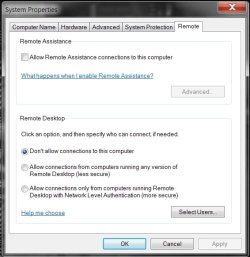
Rightclick "My Computer" then click Properties.
On the lefthand side click Remote Settings.
Next click the Remote tab if it's not open.
Then set it up like the screenshot below.
Unchecking & checking the appropriate places
to cut off all remote access then click Apply OK. :geek:
 

Attachments

  • Cutoff Remote Access.jpg
    Cutoff Remote Access.jpg
    41.9 KB · Views: 761

My Computer

Computer Manufacturer/Model Number
ABS Tech Ultimate X9
OS
Windows® 7 Ultimate x64 SP1
CPU
Intel Core 2 Duo E8400 (E0) @ 4.0GHz
Motherboard
ASUS P5Q Pro Turbo / 1780 FSB
Memory
G.SKILL-F2-8500CL5D-4GBPK (2x2Gbs) (5-5-5-15) @ 1067Mhz
Graphics Card(s)
EVGA GTX 470 SC (845/1690/2000) 160Gbs
Sound Card
VIA HD Audio / Boston Acoustics
Monitor(s) Displays
Acer X222W HD 22" LCD 2500:1 / 5ms
Screen Resolution
1680x1050
Hard Drives
Seagate Barracuda SATAII 2 x 320GB
Seagate Barracuda SATAII 1Tb
Intel® Rapid Storage Technology v10.1.0.1008
AHCI-NCQ Enabled
PSU
Silent Pro GOLD 80 PLUS 800w /95% efficiency / SLI-Crossfire
Case
ABS Stealth Black-Custom
Cooling
CoolerMaster V6GT 6 Heatpipe 200w CPU Cooler
Keyboard
Logitech G15 Gaming Keyboard (Old Style Blue!)
Mouse
Logitech MX518 Gaming Mouse
Internet Speed
1Mbs-up/ 6Mbs-down
thanks Muff1n! Thats exactly what I needed!! :D
 

My Computer

Computer Manufacturer/Model Number
Custom Build (by me)
OS
Windows 7 Professional SP1 64-Bit

My Computer

Computer Manufacturer/Model Number
ABS Tech Ultimate X9
OS
Windows® 7 Ultimate x64 SP1
CPU
Intel Core 2 Duo E8400 (E0) @ 4.0GHz
Motherboard
ASUS P5Q Pro Turbo / 1780 FSB
Memory
G.SKILL-F2-8500CL5D-4GBPK (2x2Gbs) (5-5-5-15) @ 1067Mhz
Graphics Card(s)
EVGA GTX 470 SC (845/1690/2000) 160Gbs
Sound Card
VIA HD Audio / Boston Acoustics
Monitor(s) Displays
Acer X222W HD 22" LCD 2500:1 / 5ms
Screen Resolution
1680x1050
Hard Drives
Seagate Barracuda SATAII 2 x 320GB
Seagate Barracuda SATAII 1Tb
Intel® Rapid Storage Technology v10.1.0.1008
AHCI-NCQ Enabled
PSU
Silent Pro GOLD 80 PLUS 800w /95% efficiency / SLI-Crossfire
Case
ABS Stealth Black-Custom
Cooling
CoolerMaster V6GT 6 Heatpipe 200w CPU Cooler
Keyboard
Logitech G15 Gaming Keyboard (Old Style Blue!)
Mouse
Logitech MX518 Gaming Mouse
Internet Speed
1Mbs-up/ 6Mbs-down
Windows security settings are pretty much just a facade to work against the casual user but do almost nothing to stopping a hacker.

Better to always work from flash drives with Fat 32 formatting. Don't ever put anything sensitive on the local drive.

Also Windows encryption is dangerous if the hacker knows how to disable your certificates and even your backup certificates.
 

My Computer

Computer type
PC/Desktop
OS
California
Back
Top