
Error 1068, Can't connect to internet

First can you click start and then in the search box type the following:

Code:
services.msc

Open the first application shown

Upon launch search for 'Wired AutoConfig' and then right click and click on properties
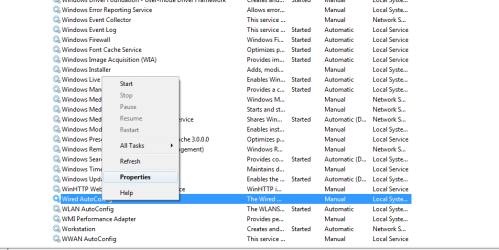
prop.png

After that you should get a properties window, please start the service as well as change the Startup Type to Automatic
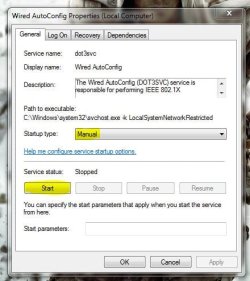
service.JPG

This should allow your ethernet NIC to connect automatically if all drivers are correct.

If not then can you boot the machine in safe mode with networking and test. To do so follow this tutorial (OPTION ONE ONLY) - http://www.sevenforums.com/tutorials/69585-safe-mode.html

   Note
Please replace all references of 'Safe Mode' with 'Safe Mode with Networking'


If it still doesn't connect then try to use a different port on your router and/or a different cable as it may be a physical issue. If that doesn't work then I would begin to suspect drivers

Josh :)
 

My Computer My Computer

Computer type
PC/Desktop
Computer Manufacturer/Model Number
Custom Built
OS
Windows 7 Professional x64 SP1 ; Windows Server 2012 R2 Standard
CPU
Intel Core i5 2400 @ 3.10GHz
Motherboard
Foxconn H67MP-S/-V/H67MP
Memory
8.0GB DDR3 @ 665MHz (2GBx4)
Graphics Card(s)
AMD Radeon HD 6870
Sound Card
Realtek High Definition Audio
Monitor(s) Displays
AOC 2243W & SMB1930NW
Screen Resolution
1440x900 & 1920x1080
Hard Drives
977GB Seagate ST31000524AS ATA Drive (SATA)
250GB WD iSCSI attached Drive
PSU
750W Gaming PSU
Case
Novatech Night
Cooling
Fan
Keyboard
Dell Standard PS/2 Keyboard
Mouse
R.A.T 07 Gaming Mouse
Internet Speed
Download: 10 Mbps Ping: 30ms Upload: 0.81 Mbps
Browser
Google Chrome
Other Info
Optiarc DVD RW AD-5260S ATA Device
OK, here's what I did. After posting to the Networking forum I decided to try something I should have done first. I performed a system restore to a point 2 weeks ago. Voila' the internet is back!

So, I then ran hitman, which found some stuff. I let hitman take care of it. Then I ran Malewarebytes. And then Tdsskiller.

Malewarebytes found some stuff and got rid of it. Tdsskiller found no problems.

I used Norton removal tool to remove Norton Security Suite (which would not uninstall). I then downloaded Microsft Secutity Essentials and ran a complete system scan. It found one adware.

I also ran Windows Malicious Software removal tool, which found nothing.

I then ran the Services fixer tool you recommended and it was able to restore the services.

I've attached log files from Hitman and Malewarebytes. Thanks.

HitmanPro_20130801_1746.log

mbam-log-2013-08-01 (17-06-04).txt
 

My Computer My Computer

Computer type
PC/Desktop
Computer Manufacturer/Model Number
HP, HPE-410y
OS
Windows 7 Home Premium 64 bit
CPU
AMD Phenom II X6 1045t 2.70 GHz
Motherboard
FOXCONN 2AB1 DVT
Memory
8 GB
Graphics Card(s)
ATI Radeon HD 5570
Sound Card
AMD High Definition Audio Device
Monitor(s) Displays
HP 2310
Hard Drives
Hitachi HDS721010CLA332
Maxtor 3200 USB Device
WD My Book 1140 USB Device
Antivirus
Norton Security Suite, Immunet 3.0
Browser
Chrome
Might want to run AdwCleaner and Junkware Removal Tool . Glad you have fixed your issue .
 

My Computer My Computer

Computer Manufacturer/Model Number
Custom Built
OS
Windows 7 Ultimate 32-Bit & Windows 7 Ultimate 64-Bit
CPU
Intel Core i7 CPU 950 @ 3.07GHz
Motherboard
ASUS P6T DELUXE V2
Memory
OCZ 6GB (3 x 2GB) 240-Pin DDR3 SDRAM DDR3 1600 OCZ3X1600R2
Graphics Card(s)
ATI Radeon HD 5700 Series
Sound Card
OnBoard
Hard Drives
WD6400AACS-00M3B0 (640GB SATA )
PSU
CORSAIR 850w
Case
NZXT LEXA
Cooling
Intel Stock Heatsink Fan
Keyboard
Microsoft Wireless Laser Keyboard 7000
Mouse
Microsoft Wireless Laser Mouse 7000
Will do. Thanks!
 

My Computer My Computer

Computer type
PC/Desktop
Computer Manufacturer/Model Number
HP, HPE-410y
OS
Windows 7 Home Premium 64 bit
CPU
AMD Phenom II X6 1045t 2.70 GHz
Motherboard
FOXCONN 2AB1 DVT
Memory
8 GB
Graphics Card(s)
ATI Radeon HD 5570
Sound Card
AMD High Definition Audio Device
Monitor(s) Displays
HP 2310
Hard Drives
Hitachi HDS721010CLA332
Maxtor 3200 USB Device
WD My Book 1140 USB Device
Antivirus
Norton Security Suite, Immunet 3.0
Browser
Chrome
jkoll66,

Good news, and a good job on your part!!

Was just getting ready to tackle the Internet issue, and running a Registry backup from July 23 using FRST was one of the items on the agenda.

Would appreciate your attaching the HitmanPro_20130801_1746.log, and the mbam-log-2013-08-01 (17-06-04).txt again. Something did not work with the attachment.

Also, since we have come this far, let's make sure all is well.

Please run the following from the Desktop...

Farbar Recovery Scan Tool - this time check the Addition option
Farbar Service Scanner
MiniToolBox

On the MiniTooloBox:
(Image from BleepingComputer)
http://i646.photobucket.com/albums/uu186/farbar/MTB.gif

Check the following options:
Report FF Proxy Settings
List content of Hosts
List IP configuration
List Winsock Entries
List last 10 Event Viewer log
List Installed Programs
List Devices
List Restore Points

When done with all of the above, please post the new reports from the 3 tools.

Thanks!!
 

My Computer My Computer

Computer type
PC/Desktop
Computer Manufacturer/Model Number
An ol' eMachines
OS
Windows 7 Home Premium
Internet Speed
Fine for me...I'm retired!

My Computer My Computer

Computer type
PC/Desktop
Computer Manufacturer/Model Number
HP, HPE-410y
OS
Windows 7 Home Premium 64 bit
CPU
AMD Phenom II X6 1045t 2.70 GHz
Motherboard
FOXCONN 2AB1 DVT
Memory
8 GB
Graphics Card(s)
ATI Radeon HD 5570
Sound Card
AMD High Definition Audio Device
Monitor(s) Displays
HP 2310
Hard Drives
Hitachi HDS721010CLA332
Maxtor 3200 USB Device
WD My Book 1140 USB Device
Antivirus
Norton Security Suite, Immunet 3.0
Browser
Chrome
Thanks for the info.

Lots of garbage there, and it would be wise to run AdwCleaner and the Junkware Removal Tool as VistaKing suggested.

In addition, since there were ZeroAccess entries (RootKit) showing in the previous runs, having the results of the Farbar Recovery Scan Tool (with the Addition option), Farbar Service Scanner, and the MiniToolBox would be wise.You do not want any Rootkit leftovers.

We'll be ready when you post.


My Computer My Computer

Computer type
PC/Desktop
Computer Manufacturer/Model Number
An ol' eMachines
OS
Windows 7 Home Premium
Internet Speed
Fine for me...I'm retired!

My Computer My Computer

Computer type
PC/Desktop
Computer Manufacturer/Model Number
HP, HPE-410y
OS
Windows 7 Home Premium 64 bit
CPU
AMD Phenom II X6 1045t 2.70 GHz
Motherboard
FOXCONN 2AB1 DVT
Memory
8 GB
Graphics Card(s)
ATI Radeon HD 5570
Sound Card
AMD High Definition Audio Device
Monitor(s) Displays
HP 2310
Hard Drives
Hitachi HDS721010CLA332
Maxtor 3200 USB Device
WD My Book 1140 USB Device
Antivirus
Norton Security Suite, Immunet 3.0
Browser
Chrome
I do see the zero access inside FRST.txt log . The AdwCleaner[Sn].txt log
 

My Computer My Computer

Computer Manufacturer/Model Number
Custom Built
OS
Windows 7 Ultimate 32-Bit & Windows 7 Ultimate 64-Bit
CPU
Intel Core i7 CPU 950 @ 3.07GHz
Motherboard
ASUS P6T DELUXE V2
Memory
OCZ 6GB (3 x 2GB) 240-Pin DDR3 SDRAM DDR3 1600 OCZ3X1600R2
Graphics Card(s)
ATI Radeon HD 5700 Series
Sound Card
OnBoard
Hard Drives
WD6400AACS-00M3B0 (640GB SATA )
PSU
CORSAIR 850w
Case
NZXT LEXA
Cooling
Intel Stock Heatsink Fan
Keyboard
Microsoft Wireless Laser Keyboard 7000
Mouse
Microsoft Wireless Laser Mouse 7000
I ran adwcleaner, however, it didn't produce a log file afterwards. I can try running it again.
 

My Computer My Computer

Computer type
PC/Desktop
Computer Manufacturer/Model Number
HP, HPE-410y
OS
Windows 7 Home Premium 64 bit
CPU
AMD Phenom II X6 1045t 2.70 GHz
Motherboard
FOXCONN 2AB1 DVT
Memory
8 GB
Graphics Card(s)
ATI Radeon HD 5570
Sound Card
AMD High Definition Audio Device
Monitor(s) Displays
HP 2310
Hard Drives
Hitachi HDS721010CLA332
Maxtor 3200 USB Device
WD My Book 1140 USB Device
Antivirus
Norton Security Suite, Immunet 3.0
Browser
Chrome
Pressing on with FRST...

:info: Open Notepad (Start > All Programs > Accessories > Notepad)
Copy the entire contents of the quote box below (Do not copy the word 'Quote')
Save it on the Desktop, and name it: fixlist.txt

start
HKLM\...D6A79037F57F\InprocServer32: [Default-fastprox] C:\$Recycle.Bin\S-1-5-18\$8d6e451df1df7da1582cafd4e7bd6506\n. ATTENTION! ====> ZeroAccess?
HKLM\...\InprocServer32: [Default-cscui] <==== ATTENTION!
HKCR\...409d6c4515e9\InprocServer32: [Default-shell32] C:\$Recycle.Bin\S-1-5-21-3925031014-69785429-301285770-1000\$8d6e451df1df7da1582cafd4e7bd6506\n. ATTENTION! ====> ZeroAccess?
C:\Users\Nicholas\jagex_cl_loginapplet_LIVE.dat
C:\Users\Nicholas\jagex_cl_runescape_LIVE.dat
C:\Users\Nicholas\random.dat
End

This script is written specifically for jkoll66, and, only for use on this infected computer.
Running this on another computer may cause damage to the Operating System!!

Run FRST, and press the Fix button, just once, and wait.

The tool creates a report on the Desktop called: Fixlog.txt

:ar: Please post the Fixlog.txt in your reply.
 

My Computer My Computer

Computer type
PC/Desktop
Computer Manufacturer/Model Number
An ol' eMachines
OS
Windows 7 Home Premium
Internet Speed
Fine for me...I'm retired!
Duplicate post.
 

My Computer My Computer

Computer type
PC/Desktop
Computer Manufacturer/Model Number
An ol' eMachines
OS
Windows 7 Home Premium
Internet Speed
Fine for me...I'm retired!

My Computer My Computer

Computer type
PC/Desktop
Computer Manufacturer/Model Number
HP, HPE-410y
OS
Windows 7 Home Premium 64 bit
CPU
AMD Phenom II X6 1045t 2.70 GHz
Motherboard
FOXCONN 2AB1 DVT
Memory
8 GB
Graphics Card(s)
ATI Radeon HD 5570
Sound Card
AMD High Definition Audio Device
Monitor(s) Displays
HP 2310
Hard Drives
Hitachi HDS721010CLA332
Maxtor 3200 USB Device
WD My Book 1140 USB Device
Antivirus
Norton Security Suite, Immunet 3.0
Browser
Chrome
jkoll66,

My apology for the delay.

Please provide an update on whether you are still having malware problems.

Thanks!
 

My Computer My Computer

Computer type
PC/Desktop
Computer Manufacturer/Model Number
An ol' eMachines
OS
Windows 7 Home Premium
Internet Speed
Fine for me...I'm retired!
My stepson hasn't reported any issues. Did the last log file show anything else? Someone mentioned "zero access" in an earlier post. Thanks.
 

My Computer My Computer

Computer type
PC/Desktop
Computer Manufacturer/Model Number
HP, HPE-410y
OS
Windows 7 Home Premium 64 bit
CPU
AMD Phenom II X6 1045t 2.70 GHz
Motherboard
FOXCONN 2AB1 DVT
Memory
8 GB
Graphics Card(s)
ATI Radeon HD 5570
Sound Card
AMD High Definition Audio Device
Monitor(s) Displays
HP 2310
Hard Drives
Hitachi HDS721010CLA332
Maxtor 3200 USB Device
WD My Book 1140 USB Device
Antivirus
Norton Security Suite, Immunet 3.0
Browser
Chrome
The last fixlist of the FRST program should have taken care of the issue.

However, since no one program is all-inclusive, it is best to also use 'reinforcements'.

:info: Please download Malwarebytes : Malwarebytes Anti-Rootkit

Save to the Desktop (easy to find)
Right-click the file and select: Extract here...
Follow the Usage instructions on the website, but, for now, please stop at Step 6.

When the program is done, two reports are created in the mbar folder:
1. system-log.txt
2. mbar-log-2013-08-08 (20-13-32).txt (corresponds to mbar-log-year-month-day (hour-minute-second).txt)

If anything is detected and removed, please provide the mbar-log containing the information.
 

My Computer My Computer

Computer type
PC/Desktop
Computer Manufacturer/Model Number
An ol' eMachines
OS
Windows 7 Home Premium
Internet Speed
Fine for me...I'm retired!
I ran Malwarebytes anti rootkit. It found no malware.
 

My Computer My Computer

Computer type
PC/Desktop
Computer Manufacturer/Model Number
HP, HPE-410y
OS
Windows 7 Home Premium 64 bit
CPU
AMD Phenom II X6 1045t 2.70 GHz
Motherboard
FOXCONN 2AB1 DVT
Memory
8 GB
Graphics Card(s)
ATI Radeon HD 5570
Sound Card
AMD High Definition Audio Device
Monitor(s) Displays
HP 2310
Hard Drives
Hitachi HDS721010CLA332
Maxtor 3200 USB Device
WD My Book 1140 USB Device
Antivirus
Norton Security Suite, Immunet 3.0
Browser
Chrome
Looks like all is going well.

Next, let's remove the programs you no longer need...

:info: Remove any fixlist.txt from the Desktop.
Open Notepad (Start > All Programs > Accessories > Notepad)
Copy/paste all the contents of the quote box below to Notepad (do not copy the word 'Quote').
Save it on the Desktop as: fixlist.txt

start
DeleteQuarantine:
End

Run FRST from the Desktop again, press the Fix button once.
When done, you can delete the FRST icon from the Desktop (if still there).


:info: Also, the following can be removed or uninstalled:
-Malwarebytes Anti-Rootkit
-RogueKiller
-Farbar Service Scanner
-MiniToolBox
-AdwCleaner (run the program and press: Uninstall)
-Junkware Removal Tool
-TDSSKiller
-ESET ServiceRepair
-HitmanPro.Kickstart (free 30 days trial)


:info: The following .bat or .reg files can be deleted (Use right-click > Delete):
-isvcfix.bat
-ActionCenterIcon.reg
-DNScache
-DHCP
-AFD
-TCPIP
-Nsi
-nsiproxy
-mpsdrv
-MpsSvc
-BFE


:info: Last, let’s check your Security status with the following...
Download Security Check:
http://screen317.spywareinfoforum.org/
Save to your Desktop.
Double-click: SecurityCheck.exe
Follow the onscreen instructions inside the black box.
When done, a Notepad report opens automatically, called: checkup.txt

:ar: Please post the checkup.txt in your reply.
(Please do not take any corrective actions!)
 

My Computer My Computer

Computer type
PC/Desktop
Computer Manufacturer/Model Number
An ol' eMachines
OS
Windows 7 Home Premium
Internet Speed
Fine for me...I'm retired!
Back
Top