Solved Can't connect to internet with Windows 7

byzantine

New member
Member
Local time
7:35 PM
Messages
53
I am trying to connect to broadband wired internet with Windows 7. I just added internet to my cable TV package. Bought a new SB6183 modem. No router.

I have 2 desktop computers. One of them has no problem connecting. No userid or password needed.

The other one gets a popup asking for "the user name and password that your ISP provided to you". Ha HA. The ISP (my cable co) says they don't have user name or password to provide, and what, are you crazy, no one else has that problem, please go away.

I'm glad to have the one computer accessing the net, but I would prefer to have the other PC also connecting, since it is newer.

The newer PC has Windows 7. The older PC, which is * able to connect * with no problemos, has Windows ME.

In addition to the user name and password problem, the troubleshooter tells me I need to install drivers for the network adapter.

Where is a safe website to download drivers for it?

I cannot download drivers from the internet because the computer that is able to connect is so old and limited, that I can only connect to a limited selection of websites . I get a "protocol error' trying to connect to most websites.

I can provide specs on the newer pc in the future. I am not at home now.

I bought it used, and have never tried to hook it to broadband internet before. Years ago, I did attempt to get a dial up modem working in it, and downloaded and installed drivers, to no avail.

The other computer (Windows ME) was already configured to connect with a dial up modem, and I did not have to change a thing to get connected to broadband internet. Did it just a few days ago with the new SB6183 cable modem.

Thanks.
 

My Computer My Computer

Computer type
PC/Desktop
Computer Manufacturer/Model Number
custom
OS
windows 7 32 bit
Motherboard
asus ??
Hard Drives
maxtor 75 g
Browser
firefox
First thing does your isp allow more than one connects a lot don. Second if its a modem then you pc is live on the net and anyone can reach it and hack it with a router its hides your pc
 

My Computer My Computer

Computer type
PC/Desktop
OS
win 8 32 bit
The modem only allows you to connect one computer at one time. You need to use a router with the modem to plug in more than one computer.
 

My Computers My Computers

System One System Two

  • Computer type
    PC/Desktop
    Computer Manufacturer/Model Number
    Custom build
    OS
    Windows 7 Home Premium 64-bits
    CPU
    AMD FX-8350
    Motherboard
    Gigabyte GA-990FXA-UD3 (AM3+)
    Memory
    GSKILL Ripjaw-X PC3 12800 8GB (2x4GB)
    Graphics Card(s)
    ASUS ROG STRIX GTX 1060 6GB
    Sound Card
    Integrated
    Monitor(s) Displays
    Asus VE228H (21.5-in)
    Screen Resolution
    1920x1080 60Hz
    Hard Drives
    SAMSUNG 870 EVO 2.5 Inch SATA SSD (1TB)
    SAMSUNG 870 EVO 2.5 Inch SATA SSD (1TB)
    SAMSUNG 870 EVO 2.5 Inch SATA SSD (1TB)
    PSU
    Corsair RM750x (750 watts)
    Case
    Corsair Carbide Series 200R
    Cooling
    Corsair Hydro Series H60 (CWCH60)
    Keyboard
    Logitech Elite
    Mouse
    Logitech M510 Wireless Mouse
    Internet Speed
    Comcast Gigabit Extra (1200Mbps down / 35Mbps up)
    Antivirus
    Malwarebytes
    Browser
    Firefox, Edge, Chrome
    Other Info
    ASUS DRW-24B1ST DVD-RW (24X) optical drive
    Seagate Expansion Desk (5TB) external SATA/USB HDD
    Comcast XB8 Internet Gateway
  • Computer type
    PC/Desktop
    System Manufacturer/Model Number
    Custom
    OS
    Windows 7 Pro (64-bit)
    CPU
    AMD Phenom II 960T X4
    Motherboard
    ASUS M4N82 Deluxe
    Memory
    Corsair XMS2 DDR2-800 8GB (4x2GB)
    Graphics Card(s)
    ASUS ENGTX560 DCII OC/2DI/1GD5 1GB
    Monitor(s) Displays
    Samsung 930B 19-inch LCD
    Screen Resolution
    1280x1024
    Hard Drives
    Samsung SSD 870 EVO 1000 GB (Windows 10)
    Seagate ST1000DM003 1000 GB (Windows 7)
    PSU
    Antec TruePower (new) TP-650
    Case
    Antec Three Hundred
    Cooling
    AMD stock cooler from FX8350
    Mouse
    Logitech M100
    Internet Speed
    Xfinity Gigabit Extra 1200/35 Mbps
Thanks.

I reread my post, and yes, it seems like I was saying I wanted to have two going at the same time, but no, I just want one computer at a time.

I don't want both computers to be online at the same time. One is all I want, but I would like it to be the Windows 7 computer.

I mentioned the other computer just to let you know I can get an internet connection.

I am testing one computer at a time. I just move the ethernet cable from one to the other.
 

My Computer My Computer

Computer type
PC/Desktop
Computer Manufacturer/Model Number
custom
OS
windows 7 32 bit
Motherboard
asus ??
Hard Drives
maxtor 75 g
Browser
firefox
Thanks.
I reread my post, and yes, it seems like I was saying I wanted to have two going at the same time, but no, I just want one computer at a time.
I don't want both computers to be online at the same time. One is all I want, but I would like it to be the Windows 7 computer.
I mentioned the other computer just to let you know I can get an internet connection.
I am testing one computer at a time. I just move the ethernet cable from one to the other.
I don't understand what username & password you are talking about. You don't need them to connect to the Internet if you are using Ethernet. Are you sure you are not talking about the username & password to log into the modems config menu? You only need that to check the configuration for the modem.

It still wouldn't hurt to have a router to connect both computers at the same time. That doesn't mean you have to use both computers at the same time. It would also help with network testing.

BTW, I have 5 desktop computers hooked to my Gateway (modem/router). The router only has 4 ports so I added an Ethernet switch to extend that to 7 ports. I normally only use one of two computers at time but it is nice to just turn one on and be able to connect right to the Internet.

Have you set up the Windows 7 computer to use networking by selecting Connect to a Network. You have to do that first.
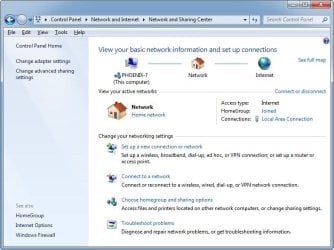
You have to start here. Once done you will see it is connected to the Internet as you see in the screenshot taken in one of my Windows 7 computers.

2023-12-25 20_41_05-Network and Sharing Center.jpg
 

My Computers My Computers

System One System Two

  • Computer type
    PC/Desktop
    Computer Manufacturer/Model Number
    Custom build
    OS
    Windows 7 Home Premium 64-bits
    CPU
    AMD FX-8350
    Motherboard
    Gigabyte GA-990FXA-UD3 (AM3+)
    Memory
    GSKILL Ripjaw-X PC3 12800 8GB (2x4GB)
    Graphics Card(s)
    ASUS ROG STRIX GTX 1060 6GB
    Sound Card
    Integrated
    Monitor(s) Displays
    Asus VE228H (21.5-in)
    Screen Resolution
    1920x1080 60Hz
    Hard Drives
    SAMSUNG 870 EVO 2.5 Inch SATA SSD (1TB)
    SAMSUNG 870 EVO 2.5 Inch SATA SSD (1TB)
    SAMSUNG 870 EVO 2.5 Inch SATA SSD (1TB)
    PSU
    Corsair RM750x (750 watts)
    Case
    Corsair Carbide Series 200R
    Cooling
    Corsair Hydro Series H60 (CWCH60)
    Keyboard
    Logitech Elite
    Mouse
    Logitech M510 Wireless Mouse
    Internet Speed
    Comcast Gigabit Extra (1200Mbps down / 35Mbps up)
    Antivirus
    Malwarebytes
    Browser
    Firefox, Edge, Chrome
    Other Info
    ASUS DRW-24B1ST DVD-RW (24X) optical drive
    Seagate Expansion Desk (5TB) external SATA/USB HDD
    Comcast XB8 Internet Gateway
  • Computer type
    PC/Desktop
    System Manufacturer/Model Number
    Custom
    OS
    Windows 7 Pro (64-bit)
    CPU
    AMD Phenom II 960T X4
    Motherboard
    ASUS M4N82 Deluxe
    Memory
    Corsair XMS2 DDR2-800 8GB (4x2GB)
    Graphics Card(s)
    ASUS ENGTX560 DCII OC/2DI/1GD5 1GB
    Monitor(s) Displays
    Samsung 930B 19-inch LCD
    Screen Resolution
    1280x1024
    Hard Drives
    Samsung SSD 870 EVO 1000 GB (Windows 10)
    Seagate ST1000DM003 1000 GB (Windows 7)
    PSU
    Antec TruePower (new) TP-650
    Case
    Antec Three Hundred
    Cooling
    AMD stock cooler from FX8350
    Mouse
    Logitech M100
    Internet Speed
    Xfinity Gigabit Extra 1200/35 Mbps
Without a router and out of support windows your pc is in danger Its possible the isp only allows 1 pc and its going by mac address
 

My Computer My Computer

Computer type
PC/Desktop
OS
win 8 32 bit
MisterEd, Yes, I get that screen (something similar). When I click on the 'set up a new connection' option, it only shows me my old 56K dial up connection, but it lets me click on an option to 'see other available networks you are not connected to' and it then shows an icon for broadband. When I click on that, it asks for 'username and password your ISP provided to you'. I can cancel out, or 'skip' or 'continue anyway', and whatever I do, it says 'you are not connected to a network' or something, and truoubleshooting says it did not find a working network adapter, or that I am missing the drivers for the network adapter. When I plug the ethernet cable into the back of the PC it plugs into a card, and a yellow light comes on, so something is there.

If you google 'windows asking for username and password to connect modem' you will get lots of results. I am not the only one. Unfortunately, there were no solutions offered in any of the discussions, lol'

- - - Updated - - -

Without a router and out of support windows your pc is in danger Its possible the isp only allows 1 pc and its going by mac address

OK, I am worried enough now to get a router. Am thinking of returning my Arris SB6183 modem, and getting an Arris combo modem/router instead (don't know number). Costs $79 I think at Walmart. How do I tell if a router has a firewall? If it has wifi optional, can I turn the wifi off ?


- - - Updated - - -

Is the LAN involved in this problem? Or just the WAN ?
 

My Computer My Computer

Computer type
PC/Desktop
Computer Manufacturer/Model Number
custom
OS
windows 7 32 bit
Motherboard
asus ??
Hard Drives
maxtor 75 g
Browser
firefox
MisterEd, Yes, I get that screen (something similar). When I click on the 'set up a new connection' option, it only shows me my old 56K dial up connection, but it lets me click on an option to 'see other available networks you are not connected to' and it then shows an icon for broadband. When I click on that, it asks for 'username and password your ISP provided to you'. I can cancel out, or 'skip' or 'continue anyway', and whatever I do, it says 'you are not connected to a network' or something, and truoubleshooting says it did not find a working network adapter, or that I am missing the drivers for the network adapter. When I plug the ethernet cable into the back of the PC it plugs into a card, and a yellow light comes on, so something is there.

If you google 'windows asking for username and password to connect modem' you will get lots of results. I am not the only one. Unfortunately, there were no solutions offered in any of the discussions, lol'
- - - Updated - - -

OK, I am worried enough now to get a router. Am thinking of returning my Arris SB6183 modem, and getting an Arris combo modem/router instead (don't know number). Costs $79 I think at Walmart. How do I tell if a router has a firewall? If it has wifi optional, can I turn the wifi off ?

- - - Updated - - -

Is the LAN involved in this problem? Or just the WAN ?
You could just buy a router and plug it into the modem but a modem/router combo is OK if that is what you want. A router always has a built-in firewall. Just make sure it is acceptable by your ISP.

Why wouldn't you want Wi-Fi turned on? Don't you have any wireless devices? Also, when family and friends stop by they usually ask to connect their phones to the Wi-Fi.

I have a lot of things connected to Wi-Fi including: 3 x laptops, 1 x printer, 3 x phones, 3 x TVs, etc.

Your modem is given an public Wi-Fi address by your ISP. When a router is connected it assigns individual local IP addresses to your computers, phones, or whatever else you want to connect. These devices can be connected either connected using an Ethernet cable or by Wi-Fi.

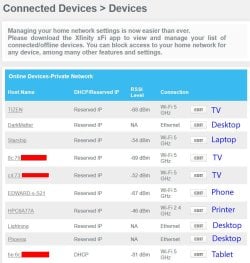
Here are some screenshots taken on the menu for my Gateway (modem/router).

These are all the devices currently connected to my router. Some are connected by Ethernet while most are connected by Wi-Fi.

router1a.jpg

These are all the devices that had been connected to my router in the last couple months but are not connected right now. Again there are a mix of devices connected with Ethernet or Wi-Fi.

router2a.jpg
 
Last edited:

My Computers My Computers

System One System Two

  • Computer type
    PC/Desktop
    Computer Manufacturer/Model Number
    Custom build
    OS
    Windows 7 Home Premium 64-bits
    CPU
    AMD FX-8350
    Motherboard
    Gigabyte GA-990FXA-UD3 (AM3+)
    Memory
    GSKILL Ripjaw-X PC3 12800 8GB (2x4GB)
    Graphics Card(s)
    ASUS ROG STRIX GTX 1060 6GB
    Sound Card
    Integrated
    Monitor(s) Displays
    Asus VE228H (21.5-in)
    Screen Resolution
    1920x1080 60Hz
    Hard Drives
    SAMSUNG 870 EVO 2.5 Inch SATA SSD (1TB)
    SAMSUNG 870 EVO 2.5 Inch SATA SSD (1TB)
    SAMSUNG 870 EVO 2.5 Inch SATA SSD (1TB)
    PSU
    Corsair RM750x (750 watts)
    Case
    Corsair Carbide Series 200R
    Cooling
    Corsair Hydro Series H60 (CWCH60)
    Keyboard
    Logitech Elite
    Mouse
    Logitech M510 Wireless Mouse
    Internet Speed
    Comcast Gigabit Extra (1200Mbps down / 35Mbps up)
    Antivirus
    Malwarebytes
    Browser
    Firefox, Edge, Chrome
    Other Info
    ASUS DRW-24B1ST DVD-RW (24X) optical drive
    Seagate Expansion Desk (5TB) external SATA/USB HDD
    Comcast XB8 Internet Gateway
  • Computer type
    PC/Desktop
    System Manufacturer/Model Number
    Custom
    OS
    Windows 7 Pro (64-bit)
    CPU
    AMD Phenom II 960T X4
    Motherboard
    ASUS M4N82 Deluxe
    Memory
    Corsair XMS2 DDR2-800 8GB (4x2GB)
    Graphics Card(s)
    ASUS ENGTX560 DCII OC/2DI/1GD5 1GB
    Monitor(s) Displays
    Samsung 930B 19-inch LCD
    Screen Resolution
    1280x1024
    Hard Drives
    Samsung SSD 870 EVO 1000 GB (Windows 10)
    Seagate ST1000DM003 1000 GB (Windows 7)
    PSU
    Antec TruePower (new) TP-650
    Case
    Antec Three Hundred
    Cooling
    AMD stock cooler from FX8350
    Mouse
    Logitech M100
    Internet Speed
    Xfinity Gigabit Extra 1200/35 Mbps
Getting back to my original problem, not getting into the internet: In my windows 7 PC, I can't see any reference of the word 'ethernet' anywhere when I look around in internet options, modems, networks and sharing, device manager, etc.

In my Windows ME PC, I see reference to a 'PCI fast ethernet adapter' but no 'ethernet' mentioned on WIndows 7 PC. Shouldn't there be some mention of ethernet?
 

My Computer My Computer

Computer type
PC/Desktop
Computer Manufacturer/Model Number
custom
OS
windows 7 32 bit
Motherboard
asus ??
Hard Drives
maxtor 75 g
Browser
firefox
Getting back to my original problem, not getting into the internet: In my windows 7 PC, I can't see any reference of the word 'ethernet' anywhere when I look around in internet options, modems, networks and sharing, device manager, etc.

In my Windows ME PC, I see reference to a 'PCI fast ethernet adapter' but no 'ethernet' mentioned on WIndows 7 PC. Shouldn't there be some mention of ethernet?

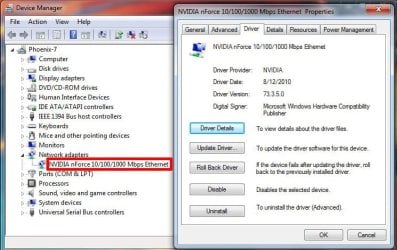
You should see the Ethernet adapter in the Device Manager. I have an Nvidia nForce 10/10/100 Mbps Ethernet

ethernet1a.jpg

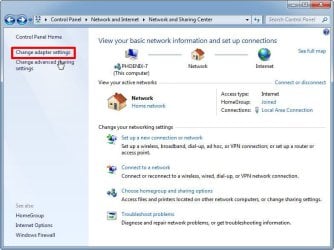
In the Control Panel if you go to Network and Sharing Center select Change adapter settings

ethernet2a.jpg

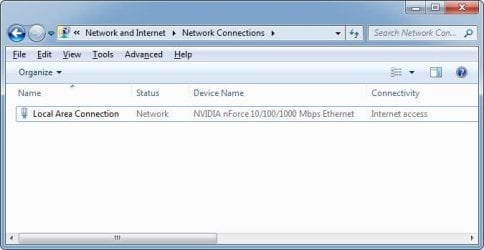
You will see the Ethernet adapter there

ethernet3a.jpg

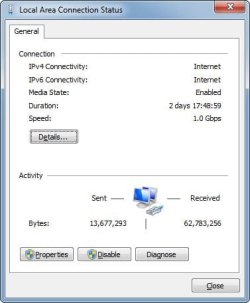
You can show its properties and status

ethernet4a.jpg

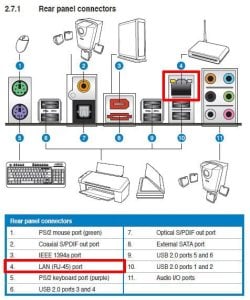
You will see the Ethernet adapter specification in the user manual.

ethernet5a.jpg

Also, in the user manual you see that the Ethernet port is called LAN (RJ-45).

ethernet6a.jpg

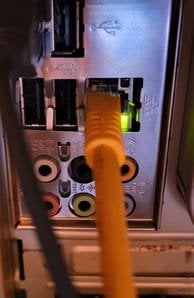
Lastly you will see the Ethernet port on the back of the computer. Here a yellow Cat 5e Ethernet cable is plugged into it.

ethernet5a.jpg
 

My Computers My Computers

System One System Two

  • Computer type
    PC/Desktop
    Computer Manufacturer/Model Number
    Custom build
    OS
    Windows 7 Home Premium 64-bits
    CPU
    AMD FX-8350
    Motherboard
    Gigabyte GA-990FXA-UD3 (AM3+)
    Memory
    GSKILL Ripjaw-X PC3 12800 8GB (2x4GB)
    Graphics Card(s)
    ASUS ROG STRIX GTX 1060 6GB
    Sound Card
    Integrated
    Monitor(s) Displays
    Asus VE228H (21.5-in)
    Screen Resolution
    1920x1080 60Hz
    Hard Drives
    SAMSUNG 870 EVO 2.5 Inch SATA SSD (1TB)
    SAMSUNG 870 EVO 2.5 Inch SATA SSD (1TB)
    SAMSUNG 870 EVO 2.5 Inch SATA SSD (1TB)
    PSU
    Corsair RM750x (750 watts)
    Case
    Corsair Carbide Series 200R
    Cooling
    Corsair Hydro Series H60 (CWCH60)
    Keyboard
    Logitech Elite
    Mouse
    Logitech M510 Wireless Mouse
    Internet Speed
    Comcast Gigabit Extra (1200Mbps down / 35Mbps up)
    Antivirus
    Malwarebytes
    Browser
    Firefox, Edge, Chrome
    Other Info
    ASUS DRW-24B1ST DVD-RW (24X) optical drive
    Seagate Expansion Desk (5TB) external SATA/USB HDD
    Comcast XB8 Internet Gateway
  • Computer type
    PC/Desktop
    System Manufacturer/Model Number
    Custom
    OS
    Windows 7 Pro (64-bit)
    CPU
    AMD Phenom II 960T X4
    Motherboard
    ASUS M4N82 Deluxe
    Memory
    Corsair XMS2 DDR2-800 8GB (4x2GB)
    Graphics Card(s)
    ASUS ENGTX560 DCII OC/2DI/1GD5 1GB
    Monitor(s) Displays
    Samsung 930B 19-inch LCD
    Screen Resolution
    1280x1024
    Hard Drives
    Samsung SSD 870 EVO 1000 GB (Windows 10)
    Seagate ST1000DM003 1000 GB (Windows 7)
    PSU
    Antec TruePower (new) TP-650
    Case
    Antec Three Hundred
    Cooling
    AMD stock cooler from FX8350
    Mouse
    Logitech M100
    Internet Speed
    Xfinity Gigabit Extra 1200/35 Mbps
You need to reset your Internet settings. I created a batch file turned into an executable that will do just that. It initiates over 10 commands to help reset the network. Right click the Nuke TCP Reset and run as Admin. Once completed you computer will auto restart in 15 seconds.

You anti-virus software may flag the file as malware. Rest assured it is not. I made it myself which is just a batch file. I think the reason as to why some anti-virus software flags it is due to being compressed with the 7Z compression and for some reason some anti-virus software doesn't like 7Z. It's just a false positive. If you don't want to run this then I can tell you what commands to run yourself manually, but it's over ten of them. What this does is fire them all off at once in 5 second intervals. So it's all automatic.

Once your TCP/IP stack has been reset you should be able to simply plug in the Ethernet cable from the modem into your computer and away you go. No password or any of that. The password crap is a remnant of some other configuration you had going there. This will hopefully reset all that back to what it was.

Yes, you should get a router as that modem is just that - a modem. So there's no SPI (Stateful Packet Inspection) and NAT to afford you some basic networking security. Using just the modem now, every time you switch computers you may need to reset the modem as it will pick up different MAC addresses from each computer and change your IP address as well.

Some modems are a modem/router combo, but yours is not.


View attachment Nuke TCP Reset.zip

- - - Updated - - -

Here are some of the commands it fires off. For some reason my .EXE nuke does more than what I have published at Github. GitHub - 737simpilot/tcp-ip-reset: Resetting Winsock in Windows 7 (Click Source).
 

My Computer My Computer

Computer type
PC/Desktop
OS
Windows 7 Ultimate x64
You should see the Ethernet adapter in the Device Manager. I have an Nvidia nForce 10/10/100 Mbps Ethernet
In the Control Panel if you go to Network and Sharing Center select Change adapter settings
You will see the Ethernet adapter there
You can show its properties and status
You will see the Ethernet adapter specification in the user manual.

Also, in the user manual you see that the Ethernet port is called LAN (RJ-45).

Lastly you will see the Ethernet port on the back of the computer. Here a yellow Cat 5e Ethernet cable is plugged into it.
MisterEd,

Cool diagrams. I am at the library now since that is the only place I can currently access this site, lol. But I will def check my control panel for the 'change adapter settings' icon when I get back home. I do not think it is there on my version.

I did see some mention of tcp/ip 4 and tcp/ip 6 and they were both checked off already so I left them alone. It offered me the option to 'install' them, but since already checked off, left well enuf alone.

I do have something mentioned under network adapters, but it does not have the word 'ethernet' in it. Can't remember what it said.
I was poking around for hours before I saw the 'show hidden items' option somewhere, and clicked on it, and the network adapters tag showed itself ! Arggghh!! Why did they hide it ? Because it wasn't working properly ?

- - - Updated - - -

You need to reset your Internet settings. I created a batch file turned into an executable that will do just that. It initiates over 10 commands to help reset the network. Right click the Nuke TCP Reset and run as Admin. Once completed you computer will auto restart in 15 seconds.

You anti-virus software may flag the file as malware. Rest assured it is not. I made it myself which is just a batch file. I think the reason as to why some anti-virus software flags it is due to being compressed with the 7Z compression and for some reason some anti-virus software doesn't like 7Z. It's just a false positive. If you don't want to run this then I can tell you what commands to run yourself manually, but it's over ten of them. What this does is fire them all off at once in 5 second intervals. So it's all automatic.

Once your TCP/IP stack has been reset you should be able to simply plug in the Ethernet cable from the modem into your computer and away you go. No password or any of that. The password crap is a remnant of some other configuration you had going there. This will hopefully reset all that back to what it was.

Yes, you should get a router as that modem is just that - a modem. So there's no SPI (Stateful Packet Inspection) and NAT to afford you some basic networking security. Using just the modem now, every time you switch computers you may need to reset the modem as it will pick up different MAC addresses from each computer and change your IP address as well.

Some modems are a modem/router combo, but yours is not.


View attachment 423414

- - - Updated - - -

Here are some of the commands it fires off. For some reason my .EXE nuke does more than what I have published at Github. GitHub - 737simpilot/tcp-ip-reset: Resetting Winsock in Windows 7 (Click Source).

F22 Simpilot,

Thanks. I am afraid of doing all that, at this time. Maybe later, lol.

About the MAC address : I had a MAC address on the modem itself, which is what I read off to the cable company as we were getting a connection to work. I didn't think the computers had MAC addresses.

It is my understanding that the cable co only is interested in the MAC address of my modem, not ip address or mac address on the computers. No ? They said it was just the modem MAC they wanted. I told them it worked in one old computer and not the newer one, and were fine with that, no mention of my having to call them back to reset anything, to use another computer.

- - - Updated - - -

This website is combining my posts for some reason, guys. Sorry about that.

- - - Updated - - -

OK, more data. My control panel settings are different. I don't have any 'change adapter settings' tab. I do have a 'wan miniport (PPPOE)' entry in the list under 'network adapters', and I get a popup screen saying 'connecting to broadband with wan miniport PPPOE' but it never connects. Still haven't found the word 'ethernet' anywhere on the newer pc.
Thinking I might fix things by downloading and installing drivers for the network adapter, since troubleshooting says I need them. Where is a good place to download drivers? Thanks.
 

My Computer My Computer

Computer type
PC/Desktop
Computer Manufacturer/Model Number
custom
OS
windows 7 32 bit
Motherboard
asus ??
Hard Drives
maxtor 75 g
Browser
firefox
That PPPOE entry, right click and delete it. After that you may need to reboot the computer.
 

My Computer My Computer

Computer type
PC/Desktop
OS
Windows 7 Ultimate x64
That PPPOE entry, right click and delete it. After that you may need to reboot the computer.

That's a bold move.

Can I re enter the PPPOE entry later on if I want to? What about uninstalling stuff? Can it later be reinstalled just by clicking 'install'?

I am hesitant to delete or uninstall drivers, adapters, connections, etc without a plan to restore them.

Is the goal of deleting the pppoe entry to get windows to reacquire it (in a better form) on reboot ?

- - - Updated - - -

Should I try downloading drivers for my network adapter? Windows says I need to. I would have to get them from a third party website. Google searching says all those sites give you bloatware and viruses along with the drivers.

I think I used CNET to download some dial up modem drivers a few years ago. They would not install properly even though I followed the directions.

Any safe websites to get drivers?
 

My Computer My Computer

Computer type
PC/Desktop
Computer Manufacturer/Model Number
custom
OS
windows 7 32 bit
Motherboard
asus ??
Hard Drives
maxtor 75 g
Browser
firefox
The issue is that you more than likely added a PPPOE connection which is a DSL connection and now Windows is trying to make a DSL connection instead of using your broadband connection. So deleting that connection should go back to what it was before and connect straight away to your modem.

Yes, the PPPOE connection can be created again within the options in Windows networking.

What is the make and model of your computer? You want to get your drivers for your computer or motherboard from the manufacture's website and not some site like CNET or whatever. Those can be laced with Adware or whatever...
 

My Computer My Computer

Computer type
PC/Desktop
OS
Windows 7 Ultimate x64
No make an model. It's a build. I bought it from a gamer 10 years ago. The network adapter it is using is ISATAP, which is supposedly a problem. ISATAP does something with 32 bit machines to increase speed or something. It can be 'disabled', which supposedly could fix things.

The windows 7 troubleshooter tells me I don't have properly installed drivers for the 'network adapter' . I am assuming that the ISATAP, which is the first entry under 'network adapters', is what they are referring to.


It's tempting to remove the PPPOE connection, and see what happens on reboot.
 

My Computer My Computer

Computer type
PC/Desktop
Computer Manufacturer/Model Number
custom
OS
windows 7 32 bit
Motherboard
asus ??
Hard Drives
maxtor 75 g
Browser
firefox
Are you using the built-in network card on the motherboard or a dedicated network card? If dedicated, what is its make and model?

What is the make and model of the motherboard? You can run something like CPUz and it'll tell you under the Mainboard tab. CPU-Z | Softwares | CPUID
 

My Computer My Computer

Computer type
PC/Desktop
OS
Windows 7 Ultimate x64
Don't know. I am plugging the ethernet into the receptacle for it, which looks like it is the motherboard.

Someone suggested removing the dialup modem card, to see if the bootup would look for something else. Might work.

But I have a modem card in my other pc too, the pc which does connect to the net, and i didn't need to remove it there.
 

My Computer My Computer

Computer type
PC/Desktop
Computer Manufacturer/Model Number
custom
OS
windows 7 32 bit
Motherboard
asus ??
Hard Drives
maxtor 75 g
Browser
firefox
Hi

if the Wifi card is NOT showing under device drivers, please check your Bios settings if its(Wifi)is dissabled it will NOT show under device drivers
 

My Computer My Computer

Computer type
PC/Desktop
Computer Manufacturer/Model Number
medionl/Aspire 6930G/acer x55a
OS
W7 home premium 32bit/W7HP 64bit/w10 tp insider ring
CPU
E5300 dual core
Motherboard
medion MS7366
Memory
3gb
Graphics Card(s)
Nvidia Geforce 7100 Nforce 630i
Monitor(s) Displays
avixc
Internet Speed
n (isp resticted to 72)
Antivirus
mse/pands
Browser
palemoon
Other Info
Belkin Fd7050 n USB using Railink RT2870 drivers, more upto date
No wifi involved.

- - - Updated - - -

Thanks, everyone for your help. I have learned a lot about Windows 7 and Windows in general from this discussion, as a user.

I think I have solved the problem ! I looked back at my notes and saw that I had been looking at the bios years ago, so I looked in bios and saw lots of interesting stuff, one of which was that the 'onboard LAN' was disabled. I don't remember doing that, but maybe the previous owner, a gamer, did it.

Anyway, I enabled the onboard LAN, and rebooted, and I got online ! I poked around and right clicked on the connection, and the troubleshooter asked me something, and clicked yes, and it then said it was 'making some changes' but didn't say what they were.

At first the download speed was awful, as in 1.0 Mbps. That was with an unknown version of Firefox that I was using. I then installed what is supposed to be Firefox 115, and my download speed is now 7.9 Mbps. Supposed to be max of 100 Mbps, but at least I can navigate the websites in a fairly quick manner.

Thanks again to all.
 

My Computer My Computer

Computer type
PC/Desktop
Computer Manufacturer/Model Number
custom
OS
windows 7 32 bit
Motherboard
asus ??
Hard Drives
maxtor 75 g
Browser
firefox
Back
Top