Error 1068, Can't connect to internet

jkoll66

New member
Local time
11:39 PM
Messages
19
Hi, My stepson is not very responsible when it comes to Anti-virus protection. Now his computer cannot connect to the internet.

He connects via wire.

Looked at his services and DNS was not started, so I clicked on it and attempted to start it. That's when I got the 1068 error. Tried a number of other services and got the same error.

I'm assuming it's a virus. He's had them before.

Please help.

He's running Windows 7 Home Premium 64 bit.

Thanks.
 

My Computer

Computer type
PC/Desktop
Computer Manufacturer/Model Number
HP, HPE-410y
OS
Windows 7 Home Premium 64 bit
CPU
AMD Phenom II X6 1045t 2.70 GHz
Motherboard
FOXCONN 2AB1 DVT
Memory
8 GB
Graphics Card(s)
ATI Radeon HD 5570
Sound Card
AMD High Definition Audio Device
Monitor(s) Displays
HP 2310
Hard Drives
Hitachi HDS721010CLA332
Maxtor 3200 USB Device
WD My Book 1140 USB Device
Antivirus
Norton Security Suite, Immunet 3.0
Browser
Chrome
Please download the following to a USB pen drive using a non-infected computer, and then move the programs to the Desktop of the suspect infected computer...

:info: Download the Farbar Recovery Scan Tool
Select the version that applies to the system.


Save it to the Desktop.
  • Double-click the downloaded file to run it.
  • When the tool opens click Yes to disclaimer.
  • Press the Scan button.
  • FRST64 makes a log (FRST.txt) in the same directory from which the tool is run (Desktop).
Please provide the FRST.txt in your reply. <<---


The first time the tool is run, it also makes another log: Addition.txt
Also post the Addition.txt in your reply. <<---


:info: Also, download Farbar Service Scanner
Save to the Desktop
  • Make sure the following options are checked:
    • Internet Services
    • Windows Firewall
    • System Restore
    • Security Center
    • Windows Update
    • Windows Defender
  • Press: Scan
  • FSS creates a log, FSS.txt, on the Desktop.
Please provide the FSS.txt in your reply. <<---
 

My Computer

Computer type
PC/Desktop
Computer Manufacturer/Model Number
An ol' eMachines
OS
Windows 7 Home Premium
Internet Speed
Fine for me...I'm retired!
Windows 7: Error 1068, Can't connect to internet

Hello and thanks. I've attached the log files you've requested.
 

Attachments

My Computer

Computer type
PC/Desktop
Computer Manufacturer/Model Number
HP, HPE-410y
OS
Windows 7 Home Premium 64 bit
CPU
AMD Phenom II X6 1045t 2.70 GHz
Motherboard
FOXCONN 2AB1 DVT
Memory
8 GB
Graphics Card(s)
ATI Radeon HD 5570
Sound Card
AMD High Definition Audio Device
Monitor(s) Displays
HP 2310
Hard Drives
Hitachi HDS721010CLA332
Maxtor 3200 USB Device
WD My Book 1140 USB Device
Antivirus
Norton Security Suite, Immunet 3.0
Browser
Chrome
Please do the following:

:info: Make sure there are no USB drives connected to the infected computer except K:\
FRST is running from K:\ <<--- so the fixlist to follow also has to be on this drive!!

Open Notepad (Start > All Programs > Accessories > Notepad)
Copy the entire contents of the quote box below (Do not copy the word 'Quote');
Save it on the USB pen drive (K:\) that has FRST and name it: fixlist.txt

Code:
Start
HKLM\...D6A79037F57F\InprocServer32: [Default-fastprox] C:\$Recycle.Bin\S-1-5-18\$8d6e451df1df7da1582cafd4e7bd6506\n. ATTENTION! ====> ZeroAccess?
HKCR\...409d6c4515e9\InprocServer32: [Default-shell32] C:\$Recycle.Bin\S-1-5-21-3925031014-69785429-301285770-1000\$8d6e451df1df7da1582cafd4e7bd6506\n. ATTENTION! ====> ZeroAccess?
HKLM-x32\...\Run: [] -  [x]
ZeroAccess:
C:\$Recycle.Bin\S-1-5-21-3925031014-69785429-301285770-1000\$8d6e451df1df7da1582cafd4e7bd6506
ZeroAccess:
C:\$Recycle.Bin\S-1-5-18\$8d6e451df1df7da1582cafd4e7bd6506
C:\ProgramData\SMRResults311.dat
end

This script is written specifically for jkoll66, and, only for use on this infected computer.
Running this on another computer may cause damage to the Operating System!!

Run FRST, and press the Fix button, just once, and wait.
The tool creates a report on the pendrive called: Fixlog.txt

:ar: Remove the pen drive from the infected computer, and post Fixlog.txt in your reply using the good computer.

:info: Still using the clean computer, continue with the USB pendrive (K:\) plugged in, and download RogueKiller: http://tigzy.geekstogo.com/roguekiller.php
Select the version that applies to the infected system.
Save to the USB pen drve (K:\)

:info: Also press on with Downloading MiniToolBox
Save to the USB pen drve (K:\)

:ar: Now, connect the USB pen drive (K:\) to the infected computer.

:info: After closing all windows and browsers, right-click the downloaded RogueKiller file and select: Run as Administrator
At the program console, wait for the Prescan to finish. (Under Status, it says: Prescan finished.)
Press: SCAN
When done, a report opens on the drive: RKreport.txt

:ar: Please provide the RKreport.txt (Mode: Scan) in your reply.

:info: Next, double-click the MiniToolBox downloaded file to run it.
When the program console opens, please check the following boxes:

Flush DNS
Report IE Proxy Settings
Report FF Proxy Settings
List content of Hosts
List IP Configuration
List Winsock Entries

Click: Go

:ar: Please post the MiniToolBox Result.txt in your reply.


Are both Norton and McAfee Antivirus installed on the infected computer?? :shock:
 

My Computer

Computer type
PC/Desktop
Computer Manufacturer/Model Number
An ol' eMachines
OS
Windows 7 Home Premium
Internet Speed
Fine for me...I'm retired!
Last edited:

My Computer

Computer type
PC/Desktop
Computer Manufacturer/Model Number
HP, HPE-410y
OS
Windows 7 Home Premium 64 bit
CPU
AMD Phenom II X6 1045t 2.70 GHz
Motherboard
FOXCONN 2AB1 DVT
Memory
8 GB
Graphics Card(s)
ATI Radeon HD 5570
Sound Card
AMD High Definition Audio Device
Monitor(s) Displays
HP 2310
Hard Drives
Hitachi HDS721010CLA332
Maxtor 3200 USB Device
WD My Book 1140 USB Device
Antivirus
Norton Security Suite, Immunet 3.0
Browser
Chrome
Good job!

All sorts of "stuff" still remains, so let's remove some more. We need a clean computer before we start repairing services causing the Error 1068.

Since you have no Internet connection, please download the following programs to the USB pen drive, move the programs to the Desktop of the troubled computer, and run them from there.

:info: Download AdwCleaner:
http://www.bleepingcomputer.com/download/adwcleaner/


:info: Also use the Junkware Removal Tool Download


:info: Please go to the TDSSKiller Download, and select the .exe version.


:info: AdwCleaner:
  • Save the program to the Desktop
  • Close all open programs and internet browsers.
  • Right-click on adwcleaner.exe and select: Run As Administrator
  • At the program console, click on: Delete
  • When the program is done, the computer is rebooted automatically, and a text file opens after the restart.
:ar: Please post the AdwCleaner report in your reply.


:info: Junkware Removal Tool:
Save to the Desktop.

Make sure you temporarily disable your AntiVirus, Firewall, and any other AntiSpyware applications.
These programs may interfere with the running of JRT.
Info: How To Temporarily Disable Your Anti-virus, Firewall And Anti-malware Programs - Security Mini-Guides

Right-click JRT.exe and select: Run as Administrator
The tool opens and starts scanning the system. Please be patient as this can take a while...

When done, a report, JRT.txt is saved on the Desktop.

:ar: Please post the contents of JRT.txt in your reply.


:info: TDSSKiller:
Move from the USB pen drive to the Desktop!!
Double-click on TDSSKiller.exe to run the program.

When the TDSSKiller console opens, click on: Change Parameters
Under Additional Options, place a check in the box next to: Detect TDLFS File System
Click: OK

Press: Start Scan

•If a suspicious object is detected by this program, the default action is Skip. Leave this action as is, and click on: Continue
•If malicious objects are found, they show in the Scan results.
Ensure Cure (the default action) is selected, then click: Continue > Reboot now, to finish the cleaning process.
(Note: If Cure is not available, select Skip, >>Do not select: Delete<<)

When done, the tool creates a log on the disk with the Windows Operating System, normally C:\

Logs have a name like:
C:\TDSSKiller.X.X.X_07.31.2013_15.31.43_log.txt

:ar: Please attach the TDSSKiller log in your reply.


:info: Now, let's use HitmanPro.Kickstart on the troubled computer, scan it for any leftover malware, and remove any infection that may still be present.

Also, you may want to print these instructions, so they are available to follow.

Load the USB flash drive with HitmanPro.Kickstart as follows...
Note: the contents of the USB flash drive are erased during this process!

Use the clean (non-infected) computer, and download:
HitmanPro.Kickstart - Anti ransomware, politievirus, bundestrojaner, Reveton, BKA, GVU - SurfRight

Under Download (on the right) select the program applicable to the infected system: 64-bit or 32-bit

When HitmanPro opens, click the KickStart icon at the bottom of the screen.

:ar: Plug in the USB flash drive.

When the USB flash drive is detected, a selection screen is presented.
Select the USB flash drive from the choices, and press: Install Kickstart
A warning that all contents of the selected flash drive will erase is presented.
Press: Yes

As the HitmanPro.Kickstart files are loaded, a progress indicator is shown on the screen.
Once the process is completed a screen is presented with the contents of HitmanPro.Kickstart

:ar: Remove the USB flash drive from the clean computer and press: Close


:info: Now, with the problem computer shut down, plug the USB flash drive into a USB port, and turn on the power.

When the computer starts, press the key that brings up the Boot Menu. (On some machines its F12, F10, or F2)

From there, select to boot from the USB drive. (It may say 'Removable Drive' in the options.)
Info: How to Remove Ransomware - Select Real Security

Once you select the USB flash drive to boot from, press: Enter

A KickStart prompt with USB boot options appears.
Select: 1 (Bypass the Master Boot Record (Default))

The system continues to boot from the hard drive and starts Windows.

If you get a message stating that Windows failed to start, etc., just select: Start Windows Normally

When Windows boots, you either get a logon screen, or the Desktop is started.
If you see a logon screen with your User name, logon with it.


In the next prompt, to start the program without installing to the local hard disk, select the option to do: One-time scan to check the computer

To start scanning for malware press: Next

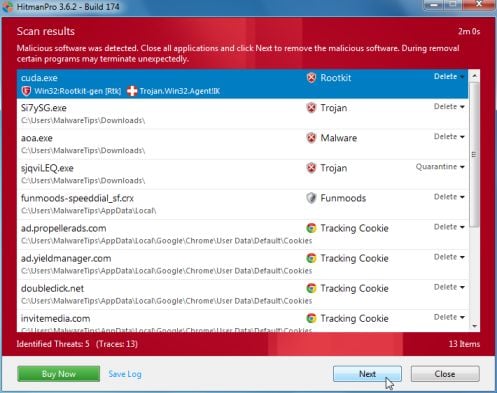
If malware is detected, the program shows what malware is present on the system using a red framed screen as shown below:
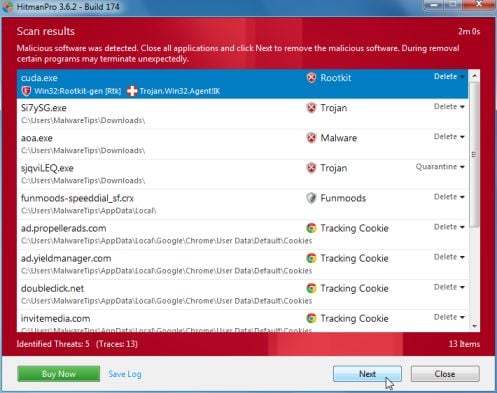

Select Next to quarantine the malware into a secure storage where it can no longer start.


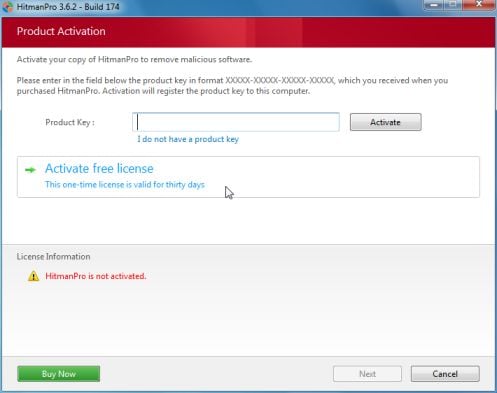
At the next screen, activate the 30-day free license:
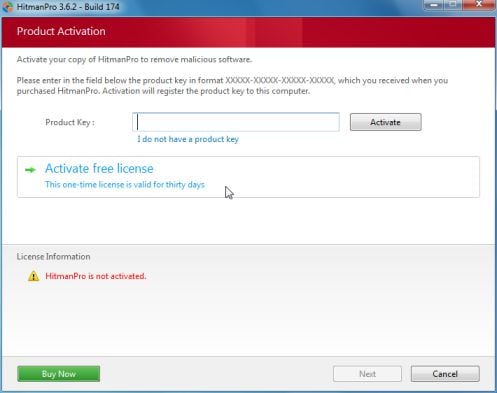
After successful activation (30 days), press: Next

A screen indicating that the malware was successfully disabled or removed is presented.
Press: Next

To obtain a report of the scan results, press: Save log
Save the Notepad log!!
It has a name such as: HitmanPro_xxxxxxxx_xxxx


Remove the USB drive, and press: Reboot
If no malware is found, press: Close

After HitmanPro.Kickstart is done, you should be back into normal Windows.

:ar: Please post the HitmanPro log in your reply.

 
Last edited:

My Computer

Computer type
PC/Desktop
Computer Manufacturer/Model Number
An ol' eMachines
OS
Windows 7 Home Premium
Internet Speed
Fine for me...I'm retired!
Ok, I followed your instructions and everything went fine until Hitman pro.

I put in the flash drive and started up his PC. I got to the boot screen and chose the flash drive.

At the kickstart prompt the keyboard would not respond. Therefore, I couldn't select "Bypass the Master Boot Record".

I had to hold the power button down to restart. From that point on I no longer could get back to the kickstart prompt.

I decided to move on and try the Hitman Pro scan. It refused to run without an internet connection.

I have attached the log files from the other programs. Thanks.

View attachment tdsskillerlog.txt

View attachment JRT.txt

View attachment AdwCleaner[S1].txt
 

My Computer

Computer type
PC/Desktop
Computer Manufacturer/Model Number
HP, HPE-410y
OS
Windows 7 Home Premium 64 bit
CPU
AMD Phenom II X6 1045t 2.70 GHz
Motherboard
FOXCONN 2AB1 DVT
Memory
8 GB
Graphics Card(s)
ATI Radeon HD 5570
Sound Card
AMD High Definition Audio Device
Monitor(s) Displays
HP 2310
Hard Drives
Hitachi HDS721010CLA332
Maxtor 3200 USB Device
WD My Book 1140 USB Device
Antivirus
Norton Security Suite, Immunet 3.0
Browser
Chrome
Presuming that this is the error you are getting:
Error 1068: The dependency service or group failed to start.

Let's do the following and see what it can repair...

:info: Please download the ESET ServiceRepair to the good computer:
http://kb.eset.com/library/ESET/KB%20Team%20Only/Malware/ServicesRepair.exe
Save to the USB pen drive.

Remove the pen drive from the good computer and plug it into the troubled computer.

:ar: Must do: Move the ESET ServiceRepair program from the pen drive to the Desktop of the troubled computer. Just let it be for now.

:info: Next, in the infected computer, see if you can do the following:
Since the step that follows involves editing the Registry, please create new restore point before proceeding.
Look at the following instructions (on the good computer) and follow: Option Two
http://www.sevenforums.com/tutorials/697-system-restore-point-create.html

:info: Now, back to the ESET ServiceRepair program on the Desktop...
Double-click the file to run it.
When the program runs, a prompt appears asking if you want to proceed.
Click: Yes

When the Services routine is Completed, you are asked to Reboot.
Click Yes to allow the reboot.

The tool creates a folder named CC Support on the Desktop.
:ar: Open the CC Support folder, and please provide the CC Support\Logs\SvcRepair.txt in your reply.

:info: Last, run the Farbar Service Scanner once again, but do so from the :ar: Desktop!
Select all the options.
Press: Scan

:ar: Please provide the new FSS.txt in your reply.
 

My Computer

Computer type
PC/Desktop
Computer Manufacturer/Model Number
An ol' eMachines
OS
Windows 7 Home Premium
Internet Speed
Fine for me...I'm retired!

My Computer

Computer type
PC/Desktop
Computer Manufacturer/Model Number
HP, HPE-410y
OS
Windows 7 Home Premium 64 bit
CPU
AMD Phenom II X6 1045t 2.70 GHz
Motherboard
FOXCONN 2AB1 DVT
Memory
8 GB
Graphics Card(s)
ATI Radeon HD 5570
Sound Card
AMD High Definition Audio Device
Monitor(s) Displays
HP 2310
Hard Drives
Hitachi HDS721010CLA332
Maxtor 3200 USB Device
WD My Book 1140 USB Device
Antivirus
Norton Security Suite, Immunet 3.0
Browser
Chrome
Made some progress, but, still have more to do. Let's give the following a whirl to see if we can get the services running...

:info: Please open Notepad (Start > All Programs > Accessories > Notepad)
Copy the entire contents of the quote box below (Do not copy the word 'Quote'):

@echo off
sc config Dnscache start= auto
Net Start Dnscache
sc config Dhcp start= auto
Net Start Dhcp
sc config Nsi start= auto
Net Start Nsi
sc config nsiproxy start= auto
Net Start nsiproxy
sc config tdx start= auto
Net Start tdx
sc config afd start= auto
Net Start afd
sc config Tcpip start= auto
Net Start Tcpip
sc config mpsdrv start= auto
Net Start mpsdrv
sc config MpsSvc start= auto
Net Start MpsSvc
sc config bfe start= auto
Net Start bfe
sc config wscsvc start= auto
Net Start wscsvc
sc config wuauserv start= auto
Net Start wuauserv
sc config WinDefend start= manual
Net Start WinDefend
shutdown -r -t 1
del %0

In Notepad, select: File > Save As...
Select the Desktop on the left side of the Save As... dialog box.
In File name box, type: isvcfix.bat
Press: Save
Close: Notepad

Right click the file on the Desktop, and select: Run as Administrator
If prompted by User Account Control, select: Yes
When the batch file is processed the system will reboot.

:info: After the reboot, run the Farbar Service Scanner once again (from the Desktop!)
Select all the options.
Press: Scan

:ar: Please provide the new FSS.txt in your reply.


:tip: If the above does not get your Internet back, let's go on a hunch, and uninstall Norton Internet Security using Control Panel > Programs and Features > Uninstall List. When you get your Internet back you can either reinstall NIS, or install another AntiVirus program.
 
Last edited:

My Computer

Computer type
PC/Desktop
Computer Manufacturer/Model Number
An ol' eMachines
OS
Windows 7 Home Premium
Internet Speed
Fine for me...I'm retired!
Last edited:

My Computer

Computer type
PC/Desktop
Computer Manufacturer/Model Number
HP, HPE-410y
OS
Windows 7 Home Premium 64 bit
CPU
AMD Phenom II X6 1045t 2.70 GHz
Motherboard
FOXCONN 2AB1 DVT
Memory
8 GB
Graphics Card(s)
ATI Radeon HD 5570
Sound Card
AMD High Definition Audio Device
Monitor(s) Displays
HP 2310
Hard Drives
Hitachi HDS721010CLA332
Maxtor 3200 USB Device
WD My Book 1140 USB Device
Antivirus
Norton Security Suite, Immunet 3.0
Browser
Chrome
Try these

Download the .reg files above and save them onto your Desktop . Right click on the .reg file and select Merge and select Yes . One at a time .

Try this as well

Open Notepad . Inside notepad paste the highlighted text below


Windows Registry Editor Version 5.00

[HKEY_LOCAL_MACHINE\SOFTWARE\Microsoft\Windows\CurrentVersion\Explorer\ShellServiceObjects\{F56F6FDD-AA9D-4618-A949-C1B91AF43B1A}]
"AutoStart"=""


Click on File ===> Save As

File Name : ActionCenterIcon.reg

Save as type: All Files

and save it to your Desktop .


Right click the ActionCenterIcon.reg file and Select Merge and then reboot your machine

Then run a new FSS scan and upload the FSS.txt file

   Note
I apologize for jumping on the thread
 

My Computer

Computer Manufacturer/Model Number
Custom Built
OS
Windows 7 Ultimate 32-Bit & Windows 7 Ultimate 64-Bit
CPU
Intel Core i7 CPU 950 @ 3.07GHz
Motherboard
ASUS P6T DELUXE V2
Memory
OCZ 6GB (3 x 2GB) 240-Pin DDR3 SDRAM DDR3 1600 OCZ3X1600R2
Graphics Card(s)
ATI Radeon HD 5700 Series
Sound Card
OnBoard
Hard Drives
WD6400AACS-00M3B0 (640GB SATA )
PSU
CORSAIR 850w
Case
NZXT LEXA
Cooling
Intel Stock Heatsink Fan
Keyboard
Microsoft Wireless Laser Keyboard 7000
Mouse
Microsoft Wireless Laser Mouse 7000
I merged all of the reg files. Rebooted and still no internet.

Here's the FSS log file. Thanks.

View attachment FSS.txt
 

My Computer

Computer type
PC/Desktop
Computer Manufacturer/Model Number
HP, HPE-410y
OS
Windows 7 Home Premium 64 bit
CPU
AMD Phenom II X6 1045t 2.70 GHz
Motherboard
FOXCONN 2AB1 DVT
Memory
8 GB
Graphics Card(s)
ATI Radeon HD 5570
Sound Card
AMD High Definition Audio Device
Monitor(s) Displays
HP 2310
Hard Drives
Hitachi HDS721010CLA332
Maxtor 3200 USB Device
WD My Book 1140 USB Device
Antivirus
Norton Security Suite, Immunet 3.0
Browser
Chrome
Have you tried running

inside command prompt

netsh int ip reset reset.log

and netsh winsock reset catalog

Open up an Elevated Command Prompt. Click on :orb: in
2nqbqes.png
type CMD . Right click on CMD under Programs (1) choose
mawket.jpg
. On the User Access Control window click on the Yes button . Command Prompt opens up to C:\Windows\System32>_

Press [Enter] after each command
 

My Computer

Computer Manufacturer/Model Number
Custom Built
OS
Windows 7 Ultimate 32-Bit & Windows 7 Ultimate 64-Bit
CPU
Intel Core i7 CPU 950 @ 3.07GHz
Motherboard
ASUS P6T DELUXE V2
Memory
OCZ 6GB (3 x 2GB) 240-Pin DDR3 SDRAM DDR3 1600 OCZ3X1600R2
Graphics Card(s)
ATI Radeon HD 5700 Series
Sound Card
OnBoard
Hard Drives
WD6400AACS-00M3B0 (640GB SATA )
PSU
CORSAIR 850w
Case
NZXT LEXA
Cooling
Intel Stock Heatsink Fan
Keyboard
Microsoft Wireless Laser Keyboard 7000
Mouse
Microsoft Wireless Laser Mouse 7000
I followed your instructions. I rebooted and still no internet.
Could this be a hardware issue?

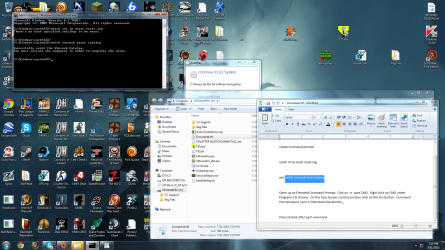
I've attached screenshot and a new FSS log.

Thanks.

Screen Save.png

View attachment FSS.txt
 

My Computer

Computer type
PC/Desktop
Computer Manufacturer/Model Number
HP, HPE-410y
OS
Windows 7 Home Premium 64 bit
CPU
AMD Phenom II X6 1045t 2.70 GHz
Motherboard
FOXCONN 2AB1 DVT
Memory
8 GB
Graphics Card(s)
ATI Radeon HD 5570
Sound Card
AMD High Definition Audio Device
Monitor(s) Displays
HP 2310
Hard Drives
Hitachi HDS721010CLA332
Maxtor 3200 USB Device
WD My Book 1140 USB Device
Antivirus
Norton Security Suite, Immunet 3.0
Browser
Chrome
Uninstall McAfee Security Scan Plus

Click :orb: type Programs and Features inside
2nqbqes.png
press [Enter]

Select McAfee Security Scan Plus.

Click Uninstall and follow the steps provided.

Then use MCPR
 

My Computer

Computer Manufacturer/Model Number
Custom Built
OS
Windows 7 Ultimate 32-Bit & Windows 7 Ultimate 64-Bit
CPU
Intel Core i7 CPU 950 @ 3.07GHz
Motherboard
ASUS P6T DELUXE V2
Memory
OCZ 6GB (3 x 2GB) 240-Pin DDR3 SDRAM DDR3 1600 OCZ3X1600R2
Graphics Card(s)
ATI Radeon HD 5700 Series
Sound Card
OnBoard
Hard Drives
WD6400AACS-00M3B0 (640GB SATA )
PSU
CORSAIR 850w
Case
NZXT LEXA
Cooling
Intel Stock Heatsink Fan
Keyboard
Microsoft Wireless Laser Keyboard 7000
Mouse
Microsoft Wireless Laser Mouse 7000
jkoll66,

I am still actively pursuing/researching a solution for the Internet problem.

Thank you for your patience.

CB
 

My Computer

Computer type
PC/Desktop
Computer Manufacturer/Model Number
An ol' eMachines
OS
Windows 7 Home Premium
Internet Speed
Fine for me...I'm retired!
Please try this again, since the previous attempt did not provide the results desired.

:info: Go to Start, and type cmd in: Search programs and files

Right-click cmd.exe icon in Programs and select: Run as Administrator
OK/Yes the User Account Control box.

At the command prompt, copy/paste (with mouse) the following command and press: Enter
netsh int ip reset c:\resetlog.txt

When done, please copy the log file that is generated by netsh when the IP reset command is issued.
It is located in C:\resetlog.txt

:info: Restart the computer.

Any Internet?
 

My Computer

Computer type
PC/Desktop
Computer Manufacturer/Model Number
An ol' eMachines
OS
Windows 7 Home Premium
Internet Speed
Fine for me...I'm retired!
After taking a good look at the results of the MiniToolBox program, there are issues here which go beyond the scope of malware removal. For starters, there is no Ethernet adapter Local Area Connection showing, and there are other items that need attention.

You may want to post your situation in the Network & Sharing - Windows 7 Help Forums forum, and then come back to finish up with some of the other services that are not running.
 
Last edited:

My Computer

Computer type
PC/Desktop
Computer Manufacturer/Model Number
An ol' eMachines
OS
Windows 7 Home Premium
Internet Speed
Fine for me...I'm retired!
OK, will do. Thanks.
 

My Computer

Computer type
PC/Desktop
Computer Manufacturer/Model Number
HP, HPE-410y
OS
Windows 7 Home Premium 64 bit
CPU
AMD Phenom II X6 1045t 2.70 GHz
Motherboard
FOXCONN 2AB1 DVT
Memory
8 GB
Graphics Card(s)
ATI Radeon HD 5570
Sound Card
AMD High Definition Audio Device
Monitor(s) Displays
HP 2310
Hard Drives
Hitachi HDS721010CLA332
Maxtor 3200 USB Device
WD My Book 1140 USB Device
Antivirus
Norton Security Suite, Immunet 3.0
Browser
Chrome
Back
Top