You are a very patient and tolerant contributor Mr. UsernameIssues: I envy you your genial disposition....
Thanks... learning & posting is a hobby. I hope that the info that I post is correct.
@Anyone,
Feel free to correct me.
........I installed I.E.9. 32 and 64 bit software but was advised that the 64 would present problems –- which it did on a lot of sites so I abandoned it...
On a 64bit OS, IE9 can run as a 32bit app or as a 64bit app.
You can also run IE9 32bit and IE9 64bit at the same time.
On a 64bit OS, IE10 starts with a 64bit parent process that gives birth to 32bit children (tabs). If you force IE10 32bit to launch first (as the parent process), it will launch a 64bit parent and then the original 32 bit version will exit... resistance is futile

On a 64bit OS, IE10 (with 64bit tabs enabled), makes the same 64bit parent process start first and the children are all 64bits* processes.
*unless the parent process thinks that a 32bit child (tab) is needed to run a 32bit plug-in/add-on.
...I did attempt to use I.E.11. last week and that insisted I install the 64bit version but it was messing with too many things on my system so I abandoned it until it has been fine tuned....
I had no problems with IE11, but I only spent a few hours with it inside a VM. And I've played with it inside a W8.1 VM. I guess that I just don't push IE hard enough to see the issues that others see.
...When you speak of 64bit tabs and refer to EPM do you mean Enhanced Protection Mode and are they one and the same? I have always had EPM activated (maybe it is on by default)....
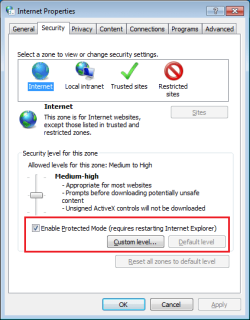
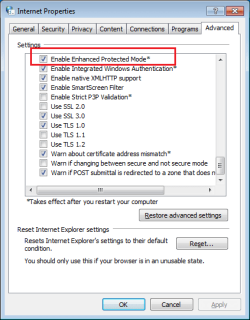
"64bit tabs" and "Enhanced Protected Mode" (EPM) are the same option. Sorry for not being clear. I should always spell out the term before using the abbreviation.
This is turned on by default:
EPM is not turned on by default:
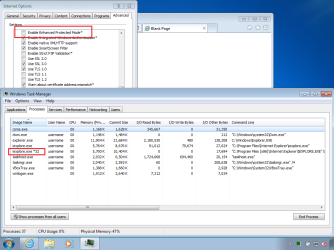
Take a look in Task Manager (or
Process Explorer) while EPM is off:
(Restart IE if you just turned EPM off.)
...You also refer to UAC: is this User Account Control? Of this I know nothing really and, as far as I am aware, I am running in administrator mode continuously. Should I be doing otherwise?....
Doh! i did it again. Yes, UAC = User Access Control.
Here is the short version:
If your user account type = admin
And if UAC = off
Then the stuff that you start (like IE10) will start at the high integrity level.
If your user account type = admin
And if UAC = on
Then you can...
...right click on some files or shortcuts
...select "Run as administrator" from the context menu
...answer yes to the UAC prompt
...then the app will start at the high integrity level.
Apps running at the high integrity level can do a lot of damage to the computer.
In my opinion, it is best that you be notified/warned by the UAC popup that an app is going to run at that dangerous level. Letting every app (that an admin user starts) run at the high integrity level is just not needed. It is taking a risk for not much gain. It puts the files in the Program Files folder(s) and the Windows folders and other protected folders at risk.
It is better/safer when apps run at the medium integrity level or the low integrity level.
Process Explorer can show integrity levels and what app starts other apps (parent/child). An app running at the low integrity level should not be able to change files in the Windows OS system folder or in the root of the system drive (e.g. C:\).
If you start notepad while UAC is turned on, then it should start at the medium integrity level. Windows (file) Explorer is also running at the medium integrity level. You can drag a file from the Windows (file) Explorer and drop it into Notepad. The file will be opened in Notepad.
With the UAC still turned on, right click on notepad.exe or a shortcut to notepad.exe and select "Run as administrator" from the context menu. Notepad should start at the high integrity level. You can drag a file from the Windows (file) Explorer and drop it into Notepad. The file will NOT be opened in Notepad. Interactions between apps at different integrity levels are limited for safety. Those who turn off the UAC throw that safety model out the window.
On a 64bit OS (with the UAC still turned on and with EPM turned on), IE10 starts with a 64bit parent process at the medium integrity level. That parent gives birth to 64bit or 32bit children (tabs) that run at the low integrity level. It is those tabs that do the actual surfing to web sites. It is that low integrity level that helps keep you safe.
On a 64bit OS (with the UAC still turned
OFF and with EPM turned
ON), IE10 starts with a 64bit parent process at the
medium high integrity level. That parent gives birth to
only 32bit children (tabs) that also run at the high integrity level. It is those tabs that do the actual surfing to web sites. It is that high integrity level that makes IE less safe. [You can force 64bit tabs, but let's not go there.]
If you are still awake - I'll ramble on a bit about account types:
If your user account type = standard
And if UAC = on
Then you can...
...right click on some files or shortcuts
...select "Run as administrator" from the context menu
...
type in the password for an admin account
(if there is a password on the admin user account)
...answer yes to the UAC prompt
...then the app will start at the high integrity level.
Standard users might have to do one more step....
...but there are things that happen as a standard user that I don't understand; so my account type = admin.
..........I had not been running the Smart Screen Filter so I have turned it on: is this wise? (Maybe it is off by default.)...
SmartScreen Filter is on by default. It is IE's filter for known bad websites, known bad files that you might be downloading and maybe it does other stuff that I don't know about
.......I run MB-AM (free) on a regular basis (2-3 times a week on quick scan, plus once a week on full scan); should I be scanning my (strictly) data storage HDD as well as my OS SSD?
If an infection got past MSE, it could scatter itself 100s of times onto any drive that it can. If Malwarebytes picks up anything during a quick scan, then run a full scan on everything.


