malwarebytes VS Mcafee

That's not always true. Multiple AV/anti-malware programs can be chosen to "play well" with each other. The ability to do so is one of MBAM's strongest points. While running two or more AVs at the same time is a bad idea, MBAM is designed to be run with an AV. It will NOT interfere with anything except what it is supposed to interfere with. One can have multiple layers of protection and not have any slowdowns, etc. I run Avast free, MBAM Pro, SAS (SuperAntiSpyware) free, Spybot S&D free, ZoneAlarm Free Firewall, Secunia PSI, and WOT (Web of Trust). All except SAS and Spybot (those are scan only) have been running full time on both of my machines for quite some time and they do not slow them down one bit that I can tell. The only time I can tell they are running is when they detect and/or block a nasty or are otherwise doing their job. ZoneAlarm's firewall will throw up frequent alerts for the first week or two but, as it gets trained, it tapers off dramatically; I get alerts from ZoneAlarm far less frequently than I do from UAC (I run UAC at full strength).

As long as they are carefully matched, there is no reason not to run multiple AV/anti-malware programs. If carefully chosen, they will be more effective than most, if not all, security suites and will have a lighter footprint.

Wow! That's quite an arsenal!
You are, of course, correct. However, the people utilizing my services are not capable of this sort of intelligent selection and evaluation. If they were, they wouldn't need my services.
 

My Computer

Computer type
PC/Desktop
Computer Manufacturer/Model Number
Dell, HP, Toshiba, Compaq
OS
Windows 7 Ultimate x86 and x64
...However, the people utilizing my services are not capable of this sort of intelligent selection and evaluation. If they were, they wouldn't need my services.

That's what's known as job security.
 

My Computer

Computer type
PC/Desktop
Computer Manufacturer/Model Number
Custom Build
OS
Win 7 Ultimate 64 bit
CPU
Intel i7-3930K
Motherboard
ASUS P9X79 WS
Memory
Kingston HyperX Genesis 32GB Kit (8x4GB Modules) 1600MHz DDR
Graphics Card(s)
MSI R7850 Twin Frozr 2GD5/OC Radeon HD 7850 2GB 256-bit GDDR
Sound Card
Asus Xonar Essence STX
Monitor(s) Displays
3x Asus VG248QE 24", Vizio 32" TV
Screen Resolution
1920 x 1080, ?
Hard Drives
Samsung 128GB 840 Pro SSD (1),
Samsung 4TB 850 EVO SSDs (4)
Samsung 4TB 850 EVO SSDs (16) external backup drives used in 2.5" hot swap bays in the computer.
PSU
Corsair HX750w
Case
Antec Two Hundred v2 (modified)
Cooling
Cooler Master GeminII S524 120mm (fan replaced with a 140mm)
Keyboard
Logitech G510s
Mouse
Logitech M525 (two in use)
Internet Speed
=< 32Mbps down, 8Mbps up
Antivirus
AVAST!, MBAM, SAS, Spybot S&D (all but MBAM free) Glary Util
Browser
IE11
Other Info
LSI 9211-8i HBA card (8 SATA III ports), 2.5" & 3.5" Hot Swap Bays, HooToo HT-CR001 PCI-E to USB 3.0 Internal Hub + 6 Slot Card Reader, and LG Model CH12LS28 BD-ROM Optical Drive. Also, ScanSnap S1500 ADF duplexing scanner, Canon 9000F flat bed scanner, Corsair SP2500 2.1 speakers, Samsung CLP 415nw laser color printer, Cyberpower PP2200SW UPS
While I am generally a fan of free software, I have avoided MSE for two reasons. The first is the poor reviews it receives. The second is Microsoft's general inability to improve upon (or even equal) a good idea once they have stolen it. As I have stated many times, if Microsoft did their job better, I'd have to find another line of work. Now that's job security!

Edit: Jinx! You posted while I was typing.
 

My Computer

Computer type
PC/Desktop
Computer Manufacturer/Model Number
Dell, HP, Toshiba, Compaq
OS
Windows 7 Ultimate x86 and x64
So the fact that MSE stays near or at the bottom of AV reviews doesn't bother you? During the few months I had it, MBAM got frequent hits. Since I replaced MSE with Avast free, MBAM rarely gets any hits. I also had problems getting MSE to automatically update. I had to do it manually. That is not acceptable for one's first line of defense.

1. AV reviews, and frankly any "reviews" in general, are dubious at best. I personally take them with a cupful of salt. In fact, I had to test a file for viruses a few weeks ago (I was checking a file for a game-making community that I frequent) and McAfee gave a clean bill of health while Avast, AVG, Symantec, eset, Kaspersky, and MSE (among others) all flagged the file as containing Virut.

2. Being a guy that simply doesn't get almost any viruses to begin with, MSE is more than adequate for my needs (and MBAM also gave a clean bill of health when I ran a scan the other week, if you're curious).

3. I've never had MSE act badly. Even Avast has given me its fair share of grief over on my Windows XP machine, such that I had to uninstall it at one point, but MSE has always just sat in the background minding its own business and having tea with its Windows 7 host, only asking for my attention when it really needs my help.

4. MSE, alongside Avast and AVG, is still strongly suggested in these forums whenever anyone asks for a good free AV solution. Whatever the reviews might say, MSE has an extremely good rep within the Windows/Microsoft community.

5. MSE auto-updates just fine either shortly after boot up or every 24 hours after boot up, in addition to any automatic Windows Update routines (MSE pulls updates through Windows Update). There was one event where auto-updates weren't getting pushed out, but that was just a one-time hiccup in Windows Update and nothing bad to do with MSE itself.
 

My Computer

Computer type
PC/Desktop
Computer Manufacturer/Model Number
N/A (custom-built)
OS
Windows 7 Ultimate x64 SP1
CPU
Intel Core i7 2700K @ 3.5GHz (TurboBoost disabled)
Motherboard
ASUS P8Z68-V/GEN3
Memory
16GB (4x4GB) Kingston HyperX DDR3 1600MHz @ 1333MHz
Graphics Card(s)
Nvidia EVGA GeForce GTX 1060 6GB
Sound Card
Realtek High Definition Audio (motherboard integrated)
Monitor(s) Displays
NEC Multisync EX231W
Screen Resolution
1920x1080 @ 60Hz via DVI-D
Hard Drives
2x Western Digital 1TB SATA3 Caviar Black Internal HDD // 1x WD 500GB USB 3.0 "My Passport Essential" External HDD // 1x WD 1TB USB 3.0 "My Passport Essential" External HDD // 2x WD 2TB USB 3.0 "My Passport Essential" External HDD
PSU
Corsair Professional Series Gold AX850
Case
Antec 300
Cooling
Air-cooling
Keyboard
Steelseries 6Gv2
Mouse
Steelseries Sensei RAW Glossy, Logitech M500
Internet Speed
DSL (AT&T)
Antivirus
Microsoft Security Essentials
Browser
Pale Moon, Mozilla Firefox 12, Opera 12, Chromium, IE9
Other Info
Virtual Machines (VirtualBox):
* Japanese Windows XP Professional SP3
* Japanese Windows 7 Professional SP1
I gather Norton went through a slump but I've been using Norton NIS, 360 for ~6 years and keep renewing it based on personal experience. I wouldn't call myself knowledgeable in this area!
I do have MSE on one PC that is generally offline.

MSE is as bad, if not worse, than McAfee.
MSE just happened to be free and the PC in question is rarely online plus it has Malwarebytes (free).
It didn't seem that long ago that senior members of this forum were singing the praises of MSE as a good free option.
.
 

My Computer

Computer type
PC/Desktop
Computer Manufacturer/Model Number
Own build
OS
Windows 7x64 Home Premium SP1
CPU
Intel i7 2600k
Motherboard
ASUS P8Z68 Deluxe
Memory
G.Skill Ripjaws (DDR3-1600) 2x4GB
Graphics Card(s)
Nvidia GeForce GTS 450; Intel HD Graphics 3000(GT2+)
Monitor(s) Displays
Dell Ultrasharp IPS panel U2311H, Samsung SyncMaster P2350
Screen Resolution
1920x1080
Hard Drives
Samsung 850 Pro SSD 256GB, Samsung SSD 840 120GB, Seagates 1TB Barracuda ST31000528AS x2
PSU
Seasonic M12II 520W
Case
Lian Li Lancool PC-K60
Cooling
Case: 1x120mm, 3x140mm CPU: Hyper 212+
Keyboard
Logitech MK520 (wireless)
Mouse
Logitech MK520
Internet Speed
6-7 Mbps
Antivirus
Norton Security Premium, Malwarebytes on 2 (MSE on 3rd PC)
Browser
FireFox
Other Info
Audio: Logitech Z523 2.1
I gather Norton went through a slump but I've been using Norton NIS, 360 for ~6 years and keep renewing it based on personal experience. I wouldn't call myself knowledgeable in this area!
I do have MSE on one PC that is generally offline.

MSE is as bad, if not worse, than McAfee.
MSE just happened to be free and the PC in question is rarely online plus it has Malwarebytes (free).
It didn't seem that long ago that senior members of this forum were singing the praises of MSE as a good free option.
.

When it first came out, it was worthy of praise. After a while, M$ let it go downhill, which was a crying shame.
 

My Computer

Computer type
PC/Desktop
Computer Manufacturer/Model Number
Custom Build
OS
Win 7 Ultimate 64 bit
CPU
Intel i7-3930K
Motherboard
ASUS P9X79 WS
Memory
Kingston HyperX Genesis 32GB Kit (8x4GB Modules) 1600MHz DDR
Graphics Card(s)
MSI R7850 Twin Frozr 2GD5/OC Radeon HD 7850 2GB 256-bit GDDR
Sound Card
Asus Xonar Essence STX
Monitor(s) Displays
3x Asus VG248QE 24", Vizio 32" TV
Screen Resolution
1920 x 1080, ?
Hard Drives
Samsung 128GB 840 Pro SSD (1),
Samsung 4TB 850 EVO SSDs (4)
Samsung 4TB 850 EVO SSDs (16) external backup drives used in 2.5" hot swap bays in the computer.
PSU
Corsair HX750w
Case
Antec Two Hundred v2 (modified)
Cooling
Cooler Master GeminII S524 120mm (fan replaced with a 140mm)
Keyboard
Logitech G510s
Mouse
Logitech M525 (two in use)
Internet Speed
=< 32Mbps down, 8Mbps up
Antivirus
AVAST!, MBAM, SAS, Spybot S&D (all but MBAM free) Glary Util
Browser
IE11
Other Info
LSI 9211-8i HBA card (8 SATA III ports), 2.5" & 3.5" Hot Swap Bays, HooToo HT-CR001 PCI-E to USB 3.0 Internal Hub + 6 Slot Card Reader, and LG Model CH12LS28 BD-ROM Optical Drive. Also, ScanSnap S1500 ADF duplexing scanner, Canon 9000F flat bed scanner, Corsair SP2500 2.1 speakers, Samsung CLP 415nw laser color printer, Cyberpower PP2200SW UPS
I gather Norton went through a slump but I've been using Norton NIS, 360 for ~6 years and keep renewing it based on personal experience. I wouldn't call myself knowledgeable in this area!
I do have MSE on one PC that is generally offline.

MSE is as bad, if not worse, than McAfee.
MSE just happened to be free and the PC in question is rarely online plus it has Malwarebytes (free).
It didn't seem that long ago that senior members of this forum were singing the praises of MSE as a good free option.
.

And it's still recommended and used more than any other av out there,
I use it and love it,
Despite what others post,
These are all opinions and most coming from here/say articles,
Malwarebytes pro is universally loved = common ground :D
MABM free does not provide real time protection so it's not recommended to count on to prevent anything it's mostly after the fact scanning,
Cheers.
 

My Computer

Computer type
PC/Desktop
Computer Manufacturer/Model Number
Custom assembled by me :}
OS
Win-7-Pro64bit 7-H-Prem-64bit
CPU
i7-5930K 2nd i9-9940x both water blocked VRM's too
Motherboard
ASUS SABERTOOTH X99 2nd ASUS x299 Apex
Memory
Trident-z 3200C14 2nd Trident-z 3600C16
Graphics Card(s)
EVGA 1080ti ftw3 2nd Titan Xp both water blocked
Sound Card
Built-in Realtek
Monitor(s) Displays
1-AOC G2460PG 24"G-Sync 144Hz/ 2nd 1-ASUS VG248QE 24" 144Hz
Screen Resolution
1920 x 1080 144Hz
Hard Drives
2-Samsung M.2 Evo & Evo Plus
2-Samsung 850 EVO 500GB SSD's/ 3-2.5 W.D. Black 1tb-&3-1tb/3-3.5 WD Black 1tb hdd's
PSU
EVGA SuperNOVA 1000-P2 2nd 1200-P2
Case
2-Corsair Obsidian Series 450D Black ATX Mid Tower
Cooling
Custom water loops
Keyboard
Logitech G710+/ 2nd Logitech G910
Mouse
2-RedDragon M901 Perdition 16400 dpi Gaming mouse = wired
Internet Speed
Comcast Ping 19ms 89.31mbps download speed 6.12mbps upload
Antivirus
Malwarebytes Pro/ Superantispyware Pro
Browser
FireFox & Pale moon
Other Info
2nd ASUS X299 Apex/Intel i9-9940x with Custom water loop/7H-Prem-x64/Corsair 450D case/Ram Trident-z 3600C16 4x8gb / Samsung970Evo plus 500gb SSD/Dual ssd EZ swap evo/PSU EVGA SuperNova 1200w-P2 80+Platinum/GPU Titan Xp /8-ML-140 on push-pull on 2-280GTX rads
So the fact that MSE stays near or at the bottom of AV reviews doesn't bother you? During the few months I had it, MBAM got frequent hits. Since I replaced MSE with Avast free, MBAM rarely gets any hits. I also had problems getting MSE to automatically update. I had to do it manually. That is not acceptable for one's first line of defense.
Not surprising since MSE and MBAM look for different things - but you knew that. (e.g. MSE allows the Conduit crapware. MBAM does not.) And MSE sets the bar really low (or high, depending on how you look at things). A file has to be really bad or from a company that is not likely to sue* before MSE will try and stop it.

*just guessing as to why MSE stops some really trivial junk that has not clear company behind it and yet lets stuff like (and worst than) Conduit install/run. MBAM only calls Conduit a PUP. That classification alone might be how to avoid litigation. I just wish MSE would go after the likes of Conduit and call it a PUP - if need be.


~~~
2. Being a guy that simply doesn't get almost any viruses to begin with,...
I still install MSE for others, but I'm not sure that you can know that you don't get infected - especially with MSE watching over your computer. MSE does not seem to scan for root kits. This computer is still infected with a root kit and MSE still says that it is clean. Also, too many infections go undetected by the majority of tools.

Source.
Nick Harbour's team completed the DEFCON race in just over six hours; the fastest team managed completion in about two-and-a-half-hours. Nick Harbour's team came out on top when the viruses were tested and all 10 of his modified viruses eluded virus detection.
Nick Harbour did not know he was going to enter the Race to Zero contest when he attended the DEFCON 16 hacker conference in Las Vegas.
"It was kind of funny," Nick Harbour said. "We were just flipping through the program and saw a list of contests and thought this one looked interesting. Most of the other teams had prepared for weeks."
There are infections that hide for years before any company finds them. And there are just too many known infections that MSE does not catch. I've cleaned up after some pretty nasty stuff that MSE let thru. I've moved two "clients" away from MSE and over to Panda Cloud Antivirus because PCA stops Conduit and MSE does not. I had cleaned conduit off for these two "clients" twice in recent months, so.... MSE had to go.

Here is one annoyance with MSE:
http://www.sevenforums.com/system-s...-uninstall-microsoft-security-essentials.html

...and another small annoyance:
http://www.sevenforums.com/system-security/280043-ms-security-essentials-2.html#post2305617

..and another one:
Issue with Microsoft Security Essentials - can someone try to - Microsoft Community
MSE did not honor OS environment variables. That one cost me hours and hours on the phone with MS. Even with them remotely controlling the computers (more than one) they could not fix. I had to endure each support tech starting the scripted list of things to check. Each one started from square one. It was painful. They were had to understand and they never learn how irritating it is to hear them repeat the platitude, "Do not worry, we will resolve this for you." NOT!

I write scripts. I'm not a programmer by any means, but some of my scripts do get pretty complicated. I know that it annoys user to have every error popup, so some errors just get written to log files. I suspect that updating MSE is a lot more complicated than any of my scripts, but MSE should have at least logged that fact that it could not find the temp folder for a particular file operation. MSE was putting the log file into the correct temp folder (along with some other files) but apparently, someone hard coded the path to the temp folder in some part of MSE updating code. It took several years for them to fix that. And even after I (and others) figured out what was going on, there was no path for us to provide this feedback to MS. Well, I should say, no path that got things changed.


BUT - then there is this:
http://www.sevenforums.com/system-security/308472-mse-worries-6.html#post2573490
MSE heuristics are very weak. It should never let anything write to that registry key without warning the user. Also, MSE could not clean up after this very simple infection. The DAT file was not even locked. If I renamed it soon enough, the shell was not taken over.

If you will notice - in that first video - MSE says that the file is clean, MSE lets me run it and then something (heuristics?) says that the same file is bad. MSE proudly announces that is has cleaned the infection. A closer inspection shows that MSE failed to find the file to be cleaned. It never could cure this type of infection during the weeks that I played with that morphing file. Feel free to read thru that entire group of rants of mine in that thread. I welcome any comments (really!) on how I could have done things better. Let me know if you see flaws in my simple methods. I'm not a pro at testing AV tools either.

I've found dozens of infections that MSE did not catch. And some that my "clients" find have been very nasty. The type that replaces every document, image and EXE with a copy of itself... and it did so to a file server :-(

So - why on Earth would I still install MSE for my "clients". Its like you said, MSE gets along with other apps. For instance, MozyHome seems to be picky about the AV tools that it will play nice with. Excluding Mozy's EXEs is not enough. It is having two apps that use low level filters to watch for file changes that causes barfs. Not that fully understand LSPs - but that seems to be the issue.

Panda is looking good from the compatibility stand point, but it too has failed to find some infected files that I threw at it. Also, Panda has some settings for it Data Shield (app white listing) that people need to leave alone or fully understand before they change them. Panda can be put into a state that silently prevents temporary internet files from being deleted.

I could go on an on - on this topic, but I'll end by saying that MSE is a good tool to use while attempting to solve problems with a computer. It provides a great alternative if one suspects that a forum member's problem might be caused by their choice of AV tool.

edit:
"clients" = family, friends, non-profits, a few businesses and way too many friend of friends - 'cuz I don't charge my "clients".

 

My Computer

Computer type
Laptop
Computer Manufacturer/Model Number
Employer provided Dell Latitude
OS
W7 Pro SP1 64bit
CPU
i7
Memory
8GB
Graphics Card(s)
Intel HD Graphics
Hard Drives
crappy SSD
Antivirus
Employer mandated Symantec Endpoint Protection
Browser
Pale Moon 64bit, IE11 64bit & Chrome 64bit
Well now so many opinions and that is good.

To start off I use Microsoft Security Essential and Malwarebytes Anti Malware Pro.
As far as I can tell Microsoft Security Essentials does not stop any PUP's and does not catch them in a scan. It keep Microsoft out of court rooms.
Malwarebytes Anti Malware Pro doesn't stop PUP's but will find them with a scan.
PUP's are not considered a infection by such programs. They are to me.
Anything that enters my computer without my knowledge and or permission is a infection but security programs can't do things in that fashion unless they want to spend the rest of the companies life in court rooms.
I'm surprised some company hasn't taken the industry to court for a name change. From Potentially Unwanted Program to Maybe Unwanted Program.

Microsoft will never have a security program judged as a quality security programs by the firms doing the testing. Those testing firms don't want to bite the hands that feed them. It will never matter to these firms whether Microsoft Security Programs are at the top, middle or bottom of the quality list in actuality.
Stop and think other than Microsoft Security Essential who offers a free anti virus program that also doesn't offer a paid for version. Microsoft Security Essentials is free with no paid for version.
That stops companies that make a paid for anti virus program from taking Microsoft to court to some degree. Why take Microsoft to court one might ask. It's simple, Microsoft has deep pockets and some countries just don't like Microsoft. Just look at what has been done in the past. Microsoft has to offer competing browsers with their Windows 7. That is like General Motors having to offer a Ford to sell you in their General Motors show rooms.

Which anti virus is the best; I have no idea. By the time one would do the honest testing three newer version and updates would be out and you would have to start all over. The difference between a good and bad anti virus program is one update away.

Now what I would like to see offered.

Malwarebytes to make a anti malware, anti spyware, anti virus, anti PUP all in one program. A paid for Professional version.
Judging by the quality of their anti malware paid for version that would be one killer program.
To the best of my memory Microsoft Security Essentials or Malwarebytes Anti Malware have never caused a BSOD with Windows 7.

Layback Bears long winded thoughts.
 

My Computer

Computer type
PC/Desktop
Computer Manufacturer/Model Number
Home made Desktop
OS
Windows 10 Pro. 64/ version 1709 Windows 7 Pro/64
CPU
Intel i7-6800K @ 4.3
Motherboard
ASUS X-99 Deluxe II
Memory
Corsair Platinum 16 gig @2400
Graphics Card(s)
EVGA GTX 1070 OC
Monitor(s) Displays
Asus 27" LED LCD/VE278Q
Screen Resolution
1920-1080 or 1280-720 HDMI
Hard Drives
INTEL SSD 730-240 Gb Sata 3.0/
PSU
EVGA Platium 1200W
Case
Phanteks Luxe Tempered Glass 8 fans/ one radiator
Cooling
XSPC/ Water Cooled CPU
Keyboard
Das 4 Professional
Mouse
Logitech M705/MX Anywhere 2-S
Internet Speed
100 mbits
Antivirus
Microsoft Security Essentials/ Malwarebytes Premium 3.0/ SAS
Browser
I.E. 11 default/Firefox/ ISP Time Warner Cable/Spectrum
Other Info
LG BluRay Burner/
Sound system-KLipsch-THX/
Icy Dock ssd Hot Swap bays.
I still install MSE for others, but I'm not sure that you can know that you don't get infected - especially with MSE watching over your computer. MSE does not seem to scan for root kits. This computer is still infected with a root kit and MSE still says that it is clean. Also, too many infections go undetected by the majority of tools.

<snip>

All good points, but if we keep endlessly worrying about threats that MSE and other security software aren't finding we eventually get to a state of being fear mongered and not being able to do anything constructive.

I personally draw the line that a given system is safe when:
1. The system does not blatantly exhibit unstable or dangerous behavior. Stuff like BSODs, driver crashes, strange file/directory names, and so forth among others.
2. Reasonable effort has been spent in looking for (and destroying) any threats, including a complete reformat+reinstall (where practical) depending on the severity of any threats.
3. Routine checks of the system (such as reading the Event Viewer entries) do not reveal anything needing immediate attention.

Another thing I value in an AV software besides its potency is whether it itself acts like a virus or not. The Symantec/Norton of ye olde days come to mind as an AV suite that was just as bad as the viruses it protected against, in terms of how bad of an impact it had on system performance and stability. After all, what's the point of having an AV solution installed if it's just as bad as the viruses you want to keep out, aye? ;)

I've mentioned that I use Avast on my Windows XP machine (MSE is too heavy for my poor Pentium IV :( ). Even with Avast having a good reputation, I've had it negatively affect boot times and system performance in daily use that I had to at one point completely uninstall it from my system to get something that needed doing done. MSE is the first AV solution I've used that has managed to co-exist peacefully with its host and surrounding environment, and I credit this to the devs behind MSE being more aware of how Windows works and is designed than any 3rd-party devs can hope to be.
To sum up my thoughts on MSE, MSE is an AV solution that does its job of dealing with viruses adequately with no additional bloat or fluff (Avast by comparison has gotten bloated nowadays) while co-existing peacefully with its Windows host and neighboring software used by the user without causing any riots or dragging the host's feet. This is why I will recommend and stand for MSE in discussions like this where the topic is the merit of the various AV solutions available and how they compare.

To be clear, my statements are all opinions driven from personal experiences (like many others' I'm sure), and some may agree and some may disagree with what I say. This is good. Differing opinions promote discussions, especially in a frontier like AV solutions where nothing is rock solid for long.
 

My Computer

Computer type
PC/Desktop
Computer Manufacturer/Model Number
N/A (custom-built)
OS
Windows 7 Ultimate x64 SP1
CPU
Intel Core i7 2700K @ 3.5GHz (TurboBoost disabled)
Motherboard
ASUS P8Z68-V/GEN3
Memory
16GB (4x4GB) Kingston HyperX DDR3 1600MHz @ 1333MHz
Graphics Card(s)
Nvidia EVGA GeForce GTX 1060 6GB
Sound Card
Realtek High Definition Audio (motherboard integrated)
Monitor(s) Displays
NEC Multisync EX231W
Screen Resolution
1920x1080 @ 60Hz via DVI-D
Hard Drives
2x Western Digital 1TB SATA3 Caviar Black Internal HDD // 1x WD 500GB USB 3.0 "My Passport Essential" External HDD // 1x WD 1TB USB 3.0 "My Passport Essential" External HDD // 2x WD 2TB USB 3.0 "My Passport Essential" External HDD
PSU
Corsair Professional Series Gold AX850
Case
Antec 300
Cooling
Air-cooling
Keyboard
Steelseries 6Gv2
Mouse
Steelseries Sensei RAW Glossy, Logitech M500
Internet Speed
DSL (AT&T)
Antivirus
Microsoft Security Essentials
Browser
Pale Moon, Mozilla Firefox 12, Opera 12, Chromium, IE9
Other Info
Virtual Machines (VirtualBox):
* Japanese Windows XP Professional SP3
* Japanese Windows 7 Professional SP1
~~~
(e.g. MSE allows the Conduit crapware. MBAM does not.)
~~~

~~~
Malwarebytes Anti Malware Pro doesn't stop PUP's but will find them with a scan.
~~~

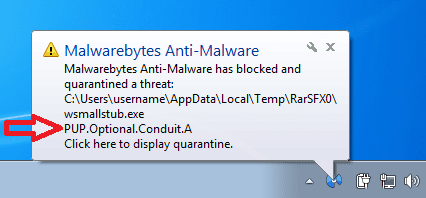
There are several versions of Conduit crapware and perhaps MBAM has changed, but the last time that I checked - the Pro version blocks its install. I installed MBAM again for this post and it still calls Conduit a PUP and blocks it before it can install.


conduit.png

Note: I'm not attempting to be argumentative. But knowing your thoughts on PUPs, I figured that you would be thrilled to see the block :-)
 

My Computer

Computer type
Laptop
Computer Manufacturer/Model Number
Employer provided Dell Latitude
OS
W7 Pro SP1 64bit
CPU
i7
Memory
8GB
Graphics Card(s)
Intel HD Graphics
Hard Drives
crappy SSD
Antivirus
Employer mandated Symantec Endpoint Protection
Browser
Pale Moon 64bit, IE11 64bit & Chrome 64bit
I almost forgot MSE is Optimized with the security features of Internet explorer ie9 and above but more so in 10 and 11,
So if you use another browser you'll most like be a bit less secure,
Cheers.
 

My Computer

Computer type
PC/Desktop
Computer Manufacturer/Model Number
Custom assembled by me :}
OS
Win-7-Pro64bit 7-H-Prem-64bit
CPU
i7-5930K 2nd i9-9940x both water blocked VRM's too
Motherboard
ASUS SABERTOOTH X99 2nd ASUS x299 Apex
Memory
Trident-z 3200C14 2nd Trident-z 3600C16
Graphics Card(s)
EVGA 1080ti ftw3 2nd Titan Xp both water blocked
Sound Card
Built-in Realtek
Monitor(s) Displays
1-AOC G2460PG 24"G-Sync 144Hz/ 2nd 1-ASUS VG248QE 24" 144Hz
Screen Resolution
1920 x 1080 144Hz
Hard Drives
2-Samsung M.2 Evo & Evo Plus
2-Samsung 850 EVO 500GB SSD's/ 3-2.5 W.D. Black 1tb-&3-1tb/3-3.5 WD Black 1tb hdd's
PSU
EVGA SuperNOVA 1000-P2 2nd 1200-P2
Case
2-Corsair Obsidian Series 450D Black ATX Mid Tower
Cooling
Custom water loops
Keyboard
Logitech G710+/ 2nd Logitech G910
Mouse
2-RedDragon M901 Perdition 16400 dpi Gaming mouse = wired
Internet Speed
Comcast Ping 19ms 89.31mbps download speed 6.12mbps upload
Antivirus
Malwarebytes Pro/ Superantispyware Pro
Browser
FireFox & Pale moon
Other Info
2nd ASUS X299 Apex/Intel i9-9940x with Custom water loop/7H-Prem-x64/Corsair 450D case/Ram Trident-z 3600C16 4x8gb / Samsung970Evo plus 500gb SSD/Dual ssd EZ swap evo/PSU EVGA SuperNova 1200w-P2 80+Platinum/GPU Titan Xp /8-ML-140 on push-pull on 2-280GTX rads
I almost forgot MSE is Optimized with the security features of Internet explorer ie9 and above but more so in 10 and 11,
So if you use another browser you'll most like be a bit less secure,
Cheers.
Thanks for that reminder...
...because I should add that there are times when I have to turn off IE's SmartScreen Filter just to easily save a know infected file :-)
 

My Computer

Computer type
Laptop
Computer Manufacturer/Model Number
Employer provided Dell Latitude
OS
W7 Pro SP1 64bit
CPU
i7
Memory
8GB
Graphics Card(s)
Intel HD Graphics
Hard Drives
crappy SSD
Antivirus
Employer mandated Symantec Endpoint Protection
Browser
Pale Moon 64bit, IE11 64bit & Chrome 64bit
Pup's are downloaded and Installed via User approval, knowingly or unknowingly,
When a user approves every download the popup says do you want to make changes to your computer and you click Yes at your own risk,
Cheers.
 

My Computer

Computer type
PC/Desktop
Computer Manufacturer/Model Number
Custom assembled by me :}
OS
Win-7-Pro64bit 7-H-Prem-64bit
CPU
i7-5930K 2nd i9-9940x both water blocked VRM's too
Motherboard
ASUS SABERTOOTH X99 2nd ASUS x299 Apex
Memory
Trident-z 3200C14 2nd Trident-z 3600C16
Graphics Card(s)
EVGA 1080ti ftw3 2nd Titan Xp both water blocked
Sound Card
Built-in Realtek
Monitor(s) Displays
1-AOC G2460PG 24"G-Sync 144Hz/ 2nd 1-ASUS VG248QE 24" 144Hz
Screen Resolution
1920 x 1080 144Hz
Hard Drives
2-Samsung M.2 Evo & Evo Plus
2-Samsung 850 EVO 500GB SSD's/ 3-2.5 W.D. Black 1tb-&3-1tb/3-3.5 WD Black 1tb hdd's
PSU
EVGA SuperNOVA 1000-P2 2nd 1200-P2
Case
2-Corsair Obsidian Series 450D Black ATX Mid Tower
Cooling
Custom water loops
Keyboard
Logitech G710+/ 2nd Logitech G910
Mouse
2-RedDragon M901 Perdition 16400 dpi Gaming mouse = wired
Internet Speed
Comcast Ping 19ms 89.31mbps download speed 6.12mbps upload
Antivirus
Malwarebytes Pro/ Superantispyware Pro
Browser
FireFox & Pale moon
Other Info
2nd ASUS X299 Apex/Intel i9-9940x with Custom water loop/7H-Prem-x64/Corsair 450D case/Ram Trident-z 3600C16 4x8gb / Samsung970Evo plus 500gb SSD/Dual ssd EZ swap evo/PSU EVGA SuperNova 1200w-P2 80+Platinum/GPU Titan Xp /8-ML-140 on push-pull on 2-280GTX rads
I almost forgot MSE is Optimized with the security features of Internet explorer ie9 and above but more so in 10 and 11,
So if you use another browser you'll most like be a bit less secure,
Cheers.
Thanks for that reminder...
...because I should add that there are times when I have to turn off IE's SmartScreen Filter just to easily save a know infected file :-)

Knowingly altering settings is a No-No,
You may test all you like and it's very educational :D
But altering from default settings also alters you via UAC ;)
Again at your own risk,
Cheers.
 

My Computer

Computer type
PC/Desktop
Computer Manufacturer/Model Number
Custom assembled by me :}
OS
Win-7-Pro64bit 7-H-Prem-64bit
CPU
i7-5930K 2nd i9-9940x both water blocked VRM's too
Motherboard
ASUS SABERTOOTH X99 2nd ASUS x299 Apex
Memory
Trident-z 3200C14 2nd Trident-z 3600C16
Graphics Card(s)
EVGA 1080ti ftw3 2nd Titan Xp both water blocked
Sound Card
Built-in Realtek
Monitor(s) Displays
1-AOC G2460PG 24"G-Sync 144Hz/ 2nd 1-ASUS VG248QE 24" 144Hz
Screen Resolution
1920 x 1080 144Hz
Hard Drives
2-Samsung M.2 Evo & Evo Plus
2-Samsung 850 EVO 500GB SSD's/ 3-2.5 W.D. Black 1tb-&3-1tb/3-3.5 WD Black 1tb hdd's
PSU
EVGA SuperNOVA 1000-P2 2nd 1200-P2
Case
2-Corsair Obsidian Series 450D Black ATX Mid Tower
Cooling
Custom water loops
Keyboard
Logitech G710+/ 2nd Logitech G910
Mouse
2-RedDragon M901 Perdition 16400 dpi Gaming mouse = wired
Internet Speed
Comcast Ping 19ms 89.31mbps download speed 6.12mbps upload
Antivirus
Malwarebytes Pro/ Superantispyware Pro
Browser
FireFox & Pale moon
Other Info
2nd ASUS X299 Apex/Intel i9-9940x with Custom water loop/7H-Prem-x64/Corsair 450D case/Ram Trident-z 3600C16 4x8gb / Samsung970Evo plus 500gb SSD/Dual ssd EZ swap evo/PSU EVGA SuperNova 1200w-P2 80+Platinum/GPU Titan Xp /8-ML-140 on push-pull on 2-280GTX rads
~~~
(e.g. MSE allows the Conduit crapware. MBAM does not.)
~~~

~~~
Malwarebytes Anti Malware Pro doesn't stop PUP's but will find them with a scan.
~~~

There are several versions of Conduit crapware and perhaps MBAM has changed, but the last time that I checked - the Pro version blocks its install. I installed MBAM again for this post and it still calls Conduit a PUP and blocks it before it can install.


View attachment 308773

Note: I'm not attempting to be argumentative. But knowing your thoughts on PUPs, I figured that you would be thrilled to see the block :-)

I understand your post completely and to me it is not argumentative at all.
Every update of Malwarebytes it gets a little better.
 

My Computer

Computer type
PC/Desktop
Computer Manufacturer/Model Number
Home made Desktop
OS
Windows 10 Pro. 64/ version 1709 Windows 7 Pro/64
CPU
Intel i7-6800K @ 4.3
Motherboard
ASUS X-99 Deluxe II
Memory
Corsair Platinum 16 gig @2400
Graphics Card(s)
EVGA GTX 1070 OC
Monitor(s) Displays
Asus 27" LED LCD/VE278Q
Screen Resolution
1920-1080 or 1280-720 HDMI
Hard Drives
INTEL SSD 730-240 Gb Sata 3.0/
PSU
EVGA Platium 1200W
Case
Phanteks Luxe Tempered Glass 8 fans/ one radiator
Cooling
XSPC/ Water Cooled CPU
Keyboard
Das 4 Professional
Mouse
Logitech M705/MX Anywhere 2-S
Internet Speed
100 mbits
Antivirus
Microsoft Security Essentials/ Malwarebytes Premium 3.0/ SAS
Browser
I.E. 11 default/Firefox/ ISP Time Warner Cable/Spectrum
Other Info
LG BluRay Burner/
Sound system-KLipsch-THX/
Icy Dock ssd Hot Swap bays.
I almost forgot MSE is Optimized with the security features of Internet explorer ie9 and above but more so in 10 and 11,
So if you use another browser you'll most like be a bit less secure,
Cheers.
Thanks for that reminder...
...because I should add that there are times when I have to turn off IE's SmartScreen Filter just to easily save a know infected file :-)

Knowingly altering settings is a No-No,
You may test all you like and it's very educational :D
But altering from default settings also alters you via UAC ;)
Again at your own risk,
Cheers.
This is news to me and I would like to know more. I don't see any changes to the UAC when I disable those two things. I was looking for UAC changes in the part of the registry shown in this post. Should I be looking elsewhere? If it is too far off topic for this thread, then please send me a PM.

The reason why I mentioned disabling those two things is because you mentioned IE's integration with MSE. I had just posted a lot of info about MSE not finding infected files and your post reminded me that - to be fair to MSE - I should have mentioned that SmartScreen Filter was off. (MSE disables WD, so I could have left that info off.)


When I study these files, I'm in an isolated/frozen virtual machine that is the only computer on its subnet. At times, the VM is using a different ISP than the host computer. I do try to be careful and I'm aware that VM isolation can be flawed. I would be embarrassed to admit how many decades I've been looking into infected files - because I'm not very far along on my knowledge of them.
 

My Computer

Computer type
Laptop
Computer Manufacturer/Model Number
Employer provided Dell Latitude
OS
W7 Pro SP1 64bit
CPU
i7
Memory
8GB
Graphics Card(s)
Intel HD Graphics
Hard Drives
crappy SSD
Antivirus
Employer mandated Symantec Endpoint Protection
Browser
Pale Moon 64bit, IE11 64bit & Chrome 64bit
I still install MSE for others, but I'm not sure that you can know that you don't get infected - especially with MSE watching over your computer. MSE does not seem to scan for root kits. This computer is still infected with a root kit and MSE still says that it is clean. Also, too many infections go undetected by the majority of tools.

<snip>

All good points, but if we keep endlessly worrying about threats that MSE and other security software aren't finding we eventually get to a state of being fear mongered and not being able to do anything constructive.
~~~
Oops - I missed your post due to the thread page change.

Agreed. Or to put it another way. Some people have their tin foil hat wound too tight.

Thanks for the discussion. I hope that my long post did not come across as too strong/pushy. I'm not attempting to persuade others to use or stop using/suggesting MSE. I'm just putting stuff out there after years of working with MSE.


Maybe I should adopt a new mantra:
Be more concise.
Be more concise.
.....

:-)
 

My Computer

Computer type
Laptop
Computer Manufacturer/Model Number
Employer provided Dell Latitude
OS
W7 Pro SP1 64bit
CPU
i7
Memory
8GB
Graphics Card(s)
Intel HD Graphics
Hard Drives
crappy SSD
Antivirus
Employer mandated Symantec Endpoint Protection
Browser
Pale Moon 64bit, IE11 64bit & Chrome 64bit
Pup's are downloaded and Installed via User approval, knowingly or unknowingly,
When a user approves every download the popup says do you want to make changes to your computer and you click Yes at your own risk,
Cheers.
Hmm for my 2 cents worth I get PUP's pretty all the time and I am blithely unaware of them. So I just run SuperAntiSpyware it picks them up.
In fact I think these two free scanners are in my mind at least the best along with an occasional ADWCleaner when I feel I need to.
 

My Computer

Computer type
PC/Desktop
Computer Manufacturer/Model Number
Own build (new) Desk1 / Asus ROG Win 7 / Desk2 1st build
OS
Desk1 7 Home Prem / Desk2 10 Pro / Main lap Asus ROG 10 Pro 2 laptop Toshiba 7 Pro Asus P2520 7 & 10
CPU
Desk1 i5 3750K / Laptop i7 GTX 860M / Desk2 i5 2500
Motherboard
Desk1 Asus P877-V / Desk2 Gigabyte H67 UD3H / Laptop ?
Memory
Desk1 8GB (1866) / Desk2 16GB (1333) / Laptop 8Gb DDR3
Graphics Card(s)
Desk 1& 2NVidia GTX 650 & Laptops on board Intel
Sound Card
Desk 1 & 2 -XONAR DG Realtek High Def audio Laptop
Monitor(s) Displays
Desk 1 Benq HD 2450 / Desk2 Philips 24" / Laptop 17.5"
Screen Resolution
1920x1080 D1 & D2 & Laptop 1
Hard Drives
Desk1 Samsung 120GB 830 SSD
Asus ROG 256GB 850 Pro SSD
Desk2 Samsung 840 256 SSD
Toshiba 120GB EVO
PSU
Desk 1 Corsair HX 1050/ Laptop ? / Desk 2 Corsair HX 650
Case
Desk 1 Cooler HAF XM ? Toshiba laptop / Desk2 Coolermaster
Cooling
Fans on all Desk1 -2 Desk2 - all Coolermasters 5 Laptop ?
Keyboard
Desk 1 MS Sidewinder X6 Desk 2 MS Sidewinder X 4
Mouse
Desk 1&2 - Gigabyte MS 900 gamer - laptop - Logitec wireless
Internet Speed
ADSL2+
Other Info
One other Desktop (tester) and spare Toshba laptop both with SSD's
Running Kaspersky 2016 ISS on all machines config'd identically
Logitec audio stereo systems on each machine (x3)
Canon MG5250MFC
Router/modem TP-Link running WPA2SK
Pup's are downloaded and Installed via User approval, knowingly or unknowingly,
When a user approves every download the popup says do you want to make changes to your computer and you click Yes at your own risk,
Cheers.
Hmm for my 2 cents worth I get PUP's pretty all the time and I am blithely unaware of them. So I just run SuperAntiSpyware it picks them up.
In fact I think these two free scanners are in my mind at least the best along with an occasional ADWCleaner when I feel I need to.

Yes thanks for that,
As far as I know the subject was about willingly download a program and getting extra goodies included into the original download,
I could very well be wrong ?
But I share you love for SAS as well Great tool although I have the pro version of it too,
Adwcleaner speaks for it's self great free scanner :D
Cheers.
 

My Computer

Computer type
PC/Desktop
Computer Manufacturer/Model Number
Custom assembled by me :}
OS
Win-7-Pro64bit 7-H-Prem-64bit
CPU
i7-5930K 2nd i9-9940x both water blocked VRM's too
Motherboard
ASUS SABERTOOTH X99 2nd ASUS x299 Apex
Memory
Trident-z 3200C14 2nd Trident-z 3600C16
Graphics Card(s)
EVGA 1080ti ftw3 2nd Titan Xp both water blocked
Sound Card
Built-in Realtek
Monitor(s) Displays
1-AOC G2460PG 24"G-Sync 144Hz/ 2nd 1-ASUS VG248QE 24" 144Hz
Screen Resolution
1920 x 1080 144Hz
Hard Drives
2-Samsung M.2 Evo & Evo Plus
2-Samsung 850 EVO 500GB SSD's/ 3-2.5 W.D. Black 1tb-&3-1tb/3-3.5 WD Black 1tb hdd's
PSU
EVGA SuperNOVA 1000-P2 2nd 1200-P2
Case
2-Corsair Obsidian Series 450D Black ATX Mid Tower
Cooling
Custom water loops
Keyboard
Logitech G710+/ 2nd Logitech G910
Mouse
2-RedDragon M901 Perdition 16400 dpi Gaming mouse = wired
Internet Speed
Comcast Ping 19ms 89.31mbps download speed 6.12mbps upload
Antivirus
Malwarebytes Pro/ Superantispyware Pro
Browser
FireFox & Pale moon
Other Info
2nd ASUS X299 Apex/Intel i9-9940x with Custom water loop/7H-Prem-x64/Corsair 450D case/Ram Trident-z 3600C16 4x8gb / Samsung970Evo plus 500gb SSD/Dual ssd EZ swap evo/PSU EVGA SuperNova 1200w-P2 80+Platinum/GPU Titan Xp /8-ML-140 on push-pull on 2-280GTX rads
Back
Top