Solved Need some help connecting to the internet

status1

New member
Local time
9:11 AM
Messages
8
Windows 7 version 6.1.7601

Just to set up the little of the back history
So I have an older and a newer windows 7 os plus a windows 10 dual /triple booting setup on my pc and all was working well until yesterday when I got a package from verizon for an upgrade to the tv which included a new router

I got the router set up and the windows 10 and the newer windows 7 found the network and Ethernet and configured itself and is working fine
The problem is with the older windows 7
At first turn on I did not have the mouse and keyboard working so I had to hit the power switch to reset it and than I ran the windows repair and that fixed it and I thought I was done but than when trying the internet there was an X on it so that's where I am stuck

I tried a bunch of things but nothing seems to work
Looking at the device manager I see that there is no network adapter folder so that is an obvious problem
Another thing is the Ethernet controller has yellow exclamation point so not sure if that is because there is no network adapter or missing/wrong driver

The strange thing is that the newer windows 7 has the network adapter and a driver installed and it does not have a separate Ethernet controller so not sure why the old windows is detecting an Ethernet controller when it's not needed

I am going to try out the driver I found here to see if I get anywhere with that
 

My Computer My Computer

Computer type
PC/Desktop
Computer Manufacturer/Model Number
Custom
OS
Windows 7 Pro 64bit
CPU
Intel
Motherboard
Asrock B85M-ITX
Memory
8 GB
Graphics Card(s)
On board
Hard Drives
320 GB
Antivirus
None
Browser
Firefox
You only need to follow the below steps to back up drivers Windows 7 without any software:
Step 1. Create a new folder where you want to back up the driver. Make sure that there should not be any space in the name of the folder.
Step 2. Go to the search center, enter cmd, and open the Command Prompt as administrator.
Step 3. Enter the command (dism /online /export-driver /destination:C:\Users\pravi\Downloads\Driverbackup).
Step 4. Then, you need to change the destination address as per your folder location.
Step 5. A few seconds later, you can get the successful backup message.
As you can see, it's possible to back up Drive Windows 7 without any software. However, it has some limitations, like often crashing, and you might need to start all over again. In this case, you can rely on a free backup software - EaseUS Todo Backup. It is a multi-functional backup and restore utility, helping you back up almost anything automatically, like disks, systems, apps, etc., and restore them with a few simple clicks. To conclude, I hope you can find your desired solution to back up Windows 7 drivers here.
 

My Computer My Computer

Computer type
PC/Desktop
OS
win 8 32 bit
Thanks, I managed to get the driver by going to the motherboard manufacturer
So I got that installed successfully so now it shows the same name for the network as the other windows and also that ethernet controller is gone now

Unfortunately I still can't get to the internet even though the X is gone and it says I have internet access
On the new windows 7 it says Network 2 so I am not sure if I have to set up something to make it work
Should it automatically connect or do I have to set something ?
The troubleshooter did not find anything wrong
At first internet explorer came up as working offline but I fixed but it is still not connecting

- - - Updated - - -

I got it working
Actually not sure if there was a problem when I opened it it was not going to a default website and was trying to diagnose it but then I watched a video where the guy entered the google on the right side and it worked
So as far as I am concerned it's working

- - - Updated - - -

Turns out the reason it could not connect to the web page because internet explorer is way too old
I tried to load Firefox but that one is looking for windows 10
So I downloaded Opera and it works with that
Thanks for the help
 

My Computer My Computer

Computer type
PC/Desktop
Computer Manufacturer/Model Number
Custom
OS
Windows 7 Pro 64bit
CPU
Intel
Motherboard
Asrock B85M-ITX
Memory
8 GB
Graphics Card(s)
On board
Hard Drives
320 GB
Antivirus
None
Browser
Firefox
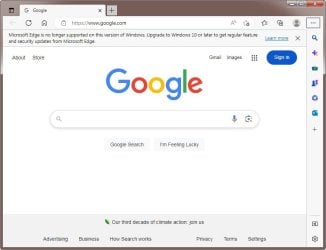
One of the Windows 7 updates should have offered the Edge browser. Edge replaced Internet Explorer. You must have missed that.

if you want, you can try downloading it. Download Microsoft Edge Make sure you select "Windows 8.1, 8, 7".

Edge no longer gets updates for Windows 7 but it is a lot better than Internet Explorer.

Microsoft​ Edge.jpg
 

My Computers My Computers

System One System Two

  • Computer type
    PC/Desktop
    Computer Manufacturer/Model Number
    Custom build
    OS
    Windows 7 Home Premium 64-bits
    CPU
    AMD FX-8350
    Motherboard
    Gigabyte GA-990FXA-UD3 (AM3+)
    Memory
    GSKILL Ripjaw-X PC3 12800 8GB (2x4GB)
    Graphics Card(s)
    ASUS ROG STRIX GTX 1060 6GB
    Sound Card
    Integrated
    Monitor(s) Displays
    Asus VE228H (21.5-in)
    Screen Resolution
    1920x1080 60Hz
    Hard Drives
    SAMSUNG 870 EVO 2.5 Inch SATA SSD (1TB)
    SAMSUNG 870 EVO 2.5 Inch SATA SSD (1TB)
    SAMSUNG 870 EVO 2.5 Inch SATA SSD (1TB)
    PSU
    Corsair RM750x (750 watts)
    Case
    Corsair Carbide Series 200R
    Cooling
    Corsair Hydro Series H60 (CWCH60)
    Keyboard
    Logitech Elite
    Mouse
    Logitech M510 Wireless Mouse
    Internet Speed
    Comcast Gigabit Extra (1200Mbps down / 35Mbps up)
    Antivirus
    Malwarebytes
    Browser
    Firefox, Edge, Chrome
    Other Info
    ASUS DRW-24B1ST DVD-RW (24X) optical drive
    Seagate Expansion Desk (5TB) external SATA/USB HDD
    Comcast XB8 Internet Gateway
  • Computer type
    PC/Desktop
    System Manufacturer/Model Number
    Custom
    OS
    Windows 7 Pro (64-bit)
    CPU
    AMD Phenom II 960T X4
    Motherboard
    ASUS M4N82 Deluxe
    Memory
    Corsair XMS2 DDR2-800 8GB (4x2GB)
    Graphics Card(s)
    ASUS ENGTX560 DCII OC/2DI/1GD5 1GB
    Monitor(s) Displays
    Samsung 930B 19-inch LCD
    Screen Resolution
    1280x1024
    Hard Drives
    Samsung SSD 870 EVO 1000 GB (Windows 10)
    Seagate ST1000DM003 1000 GB (Windows 7)
    PSU
    Antec TruePower (new) TP-650
    Case
    Antec Three Hundred
    Cooling
    AMD stock cooler from FX8350
    Mouse
    Logitech M100
    Internet Speed
    Xfinity Gigabit Extra 1200/35 Mbps
Thanks I understand I just never did the update so the edge never got installed I like Firefox better but now even that one is not available for windows 7 unless I find a download somewhere else But it's ok now that it works with Opera I am not really using it for anything but I wanted to have something in case something goes wrong with the other versions of window to go online and find solutions to any problems I may have
 

My Computer My Computer

Computer type
PC/Desktop
Computer Manufacturer/Model Number
Custom
OS
Windows 7 Pro 64bit
CPU
Intel
Motherboard
Asrock B85M-ITX
Memory
8 GB
Graphics Card(s)
On board
Hard Drives
320 GB
Antivirus
None
Browser
Firefox
Thanks I understand I just never did the update so the edge never got installed I like Firefox better but now even that one is not available for windows 7 unless I find a download somewhere else But it's ok now that it works with Opera I am not really using it for anything but I wanted to have something in case something goes wrong with the other versions of window to go online and find solutions to any problems I may have
If you use Firefox, you should automatically be switched to Firefox ESR, the only version currently supporting Windows 7, at least until August 2025. If not you can download it yourself:

Get Firefox for desktop — Mozilla (US)
 

My Computer My Computer

Computer type
PC/Desktop
Computer Manufacturer/Model Number
Gateway GT5656
OS
Windows 7 x64 SP1
CPU
AMD Athlon 64 X2 6000+ / 3.0 GHz
Motherboard
NVIDIA GeForce 6150 SE
Memory
6 GB
Monitor(s) Displays
Lenovo LED
Screen Resolution
1920 X 1080
Hard Drives
Windows on 500 GB spinner; Ubuntu 16 on Sandisk 250GB SSD; Bodhi5 on Samsung 250GB SSD; another old spinner for fooling around.
PSU
Original that came with computer
Keyboard
Logitech wireless
Mouse
Logitech wireless
Antivirus
Microsoft Sec Essentials
Browser
Vivaldi
I tried that but it did not work When I go to install it it stops and asking for windows 10
I would have to get a download before that and than upgrade to the esr version but I don't think they have that or I should say I did not try any other versions

- - - Updated - - -

It just happened again today
I was doing something on windows 10 to try to make it boot faster and the last thing I did was to go into safe boot mode so after I restarted I got another windows 7 showing up in the boot menu in addition to the normally 3 that I had
I tried the new windows 7 and windows 10 and they all worked fine but when I tried the old windows 7 for some reason it could not find the partition so I used the windows 7 dvd to repair it which worked but than that also deleted the network driver and also the opera that I just installed
So somehow windows 10 is messing with the bootloader on the old windows 7 and I guess when I repair it than it deletes the network drivers
I am not going to bother fixing the drivers but if I need the old windows 7 I know what I need to fix it
I guess windows 10 is not happy dual booting with windows 7

- - - Updated - - -

I just wanted to mention about why the mouse and keyboard is not working in the old windows 7 as I said in the first post
Again it's because of windows 10
If I use windows 10 and without doing anything just reset and start the old windows 7 the keyboard and mouse is not working
I don't even have to use the dvd to repair it
I just restart the new windows 7 and the keyboard and mouse works there so than if I restart the old windows 7 after that then the keyboard and mouse works
So in order to switch from windows 10 to the old windows 7 I have to run it through the new windows 7 in order for the keyboard and mouse to work
 

My Computer My Computer

Computer type
PC/Desktop
Computer Manufacturer/Model Number
Custom
OS
Windows 7 Pro 64bit
CPU
Intel
Motherboard
Asrock B85M-ITX
Memory
8 GB
Graphics Card(s)
On board
Hard Drives
320 GB
Antivirus
None
Browser
Firefox
Back
Top