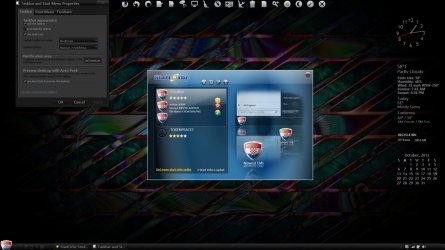
Custom Start Menu Button Collection

How I made it round was after I opened your image I created a new layer above it and then using a round brush I created a round image about the size I wanted and then clicking and holding the Ctrl button on the keyboard and selecting the thumbnail image of that new layer created a selected area and then in the toolbar menu I went to Select and then down to invert selected and then selected your image in the layer box and then hit delete key and it removed all the outside area.

Here are some screenshots on how I make a start orb.

First I open up the PSD that I have made up (it is in the zip folder at the bottom of this post). I have a black and a white background on the bottom layers so you can see what it looks like without the transparency showing through.
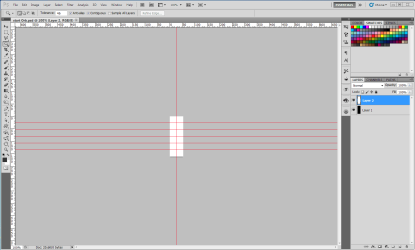
1.PNG

Then make your three images and adding anything you want to them at this time.
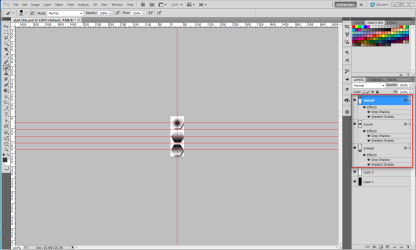
2.PNG

Then make the black and white layer invisible, right-click on the top layer and go down to merge visible.
3.PNG

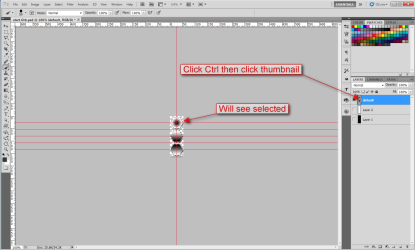
Then click on and hold the Ctrl key on the keyboard and click on the thumbnail in the layers panel you should see the selected area than.
4.PNG

Then click on the Channels tab.
5.PNG

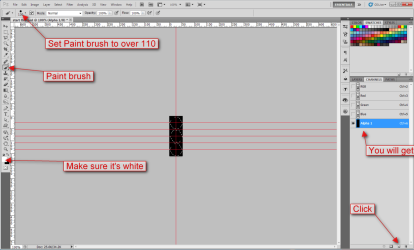
Then click on the create new channel button at the bottom you will get a alpha channel. Then make sure your foreground color is set to white select the paintbrush tool using a round brush set it above 110.
6.PNG

Then paint over until the selected area is all white.
7.PNG

Then select the RBG at the top it will select the rest of them automatically and then select the Layers tab.
8.PNG

Now go to Select and then click on deselect.
9.PNG

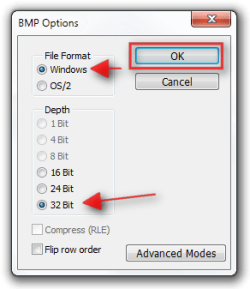
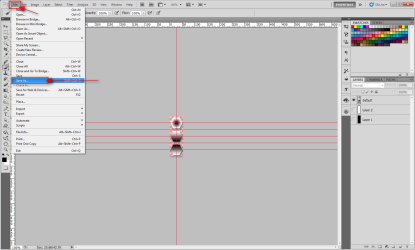
Now all you need to do is save it as a .bmp.
10.PNG11.png12.png

Jerry
 

Attachments

My Computer

Computer type
Laptop
Computer Manufacturer/Model Number
Sager NP9170
OS
Win 7 Pro x64 / Win 10 Pro
CPU
Intel(R) Core(TM) i7-3630QM CPU @ 2.40GHz
Motherboard
CLEVO P170EM
Memory
12 GB
Graphics Card(s)
(1) Intel(R) HD Graphics 4000 (2) NVIDIA GeForce GTX 675M
Sound Card
(1) Realtek High Definition Audio (2) Intel(R) Display Aud
Monitor(s) Displays
17.3
Screen Resolution
1920x1080
Hard Drives
(1) Samsung 860 EVO 500GB(OS) (1) Samsung 860 EVO 500GB(Data)
Keyboard
Backlite
Antivirus
MSE, Malwarebytes Pro
Browser
Firefox
Other Info
DESKTOP: Custom-built.
OS: Win 10 Pro x64.
CASE: Rosewill R5.
CPU: Intel I5 4670K CPU @ 3.40GHz.
CPU COOLER: Cool Master Hyper 212 EVO.
MOTHERBOARD: Asus Z87-A.
MEMORY: Kingston HyperX 2x4 GB.
GPU: Nvidia Geforce 650 TI.
PSU: Corsair TX750.
DRIVES: (1) Samsung 840 120 GB SSD (2) Western Digital blue 500 GB 7200 RPM.
How I made it round was after I opened your image I created a new layer above it and then using a round brush I created a round image about the size I wanted and then clicking and holding the Ctrl button on the keyboard and selecting the thumbnail image of that new layer created a selected area and then in the toolbar menu I went to Select and then down to invert selected and then selected your image in the layer box and then hit delete key and it removed all the outside area.

Here are some screenshots on how I make a start orb.

First I open up the PSD that I have made up (it is in the zip folder at the bottom of this post). I have a black and a white background on the bottom layers so you can see what it looks like without the transparency showing through.
View attachment 288854

Then make your three images and adding anything you want to them at this time.
View attachment 288855

Then make the black and white layer invisible, right-click on the top layer and go down to merge visible.
View attachment 288856

Then click on and hold the Ctrl key on the keyboard and click on the thumbnail in the layers panel you should see the selected area than.
View attachment 288857

Then click on the Channels tab.
View attachment 288858

Then click on the create new channel button at the bottom you will get a alpha channel. Then make sure your foreground color is set to white select the paintbrush tool using a round brush set it above 110.
View attachment 288859

Then paint over until the selected area is all white.
View attachment 288860

Then select the RBG at the top it will select the rest of them automatically and then select the Layers tab.
View attachment 288861

Now go to Select and then click on deselect.
View attachment 288862

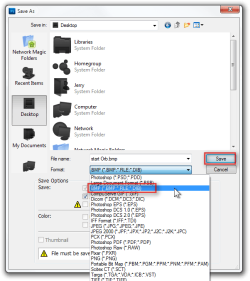
Now all you need to do is save it as a .bmp.
View attachment 288863View attachment 288864View attachment 288865

Jerry

I think i got it figured out as far as making a Start Orb,i don't what you mean by using a round brush to make the images round.
I'm not sure if this is how you did it but this is the way i figured out how to do it,if you will watch the short video clip i made on how i done it and see if that is alright.
It seems to work that way for me.
I also noticed that when i merge my layers for the images Merge Visible does work for me,i have do Merge Layers.

Also Thanks for all your help so far.

View attachment 288900
 
Last edited:

My Computer

Computer type
PC/Desktop
OS
Windows 7
I think i got it figured out as far as making a Start Orb,i don't what you mean by using a round brush to make the images round.
I'm not sure if this is how you did it but this is the way i figured out how to do it,if you will watch the short video clip i made on how i done it and see if that is alright.
It seems to work that way for me.
I also noticed that when i merge my layers for the images Merge Visible does work for me,i have do Merge Layers.

Also Thanks for all your help so far.

View attachment 288900

As long as you merge the layers together it doesn't matter how you do it.

I looked at your video and you're doing it just fine, I am a quadriplegic so I go about things a little bit differently sometimes.

Jerry
 

My Computer

Computer type
Laptop
Computer Manufacturer/Model Number
Sager NP9170
OS
Win 7 Pro x64 / Win 10 Pro
CPU
Intel(R) Core(TM) i7-3630QM CPU @ 2.40GHz
Motherboard
CLEVO P170EM
Memory
12 GB
Graphics Card(s)
(1) Intel(R) HD Graphics 4000 (2) NVIDIA GeForce GTX 675M
Sound Card
(1) Realtek High Definition Audio (2) Intel(R) Display Aud
Monitor(s) Displays
17.3
Screen Resolution
1920x1080
Hard Drives
(1) Samsung 860 EVO 500GB(OS) (1) Samsung 860 EVO 500GB(Data)
Keyboard
Backlite
Antivirus
MSE, Malwarebytes Pro
Browser
Firefox
Other Info
DESKTOP: Custom-built.
OS: Win 10 Pro x64.
CASE: Rosewill R5.
CPU: Intel I5 4670K CPU @ 3.40GHz.
CPU COOLER: Cool Master Hyper 212 EVO.
MOTHERBOARD: Asus Z87-A.
MEMORY: Kingston HyperX 2x4 GB.
GPU: Nvidia Geforce 650 TI.
PSU: Corsair TX750.
DRIVES: (1) Samsung 840 120 GB SSD (2) Western Digital blue 500 GB 7200 RPM.
thanks for sharing:):):) i really love your collection....:D:D:D
 

My Computer

Computer type
Laptop
Computer Manufacturer/Model Number
acer
OS
windows 7 ultimate 32bit
Antivirus
microsoft security essentials
Browser
opera mini
After reading the tutorial some more i think i figured it out,although i think i found one flaw in the tutorial.
In the part where you have to do the merge it says to Merge Visible,and i think it should be Merge Layers. I did it this way and it worked for me at least.

As Jerry mentioned, how you merge the three layers for the button states doesn't really matter (I could probably clarify that part of the tutorial though)... In the end, all you need is to have the button states on one layer with all the visual effects flattened onto the layer. This step is important for the alpha layer calculation to work correctly.

If you have the background layer visible when you do this, then manually merging the layers down one at a time is the only way. If you hide everything except the three button states, then merge visible will work fine. (:
 

My Computer

Computer type
PC/Desktop
OS
Win 10 x64 Pro x64 / Ubuntu 15.10 x64
CPU
Intel i7-4960X
Motherboard
Asus Rampage IV Black Edition
Memory
4x8GB Corsair Dominator Platinum @2400MHz 10-12-12-31
Graphics Card(s)
2x MSI GTX780Ti 3GB (SLI)
Sound Card
Onboard SupremeFX (Cirrus Logic CS4398)
Monitor(s) Displays
3x LG Cinema 27" IPS LED (27MP65)
Screen Resolution
[1920x1080]x3
Hard Drives
Crucial M500 120GB, Crucial M500 480GB, Toshiba DT01ACA200 2TB
PSU
CoolerMaster V1000
Case
Corsair Obsidian 750D
Cooling
ThermalTake Water 3.0 Extreme, 4xSP120, 3xAF120
Keyboard
Moshi Luna
Mouse
Logitech G700s / Roccat Tyon
Internet Speed
4Mb uncapped ADSL (Afrihost)
Antivirus
MS Security Essentials
Browser
Chrome... Duh. (:
Wow! Nice post, Jerry! Would rep you for it but I'm afraid I've got to spread it around first.
 

My Computer

Computer type
PC/Desktop
Computer Manufacturer/Model Number
Build #1
OS
Windows 8.1 Pro x64
CPU
Intel i7 3770K @4.5GHz
Motherboard
ASUS P8Z77-V PRO
Memory
Corsair Vengeance 2x4GB DDR3 1600MHz Low Profile (White)
Graphics Card(s)
Gigabyte Radeon HD 7850 (2GB GDDR5)
Sound Card
Integrated on motherboard
Monitor(s) Displays
23" LG LCD/LED IPS
Screen Resolution
1920*1080
Hard Drives
Samsung EVO 128GB SSD
Seagate Barracuda 2GB 7200rpm
2x Seagate FreeAgent [500gb]
PSU
Corsair TX650W V2 (80+ Bronze)
Case
NZXT Phantom 410 White
Cooling
Corsair H100 Water Cooler
Keyboard
Microsoft Desktop 2000 Wireless Keyboard
Mouse
Microsoft Desktop 2000 Wireless Mouse
Internet Speed
95 Mb/s Download 70 Mb/s Upload
Antivirus
MSE + MBAM Pro
Browser
Firefox
Thank you very much for saying so Tom, that means more than the rep anyway.
 

My Computer

Computer type
Laptop
Computer Manufacturer/Model Number
Sager NP9170
OS
Win 7 Pro x64 / Win 10 Pro
CPU
Intel(R) Core(TM) i7-3630QM CPU @ 2.40GHz
Motherboard
CLEVO P170EM
Memory
12 GB
Graphics Card(s)
(1) Intel(R) HD Graphics 4000 (2) NVIDIA GeForce GTX 675M
Sound Card
(1) Realtek High Definition Audio (2) Intel(R) Display Aud
Monitor(s) Displays
17.3
Screen Resolution
1920x1080
Hard Drives
(1) Samsung 860 EVO 500GB(OS) (1) Samsung 860 EVO 500GB(Data)
Keyboard
Backlite
Antivirus
MSE, Malwarebytes Pro
Browser
Firefox
Other Info
DESKTOP: Custom-built.
OS: Win 10 Pro x64.
CASE: Rosewill R5.
CPU: Intel I5 4670K CPU @ 3.40GHz.
CPU COOLER: Cool Master Hyper 212 EVO.
MOTHERBOARD: Asus Z87-A.
MEMORY: Kingston HyperX 2x4 GB.
GPU: Nvidia Geforce 650 TI.
PSU: Corsair TX750.
DRIVES: (1) Samsung 840 120 GB SSD (2) Western Digital blue 500 GB 7200 RPM.
hello, you guys are awesome with these orbs..

any chance someone can make 2 for me.

one with a Croatia crest and another with Bayern Munich soccer team logo..

thanks
 

My Computer

Computer type
PC/Desktop
OS
windows 8
hello, you guys are awesome with these orbs..

any chance someone can make 2 for me.

one with a Croatia crest and another with Bayern Munich soccer team logo..

thanks

I can if you find the images and post them in your next post.

Jerry
 

My Computer

Computer type
Laptop
Computer Manufacturer/Model Number
Sager NP9170
OS
Win 7 Pro x64 / Win 10 Pro
CPU
Intel(R) Core(TM) i7-3630QM CPU @ 2.40GHz
Motherboard
CLEVO P170EM
Memory
12 GB
Graphics Card(s)
(1) Intel(R) HD Graphics 4000 (2) NVIDIA GeForce GTX 675M
Sound Card
(1) Realtek High Definition Audio (2) Intel(R) Display Aud
Monitor(s) Displays
17.3
Screen Resolution
1920x1080
Hard Drives
(1) Samsung 860 EVO 500GB(OS) (1) Samsung 860 EVO 500GB(Data)
Keyboard
Backlite
Antivirus
MSE, Malwarebytes Pro
Browser
Firefox
Other Info
DESKTOP: Custom-built.
OS: Win 10 Pro x64.
CASE: Rosewill R5.
CPU: Intel I5 4670K CPU @ 3.40GHz.
CPU COOLER: Cool Master Hyper 212 EVO.
MOTHERBOARD: Asus Z87-A.
MEMORY: Kingston HyperX 2x4 GB.
GPU: Nvidia Geforce 650 TI.
PSU: Corsair TX750.
DRIVES: (1) Samsung 840 120 GB SSD (2) Western Digital blue 500 GB 7200 RPM.
Hey Jerry, thanks appreciate it, here are the pics..BMlogo.jpg

croatian button.jpg

Possible to make the buttons so they are bigger than the taskbar?....
 

My Computer

Computer type
PC/Desktop
OS
windows 8
Welcome to Seven Forums tatamata. A Guy
 

My Computer

Computer type
PC/Desktop
OS
Windows 10 Home x64
CPU
INTEL Core i5-750 Quad-Core 3.37GHz
Motherboard
ASUS P7P55D
Memory
HyperX Fury Black Series 8GB (2 x 4GB) 1866Mhz
Graphics Card(s)
EVGA GeForce GTX 750 Superclocked 1GB 128-Bit GDDR5
Monitor(s) Displays
LG 32MA68HY 32" IPS
Screen Resolution
1920 x 1080
Hard Drives
Samsung 840 Evo 120GB, SEAGATE 500GB Barracuda® 7200.12, SATA 3 Gb/s, 7200 RPM, 16MB cache
PSU
ANTEC TruePower New TP-550, 80 PLUS, 550W
Case
ANTEC Three Hundred Illusion
Cooling
COOLER MASTER Hyper 212 Plus, 4 x 120mm 1 x 140mm Noctua's
Internet Speed
85 + Mbps
Antivirus
Avast
Browser
Vivaldi
thank you. great site.

Jerry i hope you don't mind i wanted to give these a try.

tatamata i hope you like these,if you want anything changed then i will let Jerry take care of that then.
I tried making these a little bigger than the taskbar,but it cut off the top and bottom of the buttons.
The bmp's are in the zip file located below.

BMlogo.jpg croatian button.jpg

View attachment Desktop.zip
 

My Computer

Computer type
PC/Desktop
OS
Windows 7
thank you. great site.

Jerry i hope you don't mind i wanted to give these a try.

tatamata i hope you like these,if you want anything changed then i will let Jerry take care of that then.
I tried making these a little bigger than the taskbar,but it cut off the top and bottom of the buttons.
The bmp's are in the zip file located below.

View attachment 290389 View attachment 290390

View attachment 290388
Nice work, I don't mind at all.

Jerry
 

My Computer

Computer type
Laptop
Computer Manufacturer/Model Number
Sager NP9170
OS
Win 7 Pro x64 / Win 10 Pro
CPU
Intel(R) Core(TM) i7-3630QM CPU @ 2.40GHz
Motherboard
CLEVO P170EM
Memory
12 GB
Graphics Card(s)
(1) Intel(R) HD Graphics 4000 (2) NVIDIA GeForce GTX 675M
Sound Card
(1) Realtek High Definition Audio (2) Intel(R) Display Aud
Monitor(s) Displays
17.3
Screen Resolution
1920x1080
Hard Drives
(1) Samsung 860 EVO 500GB(OS) (1) Samsung 860 EVO 500GB(Data)
Keyboard
Backlite
Antivirus
MSE, Malwarebytes Pro
Browser
Firefox
Other Info
DESKTOP: Custom-built.
OS: Win 10 Pro x64.
CASE: Rosewill R5.
CPU: Intel I5 4670K CPU @ 3.40GHz.
CPU COOLER: Cool Master Hyper 212 EVO.
MOTHERBOARD: Asus Z87-A.
MEMORY: Kingston HyperX 2x4 GB.
GPU: Nvidia Geforce 650 TI.
PSU: Corsair TX750.
DRIVES: (1) Samsung 840 120 GB SSD (2) Western Digital blue 500 GB 7200 RPM.

My Computer

Computer type
Laptop
Computer Manufacturer/Model Number
Sager NP9170
OS
Win 7 Pro x64 / Win 10 Pro
CPU
Intel(R) Core(TM) i7-3630QM CPU @ 2.40GHz
Motherboard
CLEVO P170EM
Memory
12 GB
Graphics Card(s)
(1) Intel(R) HD Graphics 4000 (2) NVIDIA GeForce GTX 675M
Sound Card
(1) Realtek High Definition Audio (2) Intel(R) Display Aud
Monitor(s) Displays
17.3
Screen Resolution
1920x1080
Hard Drives
(1) Samsung 860 EVO 500GB(OS) (1) Samsung 860 EVO 500GB(Data)
Keyboard
Backlite
Antivirus
MSE, Malwarebytes Pro
Browser
Firefox
Other Info
DESKTOP: Custom-built.
OS: Win 10 Pro x64.
CASE: Rosewill R5.
CPU: Intel I5 4670K CPU @ 3.40GHz.
CPU COOLER: Cool Master Hyper 212 EVO.
MOTHERBOARD: Asus Z87-A.
MEMORY: Kingston HyperX 2x4 GB.
GPU: Nvidia Geforce 650 TI.
PSU: Corsair TX750.
DRIVES: (1) Samsung 840 120 GB SSD (2) Western Digital blue 500 GB 7200 RPM.

hi guys i searching a start botton as the X of symbol xbox360...anyone can help me?
 

My Computer

Computer type
PC/Desktop
OS
Windows 7 Ultimate x64

My Computer

Computer type
PC/Desktop
OS
Windows 10 Home x64
CPU
INTEL Core i5-750 Quad-Core 3.37GHz
Motherboard
ASUS P7P55D
Memory
HyperX Fury Black Series 8GB (2 x 4GB) 1866Mhz
Graphics Card(s)
EVGA GeForce GTX 750 Superclocked 1GB 128-Bit GDDR5
Monitor(s) Displays
LG 32MA68HY 32" IPS
Screen Resolution
1920 x 1080
Hard Drives
Samsung 840 Evo 120GB, SEAGATE 500GB Barracuda® 7200.12, SATA 3 Gb/s, 7200 RPM, 16MB cache
PSU
ANTEC TruePower New TP-550, 80 PLUS, 550W
Case
ANTEC Three Hundred Illusion
Cooling
COOLER MASTER Hyper 212 Plus, 4 x 120mm 1 x 140mm Noctua's
Internet Speed
85 + Mbps
Antivirus
Avast
Browser
Vivaldi
Back
Top