Solved Any Aero Dark Themes that are actually Aero and Not Classic?

SP1200

New member
Local time
6:03 PM
Messages
6
Everytime I download a dark theme for windows 7 it turns out to be non Aero Classic.
I like the Aero because of the subtle window animations.

Does anyone know of any dark Themes that are truly Aero that keep subtle window animations?

I like the Stock Theme just fine when I change everything dark, except the Bright White and Blue Shell.
Ugh so horrible!

>> PROBLEM SOLVED. <<

I did not have all 3 system files patched properly and therefore
Aero themes were not displaying Taskbar Thumb Animations.
 
Last edited:

My Computer My Computer

At a glance

Windows 7 Ent. 64bitAMD32gbBasic
Computer type
PC/Desktop
Computer Manufacturer/Model Number
Custom
OS
Windows 7 Ent. 64bit
CPU
AMD
Motherboard
MSI
Memory
32gb
Graphics Card(s)
Basic
Hard Drives
Several.
Antivirus
None
Browser
Chrome
Hello and welcome to SevenForums,

You can instead try and personalize it yourself by changing the color tint of the windows.

Start by going to your desktop, right-click and click Personalize.

1zxskex.png

You will notice a window like the above.

Next, click Window Color, then click Show color mixer drop-down menu.

t69ppy.png


If you want to make it dark, first, set color intensity to its highest, then tune down the saturation and the brightness as low as desired. You can also turn off transparency to get the black color more noticeable. :D
 

My Computer My Computer

At a glance

w
Computer type
PC/Desktop
OS
w
Ohh I did that already. And it makes the windows dark around the edge, but the explorer (shell) window (where the file is) is still that bright white or pink.
 

My Computer My Computer

At a glance

Windows 7 Ent. 64bitAMD32gbBasic
Computer type
PC/Desktop
Computer Manufacturer/Model Number
Custom
OS
Windows 7 Ent. 64bit
CPU
AMD
Motherboard
MSI
Memory
32gb
Graphics Card(s)
Basic
Hard Drives
Several.
Antivirus
None
Browser
Chrome
See attached file/picture.

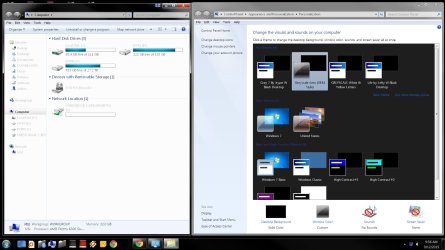
It shows although I have set all window colors to dark colors, the windows OS still has a LOT of bright white and blue colors that I have learned to be called "shell" or "Explorer Shell" colors. This is the color that I wish to change.
 

Attachments

  • Windows Shell.jpg
    Windows Shell.jpg
    165 KB · Views: 9

My Computer My Computer

At a glance

Windows 7 Ent. 64bitAMD32gbBasic
Computer type
PC/Desktop
Computer Manufacturer/Model Number
Custom
OS
Windows 7 Ent. 64bit
CPU
AMD
Motherboard
MSI
Memory
32gb
Graphics Card(s)
Basic
Hard Drives
Several.
Antivirus
None
Browser
Chrome
And as you can see under Personalization I do have other Windows 7 "Dark Themes" the problem seems to be that they are not "Aero" themes and thus cannot use "Taskbar Thumbnail Previews" as shown in this thread.

http://www.sevenforums.com/tutorials/52265-taskbar-thumbnail-previews-enable-disable.html

And this is the reason why my post is titled "Any Aero Dark Themes that are actually Aero and Not Classic?" is because All of the themes I keep finding say they are Aero themes for windows 7 but only do I find out they are simply classic themes after I download and install them. I'm looking for a truly dark theme that will allow me to keep Taskbar Thumbnails.
 

My Computer My Computer

At a glance

Windows 7 Ent. 64bitAMD32gbBasic
Computer type
PC/Desktop
Computer Manufacturer/Model Number
Custom
OS
Windows 7 Ent. 64bit
CPU
AMD
Motherboard
MSI
Memory
32gb
Graphics Card(s)
Basic
Hard Drives
Several.
Antivirus
None
Browser
Chrome
Oh.

In this case, I can't help you with it, sorry.

The only thing I can think of is that changing the theme to Windows Classic. Try searching on search engines or browsing on the tutorials. Maybe I can also provide you a link to one.

Again, sorry. :D
 

My Computer My Computer

At a glance

w
Computer type
PC/Desktop
OS
w

My Computer My Computer

At a glance

Win 7 Pro x64 / Win 10 ProIntel(R) Core(TM) i7-3630QM CPU @ 2.40GHz12 GB(1) Intel(R) HD Graphics 4000 (2) NVIDIA GeFo...
Computer type
Laptop
Computer Manufacturer/Model Number
Sager NP9170
OS
Win 7 Pro x64 / Win 10 Pro
CPU
Intel(R) Core(TM) i7-3630QM CPU @ 2.40GHz
Motherboard
CLEVO P170EM
Memory
12 GB
Graphics Card(s)
(1) Intel(R) HD Graphics 4000 (2) NVIDIA GeForce GTX 675M
Sound Card
(1) Realtek High Definition Audio (2) Intel(R) Display Aud
Monitor(s) Displays
17.3
Screen Resolution
1920x1080
Hard Drives
(1) Samsung 860 EVO 500GB(OS) (1) Samsung 860 EVO 500GB(Data)
Keyboard
Backlite
Antivirus
MSE, Malwarebytes Pro
Browser
Firefox
Other Info
DESKTOP: Custom-built.
OS: Win 10 Pro x64.
CASE: Rosewill R5.
CPU: Intel I5 4670K CPU @ 3.40GHz.
CPU COOLER: Cool Master Hyper 212 EVO.
MOTHERBOARD: Asus Z87-A.
MEMORY: Kingston HyperX 2x4 GB.
GPU: Nvidia Geforce 650 TI.
PSU: Corsair TX750.
DRIVES: (1) Samsung 840 120 GB SSD (2) Western Digital blue 500 GB 7200 RPM.
Hey guys sorry for the delay, I wanted to check and double check before closing this as solved.
So here was my problem.

I ran "Universal Theme Patcher" and it didn't patch the last file for some reason.
So I did a fresh install and ran it again, and one by one they all were patched.

Then I ran "Theme Resource Changer" and installed the themes I downloaded.
Now everything works like it should. I have Aero with Taskbar Thumbs.

I think before I was not understanding the installation.txt or readme.txt instructions for each theme well enough to realize I needed to run the "Theme Resource Changer" program prior to installing the theme. I just dumped the Theme in the Resources Folder and didn't know why it didn't work. lol.

1. Run: "Universal Theme Patcher"
2. Run: "Theme Resource Changer"
3. Unzip Downloaded theme and read carefully the installation instructions as they vary slightly sometimes.
4. Move Theme files to the Windows "C:\Windows\Resources\Themes" Folder
Note: In some themes, you need to rename the "explorer" folder to "explorer.exe" folder.
This Folder STAYS AS A FOLDER just names as an *.exe

5. Then go in to personalization and select installed Theme.
 

My Computer My Computer

At a glance

Windows 7 Ent. 64bitAMD32gbBasic
Computer type
PC/Desktop
Computer Manufacturer/Model Number
Custom
OS
Windows 7 Ent. 64bit
CPU
AMD
Motherboard
MSI
Memory
32gb
Graphics Card(s)
Basic
Hard Drives
Several.
Antivirus
None
Browser
Chrome
It's good to hear you got it sorted out.

Jerry
 

My Computer My Computer

At a glance

Win 7 Pro x64 / Win 10 ProIntel(R) Core(TM) i7-3630QM CPU @ 2.40GHz12 GB(1) Intel(R) HD Graphics 4000 (2) NVIDIA GeFo...
Computer type
Laptop
Computer Manufacturer/Model Number
Sager NP9170
OS
Win 7 Pro x64 / Win 10 Pro
CPU
Intel(R) Core(TM) i7-3630QM CPU @ 2.40GHz
Motherboard
CLEVO P170EM
Memory
12 GB
Graphics Card(s)
(1) Intel(R) HD Graphics 4000 (2) NVIDIA GeForce GTX 675M
Sound Card
(1) Realtek High Definition Audio (2) Intel(R) Display Aud
Monitor(s) Displays
17.3
Screen Resolution
1920x1080
Hard Drives
(1) Samsung 860 EVO 500GB(OS) (1) Samsung 860 EVO 500GB(Data)
Keyboard
Backlite
Antivirus
MSE, Malwarebytes Pro
Browser
Firefox
Other Info
DESKTOP: Custom-built.
OS: Win 10 Pro x64.
CASE: Rosewill R5.
CPU: Intel I5 4670K CPU @ 3.40GHz.
CPU COOLER: Cool Master Hyper 212 EVO.
MOTHERBOARD: Asus Z87-A.
MEMORY: Kingston HyperX 2x4 GB.
GPU: Nvidia Geforce 650 TI.
PSU: Corsair TX750.
DRIVES: (1) Samsung 840 120 GB SSD (2) Western Digital blue 500 GB 7200 RPM.
Back
Top