0x80070241 Error with 2 store bought disks

Adrian86

New member
Local time
5:35 AM
Messages
9
Location
Fort Laurdale
I have serched the forums, finding people who recived the same error code, however I have not come across any one who had this same situtation.

I built my computer and originally installed Windows 7 64-bit as well as all the necessary drivers for devices and the graphics. For the first hour of the computer's life everything seemd perfectly fine, however while installing Steam to play Dawn of War 2 and other games for Live I recived a Blue Screen error. From that point on I would recive a blue screen with a different error code when ever I tried booting the computer. I serched online and found millions of different explinations ranging from the graphics card not being friendly with the motherboard, to the ram having defects, to steam corrupting the system, and so on. I doubt that any of them could have been the issue. So to try and solve the problem quickly, I just reformatted the hard drive and did a fresh installation of Windows XP 64-bit. From then on when I try to install windows 7 I would recive the 0x80070241 error code. I even went back to the store and exchanged the disk for a new one. Still, I recive the error code when trying to install Windows 7 again. I think* the problem can come from the hard drive when it was reformatted. I also would like to learn what could have caused the Blue Screens of Death at the beginning of using my computer. I really do not want to take the computer to the store technician or to some computer repair place and pay alot of money for a problem I could have taken care of myself.

In the future I do plan on maxing out the RAM to 8GB and getting a second graphics card for SLI.

CPU: Intel Core Quad 2.33GHz
motherboard: ASUS P5N-D 750i
graphics: BFG Nvidia Geforce 9800 GT 1GB
ram: 4GB
Hard Drive: 500GB SATA
OS: Currently running Windows XP 64-bit
PSU: 600watts
 

My Computer My Computer

At a glance

Windows XP 64-bitIntel Core Quad 2.33GHz4GB Centon (2x2GB Dual Channel)BFG Nvidia Geforce 9800 GT 1GB
Computer Manufacturer/Model Number
Custom
OS
Windows XP 64-bit
CPU
Intel Core Quad 2.33GHz
Motherboard
ASUS P5N-D 750i
Memory
4GB Centon (2x2GB Dual Channel)
Graphics Card(s)
BFG Nvidia Geforce 9800 GT 1GB
Sound Card
onboard
Monitor(s) Displays
19 inch I-INC 1440x900
Hard Drives
500GB SATA 3.5in HDD
PSU
600 Watts
Case
Broadway Com Corp 9257-Black Black Steel ATX Mid Tower
Cooling
two 120mm case fans, 210mm case fan, stock cpu fan
Keyboard
Wireless Logitech
Mouse
Wireless Logitech
Research the drivers situation for your graphics card. Try all Win7 drivers including beta, especially WHQL. Did WIndows Updates deliver optional drivers?

Reseat your graphics card, test your RAM, swap your RAM modules, then test your HD using maker's full diag/repair CD scan: Hard Drive Diagnostics Tools and Utilities (Storage) - TACKtech Corp.URL This clears your hardware, but still check all connections and cables, swap cables.

Check for repeat errors in in Event Viewer>Admin view and Diagnostics>Performance logs, the latter by clicking thru your WEI score at Computer>Properties, then Advanced Tools. Look for issues cued on that page, and Generate A System Health Report. Type "Problem solutions" in Start Search box to see if any have been returned - always send error reports to MS for this reason.

Many have had success swapping graphics cards even with a borrowed card as this tells you for sure if that is the problem. DId you run the Windows 7 Upgrade advisor to check for hardware compat?\

You can also try installing 32 bit which is included in your license as an either/or choice. 4gb is right on the border for 32/64, and 64 bit has driver problems frequently. It won't hurt to try the difference for yourself - it kept me from going back to 64 bit.
 
I will get started on all that right away!

The RAM is Centron 2GBx2 Dual Channel Kit. I was told this was conciderd to be a low quality product and that brands like Corsair would be more reliable. Can I use just one 2GB stick, or are they ment to be run togeather?
 

My Computer My Computer

At a glance

Windows XP 64-bitIntel Core Quad 2.33GHz4GB Centon (2x2GB Dual Channel)BFG Nvidia Geforce 9800 GT 1GB
Computer Manufacturer/Model Number
Custom
OS
Windows XP 64-bit
CPU
Intel Core Quad 2.33GHz
Motherboard
ASUS P5N-D 750i
Memory
4GB Centon (2x2GB Dual Channel)
Graphics Card(s)
BFG Nvidia Geforce 9800 GT 1GB
Sound Card
onboard
Monitor(s) Displays
19 inch I-INC 1440x900
Hard Drives
500GB SATA 3.5in HDD
PSU
600 Watts
Case
Broadway Com Corp 9257-Black Black Steel ATX Mid Tower
Cooling
two 120mm case fans, 210mm case fan, stock cpu fan
Keyboard
Wireless Logitech
Mouse
Wireless Logitech
Currently in the process of reinstalling Windows XP because I began to recive 0x80070570 when trying to install Windows 7 after I used the TACKtech tools. When trying to run after I recived a message saying that windows could not start because there was a problem with ntsokrnl.exe. So... starting over for now.
 

My Computer My Computer

At a glance

Windows XP 64-bitIntel Core Quad 2.33GHz4GB Centon (2x2GB Dual Channel)BFG Nvidia Geforce 9800 GT 1GB
Computer Manufacturer/Model Number
Custom
OS
Windows XP 64-bit
CPU
Intel Core Quad 2.33GHz
Motherboard
ASUS P5N-D 750i
Memory
4GB Centon (2x2GB Dual Channel)
Graphics Card(s)
BFG Nvidia Geforce 9800 GT 1GB
Sound Card
onboard
Monitor(s) Displays
19 inch I-INC 1440x900
Hard Drives
500GB SATA 3.5in HDD
PSU
600 Watts
Case
Broadway Com Corp 9257-Black Black Steel ATX Mid Tower
Cooling
two 120mm case fans, 210mm case fan, stock cpu fan
Keyboard
Wireless Logitech
Mouse
Wireless Logitech
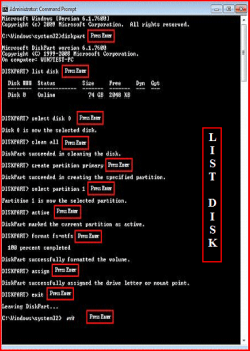
As you are starting all over, try this.

Try a full clean & full format.
http://www.sevenforums.com/tutorials/52129-disk-clean-clean-all-diskpart-command.html
http://www.sevenforums.com/tutorials/2668-partition-volume-delete.html?ltr=P
http://www.sevenforums.com/tutorials/2674-partition-volume-create-new.html?ltr=P
1) Boot DVD.
2) Press Shift+F10 (for command prompt)

Type in command line
DISKPART
LIST DISK OR List Volume (If you have partitions)
SELECT DISK # (win HD)
CLEAN ALL
CREATE PARTITION PRIMARY
SELECT PARTITION 1
ACTIVE
FORMAT=NTFS
ASSIGN
EXIT
EXIT
List Disk.PNG
List Volume.PNG
 

My Computer My Computer

At a glance

ME/XP/Vista/Win7
OS
ME/XP/Vista/Win7
When I am at the Command Prompt it says:

Microsoft Windows [Version 6.1.7600]

X:\Sources>

Where do I go from here?

Edit: okay i got to the DISKPART and input the Clean all comman. Is it supposed to take long before telling me the cleaning was completed?
 

My Computer My Computer

At a glance

Windows XP 64-bitIntel Core Quad 2.33GHz4GB Centon (2x2GB Dual Channel)BFG Nvidia Geforce 9800 GT 1GB
Computer Manufacturer/Model Number
Custom
OS
Windows XP 64-bit
CPU
Intel Core Quad 2.33GHz
Motherboard
ASUS P5N-D 750i
Memory
4GB Centon (2x2GB Dual Channel)
Graphics Card(s)
BFG Nvidia Geforce 9800 GT 1GB
Sound Card
onboard
Monitor(s) Displays
19 inch I-INC 1440x900
Hard Drives
500GB SATA 3.5in HDD
PSU
600 Watts
Case
Broadway Com Corp 9257-Black Black Steel ATX Mid Tower
Cooling
two 120mm case fans, 210mm case fan, stock cpu fan
Keyboard
Wireless Logitech
Mouse
Wireless Logitech
When I am at the Command Prompt it says:

Microsoft Windows [Version 6.1.7600]

X:\Sources>

Where do I go from here?

Type in command line
DISKPART
 

My Computer My Computer

At a glance

ME/XP/Vista/Win7
OS
ME/XP/Vista/Win7
Okay I just went into diskpart and selected it to use the Clean All command. Is it supposed to take some time?
 

My Computer My Computer

At a glance

Windows XP 64-bitIntel Core Quad 2.33GHz4GB Centon (2x2GB Dual Channel)BFG Nvidia Geforce 9800 GT 1GB
Computer Manufacturer/Model Number
Custom
OS
Windows XP 64-bit
CPU
Intel Core Quad 2.33GHz
Motherboard
ASUS P5N-D 750i
Memory
4GB Centon (2x2GB Dual Channel)
Graphics Card(s)
BFG Nvidia Geforce 9800 GT 1GB
Sound Card
onboard
Monitor(s) Displays
19 inch I-INC 1440x900
Hard Drives
500GB SATA 3.5in HDD
PSU
600 Watts
Case
Broadway Com Corp 9257-Black Black Steel ATX Mid Tower
Cooling
two 120mm case fans, 210mm case fan, stock cpu fan
Keyboard
Wireless Logitech
Mouse
Wireless Logitech
Okay I just went into diskpart and selected it to use the Clean All command. Is it supposed to take some time?

Clean all takes about hour for a 300g HD.
 

My Computer My Computer

At a glance

ME/XP/Vista/Win7
OS
ME/XP/Vista/Win7
Did the HD diagnostics find anything to repair? Did you run the one listed for your HD make?

Win7 could have been repaired using Repair CD or Win7 DVD repair console, however zeroing the HD now as you are will give you the cleanest possible slate for install.

Be sure to check optional Windows Updates for newer drivers than installer gives. Any drivers then missing in Device Manager can be found on the Support Downloads webpage for your model computer/device. But I would not change drivers from what installer/Updates gives unless there is a performance reason.
 
Alright it has been a little bit over two hours and still waiting for it to tell me diskpart finished cleaning the disk.
 

My Computer My Computer

At a glance

Windows XP 64-bitIntel Core Quad 2.33GHz4GB Centon (2x2GB Dual Channel)BFG Nvidia Geforce 9800 GT 1GB
Computer Manufacturer/Model Number
Custom
OS
Windows XP 64-bit
CPU
Intel Core Quad 2.33GHz
Motherboard
ASUS P5N-D 750i
Memory
4GB Centon (2x2GB Dual Channel)
Graphics Card(s)
BFG Nvidia Geforce 9800 GT 1GB
Sound Card
onboard
Monitor(s) Displays
19 inch I-INC 1440x900
Hard Drives
500GB SATA 3.5in HDD
PSU
600 Watts
Case
Broadway Com Corp 9257-Black Black Steel ATX Mid Tower
Cooling
two 120mm case fans, 210mm case fan, stock cpu fan
Keyboard
Wireless Logitech
Mouse
Wireless Logitech
What is your HD size? Expect about an hour per 300gb as stated.

I would do something else as watching it makes it take longer;)
 
What is your HD size? Expect about an hour per 300gb as stated.

I would do something else as watching it makes it take longer;)

haha yeah. Waiting for the cursor to do something other than blink can be maddening. The drive is 500GB.
 

My Computer My Computer

At a glance

Windows XP 64-bitIntel Core Quad 2.33GHz4GB Centon (2x2GB Dual Channel)BFG Nvidia Geforce 9800 GT 1GB
Computer Manufacturer/Model Number
Custom
OS
Windows XP 64-bit
CPU
Intel Core Quad 2.33GHz
Motherboard
ASUS P5N-D 750i
Memory
4GB Centon (2x2GB Dual Channel)
Graphics Card(s)
BFG Nvidia Geforce 9800 GT 1GB
Sound Card
onboard
Monitor(s) Displays
19 inch I-INC 1440x900
Hard Drives
500GB SATA 3.5in HDD
PSU
600 Watts
Case
Broadway Com Corp 9257-Black Black Steel ATX Mid Tower
Cooling
two 120mm case fans, 210mm case fan, stock cpu fan
Keyboard
Wireless Logitech
Mouse
Wireless Logitech
Okay, it has been 5 hours and no change ever since I used the clear all command. Still waiting for it to say it has compleated and beginning to think I should restart and simply use the clear command or try something else. Before messing with it I think its best to see what you guys think.
 

My Computer My Computer

At a glance

Windows XP 64-bitIntel Core Quad 2.33GHz4GB Centon (2x2GB Dual Channel)BFG Nvidia Geforce 9800 GT 1GB
Computer Manufacturer/Model Number
Custom
OS
Windows XP 64-bit
CPU
Intel Core Quad 2.33GHz
Motherboard
ASUS P5N-D 750i
Memory
4GB Centon (2x2GB Dual Channel)
Graphics Card(s)
BFG Nvidia Geforce 9800 GT 1GB
Sound Card
onboard
Monitor(s) Displays
19 inch I-INC 1440x900
Hard Drives
500GB SATA 3.5in HDD
PSU
600 Watts
Case
Broadway Com Corp 9257-Black Black Steel ATX Mid Tower
Cooling
two 120mm case fans, 210mm case fan, stock cpu fan
Keyboard
Wireless Logitech
Mouse
Wireless Logitech
It completed shortly after my last post. I will continue with it as I burn the iso for my HD on to a disk using this computer.
 

My Computer My Computer

At a glance

Windows XP 64-bitIntel Core Quad 2.33GHz4GB Centon (2x2GB Dual Channel)BFG Nvidia Geforce 9800 GT 1GB
Computer Manufacturer/Model Number
Custom
OS
Windows XP 64-bit
CPU
Intel Core Quad 2.33GHz
Motherboard
ASUS P5N-D 750i
Memory
4GB Centon (2x2GB Dual Channel)
Graphics Card(s)
BFG Nvidia Geforce 9800 GT 1GB
Sound Card
onboard
Monitor(s) Displays
19 inch I-INC 1440x900
Hard Drives
500GB SATA 3.5in HDD
PSU
600 Watts
Case
Broadway Com Corp 9257-Black Black Steel ATX Mid Tower
Cooling
two 120mm case fans, 210mm case fan, stock cpu fan
Keyboard
Wireless Logitech
Mouse
Wireless Logitech
Back
Top