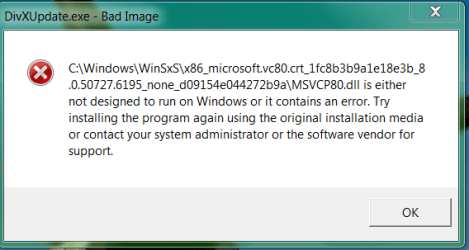
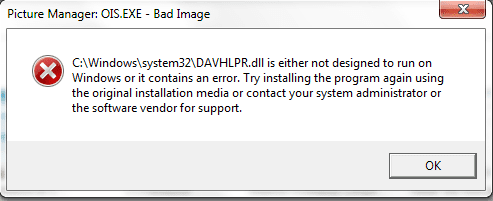
I am using a 64-bit Windows 7 on an HP Pavilion laptop, and after waking the computer from hibernation today, I attempted to open Google Chrome but received a 0xc0000005 error. In addition, multiple other applications like Microsoft Word and Dropbox failed, with various .dll file errors and bad image errors (the most notable one of which was "WTSAPI32.dll is not designed to run on Windows").
I used System Restore to restore it to the point before the most recent Windows update, which allowed me to reinstall Chrome and access Microsoft Office again, but still gave me .dll file errors for DivX upon startup (and has't let me reinstall Dropbox). In addition, when booting up after the system restore, a disk consistency check was done that I believe resulted in the deletion/correction of tons of files.
In addition, Windows Update does not start and it gives me this dialog upon starting up:
"Windows Update cannot currently check for updates, because the service is not running. You may need to restart your computer".
I did just that, but to no avail. In addition, when restarting the computer, Windows was apparently configuring some updates, but performed 3 shutdown/restart cycles and finally said "reverting changes" before I could log in.
Any advice on what to do from now?
I used System Restore to restore it to the point before the most recent Windows update, which allowed me to reinstall Chrome and access Microsoft Office again, but still gave me .dll file errors for DivX upon startup (and has't let me reinstall Dropbox). In addition, when booting up after the system restore, a disk consistency check was done that I believe resulted in the deletion/correction of tons of files.
In addition, Windows Update does not start and it gives me this dialog upon starting up:
"Windows Update cannot currently check for updates, because the service is not running. You may need to restart your computer".
I did just that, but to no avail. In addition, when restarting the computer, Windows was apparently configuring some updates, but performed 3 shutdown/restart cycles and finally said "reverting changes" before I could log in.
Any advice on what to do from now?
My Computer
At a glance
MO
- Computer type
- PC/Desktop
- OS
- MO