1-3 minutes waiting for right click menu on icons

tylar112

New member
Member
Local time
4:20 PM
Messages
51
When I right click on icons, (such as mp3's, photos, games, ect.) the menu doesn't open for a few minutes. the cursor just turns to the blue loading circle. eventually it DOES open, but it should be at least 2-5 seconds! Not minutes.

How can I fix this?
Im up to date with my virus scans, and registry cleaners

hope you can help me!
thank you :)
 

My Computer My Computer

At a glance

Windows 7 Home Premium x64Genuine Intel(R) CPU U7300 @ 1.30GHz4.00 GigsMobile Intel(R) 4 Series Express Chipset Family
Computer Manufacturer/Model Number
Asus UL50A/UL50Ag Series
OS
Windows 7 Home Premium x64
CPU
Genuine Intel(R) CPU U7300 @ 1.30GHz
Memory
4.00 Gigs
Graphics Card(s)
Mobile Intel(R) 4 Series Express Chipset Family
Sound Card
Realtek High Definition Audio
Monitor(s) Displays
Generic PnP Monitor
Screen Resolution
1366 x 768 - 60Hz
Hard Drives
500 Gigs
Internet Speed
Slow as hell.
If you weren't quite so up-to-date with the "registry cleaners" it probably wouldn't happen :)

Does the symptom reproduce in safe mode (press F8 at startup time to get there)?
 

My Computer My Computer

At a glance

Win7x64
Computer Manufacturer/Model Number
Multiple machines in various stages of decomposition.
OS
Win7x64
If you weren't quite so up-to-date with the "registry cleaners" it probably wouldn't happen :)

Does the symptom reproduce in safe mode (press F8 at startup time to get there)?

I knew someone was gonna say that!
I've heard positive, and negative things about registry cleaners
But im pretty good about it!
I usually only delete the registry for uninstalled programs that have leftover files on my computer.


I haven't tried it in safe mode yet
the problem doesn't occur 100% of the time
it happens about 60% of the time, so its hard to determine if it works or not in safe mode
 

My Computer My Computer

At a glance

Windows 7 Home Premium x64Genuine Intel(R) CPU U7300 @ 1.30GHz4.00 GigsMobile Intel(R) 4 Series Express Chipset Family
Computer Manufacturer/Model Number
Asus UL50A/UL50Ag Series
OS
Windows 7 Home Premium x64
CPU
Genuine Intel(R) CPU U7300 @ 1.30GHz
Memory
4.00 Gigs
Graphics Card(s)
Mobile Intel(R) 4 Series Express Chipset Family
Sound Card
Realtek High Definition Audio
Monitor(s) Displays
Generic PnP Monitor
Screen Resolution
1366 x 768 - 60Hz
Hard Drives
500 Gigs
Internet Speed
Slow as hell.
I knew someone was gonna say that!
I've heard positive, and negative things about registry cleaners
But im pretty good about it!
I usually only delete the registry for uninstalled programs that have leftover files on my computer.

"Cleaning" the registry is analogous to letting your Feng Shui Consultant tell you which of the house's supporting walls should go because they impede the flow of positive energy.

I haven't tried it in safe mode yet
the problem doesn't occur 100% of the time
it happens about 60% of the time, so its hard to determine if it works or not in safe mode

It's important to know whether the issue is reproducible in safe mode. The outcome channels subsequent troubleshooting into different directions.
 

My Computer My Computer

At a glance

Win7x64
Computer Manufacturer/Model Number
Multiple machines in various stages of decomposition.
OS
Win7x64
What version and build of 7 do you have installed? What software have you installed? Have you installed any third party codec packs, any "tweaking" software, etc?
 

My Computer My Computer

At a glance

Windows 7 Ultimate x64 SP1Core i7-2670QM8GB DDR3 PC3-10600Intel HD Graphics 3000 + GeForce GT 540M
Computer Manufacturer/Model Number
Dell XPS 15 L502x
OS
Windows 7 Ultimate x64 SP1
CPU
Core i7-2670QM
Memory
8GB DDR3 PC3-10600
Graphics Card(s)
Intel HD Graphics 3000 + GeForce GT 540M
Screen Resolution
1920x1080
Hard Drives
1TB 5400RPM Seagate
What version and build of 7 do you have installed? What software have you installed? Have you installed any third party codec packs, any "tweaking" software, etc?

I have build 7600 ultimate
And what do you mean by third party codec packs? or tweaking?
 

My Computer My Computer

At a glance

Windows 7 Home Premium x64Genuine Intel(R) CPU U7300 @ 1.30GHz4.00 GigsMobile Intel(R) 4 Series Express Chipset Family
Computer Manufacturer/Model Number
Asus UL50A/UL50Ag Series
OS
Windows 7 Home Premium x64
CPU
Genuine Intel(R) CPU U7300 @ 1.30GHz
Memory
4.00 Gigs
Graphics Card(s)
Mobile Intel(R) 4 Series Express Chipset Family
Sound Card
Realtek High Definition Audio
Monitor(s) Displays
Generic PnP Monitor
Screen Resolution
1366 x 768 - 60Hz
Hard Drives
500 Gigs
Internet Speed
Slow as hell.
Post a screenshot of the right click menu once it has opened. We could possibly pick out something shown that could be the cause.
 

My Computer My Computer

At a glance

7600.20510 x86P4 550 3.4 GHz HT running at 3.5 GHzOCZ 2 GB(2x1GB) DDR400mHz running @ 414 mHzHIS Radeon HD 3850 IceQ 3 Turbo HDMI Dual DL-...
Computer Manufacturer/Model Number
self built
OS
7600.20510 x86
CPU
P4 550 3.4 GHz HT running at 3.5 GHz
Motherboard
MSI PM8M3-V (MS-7211 v1.x) Micro-ATX mainboard
Memory
OCZ 2 GB(2x1GB) DDR400mHz running @ 414 mHz
Graphics Card(s)
HIS Radeon HD 3850 IceQ 3 Turbo HDMI Dual DL-DVI AGP
Sound Card
MOTU Traveler firewire studio interface 192 kHz 24 bit
Monitor(s) Displays
22" widescreen Acer X223W LCD, 17" Compaq P75 CRT
Screen Resolution
1680x1050 and 1280x1024
Hard Drives
SATA I x2 WD, 400 GB and 120 GB, SATA 2 WD Caviar Black 1 TB
PSU
350W generic
Case
Cybertronpc, it glows blue
Cooling
stock cpu fan, Ice-Q 3 gpu and system, many case fans
Keyboard
Logitch Classical Keyboard 200
Mouse
Logitech Mediaplay cordless
Internet Speed
1792/448 kbits/sec
Other Info
SATA II PCI fake RAID adapter, 1 GB Readyboost, original ATI Remote Wonder (even works with WMC perfectly), Logitech Rumblepad 2 game controller x2
I remember back in the XP era I once found out this kind of behaviour was caused by bad handlers, i.e. some third party software had added something not so well coded to the context menu thus almost crippling it.

Just my 2 cents...

Kari
 

My Computer My Computer

At a glance

Windows 10 Pro x64 EN-GB1.6 GHz Intel Core i7-720QM Processor6 GBATI Mobility Radeon HD 5850 Graphics
Computer type
Laptop
Computer Manufacturer/Model Number
HP ENVY 17-1150eg
OS
Windows 10 Pro x64 EN-GB
CPU
1.6 GHz Intel Core i7-720QM Processor
Memory
6 GB
Graphics Card(s)
ATI Mobility Radeon HD 5850 Graphics
Sound Card
Beats sound system with integrated subwoofer
Monitor(s) Displays
17" laptop display, 22" LED and 32" Full HD TV through HDMI
Screen Resolution
1600*900 (1), 1920*1080 (2&3)
Hard Drives
Internal: 2 x 500 GB SATA Hard Disk Drive 7200 rpm
External: 2TB for backups, 3TB USB3 network drive for media
Cooling
As Envy runs a bit warm, I have it on a Cooler Master pad
Keyboard
Logitech diNovo Media Desktop Laser (bluetooth)
Mouse
Logitech Performance Mouse MX
Internet Speed
50/10 Mbps VDSL
Antivirus
Windows Defender 4.3.9431.0
Browser
Maxthon 3.5.2., IE11
I remember back in the XP era I once found out this kind of behaviour was caused by bad handlers, i.e. some third party software had added something not so well coded to the context menu thus almost crippling it.

Just my 2 cents...

Kari

Absolutely. There's extra (non-default) handler code being invoked by the right-click, and for reasons of its own it's testing for the presence of something or waiting for an event to occur - and it doesn't give up until a few minutes have passed.

Programming oversight.
 

My Computer My Computer

At a glance

Win7x64
Computer Manufacturer/Model Number
Multiple machines in various stages of decomposition.
OS
Win7x64
Post a screenshot of the right click menu once it has opened. We could possibly pick out something shown that could be the cause.

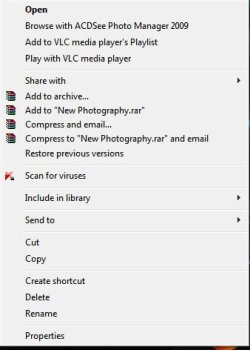
Heres a screenshot of the rightclick menu

Most of the time it happens when I right click on folders, usually 95% of the time!
 

Attachments

  • rightclick.jpg
    rightclick.jpg
    18.9 KB · Views: 49

My Computer My Computer

At a glance

Windows 7 Home Premium x64Genuine Intel(R) CPU U7300 @ 1.30GHz4.00 GigsMobile Intel(R) 4 Series Express Chipset Family
Computer Manufacturer/Model Number
Asus UL50A/UL50Ag Series
OS
Windows 7 Home Premium x64
CPU
Genuine Intel(R) CPU U7300 @ 1.30GHz
Memory
4.00 Gigs
Graphics Card(s)
Mobile Intel(R) 4 Series Express Chipset Family
Sound Card
Realtek High Definition Audio
Monitor(s) Displays
Generic PnP Monitor
Screen Resolution
1366 x 768 - 60Hz
Hard Drives
500 Gigs
Internet Speed
Slow as hell.
I would first remove ACDSee to see if that fixes the problem. If it didn't, then I'd remove VLC.
 

My Computer My Computer

At a glance

Windows 7 Ultimate x64 SP1Core i7-2670QM8GB DDR3 PC3-10600Intel HD Graphics 3000 + GeForce GT 540M
Computer Manufacturer/Model Number
Dell XPS 15 L502x
OS
Windows 7 Ultimate x64 SP1
CPU
Core i7-2670QM
Memory
8GB DDR3 PC3-10600
Graphics Card(s)
Intel HD Graphics 3000 + GeForce GT 540M
Screen Resolution
1920x1080
Hard Drives
1TB 5400RPM Seagate
I would first remove ACDSee to see if that fixes the problem. If it didn't, then I'd remove VLC.

VLC is cool...ACDSee maybe...

But I would worry about Kaspersky (i had a lot of explorer.exe crashes on Windows 7 until i uninstalled it)
 

My Computer My Computer

At a glance

Windows 7 SP1 x64Intel E8400 3.0 GHz4x1 Trascend DDR2 800 MhzGainward 8800GT 512 Mb
Computer type
PC/Desktop
Computer Manufacturer/Model Number
Custom
OS
Windows 7 SP1 x64
CPU
Intel E8400 3.0 GHz
Motherboard
Gigabyte EP45-DS3R
Memory
4x1 Trascend DDR2 800 Mhz
Graphics Card(s)
Gainward 8800GT 512 Mb
Sound Card
Realtek HD Audio 889A
Monitor(s) Displays
LG L204WS
Screen Resolution
1680x1050
Hard Drives
Intel 520 Series 120Gb SSD (System)
Western Digital 6400AAKS 640Gb (Data)
PSU
Cooler Master 650W
Case
Cooler Master Centurion 532
Cooling
2x 12 cm fans
Keyboard
Logitech Wave
Mouse
Logitech G5
Internet Speed
10 Mbit Cable Flat
Antivirus
NOD32 Smart Security
Browser
Google Chrome
I would first remove ACDSee to see if that fixes the problem. If it didn't, then I'd remove VLC.

VLC is cool...ACDSee maybe...

But I would worry about Kaspersky (i had a lot of explorer.exe crashes on Windows 7 until i uninstalled it)

If I thought Kaspersky was doing something to the context menu, I'd agree. However, AFAIK, Kaspersky doesn't have any context menu items so it shouldn't be causing the slowdown. If removing ACDSee and VLC doesn't help, Kaspersky could be the next app removed (it won't hurt anyway).

* Off topic *
Something very annoying is happening on this forum now - it's parsing A F A I K to "As far as I know". Anyone know how to stop that crap from happening (I'll keep looking, but help is appreciated - especially since I don't seem to be able to deselect "automatically parse links in text".)
 

My Computer My Computer

At a glance

Windows 7 Ultimate x64 SP1Core i7-2670QM8GB DDR3 PC3-10600Intel HD Graphics 3000 + GeForce GT 540M
Computer Manufacturer/Model Number
Dell XPS 15 L502x
OS
Windows 7 Ultimate x64 SP1
CPU
Core i7-2670QM
Memory
8GB DDR3 PC3-10600
Graphics Card(s)
Intel HD Graphics 3000 + GeForce GT 540M
Screen Resolution
1920x1080
Hard Drives
1TB 5400RPM Seagate
I would first remove ACDSee to see if that fixes the problem. If it didn't, then I'd remove VLC.

VLC is cool...ACDSee maybe...

But I would worry about Kaspersky (i had a lot of explorer.exe crashes on Windows 7 until i uninstalled it)

If I thought Kaspersky was doing something to the context menu, I'd agree. However, AFAIK, Kaspersky doesn't have any context menu items so it shouldn't be causing the slowdown. If removing ACDSee and VLC doesn't help, Kaspersky could be the next app removed (it won't hurt anyway).

* Off topic *
Something very annoying is happening on this forum now - it's parsing A F A I K to "As far as I know". Anyone know how to stop that crap from happening (I'll keep looking, but help is appreciated - especially since I don't seem to be able to deselect "automatically parse links in text".)


Just my 0.02$
The only thing i now that there is a lot of kaspersky issues with the context menu described in this thread KIS 2010 & explorer.exe crash problem - Kaspersky Lab Forum

I had this case two time in a row. After installation of Kaspersky 2010 the explorer.exe would crash or slowen every time you bring up a contex menu holding it.

I uninstalled Kaspersky and i'm using MSE until a update arrives and i havent got any problems.:D
 

My Computer My Computer

At a glance

Windows 7 SP1 x64Intel E8400 3.0 GHz4x1 Trascend DDR2 800 MhzGainward 8800GT 512 Mb
Computer type
PC/Desktop
Computer Manufacturer/Model Number
Custom
OS
Windows 7 SP1 x64
CPU
Intel E8400 3.0 GHz
Motherboard
Gigabyte EP45-DS3R
Memory
4x1 Trascend DDR2 800 Mhz
Graphics Card(s)
Gainward 8800GT 512 Mb
Sound Card
Realtek HD Audio 889A
Monitor(s) Displays
LG L204WS
Screen Resolution
1680x1050
Hard Drives
Intel 520 Series 120Gb SSD (System)
Western Digital 6400AAKS 640Gb (Data)
PSU
Cooler Master 650W
Case
Cooler Master Centurion 532
Cooling
2x 12 cm fans
Keyboard
Logitech Wave
Mouse
Logitech G5
Internet Speed
10 Mbit Cable Flat
Antivirus
NOD32 Smart Security
Browser
Google Chrome
afaik

That's odd.

Here's what's really dumb - when I quote or even go advanced, I see
Code:
afaik
(a f a i k, since it's parsed again), but it still parses everything when I preview or post. It even parses inside a code block.
 

My Computer My Computer

At a glance

Windows 7 Ultimate x64 SP1Core i7-2670QM8GB DDR3 PC3-10600Intel HD Graphics 3000 + GeForce GT 540M
Computer Manufacturer/Model Number
Dell XPS 15 L502x
OS
Windows 7 Ultimate x64 SP1
CPU
Core i7-2670QM
Memory
8GB DDR3 PC3-10600
Graphics Card(s)
Intel HD Graphics 3000 + GeForce GT 540M
Screen Resolution
1920x1080
Hard Drives
1TB 5400RPM Seagate
I would first remove ACDSee to see if that fixes the problem. If it didn't, then I'd remove VLC.

VLC is cool...ACDSee maybe...

But I would worry about Kaspersky (i had a lot of explorer.exe crashes on Windows 7 until i uninstalled it)
WinRar is also cool. Must be ACDSee?
 

My Computer My Computer

At a glance

Windows 10 Pro x64 EN-GB1.6 GHz Intel Core i7-720QM Processor6 GBATI Mobility Radeon HD 5850 Graphics
Computer type
Laptop
Computer Manufacturer/Model Number
HP ENVY 17-1150eg
OS
Windows 10 Pro x64 EN-GB
CPU
1.6 GHz Intel Core i7-720QM Processor
Memory
6 GB
Graphics Card(s)
ATI Mobility Radeon HD 5850 Graphics
Sound Card
Beats sound system with integrated subwoofer
Monitor(s) Displays
17" laptop display, 22" LED and 32" Full HD TV through HDMI
Screen Resolution
1600*900 (1), 1920*1080 (2&3)
Hard Drives
Internal: 2 x 500 GB SATA Hard Disk Drive 7200 rpm
External: 2TB for backups, 3TB USB3 network drive for media
Cooling
As Envy runs a bit warm, I have it on a Cooler Master pad
Keyboard
Logitech diNovo Media Desktop Laser (bluetooth)
Mouse
Logitech Performance Mouse MX
Internet Speed
50/10 Mbps VDSL
Antivirus
Windows Defender 4.3.9431.0
Browser
Maxthon 3.5.2., IE11
There's a new windows update (available through windows update as of yesterday) that makes changes to explorer. Have you applied that? Perhaps it would help.
 

My Computer My Computer

At a glance

Windows 7 Ultimate x64 (Retail)i7-Q 7206 GBnVidia GeForce GT 230M (1GB)
Computer Manufacturer/Model Number
HP DV8t quad
OS
Windows 7 Ultimate x64 (Retail)
CPU
i7-Q 720
Motherboard
Motherboard Chipset Intel Ibex Peak-M PM55, Intel Lynnfield
Memory
6 GB
Graphics Card(s)
nVidia GeForce GT 230M (1GB)
Sound Card
IDT High Definition Audio CODEC
Monitor(s) Displays
18.4 inch HP Infinity FHD (Samsung 184HT03-001)
Screen Resolution
1920 x 1080
Hard Drives
Hitachi 500GB 7200 rpm (x2)
Seagate FreeAgent 1.5 TB External USB (x2)
Thermaltake BlacX eSATA/USB 2.0 3.5/2.5 HD dock
Cooling
Zalman NC-2000 notebook cooling pad
Keyboard
laptop
Mouse
Logitech VX Revolution
Other Info
Backup Unit: Lenovo T61p
I would first remove ACDSee to see if that fixes the problem. If it didn't, then I'd remove VLC.

Is there a way I can remove them from the right click menu without removing the whole program?

---

There's a new windows update (available through windows update as of yesterday) that makes changes to explorer. Have you applied that? Perhaps it would help.


In fact, I installed that lastnight!
I think it actually somewhat helped
 

My Computer My Computer

At a glance

Windows 7 Home Premium x64Genuine Intel(R) CPU U7300 @ 1.30GHz4.00 GigsMobile Intel(R) 4 Series Express Chipset Family
Computer Manufacturer/Model Number
Asus UL50A/UL50Ag Series
OS
Windows 7 Home Premium x64
CPU
Genuine Intel(R) CPU U7300 @ 1.30GHz
Memory
4.00 Gigs
Graphics Card(s)
Mobile Intel(R) 4 Series Express Chipset Family
Sound Card
Realtek High Definition Audio
Monitor(s) Displays
Generic PnP Monitor
Screen Resolution
1366 x 768 - 60Hz
Hard Drives
500 Gigs
Internet Speed
Slow as hell.
Back
Top