1 Chrome window (1 tab), but 12 "chrome.exe *32" in Task Manager!

Itundic

New member
Member
Local time
7:40 AM
Messages
61
1 Chrome window (1 tab), but 12 "chrome.exe *32" in Task Manager!

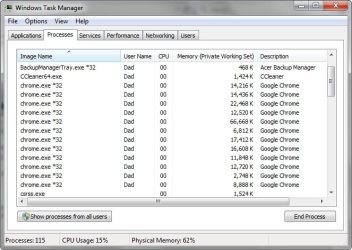
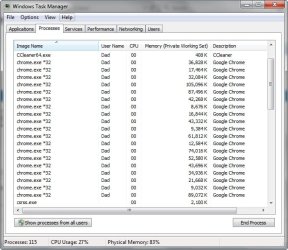
When I launch Chrome, I find 10 to 12 "chrome.exe *32" processes running in the background and the laptop can get pretty slow.

Chrome regularly displays "Not responding", as the laptop struggles to process what should be a simple opening or closing of a tab.

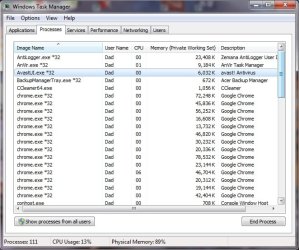
This is what I have at the moment, with just one Chrome window and one tab:

2015-04-24_175116.jpg

I have 64-bit Win 7.

Also, I no longer get the Google page, when I open the Browser for the first time, only "about:blank". It appears from the second tab onwards and for every other Chrome window and tab I open and shows the frequently visited sites, as normal.

What can I do?
 

My Computer My Computer

At a glance

Windows 7 Home Premium 64bitCore i38GB DDR3Intel HD
Computer type
Laptop
Computer Manufacturer/Model Number
Acer Aspire 5741
OS
Windows 7 Home Premium 64bit
CPU
Core i3
Memory
8GB DDR3
Graphics Card(s)
Intel HD
Hi,
Obviously you have some corruption most likely a virus or malware,
What type of extensions do you have installed in Chrome,
Review Jacee’s instructions to run Adwcleaner here post #7,
Ignore the title of the thread,
http://www.sevenforums.com/system-security/316404-instant-savings-app.html
This is what the download button looks like on the BleepingComputer site,
adwcleaner-button.JPG

You can use these free tools to see if they find anything,
Manually Update them before running full scans,
Try not to use your computer while the scans are running, (one at a time of course).
See this tutorial on how to download and run Malwarebytes,
http://www.sevenforums.com/tutorials/338716-malwarebytes-anti-malware-free.html
Also use the Custom scan option not the Threat scan,

Please Do Not clean/ Delete or Remove Any detections before posting the scan results first before review especially Malwarebytes,
http://www.malwarebytes.org/products/malwarebytes_free
SAS is safe to remove anything it finds ;)
http://www.superantispyware.com/?tag=SUPERANTISPYWARE
This one is the longest up to 4 hours, the others are only about 45 minutes,
http://www.microsoft.com/security/scanner/en-us/default.aspx
 
Last edited:

My Computer My Computer

At a glance

Win-7-Pro64bit 7-H-Prem-64biti7-5930K 2nd i9-9940x both water blocked VRM'...Trident-z 3200C14 2nd Trident-z 3600C16EVGA 1080ti ftw3 2nd Titan Xp both water blocked
Computer type
PC/Desktop
Computer Manufacturer/Model Number
Custom assembled by me :}
OS
Win-7-Pro64bit 7-H-Prem-64bit
CPU
i7-5930K 2nd i9-9940x both water blocked VRM's too
Motherboard
ASUS SABERTOOTH X99 2nd ASUS x299 Apex
Memory
Trident-z 3200C14 2nd Trident-z 3600C16
Graphics Card(s)
EVGA 1080ti ftw3 2nd Titan Xp both water blocked
Sound Card
Built-in Realtek
Monitor(s) Displays
1-AOC G2460PG 24"G-Sync 144Hz/ 2nd 1-ASUS VG248QE 24" 144Hz
Screen Resolution
1920 x 1080 144Hz
Hard Drives
2-Samsung M.2 Evo & Evo Plus
2-Samsung 850 EVO 500GB SSD's/ 3-2.5 W.D. Black 1tb-&3-1tb/3-3.5 WD Black 1tb hdd's
PSU
EVGA SuperNOVA 1000-P2 2nd 1200-P2
Case
2-Corsair Obsidian Series 450D Black ATX Mid Tower
Cooling
Custom water loops
Keyboard
Logitech G710+/ 2nd Logitech G910
Mouse
2-RedDragon M901 Perdition 16400 dpi Gaming mouse = wired
Internet Speed
Comcast Ping 19ms 89.31mbps download speed 6.12mbps upload
Antivirus
Malwarebytes Pro/ Superantispyware Pro
Browser
FireFox & Pale moon
Other Info
2nd ASUS X299 Apex/Intel i9-9940x with Custom water loop/7H-Prem-x64/Corsair 450D case/Ram Trident-z 3600C16 4x8gb / Samsung970Evo plus 500gb SSD/Dual ssd EZ swap evo/PSU EVGA SuperNova 1200w-P2 80+Platinum/GPU Titan Xp /8-ML-140 on push-pull on 2-280GTX rads
This is quite normal for Chrome, it's a documented design flaw. Have a look at the details here:
Chromium Blog: Multi-process Architecture

In short, it opens a main process, a process for each tab, a process for each plugin and a process for each extension, or at least that's what they say. It doesn't surprises me to see such usage, even with an empty browser, it's the way it's meant to be (for good or bad).
I find very little reason to worry about that really.


Obviously you have some corruption most likely a virus or malware,
What type of extensions do you have installed in Chrome

Very unlikely to be virus related, considering that Chrome published this behavior years ago and is widely known and even copied by other programs. Lots of extensions inside Chrome would easily explain the tons of processes.
Some routine virus scan for the sake of extra-safety would suffice, just in case, I think.

Unless there is a virus trying to disguise as Chrome :p
 

My Computer My Computer

At a glance

Windows 7 Ultimate x64Intel Core i7-740QM8 GB DDR3NVIDIA GeForce 330GT
Computer type
Laptop
Computer Manufacturer/Model Number
Toshiba Sattelite A665-S6092
OS
Windows 7 Ultimate x64
CPU
Intel Core i7-740QM
Memory
8 GB DDR3
Graphics Card(s)
NVIDIA GeForce 330GT
Screen Resolution
1366x768
Hard Drives
Samsung 840 SSD 500GB
1TB USB3 external HD
Cooling
Coolermaster Notepal U3 notebook cooling pad
Internet Speed
3mbps ASDL
Antivirus
ClamWin 0.98.7
Browser
Opera 12.17 x86 (main), Firefox 38 (sec), IE11 (last resort)
Hi,
Well plug-ins/ extensions get installed sometimes without notice in Chrome too,
These extensions often effect other installed browsers
Either way using that much juice might be normal but I'd say not a good thing
Cheers.

Just a note a lot of people were freaked out because ie10-11 had one process and another for every open tab,
Chrome does it for each extension :p
 

My Computer My Computer

At a glance

Win-7-Pro64bit 7-H-Prem-64biti7-5930K 2nd i9-9940x both water blocked VRM'...Trident-z 3200C14 2nd Trident-z 3600C16EVGA 1080ti ftw3 2nd Titan Xp both water blocked
Computer type
PC/Desktop
Computer Manufacturer/Model Number
Custom assembled by me :}
OS
Win-7-Pro64bit 7-H-Prem-64bit
CPU
i7-5930K 2nd i9-9940x both water blocked VRM's too
Motherboard
ASUS SABERTOOTH X99 2nd ASUS x299 Apex
Memory
Trident-z 3200C14 2nd Trident-z 3600C16
Graphics Card(s)
EVGA 1080ti ftw3 2nd Titan Xp both water blocked
Sound Card
Built-in Realtek
Monitor(s) Displays
1-AOC G2460PG 24"G-Sync 144Hz/ 2nd 1-ASUS VG248QE 24" 144Hz
Screen Resolution
1920 x 1080 144Hz
Hard Drives
2-Samsung M.2 Evo & Evo Plus
2-Samsung 850 EVO 500GB SSD's/ 3-2.5 W.D. Black 1tb-&3-1tb/3-3.5 WD Black 1tb hdd's
PSU
EVGA SuperNOVA 1000-P2 2nd 1200-P2
Case
2-Corsair Obsidian Series 450D Black ATX Mid Tower
Cooling
Custom water loops
Keyboard
Logitech G710+/ 2nd Logitech G910
Mouse
2-RedDragon M901 Perdition 16400 dpi Gaming mouse = wired
Internet Speed
Comcast Ping 19ms 89.31mbps download speed 6.12mbps upload
Antivirus
Malwarebytes Pro/ Superantispyware Pro
Browser
FireFox & Pale moon
Other Info
2nd ASUS X299 Apex/Intel i9-9940x with Custom water loop/7H-Prem-x64/Corsair 450D case/Ram Trident-z 3600C16 4x8gb / Samsung970Evo plus 500gb SSD/Dual ssd EZ swap evo/PSU EVGA SuperNova 1200w-P2 80+Platinum/GPU Titan Xp /8-ML-140 on push-pull on 2-280GTX rads
Sorry for the delay - I've been running complete scans for as many of the progs as possible.

I've had these Chrome extensions for 1,2 or 3 years without any problems:

Avast Online Security 10.2.0.190
Evernote Web Clipper 6.3
EagleGet
Flubit extension 1.1.3.1 - owned by Amazon, usd to get personal lower prices.
Full Page Screen Capture 0.0.15
History Trends Unlimited 1.1.2 - Analyse search and browsing history
Print Friendly & PDF 2.3 - strips extraneous graphics, etc, from webpages leaving only the article to print/turn into PDF
Search the Current Site 6.3 - search all pages of a website

# AdwCleaner v4.202 - Logfile created 25/04/2015 at 00:16:10
# Updated 23/04/2015 by Xplode
# Database : 2015-04-23.2 [Server]
# Operating system : Windows 7 Home Premium Service Pack 1 (x64)
# Username : Dad - DAD-PC
# Running from : C:\PROGRAMS\AdwCleaner 4.202\adwcleaner_4.202.exe
# Option : Scan

***** [ Services ] *****


***** [ Files / Folders ] *****

File Found : C:\Users\Dad\AppData\Local\Google\Chrome\User Data\Default\Local Storage\chrome-extension_ifohbjbgfchkkfhphahclmkpgejiplfo_0.localstorage
File Found : C:\Users\Public\Desktop\eBay.lnk
Folder Found : C:\Program Files (x86)\Coupon Printer
Folder Found : C:\Program Files (x86)\FLV Player
Folder Found : C:\ProgramData\Microsoft\Windows\Start Menu\Programs\Coupon Printer
Folder Found : C:\ProgramData\Microsoft\Windows\Start Menu\Programs\FLV Player
Folder Found : C:\Users\Dad\AppData\Local\Google\Chrome\User Data\Default\Extensions\jliolpcnkmolaaecncdfeofombdekjcp
Folder Found : C:\Windows\FLV Player

***** [ Scheduled tasks ] *****


***** [ Shortcuts ] *****


***** [ Registry ] *****

Data Found : HKCU\Software\Microsoft\Windows\CurrentVersion\Internet Settings [ProxyOverride] - <-loopback>
Key Found : HKCU\Software\Ask&Record
Key Found : HKCU\Software\Local AppWizard-Generated Applications
Key Found : [x64] HKCU\Software\Ask&Record
Key Found : [x64] HKCU\Software\Local AppWizard-Generated Applications
Key Found : [x64] HKCU\Software\Microsoft\Internet Explorer\SearchScopes\{AFDBDDAA-5D3F-42EE-B79C-185A7020515B}
Key Found : HKLM\SOFTWARE\Classes\CLSID\{5555CC4C-FA2B-4D69-8296-B6AE5E95C0B7}
Key Found : HKLM\SOFTWARE\Classes\TypeLib\{63BEF061-5EFC-4753-9806-ED0573BC7C4B}
Key Found : HKLM\SOFTWARE\Google\Chrome\Extensions\eofcbnmajmjmplflapaojjnihcjkigck
Key Found : HKLM\SOFTWARE\Microsoft\Internet Explorer\Low Rights\ElevationPolicy\{0E44BB13-2523-468B-BF51-58D5F52A84F6}
Key Found : HKLM\SOFTWARE\SimplyGen
Key Found : HKU\.DEFAULT\Software\Local AppWizard-Generated Applications

***** [ Web browsers ] *****

-\\ Internet Explorer v11.0.9600.17728


-\\ Mozilla Firefox v37.0.2 (x86 en-GB)


-\\ Google Chrome v42.0.2311.90

[C:\Users\CCleaner-Test\AppData\Local\Google\Chrome\User Data\Default\Web data] - Found [Search Provider] : hxxp://uk.ask.com/web?q={searchTerms}
[C:\Users\CCleaner-Test\AppData\Local\Google\Chrome\User Data\Default\Secure Preferences] - Found [Extension] : eofcbnmajmjmplflapaojjnihcjkigck
[C:\Users\Dad\AppData\Local\Google\Chrome\User Data\Default\Web data] - Found [Search Provider] : hxxp://uk.ask.com/web?q={searchTerms}
[C:\Users\Dad\AppData\Local\Google\Chrome\User Data\Default\Web data] - Found [Search Provider] : hxxp://search.conduit.com/Results.aspx?gd=&ctid=CT3315513&octid=EB_ORIGINAL_CTID&ISID=M08AB69D0-373D-4C18-956B-1138BD153C79&SearchSource=58&CUI=&UM=5&UP=SPF72EF9AF-729C-4225-8D57-299642F05D15&q={searchTerms}&SSPV=
[C:\Users\Dad\AppData\Local\Google\Chrome\User Data\Default\Secure Preferences] - Found [Extension] : booedmolknjekdopkepjjeckmjkdpfgl
[C:\Users\Dad\AppData\Local\Google\Chrome\User Data\Default\Secure Preferences] - Found [Extension] : eofcbnmajmjmplflapaojjnihcjkigck
[C:\Users\Dad\AppData\Local\Google\Chrome\User Data\Default\Secure Preferences] - Found [Extension] : flpcjncodpafbgdpnkljologafpionhb
[C:\Users\Dad\AppData\Local\Google\Chrome\User Data\Default\Secure Preferences] - Found [Extension] : jliolpcnkmolaaecncdfeofombdekjcp

-\\ Chromium v


*************************

AdwCleaner[R0].txt - [3502 bytes] - [25/04/2015 00:16:10]

########## EOF - C:\AdwCleaner\AdwCleaner[R0].txt - [3561 bytes] ##########

The only suspicious item here, that I think is fine, is the FLV Player.

MBAM

Malwarebytes Anti-Malware
www.malwarebytes.org

Scan Date: 25/04/2015
Scan Time: 00:31:49
Logfile: MBAM 2015-04-25 Results.txt
Administrator: Yes

Version: 2.01.4.1018
Malware Database: v2015.04.24.08
Rootkit Database: v2015.04.21.01
License: Free
Malware Protection: Disabled
Malicious Website Protection: Disabled
Self-protection: Disabled

OS: Windows 7 Service Pack 1
CPU: x64
File System: NTFS
User: Dad

Scan Type: Custom Scan
Result: Completed
Objects Scanned: 661839
Time Elapsed: 2 hr, 39 min, 21 sec

Memory: Enabled
Startup: Enabled
Filesystem: Enabled
Archives: Enabled
Rootkits: Disabled
Heuristics: Enabled
PUP: Enabled
PUM: Enabled

Processes: 0
(No malicious items detected)

Modules: 0
(No malicious items detected)

Registry Keys: 0
(No malicious items detected)

Registry Values: 0
(No malicious items detected)

Registry Data: 0
(No malicious items detected)

Folders: 0
(No malicious items detected)

Files: 1
PUP.Optional.InstallIQ.A, C:\PROGRAMS\Applian FLV Player 2.0.25\applianflv.exe, , [94d41c547e0cd66058771730ba47ce32],

Physical Sectors: 0
(No malicious items detected)


(end)


SuperAntispyware

It found 161 tracking cookies, which I deleted.


Microsoft Security Scanner

After 3 hours, it began scanning my external drive, so I cancelled the scan. It hadn't found anything. I couldn't find any way of limiting the scan to the "C:\" drive.

Although multiple processes is a feature of Chrome - which I wasn't aware of, unfortunately - there has to be a reason for why Chrome often grinds to a halt (taking the laptop with it), while Firefox is usually lightning fast in comparison.
 

My Computer My Computer

At a glance

Windows 7 Home Premium 64bitCore i38GB DDR3Intel HD
Computer type
Laptop
Computer Manufacturer/Model Number
Acer Aspire 5741
OS
Windows 7 Home Premium 64bit
CPU
Core i3
Memory
8GB DDR3
Graphics Card(s)
Intel HD
Thanks for the additional info,
yep well you might be seeing the effects of 3 gb of ram,
What antivirus program or any other security related suites do you use before the scanners I recommended using
It might be throwing a fit over all of the processes ?
Cheers.
According to this JRT is recommended to run,
Also HitmanPro
Remove Win32/InstallIQ.A virus (Easy Removal Guide)

If you ever save directly to the external it should also be scanned my friend :)
 
Last edited:

My Computer My Computer

At a glance

Win-7-Pro64bit 7-H-Prem-64biti7-5930K 2nd i9-9940x both water blocked VRM'...Trident-z 3200C14 2nd Trident-z 3600C16EVGA 1080ti ftw3 2nd Titan Xp both water blocked
Computer type
PC/Desktop
Computer Manufacturer/Model Number
Custom assembled by me :}
OS
Win-7-Pro64bit 7-H-Prem-64bit
CPU
i7-5930K 2nd i9-9940x both water blocked VRM's too
Motherboard
ASUS SABERTOOTH X99 2nd ASUS x299 Apex
Memory
Trident-z 3200C14 2nd Trident-z 3600C16
Graphics Card(s)
EVGA 1080ti ftw3 2nd Titan Xp both water blocked
Sound Card
Built-in Realtek
Monitor(s) Displays
1-AOC G2460PG 24"G-Sync 144Hz/ 2nd 1-ASUS VG248QE 24" 144Hz
Screen Resolution
1920 x 1080 144Hz
Hard Drives
2-Samsung M.2 Evo & Evo Plus
2-Samsung 850 EVO 500GB SSD's/ 3-2.5 W.D. Black 1tb-&3-1tb/3-3.5 WD Black 1tb hdd's
PSU
EVGA SuperNOVA 1000-P2 2nd 1200-P2
Case
2-Corsair Obsidian Series 450D Black ATX Mid Tower
Cooling
Custom water loops
Keyboard
Logitech G710+/ 2nd Logitech G910
Mouse
2-RedDragon M901 Perdition 16400 dpi Gaming mouse = wired
Internet Speed
Comcast Ping 19ms 89.31mbps download speed 6.12mbps upload
Antivirus
Malwarebytes Pro/ Superantispyware Pro
Browser
FireFox & Pale moon
Other Info
2nd ASUS X299 Apex/Intel i9-9940x with Custom water loop/7H-Prem-x64/Corsair 450D case/Ram Trident-z 3600C16 4x8gb / Samsung970Evo plus 500gb SSD/Dual ssd EZ swap evo/PSU EVGA SuperNova 1200w-P2 80+Platinum/GPU Titan Xp /8-ML-140 on push-pull on 2-280GTX rads
I have Avast Free Antivirus 2015 and the bog-standard Windows 7 firewall, I'm afraid. Plus Malwarebytes Anti-exploit free and Zemana AntiLogger.

# AdwCleaner v4.202 - Logfile created 26/04/2015 at 20:47:22
# Updated 23/04/2015 by Xplode
# Database : 2015-04-23.2 [Server]
# Operating system : Windows 7 Home Premium Service Pack 1 (x64)
# Username : Dad - DAD-PC
# Running from : C:\PROGRAMS\AdwCleaner 4.202\adwcleaner_4.202.exe
# Option : Cleaning

***** [ Services ] *****

***** [ Files / Folders ] *****

[x] Not Deleted : C:\ProgramData\Microsoft\Windows\Start Menu\Programs\FLV Player
Folder Deleted : C:\ProgramData\Microsoft\Windows\Start Menu\Programs\Coupon Printer
[x] Not Deleted : C:\Program Files (x86)\FLV Player
Folder Deleted : C:\Program Files (x86)\Coupon Printer
[x] Not Deleted : C:\Windows\FLV Player
Folder Deleted : C:\Users\Dad\AppData\Local\Google\Chrome\User Data\Default\Extensions\jliolpcnkmolaaecncdfeofombdekjcp
File Deleted : C:\Users\Dad\AppData\Local\Google\Chrome\User Data\Default\Local Storage\chrome-extension_ifohbjbgfchkkfhphahclmkpgejiplfo_0.localstorage
File Deleted : C:\Users\Public\Desktop\eBay.lnk

***** [ Scheduled tasks ] *****

***** [ Shortcuts ] *****

***** [ Registry ] *****

Key Deleted : HKLM\SOFTWARE\Google\Chrome\Extensions\eofcbnmajmjmplflapaojjnihcjkigck
Key Deleted : HKLM\SOFTWARE\Classes\CLSID\{5555CC4C-FA2B-4D69-8296-B6AE5E95C0B7}
Key Deleted : HKLM\SOFTWARE\Classes\TypeLib\{63BEF061-5EFC-4753-9806-ED0573BC7C4B}
Key Deleted : HKLM\SOFTWARE\Microsoft\Internet Explorer\Low Rights\ElevationPolicy\{0E44BB13-2523-468B-BF51-58D5F52A84F6}
Key Deleted : [x64] HKCU\Software\Microsoft\Internet Explorer\SearchScopes\{AFDBDDAA-5D3F-42EE-B79C-185A7020515B}
Key Deleted : HKCU\Software\Ask&Record
Key Deleted : HKCU\Software\Local AppWizard-Generated Applications
Key Deleted : HKLM\SOFTWARE\SimplyGen
Key Deleted : HKU\.DEFAULT\Software\Local AppWizard-Generated Applications
Data Deleted : HKCU\Software\Microsoft\Windows\CurrentVersion\Internet Settings [ProxyOverride] - <-loopback>

***** [ Web browsers ] *****

-\\ Internet Explorer v11.0.9600.17728

-\\ Mozilla Firefox v37.0.2 (x86 en-GB)

-\\ Google Chrome v42.0.2311.90

[C:\Users\CCleaner-Test\AppData\Local\Google\Chrome\User Data\Default\Web Data] - Deleted [Search Provider] : hxxp://uk.ask.com/web?q={searchTerms}
[C:\Users\CCleaner-Test\AppData\Local\Google\Chrome\User Data\Default\Secure Preferences] - Deleted [Extension] : eofcbnmajmjmplflapaojjnihcjkigck
[C:\Users\Dad\AppData\Local\Google\Chrome\User Data\Default\Web Data] - Deleted [Search Provider] : hxxp://uk.ask.com/web?q={searchTerms}
[C:\Users\Dad\AppData\Local\Google\Chrome\User Data\Default\Web Data] - Deleted [Search Provider] : hxxp://search.conduit.com/Results.aspx?gd=&ctid=CT3315513&octid=EB_ORIGINAL_CTID&ISID=M08AB69D0-373D-4C18-956B-1138BD153C79&SearchSource=58&CUI=&UM=5&UP=SPF72EF9AF-729C-4225-8D57-299642F05D15&q={searchTerms}&SSPV=
[C:\Users\Dad\AppData\Local\Google\Chrome\User Data\Default\Secure Preferences] - Deleted [Extension] : booedmolknjekdopkepjjeckmjkdpfgl
[C:\Users\Dad\AppData\Local\Google\Chrome\User Data\Default\Secure Preferences] - Deleted [Extension] : eofcbnmajmjmplflapaojjnihcjkigck
[C:\Users\Dad\AppData\Local\Google\Chrome\User Data\Default\Secure Preferences] - Deleted [Extension] : flpcjncodpafbgdpnkljologafpionhb
[C:\Users\Dad\AppData\Local\Google\Chrome\User Data\Default\Secure Preferences] - Deleted [Extension] : jliolpcnkmolaaecncdfeofombdekjcp

-\\ Chromium v

*************************

AdwCleaner[R0].txt - [3652 bytes] - [25/04/2015 00:16:10]
AdwCleaner[R1].txt - [3711 bytes] - [26/04/2015 20:40:59]
AdwCleaner[S0].txt - [3571 bytes] - [26/04/2015 20:47:22]

########## EOF - C:\AdwCleaner\AdwCleaner[S0].txt - [3630 bytes] ##########


~~~~~~~~~~~~~~~~~~~~~~~~~~~~~~~~~~~~~~~~~~~~~~~~~~~~~~~~~~~~~
Junkware Removal Tool (JRT) by Thisisu
Version: 6.6.4 (04.26.2015:1)
OS: Windows 7 Home Premium x64
Ran by Dad on 26/04/2015 at 21:40:38.44
~~~~~~~~~~~~~~~~~~~~~~~~~~~~~~~~~~~~~~~~~~~~~~~~~~~~~~~~~~~~~

~~~ Services

~~~ Tasks

~~~ Registry Values

Successfully deleted: [Registry Value] HKEY_CURRENT_USER\Software\Microsoft\Internet Explorer\Toolbar\WebBrowser\\{1392B8D2-5C05-419F-A8F6-B9F15A596612}

~~~ Registry Keys

Successfully deleted: [Registry Key] HKEY_LOCAL_MACHINE\Software\Microsoft\Internet Explorer\SearchScopes\{afdbddaa-5d3f-42ee-b79c-185a7020515b}

~~~ Files

~~~ Folders

Successfully deleted: [Folder] C:\Windows\syswow64\ai_recyclebin

~~~~~~~~~~~~~~~~~~~~~~~~~~~~~~~~~~~~~~~~~~~~~~~~~~~~~~~~~~~~~
Scan was completed on 26/04/2015 at 21:47:26.29
End of JRT log
~~~~~~~~~~~~~~~~~~~~~~~~~~~~~~~~~~~~~~~~~~~~~~~~~~~~~~~~~~~~~


Malwarebytes Anti-Malware
www.malwarebytes.org

Scan Date: 26/04/2015
Scan Time: 22:01:43
Logfile: MBAM 2015-04-26.txt
Administrator: Yes

Version: 2.01.6.1022
Malware Database: v2015.04.26.05
Rootkit Database: v2015.04.21.01
License: Free
Malware Protection: Disabled
Malicious Website Protection: Disabled
Self-protection: Disabled

OS: Windows 7 Service Pack 1
CPU: x64
File System: NTFS
User: Dad

Scan Type: Threat Scan
Result: Completed
Objects Scanned: 438882
Time Elapsed: 27 min, 15 sec

Memory: Enabled
Startup: Enabled
Filesystem: Enabled
Archives: Enabled
Rootkits: Enabled
Heuristics: Enabled
PUP: Enabled
PUM: Enabled

Processes: 0
(No malicious items detected)

Modules: 0
(No malicious items detected)

Registry Keys: 0
(No malicious items detected)

Registry Values: 0
(No malicious items detected)

Registry Data: 0
(No malicious items detected)

Folders: 0
(No malicious items detected)

Files: 0
(No malicious items detected)

Physical Sectors: 0
(No malicious items detected)

(end)


Code:
[B]HitmanPro 3.7.9.240[/B]
www.hitmanpro.com

   Computer name . . . . : DAD-PC
   Windows . . . . . . . : 6.1.1.7601.X64/4
   User name . . . . . . : Dad-PC\Dad
   UAC . . . . . . . . . : Enabled
   License . . . . . . . : Free

   Scan date . . . . . . : 2015-04-26 22:46:15
   Scan mode . . . . . . : Normal
   Scan duration . . . . : 5m 40s
   Disk access mode  . . : Direct disk access (SRB)
   Cloud . . . . . . . . : Internet
   Reboot  . . . . . . . : No

   Threats . . . . . . . : 0
   Traces  . . . . . . . : 2

   Objects scanned . . . : 1,927,805
   Files scanned . . . . : 25,661
   Remnants scanned  . . : 308,451 files / 1,593,693 keys

Potential Unwanted Programs _________________________________________________

   HKU\S-1-5-21-1050699504-4118538850-2090742069-1001\Software\AppDataLow\Software\Smartbar\ (Conduit)

Cookies _____________________________________________________________________

   C:\Users\CCleaner-Test\AppData\Local\Google\Chrome\User Data\Default\Cookies:doubleclick.net
I couldn't delete these as I couldn't activate the free licence.
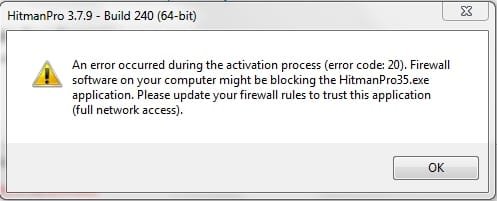
2015-04-26_232754.jpg

I can't find a way to add HitmanPro35.exe to the list of allowed processes in the Windows firewall. I've added HitmanPro.exe, but it didn't make any difference.

Is the slowness of Chrome really down to too little RAM? I know 3Gb isn't much at all and Firefox only has one "firefox.exe *32" process running, making it quicker than Chrome, but there is still a huge difference. The laptop often grinds to a halt when I use Chrome.

 

My Computer My Computer

At a glance

Windows 7 Home Premium 64bitCore i38GB DDR3Intel HD
Computer type
Laptop
Computer Manufacturer/Model Number
Acer Aspire 5741
OS
Windows 7 Home Premium 64bit
CPU
Core i3
Memory
8GB DDR3
Graphics Card(s)
Intel HD
I believe it is just Chrome bogging you down and Avast trying to keep up with all of those processes
The scans as long as you cleaned should be good,
Reset Chrome and firefox for a clean start,

You showed 8 extensions in Chrome but there was 4 additional Chrome processes running I'll assume four tabs were open and not one or two as you stated ?

You might want to test and uninstall one at a time your extensions and see if you can find the problematic add-on soaking up 66.668 kb seems quite a bit to me via your screen shot
Cheers.
 

My Computer My Computer

At a glance

Win-7-Pro64bit 7-H-Prem-64biti7-5930K 2nd i9-9940x both water blocked VRM'...Trident-z 3200C14 2nd Trident-z 3600C16EVGA 1080ti ftw3 2nd Titan Xp both water blocked
Computer type
PC/Desktop
Computer Manufacturer/Model Number
Custom assembled by me :}
OS
Win-7-Pro64bit 7-H-Prem-64bit
CPU
i7-5930K 2nd i9-9940x both water blocked VRM's too
Motherboard
ASUS SABERTOOTH X99 2nd ASUS x299 Apex
Memory
Trident-z 3200C14 2nd Trident-z 3600C16
Graphics Card(s)
EVGA 1080ti ftw3 2nd Titan Xp both water blocked
Sound Card
Built-in Realtek
Monitor(s) Displays
1-AOC G2460PG 24"G-Sync 144Hz/ 2nd 1-ASUS VG248QE 24" 144Hz
Screen Resolution
1920 x 1080 144Hz
Hard Drives
2-Samsung M.2 Evo & Evo Plus
2-Samsung 850 EVO 500GB SSD's/ 3-2.5 W.D. Black 1tb-&3-1tb/3-3.5 WD Black 1tb hdd's
PSU
EVGA SuperNOVA 1000-P2 2nd 1200-P2
Case
2-Corsair Obsidian Series 450D Black ATX Mid Tower
Cooling
Custom water loops
Keyboard
Logitech G710+/ 2nd Logitech G910
Mouse
2-RedDragon M901 Perdition 16400 dpi Gaming mouse = wired
Internet Speed
Comcast Ping 19ms 89.31mbps download speed 6.12mbps upload
Antivirus
Malwarebytes Pro/ Superantispyware Pro
Browser
FireFox & Pale moon
Other Info
2nd ASUS X299 Apex/Intel i9-9940x with Custom water loop/7H-Prem-x64/Corsair 450D case/Ram Trident-z 3600C16 4x8gb / Samsung970Evo plus 500gb SSD/Dual ssd EZ swap evo/PSU EVGA SuperNova 1200w-P2 80+Platinum/GPU Titan Xp /8-ML-140 on push-pull on 2-280GTX rads
Looks quite the same on my machine.

I had questioned it initially too. My research indicated it was normal for Chrome and does not seem to cause me any problems.

There is an option in Chromes advanced settings to prevent background processes from running after Chrome is closed you might want to experiment with.

I find I get much faster load times with the background processes running and as a have a silly abundance of RAM I just leave it. HTH

D
 

Attachments

  • 2015-04-27 12_10_42-Windows Task Manager.jpg
    2015-04-27 12_10_42-Windows Task Manager.jpg
    93.4 KB · Views: 1

My Computer My Computer

At a glance

Windows 10 Professional 64bit.Intel(R) Core(TM) i7-4770 CPU @ 3.40GHz16 GB Micron DDR3 [PC3-12800]NVIDIA GeForce GTX 650 Ti
Computer type
PC/Desktop
Computer Manufacturer/Model Number
Dell XPS 8700 SE
OS
Windows 10 Professional 64bit.
CPU
Intel(R) Core(TM) i7-4770 CPU @ 3.40GHz
Motherboard
Dell Inc. Model 0KWVT8
Memory
16 GB Micron DDR3 [PC3-12800]
Graphics Card(s)
NVIDIA GeForce GTX 650 Ti
Sound Card
SB Recon3D PCIe
Monitor(s) Displays
Dell 2707WFP
Screen Resolution
1920 x 1200
Hard Drives
Manufacturer Seagate
Model ST2000DM001-1CH SCSI Disk Device
Size 2000 GB with SAMSUNG SSD PM830 mSATA 32GB Cache drive.

Seagate
Model ST1000DM003-1CH162
Size 1000 GB

Western Digital
Model WDC WD2500JS-22MHB0
Size 250 GB
@ datapod

Do you get a huge Chrome cache after a browsing session that takes ages to cleanup using Ccleaner? Itundic has reported this issue in another thread. So - is it normal and what's your typical cache size after a browsing session?

Thanks.

356393d1429139115t-ccleaner-ccsetup504-exe-side-side-configuration-incorrect-2015-04-15_235903.jpg
 

My Computer My Computer

At a glance

Microsoft Windows 7 Home Premium 64-bit 7601 ...AMD C-60 APU with Radeon(tm) HD Graphics4.00 GBAMD Radeon HD 6290 Graphics
Computer type
Laptop
Computer Manufacturer/Model Number
ASUS
OS
Microsoft Windows 7 Home Premium 64-bit 7601 Multiprocessor Free Service Pack 1
CPU
AMD C-60 APU with Radeon(tm) HD Graphics
Motherboard
ASUSTeK COMPUTER INC. X501U
Memory
4.00 GB
Graphics Card(s)
AMD Radeon HD 6290 Graphics
Sound Card
(1) AMD High Definition Audio Device (2) Realtek High Defi
Screen Resolution
1366 x 768 x 32 bits (4294967296 colors) @ 60 Hz
Hard Drives
Hitachi HTS545050A7E380 SATA Disk Device
Antivirus
Comodo CIS & FW, SecureAplus App Whitelisting, Threatfire
Browser
Cyberfox 64bit, Opera 64bit, Airfox
Other Info
Spy-The-Spy, HitmanPro.Alert, Norton Connect Safe, MJRegWatcher, BitDefender TrafficLight, Voodoo Shield, Zemana AntiMalware
I genuinely only had one Chrome window with one tab open, but 12 processes in Task Manager.

I've opened Chrome again and Task Manager displays 11 "chrome.exe *32" processes this time.
8 extensions, plus 1 window/tab = 9. I don't know if it is as simple as this, but does that mean 2 (sometimes 3) mysterious processes?

I don't have any background Chrome apps running in the background, as there aren't any shown in the systray, and I'd rather not turn off any background processes.

Also, as I have 64-bit Win 7, why do I have "32-bit" processes? Datapod's Task Manager shows only "chrome.exe".

I also have the probably unrelated problem of the Google search bar and frequently-visited sites not displayed when I launch Chrome, but displayed from the 2nd tab onwards and in every susequent Chrome window. Why do I initially get "about:blank"?
 

My Computer My Computer

At a glance

Windows 7 Home Premium 64bitCore i38GB DDR3Intel HD
Computer type
Laptop
Computer Manufacturer/Model Number
Acer Aspire 5741
OS
Windows 7 Home Premium 64bit
CPU
Core i3
Memory
8GB DDR3
Graphics Card(s)
Intel HD
Hi,
Possibly post a ccleaner screen shot like Chandler did showing your browsers cache
After I imagine delete you Chrome browser history from the beginning of time :) funny slogan Chrome has ;)

After seeing some of the listing it might possibly time to reset Chrome and start fresh with your add-ons.
It's a pain I know but after a while everything becomes corrupt or in need of re-install.
 

My Computer My Computer

At a glance

Win-7-Pro64bit 7-H-Prem-64biti7-5930K 2nd i9-9940x both water blocked VRM'...Trident-z 3200C14 2nd Trident-z 3600C16EVGA 1080ti ftw3 2nd Titan Xp both water blocked
Computer type
PC/Desktop
Computer Manufacturer/Model Number
Custom assembled by me :}
OS
Win-7-Pro64bit 7-H-Prem-64bit
CPU
i7-5930K 2nd i9-9940x both water blocked VRM's too
Motherboard
ASUS SABERTOOTH X99 2nd ASUS x299 Apex
Memory
Trident-z 3200C14 2nd Trident-z 3600C16
Graphics Card(s)
EVGA 1080ti ftw3 2nd Titan Xp both water blocked
Sound Card
Built-in Realtek
Monitor(s) Displays
1-AOC G2460PG 24"G-Sync 144Hz/ 2nd 1-ASUS VG248QE 24" 144Hz
Screen Resolution
1920 x 1080 144Hz
Hard Drives
2-Samsung M.2 Evo & Evo Plus
2-Samsung 850 EVO 500GB SSD's/ 3-2.5 W.D. Black 1tb-&3-1tb/3-3.5 WD Black 1tb hdd's
PSU
EVGA SuperNOVA 1000-P2 2nd 1200-P2
Case
2-Corsair Obsidian Series 450D Black ATX Mid Tower
Cooling
Custom water loops
Keyboard
Logitech G710+/ 2nd Logitech G910
Mouse
2-RedDragon M901 Perdition 16400 dpi Gaming mouse = wired
Internet Speed
Comcast Ping 19ms 89.31mbps download speed 6.12mbps upload
Antivirus
Malwarebytes Pro/ Superantispyware Pro
Browser
FireFox & Pale moon
Other Info
2nd ASUS X299 Apex/Intel i9-9940x with Custom water loop/7H-Prem-x64/Corsair 450D case/Ram Trident-z 3600C16 4x8gb / Samsung970Evo plus 500gb SSD/Dual ssd EZ swap evo/PSU EVGA SuperNova 1200w-P2 80+Platinum/GPU Titan Xp /8-ML-140 on push-pull on 2-280GTX rads
I've opened Chrome again and Task Manager displays 11 "chrome.exe *32" processes this time.
8 extensions, plus 1 window/tab = 9. I don't know if it is as simple as this, but does that mean 2 (sometimes 3) mysterious processes?

The exact account of all those processes is not always exactly the same, and it's normal, it's the regular why Chrome is designed to run. A quick and dirty math (and certainly inaccurate) gives 8 extensions, plus 1 tab, plus the central coordinating process, plus possibly some plugin like Flash (quite possible) or Java (much less common) or Silverlight (almost inexistent) could easily reach 11/12 processes easily. Nothing about it is surprising to me, it's the normal Chrome way of doing things (for good or bad).


Also, as I have 64-bit Win 7, why do I have "32-bit" processes? Datapod's Task Manager shows only "chrome.exe".

It's simply that you're running the 32 bits version of Chrome, while Datapod is running the 64 bits version. Again, totally normal, just both of you downloaded different versions. In their site there are both installers available.

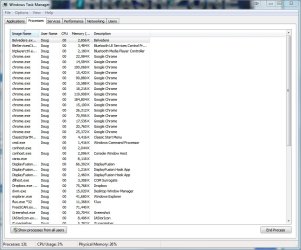
What makes me a bit suspecting about all this is your very first screenshot of task manager. I just noticed that it shows 115 processes at that time, which sounds a lot high to me. It could be nothing, but check carefully each one of them. Maybe some unneeded startup programs or something else is eating your CPU, thus making the whole thing slower. But at this point, Chrome is for sure not the primary offender. If it were, you should really consider switching to a lighter browser instead.
 

My Computer My Computer

At a glance

Windows 7 Ultimate x64Intel Core i7-740QM8 GB DDR3NVIDIA GeForce 330GT
Computer type
Laptop
Computer Manufacturer/Model Number
Toshiba Sattelite A665-S6092
OS
Windows 7 Ultimate x64
CPU
Intel Core i7-740QM
Memory
8 GB DDR3
Graphics Card(s)
NVIDIA GeForce 330GT
Screen Resolution
1366x768
Hard Drives
Samsung 840 SSD 500GB
1TB USB3 external HD
Cooling
Coolermaster Notepal U3 notebook cooling pad
Internet Speed
3mbps ASDL
Antivirus
ClamWin 0.98.7
Browser
Opera 12.17 x86 (main), Firefox 38 (sec), IE11 (last resort)
I wouldn't doubt if Avast wasn't throwing a fit over all of the "Normal" processes :D
 

My Computer My Computer

At a glance

Win-7-Pro64bit 7-H-Prem-64biti7-5930K 2nd i9-9940x both water blocked VRM'...Trident-z 3200C14 2nd Trident-z 3600C16EVGA 1080ti ftw3 2nd Titan Xp both water blocked
Computer type
PC/Desktop
Computer Manufacturer/Model Number
Custom assembled by me :}
OS
Win-7-Pro64bit 7-H-Prem-64bit
CPU
i7-5930K 2nd i9-9940x both water blocked VRM's too
Motherboard
ASUS SABERTOOTH X99 2nd ASUS x299 Apex
Memory
Trident-z 3200C14 2nd Trident-z 3600C16
Graphics Card(s)
EVGA 1080ti ftw3 2nd Titan Xp both water blocked
Sound Card
Built-in Realtek
Monitor(s) Displays
1-AOC G2460PG 24"G-Sync 144Hz/ 2nd 1-ASUS VG248QE 24" 144Hz
Screen Resolution
1920 x 1080 144Hz
Hard Drives
2-Samsung M.2 Evo & Evo Plus
2-Samsung 850 EVO 500GB SSD's/ 3-2.5 W.D. Black 1tb-&3-1tb/3-3.5 WD Black 1tb hdd's
PSU
EVGA SuperNOVA 1000-P2 2nd 1200-P2
Case
2-Corsair Obsidian Series 450D Black ATX Mid Tower
Cooling
Custom water loops
Keyboard
Logitech G710+/ 2nd Logitech G910
Mouse
2-RedDragon M901 Perdition 16400 dpi Gaming mouse = wired
Internet Speed
Comcast Ping 19ms 89.31mbps download speed 6.12mbps upload
Antivirus
Malwarebytes Pro/ Superantispyware Pro
Browser
FireFox & Pale moon
Other Info
2nd ASUS X299 Apex/Intel i9-9940x with Custom water loop/7H-Prem-x64/Corsair 450D case/Ram Trident-z 3600C16 4x8gb / Samsung970Evo plus 500gb SSD/Dual ssd EZ swap evo/PSU EVGA SuperNova 1200w-P2 80+Platinum/GPU Titan Xp /8-ML-140 on push-pull on 2-280GTX rads
I guess everyone's right - it is a normal part of Chrome's operation. More RAM is in order then, though all the other processes I have running in Windows probably don't help.

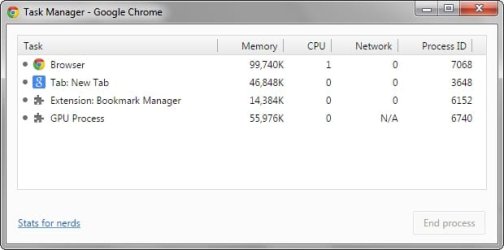
With just one Chrome window open (no additional tabs):

2015-04-28_234802.jpg

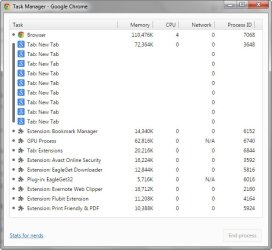
9 additional tabs - 10 'pages' in all:

2015-04-28_234904.jpg

Plus the extensions:

2015-04-28_235535.jpg

Re: "about:blank"

I've fixed this via a very circuitous route.

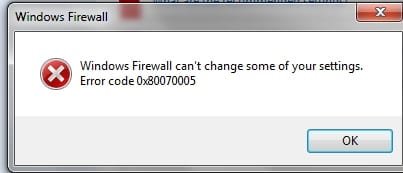
In order to register HitmanPro (post #7), I had to disable the Windows firewall, but received this error when I tried to re-enable it:

2015-04-27_192616_crop.jpg

To fix this, I found this MS support page and went through everything, none of which worked on the firewall, but indirectly led to fixing the Chrome search page problem:
https://support.microsoft.com/en-us/kb/2530126

Methods 1 & 2 - neither the Microsoft Safety Scanner page or "MS Fix it" would load.

Method 3 - there wasn't any need to manually restart the Firewall or Base Filtering Engine(?), as both were running

Method 4 - I stopped and restarted these services, via a "Repair.bat" batch file:

sc config MpsSvc start= auto
sc config KeyIso start= auto
sc config BFE start= auto
sc config FwcAgent start= auto
net stop MpsSvc
net start MpsSvc
net stop KeyIso
net start KeyIso
net start Wlansvc
net start dot3svc
net start EapHostnet
net stop BFE
net start BFE
net start PolicyAgent
net start MpsSvc
net start IKEEXT
net start DcaSvcnet
net stop FwcAgent
net start FwcAgent

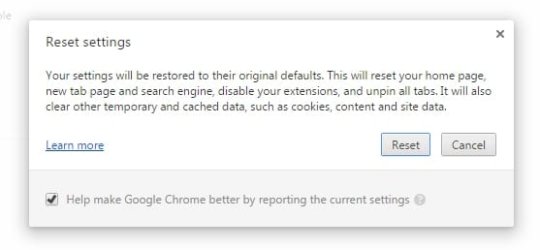
When I opened Chrome, I found that something - probably the batch file - had changed some settings:

2015-04-28_000743.jpg

2015-04-28_000806.jpg

Resetting everything restored the Search homepage.

The firewall was restored by rebooting.

I've reinstalled Chrome and the memory usage is exactly the same, so it's probably the laptop.

Re: 32-bit Chrome vs. 64-bit

I wasn't given any choice as to which version was installed. It's an automatic process, via the "ChromeSetup.exe". I'm not too concerned, I simply didn't want to miss a potentially better browser attuned to 64-bit Win 7.

Thanks to everyone for their help: ThrashZone, Datapod, Callender and Alejando85.

I also have serious problems with IE11, but I'll start a new thread for that.

Cheers.
 

My Computer My Computer

At a glance

Windows 7 Home Premium 64bitCore i38GB DDR3Intel HD
Computer type
Laptop
Computer Manufacturer/Model Number
Acer Aspire 5741
OS
Windows 7 Home Premium 64bit
CPU
Core i3
Memory
8GB DDR3
Graphics Card(s)
Intel HD
Hi,
You haven't shown what Avast is using when Chrome is open opposed to when closed not that it would be much different

I'm not sure if I translated it correctly or not but here it is,
3gb = 3000000 k or kb
So you have ram left over but :/
You have to feed the beast first :)
 

My Computer My Computer

At a glance

Win-7-Pro64bit 7-H-Prem-64biti7-5930K 2nd i9-9940x both water blocked VRM'...Trident-z 3200C14 2nd Trident-z 3600C16EVGA 1080ti ftw3 2nd Titan Xp both water blocked
Computer type
PC/Desktop
Computer Manufacturer/Model Number
Custom assembled by me :}
OS
Win-7-Pro64bit 7-H-Prem-64bit
CPU
i7-5930K 2nd i9-9940x both water blocked VRM's too
Motherboard
ASUS SABERTOOTH X99 2nd ASUS x299 Apex
Memory
Trident-z 3200C14 2nd Trident-z 3600C16
Graphics Card(s)
EVGA 1080ti ftw3 2nd Titan Xp both water blocked
Sound Card
Built-in Realtek
Monitor(s) Displays
1-AOC G2460PG 24"G-Sync 144Hz/ 2nd 1-ASUS VG248QE 24" 144Hz
Screen Resolution
1920 x 1080 144Hz
Hard Drives
2-Samsung M.2 Evo & Evo Plus
2-Samsung 850 EVO 500GB SSD's/ 3-2.5 W.D. Black 1tb-&3-1tb/3-3.5 WD Black 1tb hdd's
PSU
EVGA SuperNOVA 1000-P2 2nd 1200-P2
Case
2-Corsair Obsidian Series 450D Black ATX Mid Tower
Cooling
Custom water loops
Keyboard
Logitech G710+/ 2nd Logitech G910
Mouse
2-RedDragon M901 Perdition 16400 dpi Gaming mouse = wired
Internet Speed
Comcast Ping 19ms 89.31mbps download speed 6.12mbps upload
Antivirus
Malwarebytes Pro/ Superantispyware Pro
Browser
FireFox & Pale moon
Other Info
2nd ASUS X299 Apex/Intel i9-9940x with Custom water loop/7H-Prem-x64/Corsair 450D case/Ram Trident-z 3600C16 4x8gb / Samsung970Evo plus 500gb SSD/Dual ssd EZ swap evo/PSU EVGA SuperNova 1200w-P2 80+Platinum/GPU Titan Xp /8-ML-140 on push-pull on 2-280GTX rads
Avast seems to be fine, as far as I can tell.

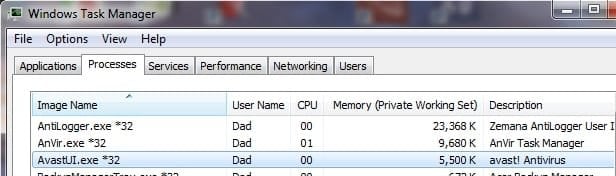
Without Chrome, this is Avast:

2015-04-29_020540 no chrome.jpg

With a single Chrome window and 10 tabs on 10 different sites:

2015-04-29_020944 10 tabs 0 ext.jpg
 

My Computer My Computer

At a glance

Windows 7 Home Premium 64bitCore i38GB DDR3Intel HD
Computer type
Laptop
Computer Manufacturer/Model Number
Acer Aspire 5741
OS
Windows 7 Home Premium 64bit
CPU
Core i3
Memory
8GB DDR3
Graphics Card(s)
Intel HD
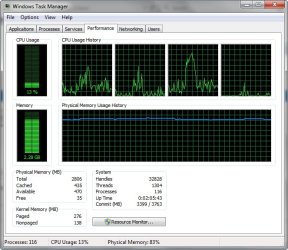
Physical Memory: 89% that pretty much speaks for it's self according to that last screen shot at the bottom :(

Go to the Performance section and lets see that one 89% might be left to use ?
 

My Computer My Computer

At a glance

Win-7-Pro64bit 7-H-Prem-64biti7-5930K 2nd i9-9940x both water blocked VRM'...Trident-z 3200C14 2nd Trident-z 3600C16EVGA 1080ti ftw3 2nd Titan Xp both water blocked
Computer type
PC/Desktop
Computer Manufacturer/Model Number
Custom assembled by me :}
OS
Win-7-Pro64bit 7-H-Prem-64bit
CPU
i7-5930K 2nd i9-9940x both water blocked VRM's too
Motherboard
ASUS SABERTOOTH X99 2nd ASUS x299 Apex
Memory
Trident-z 3200C14 2nd Trident-z 3600C16
Graphics Card(s)
EVGA 1080ti ftw3 2nd Titan Xp both water blocked
Sound Card
Built-in Realtek
Monitor(s) Displays
1-AOC G2460PG 24"G-Sync 144Hz/ 2nd 1-ASUS VG248QE 24" 144Hz
Screen Resolution
1920 x 1080 144Hz
Hard Drives
2-Samsung M.2 Evo & Evo Plus
2-Samsung 850 EVO 500GB SSD's/ 3-2.5 W.D. Black 1tb-&3-1tb/3-3.5 WD Black 1tb hdd's
PSU
EVGA SuperNOVA 1000-P2 2nd 1200-P2
Case
2-Corsair Obsidian Series 450D Black ATX Mid Tower
Cooling
Custom water loops
Keyboard
Logitech G710+/ 2nd Logitech G910
Mouse
2-RedDragon M901 Perdition 16400 dpi Gaming mouse = wired
Internet Speed
Comcast Ping 19ms 89.31mbps download speed 6.12mbps upload
Antivirus
Malwarebytes Pro/ Superantispyware Pro
Browser
FireFox & Pale moon
Other Info
2nd ASUS X299 Apex/Intel i9-9940x with Custom water loop/7H-Prem-x64/Corsair 450D case/Ram Trident-z 3600C16 4x8gb / Samsung970Evo plus 500gb SSD/Dual ssd EZ swap evo/PSU EVGA SuperNova 1200w-P2 80+Platinum/GPU Titan Xp /8-ML-140 on push-pull on 2-280GTX rads
Last edited:

My Computer My Computer

At a glance

Win-7-Pro64bit 7-H-Prem-64biti7-5930K 2nd i9-9940x both water blocked VRM'...Trident-z 3200C14 2nd Trident-z 3600C16EVGA 1080ti ftw3 2nd Titan Xp both water blocked
Computer type
PC/Desktop
Computer Manufacturer/Model Number
Custom assembled by me :}
OS
Win-7-Pro64bit 7-H-Prem-64bit
CPU
i7-5930K 2nd i9-9940x both water blocked VRM's too
Motherboard
ASUS SABERTOOTH X99 2nd ASUS x299 Apex
Memory
Trident-z 3200C14 2nd Trident-z 3600C16
Graphics Card(s)
EVGA 1080ti ftw3 2nd Titan Xp both water blocked
Sound Card
Built-in Realtek
Monitor(s) Displays
1-AOC G2460PG 24"G-Sync 144Hz/ 2nd 1-ASUS VG248QE 24" 144Hz
Screen Resolution
1920 x 1080 144Hz
Hard Drives
2-Samsung M.2 Evo & Evo Plus
2-Samsung 850 EVO 500GB SSD's/ 3-2.5 W.D. Black 1tb-&3-1tb/3-3.5 WD Black 1tb hdd's
PSU
EVGA SuperNOVA 1000-P2 2nd 1200-P2
Case
2-Corsair Obsidian Series 450D Black ATX Mid Tower
Cooling
Custom water loops
Keyboard
Logitech G710+/ 2nd Logitech G910
Mouse
2-RedDragon M901 Perdition 16400 dpi Gaming mouse = wired
Internet Speed
Comcast Ping 19ms 89.31mbps download speed 6.12mbps upload
Antivirus
Malwarebytes Pro/ Superantispyware Pro
Browser
FireFox & Pale moon
Other Info
2nd ASUS X299 Apex/Intel i9-9940x with Custom water loop/7H-Prem-x64/Corsair 450D case/Ram Trident-z 3600C16 4x8gb / Samsung970Evo plus 500gb SSD/Dual ssd EZ swap evo/PSU EVGA SuperNova 1200w-P2 80+Platinum/GPU Titan Xp /8-ML-140 on push-pull on 2-280GTX rads
Sorry, I had to go to bed.

With 10 windows/tabs:

2015-04-29_164926.jpg

Performance:

2015-04-29_165006.jpg
 

My Computer My Computer

At a glance

Windows 7 Home Premium 64bitCore i38GB DDR3Intel HD
Computer type
Laptop
Computer Manufacturer/Model Number
Acer Aspire 5741
OS
Windows 7 Home Premium 64bit
CPU
Core i3
Memory
8GB DDR3
Graphics Card(s)
Intel HD
Back
Top