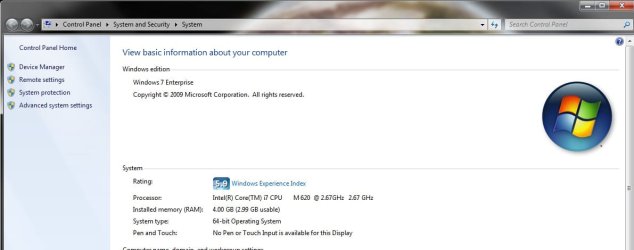
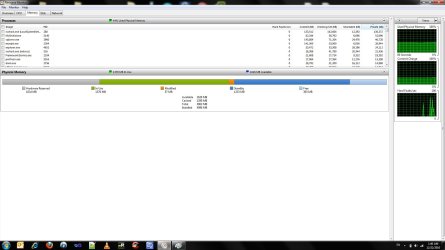
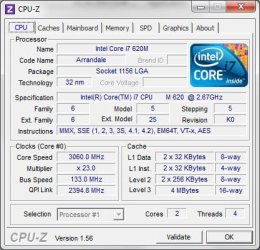
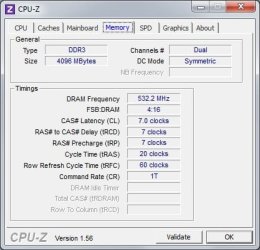
1 giga is missing

igalep132

New member
Local time
10:07 AM
Messages
34
Hi, I use win7 64b enterprise edition
i have 4 gb installed, but from some reason, only 3 gb are usable :confused:

any idea ?
 

Attachments

  • 2.jpg
    2.jpg
    43.5 KB · Views: 31
  • Untitled.jpg
    Untitled.jpg
    111.7 KB · Views: 24

My Computer

OS
7
Please fill out your system specs.
How to - System Specs

Laptop? Looks like 1GB is being reserved for hardware, I suspect Video Card is sharing system memory.
 

My Computer

Computer Manufacturer/Model Number
Custom
OS
Windows 7 Ultimate x64
CPU
Intel i5-2500k
Motherboard
ASUS P8Z68-V Pro/GEN3
Memory
16GB
Graphics Card(s)
2x Radeon HD7970 Crossfire
Sound Card
On-Board / Logitech G930
Monitor(s) Displays
3x Dell u2412m
Screen Resolution
5760x1200
Hard Drives
Toshiba thns064gg2bbaa SSD
Seagate Barracuda 7200.12 ST31000528AS 1TB
Intel RST SSD caching enabled
PSU
Corsair AX850
Case
Corsair Obsidian 650D
Cooling
Corsair H100
Keyboard
Logitech Illuminated
Mouse
Logitech M510 Wireless
Internet Speed
1Mb/s
If the BIOS does not have a memory remap option you are out of luck.
 

My Computer

Computer type
PC/Desktop
Computer Manufacturer/Model Number
Alienware Aurora ALX R4
OS
Windows 10 Pro (x64)
CPU
Intel Core i7-3930K (3.2GHz - 4.5GHz)
Motherboard
Alienware Aurora-R4 x79
Memory
4x Samsung 4GB PC3-12800 DDR3 (16GB 1600MHz)
Graphics Card(s)
Nvidia Geforce GTX 690
Sound Card
SteelSeries Siberia Elite
Monitor(s) Displays
Dell UltraSharp U3011
Screen Resolution
2560x1600
Hard Drives
Samsung 850 Pro 256 GB, Seagate 1TB Desktop Hybrid HDD, 2x Western Digital 4TB Green HDD
PSU
875W Some Dell PSU <.<
Case
Alienware Aurora ALX
Cooling
Custom Liquid Cooling (EK CPU & GPU blocks) dual EK 480RAD
Keyboard
Logitech G710+ Mechanical
Mouse
Logitech G700s
Internet Speed
Verizon Fios (50 mbps average)
Other Info
Server: Intel NUC D54250WYK: i5-4250U, 16GB, 256 GB mSATA, Windows Server 2012 R2
I have the same problem on my Dell Precision 370. I have 4GB ram but only 3GB is usable. The rest is used by Win 7 X64. I'm about to treat myself to 8GB for Christmas.

Only3GB.jpg
 

My Computer

Computer type
PC/Desktop
Computer Manufacturer/Model Number
Lenovo IdeaCenter 450
OS
Windows 10 Pro X64
CPU
Intel Quad Core i7-4770 @ 3.4Ghz
Memory
16.0GB PC3-12800 DDR3 SDRAM 1600 MHz
Graphics Card(s)
Intel Integrated HD Graphics
Sound Card
Realtek HD Audio
Monitor(s) Displays
HP 22" LCD
Screen Resolution
1680 x 1050
Hard Drives
250GB Samsung EVO SATA-3 SSD
2TB Seagate ST2000DM001 SATA-2
1.5TB Seagate ST3150041AS SATA

Keyboard
Dell USB
Mouse
Lenovo USB
Internet Speed
Cable via Road Runner 3MB Upload, 30MB Download
Antivirus
Windows Defender, MBAM Pro, MBAE
Browser
Seamonkey
Other Info
UEFI/GPT
PLDS DVD-RW DH16AERSH
Last edited by a moderator:

My Computer

Computer Manufacturer/Model Number
HP, Dell, Gateway, Toshiba - 4 laptops and 2 desktops
OS
Vista, Windows7, Mint Mate, Zorin, Windows 8
CPU
from 1.6GHz Duo to i7
Monitor(s) Displays
2x HP w2207
Hard Drives
5x HDD, 7x SSD, 12x Externals
Keyboard
with trackball - no mices
Mouse
Trackball mice
Internet Speed
DSL 6000
Please fill out your system specs.
How to - System Specs

Laptop? Looks like 1GB is being reserved for hardware, I suspect Video Card is sharing system memory.

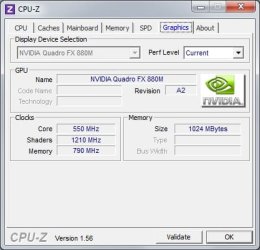
yes, it is a laptop, but i've a video card in the system
see attached screenshots

If the BIOS does not have a memory remap option you are out of luck.
i do have...


Go to msconfig > boot tab > advanced options > uncheck "Maximum memory" > reboot.

http://www.sevenforums.com/tutorials/66482-memory-set-maximum-amount-used-windows-7-a.html

it is unchecked by default
 

Attachments

  • 1.jpg
    1.jpg
    39.6 KB · Views: 3
  • 2.jpg
    2.jpg
    28.2 KB · Views: 3
  • 3.jpg
    3.jpg
    25.1 KB · Views: 3

My Computer

OS
7
Back
Top