1 User some files possibly corrupted ??

bac0926

New member
Local time
2:24 PM
Messages
4
Location
CHICAGO
I have three users on my computer. The other day it looks like some got corrupted.
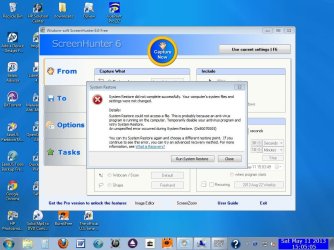
When I logon at first every thing is fine. I get my wallpaper. Then some of my regular pgms start opening up. then the background goes completely black briefly. The icons still show up. Then the background turns a pale blue (not the BSOD BLUE) there is nothing on the background it is a solid color. In addition if I right click on the background and click on either "personalize or "screen resolution" I get the message about "outgoing call" (see attached) I tried to do a checkpoint but it had an error saying a file was in use(see 2nd attached)
The other two users are fine
Do I have to create a new user and copy the data files over ?
 

Attachments

  • ScreenHunter_12 May. 10 17.19.jpg
    ScreenHunter_12 May. 10 17.19.jpg
    78.1 KB · Views: 8
  • ScreenHunter_12 May. 11 15.05.jpg
    ScreenHunter_12 May. 11 15.05.jpg
    105.2 KB · Views: 8

My Computer

Computer type
PC/Desktop
Computer Manufacturer/Model Number
HP
OS
WINDOWS 7 HOME PREMIUM 64 BIT
CPU
: AMD E-450 APU Processor Count: 2
Motherboard
: PEGATRON CORPORATION, 2AD1
Memory
3686 Mb
Graphics Card(s)
AMD Radeon HD 6320
Hard Drives
C: Total - 465640 MB
Antivirus
avast
Browser
firefox
See Option Two here: http://www.sevenforums.com/tutorials/700-system-restore.html

If you do not have a Windows 7 installation DVD, you can download a legal copy with SP1 integrated from here:

Windows 7 Direct Download Links

Make sure you get the same version you have, Home Premium, Pro or Ultimate and 32 or 64 bit. Note that Basic or Starter is not available.

I recommend using ImgBurn at 4X speed (or the slowest available) to create the DVD from the downloaded .iso file.

You can do this on any computer capable of burning a DVD.

YOU MUST HAVE A VALID KEY TO INSTALL THIS .ISO. The one on the COA sticker on your computer will work.

You can also create a bootable USB Flash drive (4GB or larger) to install Windows 7 from.

  1. Download and run Universal USB Installer – Easy as 1 2 3
  2. Select Windows 7 from the first drop down list, all the way to the bottom
  3. Select the downloaded Windows 7 iso file
  4. Select your USB flash drive
  5. Click Create

For techies or folks who work on computers: Create Windows 7 Universal ISO With All Editions Selection On Install with ei.cfg Removal Utility.
This will fit on a 6GB flash drive or can be burned to a DVD.
 

My Computer

Computer type
PC/Desktop
Computer Manufacturer/Model Number
Lenovo IdeaCenter 450
OS
Windows 10 Pro X64
CPU
Intel Quad Core i7-4770 @ 3.4Ghz
Memory
16.0GB PC3-12800 DDR3 SDRAM 1600 MHz
Graphics Card(s)
Intel Integrated HD Graphics
Sound Card
Realtek HD Audio
Monitor(s) Displays
HP 22" LCD
Screen Resolution
1680 x 1050
Hard Drives
250GB Samsung EVO SATA-3 SSD
2TB Seagate ST2000DM001 SATA-2
1.5TB Seagate ST3150041AS SATA
Keyboard
Dell USB
Mouse
Lenovo USB
Internet Speed
Cable via Road Runner 3MB Upload, 30MB Download
Antivirus
Windows Defender, MBAM Pro, MBAE
Browser
Seamonkey
Other Info
UEFI/GPT
PLDS DVD-RW DH16AERSH
Did restore worked fine...thx
 

My Computer

Computer type
PC/Desktop
Computer Manufacturer/Model Number
HP
OS
WINDOWS 7 HOME PREMIUM 64 BIT
CPU
: AMD E-450 APU Processor Count: 2
Motherboard
: PEGATRON CORPORATION, 2AD1
Memory
3686 Mb
Graphics Card(s)
AMD Radeon HD 6320
Hard Drives
C: Total - 465640 MB
Antivirus
avast
Browser
firefox
Back
Top