
1 Year old SSD will not boot into windows

Pantz

New member
Member
VIP
Local time
4:54 PM
Messages
318
Hello Every one, well today I booted to into windows 7 and it just Crashed, (weird I know ) so I tried several reboot attempt, and it would get to the windows LOGO and just crash, i was unable to get the Error code.it went by to fast

I then tried to do a repair, no luck, then tried to do a image restore ( have done a few in the past and they worked ) and the restore image was unable to restore, ( SSD drive was in use-Message )

So i tried to boot just from the SSD itself and said that the MBR was missing ( my first clue something is bad

So i tried to boot in safe mode.. i was able to boot into safe mode

so i just said let me bite the bullet and do a clean install of windows 7, I needed to do one anyways
And i could not do a Clean install of Windows 7( windows cannot be installed on this DISK.)

maybe some of my previous problems have finally come back to bite me

http://www.sevenforums.com/search.php?searchid=4534156

Any suggestion would be greatly appreciated

Thanks in advance
 

Attachments
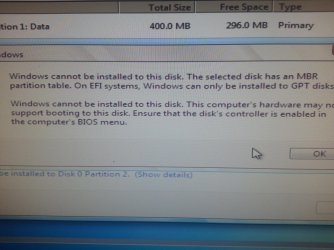
  • SSD Error.jpg
    SSD Error.jpg
    868.3 KB · Views: 0

My Computer My Computer

At a glance

Genuine windows 7X64AMD 8320 FX Processor8 Gigs Corsair Vengance DDR3 1886 MHZEVGA GTX 750 Ti FTW
Computer type
PC/Desktop
Computer Manufacturer/Model Number
Personal build
OS
Genuine windows 7X64
CPU
AMD 8320 FX Processor
Motherboard
Asus Sabertoothe 990 FX R2.0 AM2+/AM2 AMD MB
Memory
8 Gigs Corsair Vengance DDR3 1886 MHZ
Graphics Card(s)
EVGA GTX 750 Ti FTW
Sound Card
On board
Monitor(s) Displays
ASUS VE247H 24 inch
Screen Resolution
HDMI
Hard Drives
Samsung 120GB 2.5-inch SSD 840 SATA III
PSU
Corsair 750 Watts
Case
Gigabyte case
Cooling
Zellman CNPS 10 Extreme
Internet Speed
50megs
Antivirus
AVG Free
Unplug all other HD's and peripherals,

Boot into BIOS setup, reset to defaults, save changes. If an EFI BIOS you'll need to decide if you want UEFI BIOS vs. Legacy BIOS. If UEFI follow these special steps for Install, otherwise enable Legacy BIOS or Compatibility Support Module to proceed with normal install:

Set DVD drive first to boot, HD second, set SATA controller to AHCI, Save changes and Exit.

Then boot into Windows 7 installer DVD or flash stick burned or written using tool and latest ISO for your licensed OS version here. I would use a fresh ISO written with tool in Step 2 as yours is in question.

At first installer screen Press Shift + F10, or enter System Recovery Options to open a Command Box, type:

DISKPART
LIST DISK
SELECT DISK 0 (after confirming Windows 7 target HD #)
CLEAN
CREATE PARTITION PRIMARY
FORMAT FS=NTFS LABEL="WINDOWS 7"
ACTIVE
EXIT
EXIT

Next click Install Now, then Custom install to Clean Install Windows 7 to the partition you created. If it fails then report back at which step and the verbatim error message.

In addition read over these steps to understand the tools and methods which work best to get and maintain a perfect Clean Reinstall - Factory OEM Windows 7. The steps are the same for retail.

After install you can adjust partition size or Create new partitions for data, etc. in Disk Mgmt. You are creating the partition here for the purpose of wiping the HD and marking Active which overcomes certain install failures.
 
Good morning everyone, sorry for the delay in replying back, well i followed Greg's instructions, and i was able to re-install a CLEAN copy of windows 7, i also made a Image of the Clean install after all the windows updates, I am not sure of the reason why my machine crashed in the first place,( maybe because of all the chkdsk errors i was getting in boot up ? ) but it seems to be ok now, i am not getting the chkdsk error on boot up.

as Greg sugessted i may have had a currupt copy of windows 7, when i tried to do a Clean install before contacting the forum, i now have a new ISO of windows 7, which worked.

i would like to thank Greg for the help he provied,

there is just one small issue that is left, when i now boot up into winodws i get a message saying that my BIOS is set to boot from my DVD rom, which is what i want, but i rather not see that message, unfortunatly i dont have a screen shot at moment, i will try and post one later,

once again thanks Greg
 

My Computer My Computer

At a glance

Genuine windows 7X64AMD 8320 FX Processor8 Gigs Corsair Vengance DDR3 1886 MHZEVGA GTX 750 Ti FTW
Computer type
PC/Desktop
Computer Manufacturer/Model Number
Personal build
OS
Genuine windows 7X64
CPU
AMD 8320 FX Processor
Motherboard
Asus Sabertoothe 990 FX R2.0 AM2+/AM2 AMD MB
Memory
8 Gigs Corsair Vengance DDR3 1886 MHZ
Graphics Card(s)
EVGA GTX 750 Ti FTW
Sound Card
On board
Monitor(s) Displays
ASUS VE247H 24 inch
Screen Resolution
HDMI
Hard Drives
Samsung 120GB 2.5-inch SSD 840 SATA III
PSU
Corsair 750 Watts
Case
Gigabyte case
Cooling
Zellman CNPS 10 Extreme
Internet Speed
50megs
Antivirus
AVG Free
hello again, no i did not remove the HDD, i am using the HDD as a Data/software drive, i only have the OS and a few small programs on the SSD. please disregard my last post , my machine is now booting up with no errors on

once again thanks Greg.
 

My Computer My Computer

At a glance

Genuine windows 7X64AMD 8320 FX Processor8 Gigs Corsair Vengance DDR3 1886 MHZEVGA GTX 750 Ti FTW
Computer type
PC/Desktop
Computer Manufacturer/Model Number
Personal build
OS
Genuine windows 7X64
CPU
AMD 8320 FX Processor
Motherboard
Asus Sabertoothe 990 FX R2.0 AM2+/AM2 AMD MB
Memory
8 Gigs Corsair Vengance DDR3 1886 MHZ
Graphics Card(s)
EVGA GTX 750 Ti FTW
Sound Card
On board
Monitor(s) Displays
ASUS VE247H 24 inch
Screen Resolution
HDMI
Hard Drives
Samsung 120GB 2.5-inch SSD 840 SATA III
PSU
Corsair 750 Watts
Case
Gigabyte case
Cooling
Zellman CNPS 10 Extreme
Internet Speed
50megs
Antivirus
AVG Free
Back
Top