10.160.33.1

seekermeister

Old School
Guru
Gold Member
VIP
Local time
2:24 PM
Messages
6,618
Location
Indian Territory
Since I'm periodically getting slow connections while downloading certain files, I ran a tracert to see if I could figure out what is going on. Every hop is much longer than it should be, but the one that confuses me most is the second in the results shown:


Tracing route to a1700.g.akamai.net [23.15.7.169]
over a maximum of 30 hops:

1 <1 ms <1 ms <1 ms BRONZESYCAMORE [192.168.1.1]
2 216 ms 202 ms 203 ms 10.33.160.1
3 183 ms 231 ms 188 ms COX-68-12-19-186-static.coxinet.net [68.12.19.18
6]
4 215 ms 206 ms 224 ms COX-68-12-9-188-static.coxinet.net [68.12.9.188]

5 162 ms 164 ms 187 ms COX-68-12-19-4-static.coxinet.net [68.12.19.4]
6 201 ms 231 ms 203 ms 68.1.2.121
7 213 ms 218 ms 217 ms ae0-60g.cr1.dfw1.us.nlayer.net [69.31.63.125]
8 243 ms 232 ms 217 ms xe-3-3-1.cr1.atl1.us.nlayer.net [69.22.142.24]
9 253 ms 217 ms 235 ms xe-0-1-0.cr2.iad1.us.nlayer.net [69.22.142.106]

10 248 ms 285 ms 268 ms ae2-30g.ar2.iad1.us.nlayer.net [69.31.31.186]
11 231 ms 245 ms 217 ms as20940.xe-2-0-2.ar2.iad1.us.nlayer.net [69.31.3
0.74]
12 232 ms 210 ms 253 ms a23-15-7-169.deploy.akamaitechnologies.com [23.1
5.7.169]

It is sandwiched in between my network and my ISP. I tried to Google it, but found nothing that actually identifies it. The only thing between the network and the ISP is my router, but I don't recall that IP being used. Does anyone know what it is?
 

My Computer

Computer Manufacturer/Model Number
DIY
OS
W7x64 Pro, SuSe 12.1/** W7 x64 Pro, XP MCE
CPU
Phenom II 1090T w/Noctua NH-D14 /**4400+ X2 w/CM Hyper TX 3
Motherboard
ASRock 890FX Deluxe 4/**A8N-SLI
Memory
2 x 2GB Patriot PGS34g1600LLKA/**4x1GB Corsair VS
Graphics Card(s)
EVGA GTX460 SC/**EVGA 8800GTS
Sound Card
Asus Xonar D2X/**Xonar D1
Monitor(s) Displays
Acer X233H, Dell E152FPc /**LG M237-WD
Screen Resolution
1920x1080 & 1024x768/**1980x1080
Hard Drives
WDC 2TB, 1.5TB, 1TB, 500GB,Seagate 500GB , Maxtor 80GB /**500GB Seagate & WDC 1TB Black
PSU
CM RS600 w/ APC BX1000G/**Antec 500 TP w/ APC BX1000
Case
HAF922/**Antec 1040IIB
Cooling
3x200mm, 1x140 and 1x120mm/**5x80mm fans
Keyboard
Logitech Media USB/**Saitek Eclipse
Mouse
Cordless Trackman Wheel/**Ditto
Internet Speed
3.3Mbps
Other Info
SB 560 5.1 w/ Sennheiser RS140/**Creative T20 speakers, Dvico FusionHDTV7 Gold RT, Cisco E3000, HP 5510V AIO, Linksys E3000, Belkin F5U237 hub and **F5D8055 adapter
(** = 2nd rig)

My Computer

Computer type
PC/Desktop
Computer Manufacturer/Model Number
Me
OS
Win 7 Ultimate x64
CPU
FX-8350 @ 4.6 GHz so far
Motherboard
Asus M5A97 EVO
Memory
ADATA XPG V1 Series Black 8GB DDR3 1600
Graphics Card(s)
Sapphire R9 270x Dual-X
Sound Card
Xonar DGX w/ Corsair Vengence 1300
Monitor(s) Displays
Acer S232HL Abid
Screen Resolution
1920x1080
Hard Drives
120 GB OCZ Vertex 3
500 GB Seagate 7200.12
PSU
Antec Earthwatts 650W Green
Case
Antec Three Hundred
Cooling
Cooler Master 212 EVO
Keyboard
Logitech G510
Mouse
Logitech G500s
Internet Speed
35000/3000
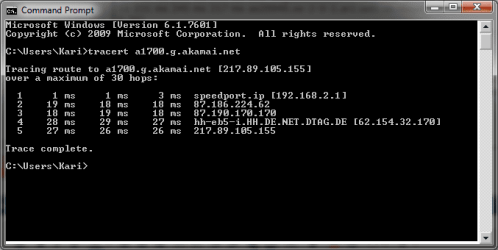
Address space 10.0.0.0 to 10.255.255.255 being private addresses makes your tracert seem a bit odd. I mean the first step is your router, so what's that second one with a private address? Somehow it makes me think you are using cable internet?

To compare, here's tracert to the same address from my rig just now. The second jump is directly from my router to my ISP:

tracert_102.PNG

I really can not think of any reason why you have that extra jump there?

Kari

EDIT: OK, Stormy explained it.
 

My Computer

Computer type
Laptop
Computer Manufacturer/Model Number
HP ENVY 17-1150eg
OS
Windows 10 Pro x64 EN-GB
CPU
1.6 GHz Intel Core i7-720QM Processor
Memory
6 GB
Graphics Card(s)
ATI Mobility Radeon HD 5850 Graphics
Sound Card
Beats sound system with integrated subwoofer
Monitor(s) Displays
17" laptop display, 22" LED and 32" Full HD TV through HDMI
Screen Resolution
1600*900 (1), 1920*1080 (2&3)
Hard Drives
Internal: 2 x 500 GB SATA Hard Disk Drive 7200 rpm
External: 2TB for backups, 3TB USB3 network drive for media
Cooling
As Envy runs a bit warm, I have it on a Cooler Master pad
Keyboard
Logitech diNovo Media Desktop Laser (bluetooth)
Mouse
Logitech Performance Mouse MX
Internet Speed
50/10 Mbps VDSL
Antivirus
Windows Defender 4.3.9431.0
Browser
Maxthon 3.5.2., IE11
The second hop is the CMTS or headend of your ISP.

Cable modem termination system - Wikipedia, the free encyclopedia

With numbers like that there is either a problem with it of the node you're on is overloaded. Only thing you can do is contact Cox and get them to fix it, there is nothing you can do on your end.

Thanks, it doesn't surprise me that it is my ISP, I kind of thought that it was anyway. It does raise a couple more questions...am I correct to assume that the all of the slow hops after that one are caused by the bottleneck at the CMTS? I don't know that it would do any good to contact Cox about it, because I feel that they are doing it on purpose, because they dislike the amount of data usage of my account. It seems to only occur when I'm using certain websites, and even then either on a random basis, or after I have gone a ways into a series of downloads from it.
 

My Computer

Computer Manufacturer/Model Number
DIY
OS
W7x64 Pro, SuSe 12.1/** W7 x64 Pro, XP MCE
CPU
Phenom II 1090T w/Noctua NH-D14 /**4400+ X2 w/CM Hyper TX 3
Motherboard
ASRock 890FX Deluxe 4/**A8N-SLI
Memory
2 x 2GB Patriot PGS34g1600LLKA/**4x1GB Corsair VS
Graphics Card(s)
EVGA GTX460 SC/**EVGA 8800GTS
Sound Card
Asus Xonar D2X/**Xonar D1
Monitor(s) Displays
Acer X233H, Dell E152FPc /**LG M237-WD
Screen Resolution
1920x1080 & 1024x768/**1980x1080
Hard Drives
WDC 2TB, 1.5TB, 1TB, 500GB,Seagate 500GB , Maxtor 80GB /**500GB Seagate & WDC 1TB Black
PSU
CM RS600 w/ APC BX1000G/**Antec 500 TP w/ APC BX1000
Case
HAF922/**Antec 1040IIB
Cooling
3x200mm, 1x140 and 1x120mm/**5x80mm fans
Keyboard
Logitech Media USB/**Saitek Eclipse
Mouse
Cordless Trackman Wheel/**Ditto
Internet Speed
3.3Mbps
Other Info
SB 560 5.1 w/ Sennheiser RS140/**Creative T20 speakers, Dvico FusionHDTV7 Gold RT, Cisco E3000, HP 5510V AIO, Linksys E3000, Belkin F5U237 hub and **F5D8055 adapter
(** = 2nd rig)
Kari that 10.x.x.x is perfectly normal and always seen on a cable connection,

Microsoft Windows [Version 6.1.7601]
Copyright (c) 2009 Microsoft Corporation. All rights reserved.

C:\Users\Richard>tracert 23.15.7.169

Tracing route to a23-15-7-169.deploy.akamaitechnologies.com [23.15.7.169]
over a maximum of 30 hops:

1 1 ms <1 ms <1 ms 192.168.1.1
2 13 ms 13 ms 13 ms 10.126.111.1
3 14 ms 11 ms 11 ms 69.63.242.89
4 22 ms 8 ms 7 ms greensboro.cable.teksavvy.com [69.165.216.46]
5 12 ms 9 ms 12 ms greensboro.cable.teksavvy.com [24.246.55.113]
6 11 ms 24 ms 15 ms tge11-3.fr4.yyz.llnw.net [208.111.134.241]
7 36 ms 26 ms 25 ms tge1-3.fr4.ord.llnw.net [69.28.172.69]
8 27 ms 28 ms 27 ms TenGigE0-0-4-0.GW5.CHI13.ALTER.NET [152.179.92.1
]
9 28 ms 26 ms 27 ms 0.xe-3-1-3.XL3.CHI13.ALTER.NET [152.63.70.122]
10 45 ms 44 ms 44 ms 0.xe-7-0-2.XL3.IAD8.ALTER.NET [152.63.32.230]
11 45 ms 45 ms 46 ms 0.TenGigE0-4-4-0.GW1.IAD8.ALTER.NET [152.63.33.4
1]
12 46 ms 43 ms 63 ms akamai.customer.alter.net [152.179.50.170]
13 44 ms 44 ms 46 ms a23-15-7-169.deploy.akamaitechnologies.com [23.1
5.7.169]

Trace complete.

C:\Users\Richard>

am I correct to assume that the all of the slow hops after that one are caused by the bottleneck at the CMTS?

Yes it is. Got any neighbors on Cox as well? If so and you can get them to test and see if they are also getting the high ping at the CMTS.
 

My Computer

Computer type
PC/Desktop
Computer Manufacturer/Model Number
Me
OS
Win 7 Ultimate x64
CPU
FX-8350 @ 4.6 GHz so far
Motherboard
Asus M5A97 EVO
Memory
ADATA XPG V1 Series Black 8GB DDR3 1600
Graphics Card(s)
Sapphire R9 270x Dual-X
Sound Card
Xonar DGX w/ Corsair Vengence 1300
Monitor(s) Displays
Acer S232HL Abid
Screen Resolution
1920x1080
Hard Drives
120 GB OCZ Vertex 3
500 GB Seagate 7200.12
PSU
Antec Earthwatts 650W Green
Case
Antec Three Hundred
Cooling
Cooler Master 212 EVO
Keyboard
Logitech G510
Mouse
Logitech G500s
Internet Speed
35000/3000
Kari that 10.x.x.x is perfectly normal and always seen on a cable connection.
Thanks for explaining it, never used a cable connection so I was unfamiliar with this.

KAri
 

My Computer

Computer type
Laptop
Computer Manufacturer/Model Number
HP ENVY 17-1150eg
OS
Windows 10 Pro x64 EN-GB
CPU
1.6 GHz Intel Core i7-720QM Processor
Memory
6 GB
Graphics Card(s)
ATI Mobility Radeon HD 5850 Graphics
Sound Card
Beats sound system with integrated subwoofer
Monitor(s) Displays
17" laptop display, 22" LED and 32" Full HD TV through HDMI
Screen Resolution
1600*900 (1), 1920*1080 (2&3)
Hard Drives
Internal: 2 x 500 GB SATA Hard Disk Drive 7200 rpm
External: 2TB for backups, 3TB USB3 network drive for media
Cooling
As Envy runs a bit warm, I have it on a Cooler Master pad
Keyboard
Logitech diNovo Media Desktop Laser (bluetooth)
Mouse
Logitech Performance Mouse MX
Internet Speed
50/10 Mbps VDSL
Antivirus
Windows Defender 4.3.9431.0
Browser
Maxthon 3.5.2., IE11
I'm on cable, I don't show that :)

Microsoft Windows [Version 6.1.7601]
Copyright (c) 2009 Microsoft Corporation. All rights reserved.

C:\Windows\system32>tracert 23.15.7.169

Tracing route to a23-15-7-169.deploy.akamaitechnologies.com [23.15.7.169]
over a maximum of 30 hops:

1 55 ms 21 ms 18 ms c-98-207-0-1.hsd1.ca.comcast.net [98.207.0.1]
2 10 ms 9 ms 9 ms te-7-6-ur01.sanmateo.ca.sfba.comcast.net [68.87.
197.225]
3 12 ms 10 ms 11 ms te-0-6-0-3-ar01.sfsutro.ca.sfba.comcast.net [68.
87.226.246]
4 14 ms 11 ms 11 ms pos-3-6-0-0-cr01.sanjose.ca.ibone.comcast.net [6
8.86.90.233]
5 20 ms 19 ms 19 ms pos-0-4-0-0-pe01.11greatoaks.ca.ibone.comcast.ne
t [68.86.87.150]
6 15 ms 16 ms 16 ms as1239-pe01.11greatoaks.ca.ibone.comcast.net [75
.149.228.170]
7 20 ms 16 ms 16 ms sl-crs2-sj-0-11-0-0.sprintlink.net [144.232.8.15
0]
8 19 ms 20 ms 54 ms sl-crs2-stk-0-2-2-0.sprintlink.net [144.232.24.3
3]
9 24 ms 21 ms 21 ms sl-crs2-oro-0-3-2-0.sprintlink.net [144.232.25.1
76]
10 73 ms 71 ms 74 ms sl-crs2-oma-0-8-5-0.sprintlink.net [144.232.25.2
14]
11 63 ms 63 ms 62 ms 144.232.25.194
12 77 ms 93 ms 76 ms sl-crs2-nsh-0-9-1-0.sprintlink.net [144.232.20.2
27]
13 93 ms 107 ms 93 ms sl-crs2-dc-0-12-3-0.sprintlink.net [144.232.19.2
01]
14 91 ms 91 ms 90 ms sl-st30-ash-0-2-0-0.sprintlink.net [144.232.25.1
3]
15 89 ms 99 ms 92 ms sl-akama8-360697-0.sprintlink.net [144.228.205.7
0]
16 89 ms 91 ms 90 ms a23-15-7-169.deploy.akamaitechnologies.com [23.1
5.7.169]

Trace complete.

C:\Windows\system32>

A Guy
 

My Computer

Computer type
PC/Desktop
OS
Windows 10 Home x64
CPU
INTEL Core i5-750 Quad-Core 3.37GHz
Motherboard
ASUS P7P55D
Memory
HyperX Fury Black Series 8GB (2 x 4GB) 1866Mhz
Graphics Card(s)
EVGA GeForce GTX 750 Superclocked 1GB 128-Bit GDDR5
Monitor(s) Displays
LG 32MA68HY 32" IPS
Screen Resolution
1920 x 1080
Hard Drives
Samsung 840 Evo 120GB, SEAGATE 500GB Barracuda® 7200.12, SATA 3 Gb/s, 7200 RPM, 16MB cache
PSU
ANTEC TruePower New TP-550, 80 PLUS, 550W
Case
ANTEC Three Hundred Illusion
Cooling
COOLER MASTER Hyper 212 Plus, 4 x 120mm 1 x 140mm Noctua's
Internet Speed
85 + Mbps
Antivirus
Avast
Browser
Vivaldi
Me either, maybe it's a Canadian property?
 

My Computer

Computer type
PC/Desktop
Computer Manufacturer/Model Number
Home Built Desktop By DataTech
OS
Windows 7 Ultimate X64 SP1
CPU
Intel i5-2550K, Differing ~4.4-4.8GHz No built in GPU
Motherboard
ASUS P8Z68-V PRO/GEN3
Memory
16GB G.Skill Sniper 1866MHz @ 2133MHz 2x8GB
Graphics Card(s)
ASUS GTX650TIB-DC2OC-2GD5, (650TI Boost)
Sound Card
Onboard Realtek 5-1
Monitor(s) Displays
Samsung P2570HD
Screen Resolution
1920x1080
Hard Drives
Samsung 840 Pro 256GB SSD for OS, 500GB Seagate Constellation (Enterprise drive) for Data
PSU
Corsair HX650W
Case
Inwin Dragon Rider
Cooling
Hyper 212 EVO w/two Noctua fans, push-pull, @1300 RPM
Keyboard
E-Z Eyes, bright yellow keys with large characters
Mouse
steelseries SENSEI Laser Pro Gaming
Internet Speed
48-51Mbs Mbs down, 11 Mbs up Xfinity Cable
Antivirus
Norton Internet Security 2013
Browser
IE 10, Opera, Pale Moon if needed
Other Info
4 case fans, LG BluRay-RE, ASUS DVD-RW, Mr. Fusion power supply, 1.21 gigawatts.
It's not that it isn't there, it is that Comcast has it configured so that the CMTS doesn't show in a tracert.
 

My Computer

Computer type
PC/Desktop
Computer Manufacturer/Model Number
Me
OS
Win 7 Ultimate x64
CPU
FX-8350 @ 4.6 GHz so far
Motherboard
Asus M5A97 EVO
Memory
ADATA XPG V1 Series Black 8GB DDR3 1600
Graphics Card(s)
Sapphire R9 270x Dual-X
Sound Card
Xonar DGX w/ Corsair Vengence 1300
Monitor(s) Displays
Acer S232HL Abid
Screen Resolution
1920x1080
Hard Drives
120 GB OCZ Vertex 3
500 GB Seagate 7200.12
PSU
Antec Earthwatts 650W Green
Case
Antec Three Hundred
Cooling
Cooler Master 212 EVO
Keyboard
Logitech G510
Mouse
Logitech G500s
Internet Speed
35000/3000
:thumbsup: Sneaky bast***** :) Thanks Richard. :)

A Guy
 

My Computer

Computer type
PC/Desktop
OS
Windows 10 Home x64
CPU
INTEL Core i5-750 Quad-Core 3.37GHz
Motherboard
ASUS P7P55D
Memory
HyperX Fury Black Series 8GB (2 x 4GB) 1866Mhz
Graphics Card(s)
EVGA GeForce GTX 750 Superclocked 1GB 128-Bit GDDR5
Monitor(s) Displays
LG 32MA68HY 32" IPS
Screen Resolution
1920 x 1080
Hard Drives
Samsung 840 Evo 120GB, SEAGATE 500GB Barracuda® 7200.12, SATA 3 Gb/s, 7200 RPM, 16MB cache
PSU
ANTEC TruePower New TP-550, 80 PLUS, 550W
Case
ANTEC Three Hundred Illusion
Cooling
COOLER MASTER Hyper 212 Plus, 4 x 120mm 1 x 140mm Noctua's
Internet Speed
85 + Mbps
Antivirus
Avast
Browser
Vivaldi
From what I read, CMTS can be used as a traffic shaper. While that does have a legitimate purpose, it seems to me that it could also be used to throttle specific connections. I will admit that it has been quite a while since I ran a tracert, but I do not remember ever seeing a CMTS number sequence before. The fact that it now appears, after receiving a warning from my ISP about my data usage cap, a couple of months ago, and being advised by others here, that an ISP might opt to throttle a connection, rather than charging for overage, makes me suspect that is the case here. If that were only being done when I had reached my usage cap, I wouldn't mind too much, but it seems to be the way of things regardless of the time of the month, or my usage.
 

My Computer

Computer Manufacturer/Model Number
DIY
OS
W7x64 Pro, SuSe 12.1/** W7 x64 Pro, XP MCE
CPU
Phenom II 1090T w/Noctua NH-D14 /**4400+ X2 w/CM Hyper TX 3
Motherboard
ASRock 890FX Deluxe 4/**A8N-SLI
Memory
2 x 2GB Patriot PGS34g1600LLKA/**4x1GB Corsair VS
Graphics Card(s)
EVGA GTX460 SC/**EVGA 8800GTS
Sound Card
Asus Xonar D2X/**Xonar D1
Monitor(s) Displays
Acer X233H, Dell E152FPc /**LG M237-WD
Screen Resolution
1920x1080 & 1024x768/**1980x1080
Hard Drives
WDC 2TB, 1.5TB, 1TB, 500GB,Seagate 500GB , Maxtor 80GB /**500GB Seagate & WDC 1TB Black
PSU
CM RS600 w/ APC BX1000G/**Antec 500 TP w/ APC BX1000
Case
HAF922/**Antec 1040IIB
Cooling
3x200mm, 1x140 and 1x120mm/**5x80mm fans
Keyboard
Logitech Media USB/**Saitek Eclipse
Mouse
Cordless Trackman Wheel/**Ditto
Internet Speed
3.3Mbps
Other Info
SB 560 5.1 w/ Sennheiser RS140/**Creative T20 speakers, Dvico FusionHDTV7 Gold RT, Cisco E3000, HP 5510V AIO, Linksys E3000, Belkin F5U237 hub and **F5D8055 adapter
(** = 2nd rig)
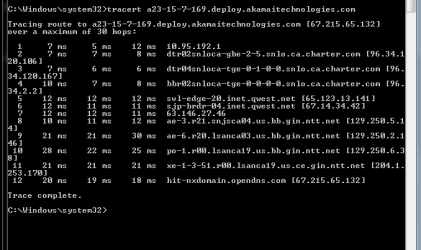
Weird that the "10..." shows as the first hit on mine... I'm also on cable...
Tracert.PNG
 

My Computer

Computer Manufacturer/Model Number
Custom build
OS
Windows 7 Ultimate SP1 x64
CPU
i7 950 4ghz
Motherboard
EVGA x58 FTW3
Memory
6GB G.Skill pc12800
Graphics Card(s)
EVGA GTX 580 SC
Sound Card
Xfi Titanium
Monitor(s) Displays
Samsung 24"
Screen Resolution
1920x1200
Hard Drives
Vertex 3 SSD 120Gb x2 RAID 0
4 x 1TB WD Black RAID 0
PSU
Thermaltake 850
Case
Mountain Mods U2-UFO Horizon
Cooling
Custom watercooling
Internet Speed
100 down 5 up

My Computer

Computer type
PC/Desktop
Computer Manufacturer/Model Number
Home Built Desktop By DataTech
OS
Windows 7 Ultimate X64 SP1
CPU
Intel i5-2550K, Differing ~4.4-4.8GHz No built in GPU
Motherboard
ASUS P8Z68-V PRO/GEN3
Memory
16GB G.Skill Sniper 1866MHz @ 2133MHz 2x8GB
Graphics Card(s)
ASUS GTX650TIB-DC2OC-2GD5, (650TI Boost)
Sound Card
Onboard Realtek 5-1
Monitor(s) Displays
Samsung P2570HD
Screen Resolution
1920x1080
Hard Drives
Samsung 840 Pro 256GB SSD for OS, 500GB Seagate Constellation (Enterprise drive) for Data
PSU
Corsair HX650W
Case
Inwin Dragon Rider
Cooling
Hyper 212 EVO w/two Noctua fans, push-pull, @1300 RPM
Keyboard
E-Z Eyes, bright yellow keys with large characters
Mouse
steelseries SENSEI Laser Pro Gaming
Internet Speed
48-51Mbs Mbs down, 11 Mbs up Xfinity Cable
Antivirus
Norton Internet Security 2013
Browser
IE 10, Opera, Pale Moon if needed
Other Info
4 case fans, LG BluRay-RE, ASUS DVD-RW, Mr. Fusion power supply, 1.21 gigawatts.
Back
Top