10 gig recovery partiton

Pantz

New member
Member
VIP
Local time
6:34 AM
Messages
318
Hello ppl, i have a small issue, i installed Windows 7 on a dell 1520 laptop. everything is workin great, i formatted the 10gig vista restore partition, and lookin at my disk management i now have 10gigs (un allocated ) 102gig healthy primary partition (windows 7 sys files) and 140 gigs healthy system partition.. in that order. first of all i would like to have the Win 7 system files in the begining of the HD, second i would like to add the 10 gigs to the 140 gig partition ... only option for the 10 gig partition is " create a new volume. any ideas are welcomed

thanks
 

My Computer My Computer

At a glance

Genuine windows 7X64AMD 8320 FX Processor8 Gigs Corsair Vengance DDR3 1886 MHZEVGA GTX 750 Ti FTW
Computer type
PC/Desktop
Computer Manufacturer/Model Number
Personal build
OS
Genuine windows 7X64
CPU
AMD 8320 FX Processor
Motherboard
Asus Sabertoothe 990 FX R2.0 AM2+/AM2 AMD MB
Memory
8 Gigs Corsair Vengance DDR3 1886 MHZ
Graphics Card(s)
EVGA GTX 750 Ti FTW
Sound Card
On board
Monitor(s) Displays
ASUS VE247H 24 inch
Screen Resolution
HDMI
Hard Drives
Samsung 120GB 2.5-inch SSD 840 SATA III
PSU
Corsair 750 Watts
Case
Gigabyte case
Cooling
Zellman CNPS 10 Extreme
Internet Speed
50megs
Antivirus
AVG Free
Hello ppl, i have a small issue, i installed Windows 7 on a dell 1520 laptop. everything is workin great, i formatted the 10gig vista restore partition, and lookin at my disk management i now have 10gigs (un allocated ) 102gig healthy primary partition (windows 7 sys files) and 140 gigs healthy system partition.. in that order. first of all i would like to have the Win 7 system files in the begining of the HD, second i would like to add the 10 gigs to the 140 gig partition ... only option for the 10 gig partition is " create a new volume. any ideas are welcomed

thanks

Hi Pantz and welcome

You can do it but need to get a 3rd party app like parigon disk suite. Its tiral is free. All you need to do is use it to expand the second partition(win 7).

Piec of cake but may take a while.

Let us know when you need help with it


Ken J+
 

My Computer My Computer

At a glance

Win 8 Release candidate 8400[email protected]4 gigsNvidia 9600M
Computer Manufacturer/Model Number
HP Pavillion dv-7 1005 Tx
OS
Win 8 Release candidate 8400
CPU
[email protected]
Memory
4 gigs
Graphics Card(s)
Nvidia 9600M
Sound Card
HD built-in
Monitor(s) Displays
17" Wxga
Screen Resolution
1440x900
Cooling
none
Internet Speed
45Mb down 5Mb up
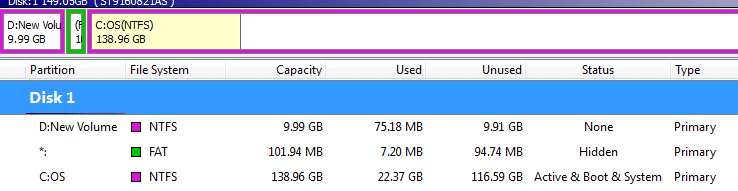
ok i have partiton wizard home edition installed on my dell 1520, i also made the 10 gig partition a new primary partiton see attached file for current config od HD, what i would like to do is have it as window7 system files first and the 10 gig added to the 140gig ...
 

Attachments

  • Capture.PNG
    Capture.PNG
    6.6 KB · Views: 34

My Computer My Computer

At a glance

Genuine windows 7X64AMD 8320 FX Processor8 Gigs Corsair Vengance DDR3 1886 MHZEVGA GTX 750 Ti FTW
Computer type
PC/Desktop
Computer Manufacturer/Model Number
Personal build
OS
Genuine windows 7X64
CPU
AMD 8320 FX Processor
Motherboard
Asus Sabertoothe 990 FX R2.0 AM2+/AM2 AMD MB
Memory
8 Gigs Corsair Vengance DDR3 1886 MHZ
Graphics Card(s)
EVGA GTX 750 Ti FTW
Sound Card
On board
Monitor(s) Displays
ASUS VE247H 24 inch
Screen Resolution
HDMI
Hard Drives
Samsung 120GB 2.5-inch SSD 840 SATA III
PSU
Corsair 750 Watts
Case
Gigabyte case
Cooling
Zellman CNPS 10 Extreme
Internet Speed
50megs
Antivirus
AVG Free
Hi Pantz,

Let's review your partitions:

1. You have a new 10GB empty partition - delete this.

2. You have a small 102MB (not GB) FAT partition -- likely the Dell Utility Partition. If you are sure you don't need this, then delete this partition also. It is not needed for Windows 7. If you do want this partition, you can move this partition to the empty space created from #1 above.

3. Expand your Windows 7 partition to take up all the remaining free space.

Hope this helps.

MLJ

--
Windows 7 in the News - all day every day
 

My Computer My Computer

At a glance

Windows 7 Pro 64-bitIntel i716GBADM Radeon HD 7570
Computer type
PC/Desktop
Computer Manufacturer/Model Number
Dell Optiplex 9010
OS
Windows 7 Pro 64-bit
CPU
Intel i7
Memory
16GB
Graphics Card(s)
ADM Radeon HD 7570
no i already have windows 7 installed , i deleted the 10 gigs, it as now become 10gigs of unallocated space, the 102mb is the windows 7 system files for recovery,
since the windows system file partiton is sandwiched between the 10 gig unallocated space and windows 7 OS ...when i go to extend the windows 7 partition it does not see the 10gigs unallocated space, maybe i can delete the windows 7 system files, then add it to the 10 gigs, then extend the windows 7 partition , and then create a partition for the windows 7 system restore files ?

thanks in advance
 

My Computer My Computer

At a glance

Genuine windows 7X64AMD 8320 FX Processor8 Gigs Corsair Vengance DDR3 1886 MHZEVGA GTX 750 Ti FTW
Computer type
PC/Desktop
Computer Manufacturer/Model Number
Personal build
OS
Genuine windows 7X64
CPU
AMD 8320 FX Processor
Motherboard
Asus Sabertoothe 990 FX R2.0 AM2+/AM2 AMD MB
Memory
8 Gigs Corsair Vengance DDR3 1886 MHZ
Graphics Card(s)
EVGA GTX 750 Ti FTW
Sound Card
On board
Monitor(s) Displays
ASUS VE247H 24 inch
Screen Resolution
HDMI
Hard Drives
Samsung 120GB 2.5-inch SSD 840 SATA III
PSU
Corsair 750 Watts
Case
Gigabyte case
Cooling
Zellman CNPS 10 Extreme
Internet Speed
50megs
Antivirus
AVG Free
two suggestios:

1. Leave the 102MB Dell utility partition alone. These are useful utilities you can run from the BIOS. You may need them one day.
2. Why not use the 10GB as a data partiton. Move your data files (Documents, Music, Pictures, Videos) or some of them there. Then at least your data is safer the day your system crashes or when you reinstall. They are easy to move in Properties > Location tab > Move.
 

My Computer My Computer

At a glance

Vista, Windows7, Mint Mate, Zorin, Windows 8from 1.6GHz Duo to i7
Computer Manufacturer/Model Number
HP, Dell, Gateway, Toshiba - 4 laptops and 2 desktops
OS
Vista, Windows7, Mint Mate, Zorin, Windows 8
CPU
from 1.6GHz Duo to i7
Monitor(s) Displays
2x HP w2207
Hard Drives
5x HDD, 7x SSD, 12x Externals
Keyboard
with trackball - no mices
Mouse
Trackball mice
Internet Speed
DSL 6000
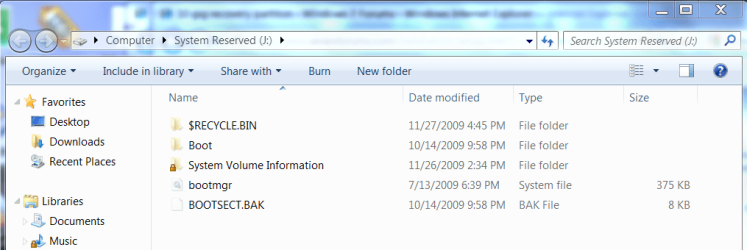
Have never heard of the 100mb Win7 boot/repair partition installed with Win7 being formatted FAT32. It is also normally boot partitiion with around 25g used, not 7g. Do you know for sure what it is and when it arrived?

If you assign it a letter and unhide protected OS and system files in Control Panel>Folder Options>View, it should look something like this:

Capture.PNG

If you want to recover that space into Win7 system partition you can recover the MBR into Win7 anyway, using the following steps:

Use free Partition Wizard bootable CD which is an important tool to have around anyway.

Delete the first two partitions by rightclick Delete.

Right click on the Win7 partition and Resize/Move into the unallocated space by sliding left border. OK.

Win7 is already Set Active, so Apply all steps, reboot into WIn7 DVD Repair console and run Startup Repair 3 times to repair the MBR which will now be in the drive's boot sector.
 
Last edited:
the 102 partition IS NOT THE DELL utility partition ...period its the partition windows 7 made during the install

i think greg understands my issue ....

so delete both the 10gigs and the 102mb partition greg ?
 

My Computer My Computer

At a glance

Genuine windows 7X64AMD 8320 FX Processor8 Gigs Corsair Vengance DDR3 1886 MHZEVGA GTX 750 Ti FTW
Computer type
PC/Desktop
Computer Manufacturer/Model Number
Personal build
OS
Genuine windows 7X64
CPU
AMD 8320 FX Processor
Motherboard
Asus Sabertoothe 990 FX R2.0 AM2+/AM2 AMD MB
Memory
8 Gigs Corsair Vengance DDR3 1886 MHZ
Graphics Card(s)
EVGA GTX 750 Ti FTW
Sound Card
On board
Monitor(s) Displays
ASUS VE247H 24 inch
Screen Resolution
HDMI
Hard Drives
Samsung 120GB 2.5-inch SSD 840 SATA III
PSU
Corsair 750 Watts
Case
Gigabyte case
Cooling
Zellman CNPS 10 Extreme
Internet Speed
50megs
Antivirus
AVG Free
the 102mb is the windows 7 system files for recovery,

Don't worry, that partition is nothing to do with 7.

If it was the 7 system partition , it would be 100mb, it would be ntfs, it would contain the boot critical files, it would have around 34 mb used space, and PW would label it as Boot.

None of those apply.

If you wish to delete it and use PW to extend the C partition to the left, you will need to run startup repair afterwards to be able to boot into 7.
 

My Computers My Computers

  • At a glance

    7 X64i5 84002x8gb 3200mhz
    Computer type
    PC/Desktop
    OS
    7 X64
    CPU
    i5 8400
    Motherboard
    gigabyte b365m ds3h
    Memory
    2x8gb 3200mhz
    Hard Drives
    various
    PSU
    pure power 11 400w cm
    Case
    Coolermaster
    Cooling
    cryorig m9i
  • At a glance

    7x64g54008gb ddr4 2400
    Computer type
    PC/Desktop
    OS
    7x64
    CPU
    g5400
    Motherboard
    ga b365m ds3h
    Memory
    8gb ddr4 2400
    PSU
    xfx pro 450w
the 102 partition IS NOT THE DELL utility partition ...period its the partition windows 7 made during the install

i think greg understands my issue ....

so delete both the 10gigs and the 102mb partition greg ?

Yes, especially after SIW2 (my teacher) confirms :geek:
 
Have never heard of the 100mb Windows 7 boot/repair partition installed with Windows 7 being formatted FAT32

I have the same 100MB partition on my Dell Vista system. Seems to be something specific to Dell. I also have utilities that you can run from the BIOS. I always thought they came from there - but I may be wrong.
 

My Computer My Computer

At a glance

Vista, Windows7, Mint Mate, Zorin, Windows 8from 1.6GHz Duo to i7
Computer Manufacturer/Model Number
HP, Dell, Gateway, Toshiba - 4 laptops and 2 desktops
OS
Vista, Windows7, Mint Mate, Zorin, Windows 8
CPU
from 1.6GHz Duo to i7
Monitor(s) Displays
2x HP w2207
Hard Drives
5x HDD, 7x SSD, 12x Externals
Keyboard
with trackball - no mices
Mouse
Trackball mice
Internet Speed
DSL 6000
Success, i now have a single 149Gig Windows 7 HD, but how do i get the windows 7 system restore files on the HD in case i have to repair it.? I did create a repair disk when i first installed Windows 7.
 

My Computer My Computer

At a glance

Genuine windows 7X64AMD 8320 FX Processor8 Gigs Corsair Vengance DDR3 1886 MHZEVGA GTX 750 Ti FTW
Computer type
PC/Desktop
Computer Manufacturer/Model Number
Personal build
OS
Genuine windows 7X64
CPU
AMD 8320 FX Processor
Motherboard
Asus Sabertoothe 990 FX R2.0 AM2+/AM2 AMD MB
Memory
8 Gigs Corsair Vengance DDR3 1886 MHZ
Graphics Card(s)
EVGA GTX 750 Ti FTW
Sound Card
On board
Monitor(s) Displays
ASUS VE247H 24 inch
Screen Resolution
HDMI
Hard Drives
Samsung 120GB 2.5-inch SSD 840 SATA III
PSU
Corsair 750 Watts
Case
Gigabyte case
Cooling
Zellman CNPS 10 Extreme
Internet Speed
50megs
Antivirus
AVG Free
System restore is turned on at Start>rightclick Computer>Properties>Advanced>System Protection>Configure

Your installer DVD and Repair CD are how you would boot into the WIndows 7 Repair console to use Recovery Tools like Startup Repair, Line Commands, or SysRestore from boot. You also reimage your HD (or a replacement) from there.

Be sure to save externally a Win7 Backup image so you never have to reinstall Win7 again, just reimage in 15 minutes.
 
It is already there.

If you want to add it to the boot menu, type bcdedit /enum all /v , find the {Identifier} and add it to the menu.

e.g.

Windows Boot Loader
-------------------
identifier {b48cfc66-d1fe-11de-92d0-001966657855}
device ramdisk=[D:]\Recovery\fef675fc-c5fd-11de-9bca-d0fdd828c7
3e\Winre.wim,{b48cfc67-d1fe-11de-92d0-001966657855}
path \windows\system32\winload.exe
description Windows Recovery Environment
locale
osdevice ramdisk=[D:]\Recovery\fef675fc-c5fd-11de-9bca-d0fdd828c7
3e\Winre.wim,{b48cfc67-d1fe-11de-92d0-001966657855}
systemroot \windows
winpe Yes


bcdedit /displayorder {b48cfc66-d1fe-11de-92d0-001966657855} /addlast
 
Last edited:

My Computers My Computers

  • At a glance

    7 X64i5 84002x8gb 3200mhz
    Computer type
    PC/Desktop
    OS
    7 X64
    CPU
    i5 8400
    Motherboard
    gigabyte b365m ds3h
    Memory
    2x8gb 3200mhz
    Hard Drives
    various
    PSU
    pure power 11 400w cm
    Case
    Coolermaster
    Cooling
    cryorig m9i
  • At a glance

    7x64g54008gb ddr4 2400
    Computer type
    PC/Desktop
    OS
    7x64
    CPU
    g5400
    Motherboard
    ga b365m ds3h
    Memory
    8gb ddr4 2400
    PSU
    xfx pro 450w
If its already there and if the repair CD will function there is not need to add it to the boot menu. ? and thanks for those who helped me.
 

My Computer My Computer

At a glance

Genuine windows 7X64AMD 8320 FX Processor8 Gigs Corsair Vengance DDR3 1886 MHZEVGA GTX 750 Ti FTW
Computer type
PC/Desktop
Computer Manufacturer/Model Number
Personal build
OS
Genuine windows 7X64
CPU
AMD 8320 FX Processor
Motherboard
Asus Sabertoothe 990 FX R2.0 AM2+/AM2 AMD MB
Memory
8 Gigs Corsair Vengance DDR3 1886 MHZ
Graphics Card(s)
EVGA GTX 750 Ti FTW
Sound Card
On board
Monitor(s) Displays
ASUS VE247H 24 inch
Screen Resolution
HDMI
Hard Drives
Samsung 120GB 2.5-inch SSD 840 SATA III
PSU
Corsair 750 Watts
Case
Gigabyte case
Cooling
Zellman CNPS 10 Extreme
Internet Speed
50megs
Antivirus
AVG Free
When you have time over the next few weeks, suggest you boot from Partition Wizard, check the file system and run a surface scan on your HD, just to be sure the moving operation didn't compromise anything. I check mine regularly anyway.

Glad to help. Knew you could handle it when you posted PW screenie at beginning.
 
ok make a PW boot disk and it works, but i could not find where it say to check system files, or is that what it check before i get the following, ( which i closed out and booted to the PW disk management ) doing as surface scan now


1 DO NOT take the following opertations movin//resizin windows vista, windows 2008, windows 7

2.creating/ deletind any partitons before the system partitons of winodws 2000, XP,2003
 

My Computer My Computer

At a glance

Genuine windows 7X64AMD 8320 FX Processor8 Gigs Corsair Vengance DDR3 1886 MHZEVGA GTX 750 Ti FTW
Computer type
PC/Desktop
Computer Manufacturer/Model Number
Personal build
OS
Genuine windows 7X64
CPU
AMD 8320 FX Processor
Motherboard
Asus Sabertoothe 990 FX R2.0 AM2+/AM2 AMD MB
Memory
8 Gigs Corsair Vengance DDR3 1886 MHZ
Graphics Card(s)
EVGA GTX 750 Ti FTW
Sound Card
On board
Monitor(s) Displays
ASUS VE247H 24 inch
Screen Resolution
HDMI
Hard Drives
Samsung 120GB 2.5-inch SSD 840 SATA III
PSU
Corsair 750 Watts
Case
Gigabyte case
Cooling
Zellman CNPS 10 Extreme
Internet Speed
50megs
Antivirus
AVG Free
Those warnings are for users who do not know how to recover the MBR into their Win7 partition like you now do. It boots, right?

I get Check File system on my right click context menu when running PW from desktop (check Fix errors, too).

It should also be on booted PW right click menu, along with HD Surface Scan
 
Yes it boots, will do a system file check once its done with surface scan.
 

My Computer My Computer

At a glance

Genuine windows 7X64AMD 8320 FX Processor8 Gigs Corsair Vengance DDR3 1886 MHZEVGA GTX 750 Ti FTW
Computer type
PC/Desktop
Computer Manufacturer/Model Number
Personal build
OS
Genuine windows 7X64
CPU
AMD 8320 FX Processor
Motherboard
Asus Sabertoothe 990 FX R2.0 AM2+/AM2 AMD MB
Memory
8 Gigs Corsair Vengance DDR3 1886 MHZ
Graphics Card(s)
EVGA GTX 750 Ti FTW
Sound Card
On board
Monitor(s) Displays
ASUS VE247H 24 inch
Screen Resolution
HDMI
Hard Drives
Samsung 120GB 2.5-inch SSD 840 SATA III
PSU
Corsair 750 Watts
Case
Gigabyte case
Cooling
Zellman CNPS 10 Extreme
Internet Speed
50megs
Antivirus
AVG Free
surface scan .... is ok.... no errors.
system files .......is ok.....no errors.
great job guys . thanks
 

My Computer My Computer

At a glance

Genuine windows 7X64AMD 8320 FX Processor8 Gigs Corsair Vengance DDR3 1886 MHZEVGA GTX 750 Ti FTW
Computer type
PC/Desktop
Computer Manufacturer/Model Number
Personal build
OS
Genuine windows 7X64
CPU
AMD 8320 FX Processor
Motherboard
Asus Sabertoothe 990 FX R2.0 AM2+/AM2 AMD MB
Memory
8 Gigs Corsair Vengance DDR3 1886 MHZ
Graphics Card(s)
EVGA GTX 750 Ti FTW
Sound Card
On board
Monitor(s) Displays
ASUS VE247H 24 inch
Screen Resolution
HDMI
Hard Drives
Samsung 120GB 2.5-inch SSD 840 SATA III
PSU
Corsair 750 Watts
Case
Gigabyte case
Cooling
Zellman CNPS 10 Extreme
Internet Speed
50megs
Antivirus
AVG Free
Back
Top