100% CPU usage and intermittent freezes

Glaice

Plays Doom
Member
Local time
8:01 AM
Messages
85
Location
North Babylon, NY
Hello, my brother's laptop since Friday (the 13th) has had slowness with something 100%ing the laptop CPU and up to a a minute or 2 before normally resuming. I'm not so sure what it is and am trying to get a HijackThis page to post here.

Also after spending enough time in Safe Mode, the laptop simply shuts off. I felt the underside of it and it was quite hot, the battery was not hot in the slightest.

Here is the HijackThis log:

Code:
Logfile of Trend Micro HijackThis v2.0.5
Scan saved at 1:19:09 PM, on 12/15/2013
Platform: Windows 7 SP1 (WinNT 6.00.3505)
MSIE: Unable to get Internet Explorer version!

FIREFOX: 25.0.1 (en-US)
Boot mode: Safe mode with network support

Running processes:
C:\Program Files (x86)\Mozilla Firefox\firefox.exe
C:\Program Files (x86)\Mozilla Firefox\plugin-container.exe
C:\Windows\SysWOW64\Macromed\Flash\FlashPlayerPlugin_11_9_900_152.exe
C:\Users\James\Downloads\HijackThis.exe

R1 - HKCU\Software\Microsoft\Internet Explorer\Main,Default_Page_URL = [URL="http://homepage.gateway.com/rdr.aspx?b=ACGW&l=0409&m=nv53&r=27361210i4b6l0470z145a4481x67p"]iGoogle Redirect[/URL]
R1 - HKCU\Software\Microsoft\Internet Explorer\Main,Search Page = [URL="http://go.microsoft.com/fwlink/?LinkId=54896"]Bing[/URL]
R0 - HKCU\Software\Microsoft\Internet Explorer\Main,Start Page = [URL="http://search.yahoo.com/?type=994519&fr=spigot-yhp-ie"]Yahoo Search - Web Search[/URL]
R0 - HKLM\Software\Microsoft\Internet Explorer\Search,SearchAssistant = 
R0 - HKLM\Software\Microsoft\Internet Explorer\Search,CustomizeSearch = 
R0 - HKLM\Software\Microsoft\Internet Explorer\Main,Local Page = 
R0 - HKCU\Software\Microsoft\Internet Explorer\Toolbar,LinksFolderName = 
R3 - URLSearchHook: (no name) - {e9df9360-97f8-4690-afe6-996c80790da4} - (no file)
F2 - REG:system.ini: UserInit=userinit.exe
O2 - BHO: Java(tm) Plug-In SSV Helper - {761497BB-D6F0-462C-B6EB-D4DAF1D92D43} - C:\Program Files (x86)\Java\jre7\bin\ssv.dll
O2 - BHO: avast! WebRep - {8E5E2654-AD2D-48bf-AC2D-D17F00898D06} - C:\Program Files\AVAST Software\Avast\aswWebRepIE.dll
O2 - BHO: Windows Live ID Sign-in Helper - {9030D464-4C02-4ABF-8ECC-5164760863C6} - C:\Program Files (x86)\Common Files\Microsoft Shared\Windows Live\WindowsLiveLogin.dll
O2 - BHO: AVG SafeGuard toolbar - {95B7759C-8C7F-4BF1-B163-73684A933233} - C:\Program Files (x86)\AVG SafeGuard toolbar\17.2.0.38\AVG SafeGuard toolbar_toolbar.dll
O2 - BHO: Java(tm) Plug-In 2 SSV Helper - {DBC80044-A445-435b-BC74-9C25C1C588A9} - C:\Program Files (x86)\Java\jre7\bin\jp2ssv.dll
O3 - Toolbar: avast! WebRep - {8E5E2654-AD2D-48bf-AC2D-D17F00898D06} - C:\Program Files\AVAST Software\Avast\aswWebRepIE.dll
O3 - Toolbar: AVG SafeGuard toolbar - {95B7759C-8C7F-4BF1-B163-73684A933233} - C:\Program Files (x86)\AVG SafeGuard toolbar\17.2.0.38\AVG SafeGuard toolbar_toolbar.dll
O4 - HKLM\..\Run: [LManager] C:\Program Files (x86)\Launch Manager\LManager.exe
O4 - HKLM\..\Run: [avast] "C:\Program Files\AVAST Software\Avast\avastUI.exe" /nogui
O4 - HKLM\..\Run: [StartCCC] "C:\Program Files (x86)\ATI Technologies\ATI.ACE\Core-Static\CLIStart.exe" MSRun
O4 - HKLM\..\Run: [emsisoft anti-malware] "C:\Program Files (x86)\Emsisoft Anti-Malware\a2guard.exe" /d=60
O4 - HKCU\..\Run: [DAEMON Tools Lite] "C:\Program Files (x86)\DAEMON Tools Lite\DTLite.exe" -autorun
O4 - HKCU\..\RunOnce: [FlashPlayerUpdate] C:\Windows\SysWOW64\Macromed\Flash\FlashUtil32_11_9_900_152_Plugin.exe -update plugin
O4 - HKUS\S-1-5-19\..\Run: [Sidebar] %ProgramFiles%\Windows Sidebar\Sidebar.exe /autoRun (User 'LOCAL SERVICE')
O4 - HKUS\S-1-5-19\..\RunOnce: [mctadmin] C:\Windows\System32\mctadmin.exe (User 'LOCAL SERVICE')
O4 - HKUS\S-1-5-20\..\Run: [Sidebar] %ProgramFiles%\Windows Sidebar\Sidebar.exe /autoRun (User 'NETWORK SERVICE')
O4 - HKUS\S-1-5-20\..\RunOnce: [mctadmin] C:\Windows\System32\mctadmin.exe (User 'NETWORK SERVICE')
O8 - Extra context menu item: Google Sidewiki... - res://C:\Program Files (x86)\Google\Google Toolbar\Component\GoogleToolbarDynamic_mui_en_E11712C84EA7E12B.dll/cmsidewiki.html
O9 - Extra button: @C:\Program Files (x86)\Windows Live\Writer\WindowsLiveWriterShortcuts.dll,-1004 - {219C3416-8CB2-491a-A3C7-D9FCDDC9D600} - C:\Program Files (x86)\Windows Live\Writer\WriterBrowserExtension.dll
O9 - Extra 'Tools' menuitem: @C:\Program Files (x86)\Windows Live\Writer\WindowsLiveWriterShortcuts.dll,-1003 - {219C3416-8CB2-491a-A3C7-D9FCDDC9D600} - C:\Program Files (x86)\Windows Live\Writer\WriterBrowserExtension.dll
O10 - Unknown file in Winsock LSP: c:\program files (x86)\common files\microsoft shared\windows live\wlidnsp.dll
O18 - Protocol: viprotocol - {B658800C-F66E-4EF3-AB85-6C0C227862A9} - C:\Program Files (x86)\Common Files\AVG Secure Search\ViProtocolInstaller\17.2.0\ViProtocol.dll
O18 - Protocol: wlpg - {E43EF6CD-A37A-4A9B-9E6F-83F89B8E6324} - C:\Program Files (x86)\Windows Live\Photo Gallery\AlbumDownloadProtocolHandler.dll
O23 - Service: Emsisoft Anti-Malware 7.0 - Service (a2AntiMalware) - Emsisoft GmbH - C:\Program Files (x86)\Emsisoft Anti-Malware\a2service.exe
O23 - Service: @%SystemRoot%\system32\Alg.exe,-112 (ALG) - Unknown owner - C:\Windows\System32\alg.exe (file missing)
O23 - Service: AMD External Events Utility - Unknown owner - C:\Windows\system32\atiesrxx.exe (file missing)
O23 - Service: AMD FUEL Service - Advanced Micro Devices, Inc. - C:\Program Files\ATI Technologies\ATI.ACE\Fuel\Fuel.Service.exe
O23 - Service: avast! Antivirus - AVAST Software - C:\Program Files\AVAST Software\Avast\AvastSvc.exe
O23 - Service: @%SystemRoot%\system32\efssvc.dll,-100 (EFS) - Unknown owner - C:\Windows\System32\lsass.exe (file missing)
O23 - Service: Acer ePower Service (ePowerSvc) - Acer Incorporated - C:\Program Files\Gateway\Gateway Power Management\ePowerSvc.exe
O23 - Service: GRegService (Greg_Service) - Acer Incorporated - C:\Program Files (x86)\Gateway\Registration\GregHSRW.exe
O23 - Service: @keyiso.dll,-100 (KeyIso) - Unknown owner - C:\Windows\system32\lsass.exe (file missing)
O23 - Service: Mozilla Maintenance Service (MozillaMaintenance) - Mozilla Foundation - C:\Program Files (x86)\Mozilla Maintenance Service\maintenanceservice.exe
O23 - Service: @comres.dll,-2797 (MSDTC) - Unknown owner - C:\Windows\System32\msdtc.exe (file missing)
O23 - Service: @%SystemRoot%\System32\netlogon.dll,-102 (Netlogon) - Unknown owner - C:\Windows\system32\lsass.exe (file missing)
O23 - Service: NTI IScheduleSvc - NewTech Infosystems, Inc. - C:\Program Files (x86)\NewTech Infosystems\Gateway MyBackup\IScheduleSvc.exe
O23 - Service: PnkBstrA - Unknown owner - C:\Windows\system32\PnkBstrA.exe
O23 - Service: PnkBstrB - Unknown owner - C:\Windows\system32\PnkBstrB.exe
O23 - Service: @%systemroot%\system32\psbase.dll,-300 (ProtectedStorage) - Unknown owner - C:\Windows\system32\lsass.exe (file missing)
O23 - Service: Realtek11nCU - Realtek - C:\Program Files (x86)\Realtek\11n USB Wireless LAN Utility\RtlService.exe
O23 - Service: @%systemroot%\system32\Locator.exe,-2 (RpcLocator) - Unknown owner - C:\Windows\system32\locator.exe (file missing)
O23 - Service: @%SystemRoot%\system32\samsrv.dll,-1 (SamSs) - Unknown owner - C:\Windows\system32\lsass.exe (file missing)
O23 - Service: @%SystemRoot%\system32\snmptrap.exe,-3 (SNMPTRAP) - Unknown owner - C:\Windows\System32\snmptrap.exe (file missing)
O23 - Service: @%systemroot%\system32\spoolsv.exe,-1 (Spooler) - Unknown owner - C:\Windows\System32\spoolsv.exe (file missing)
O23 - Service: @%SystemRoot%\system32\sppsvc.exe,-101 (sppsvc) - Unknown owner - C:\Windows\system32\sppsvc.exe (file missing)
O23 - Service: Steam Client Service - Valve Corporation - C:\Program Files (x86)\Common Files\Steam\SteamService.exe
O23 - Service: TeamViewer 8 (TeamViewer8) - TeamViewer GmbH - C:\Program Files (x86)\TeamViewer\Version8\TeamViewer_Service.exe
O23 - Service: @%SystemRoot%\system32\ui0detect.exe,-101 (UI0Detect) - Unknown owner - C:\Windows\system32\UI0Detect.exe (file missing)
O23 - Service: Updater Service - Acer - C:\Program Files\Gateway\Gateway Updater\UpdaterService.exe
O23 - Service: @%SystemRoot%\system32\vaultsvc.dll,-1003 (VaultSvc) - Unknown owner - C:\Windows\system32\lsass.exe (file missing)
O23 - Service: @%SystemRoot%\system32\vds.exe,-100 (vds) - Unknown owner - C:\Windows\System32\vds.exe (file missing)
O23 - Service: @%systemroot%\system32\vssvc.exe,-102 (VSS) - Unknown owner - C:\Windows\system32\vssvc.exe (file missing)
O23 - Service: @%SystemRoot%\system32\Wat\WatUX.exe,-601 (WatAdminSvc) - Unknown owner - C:\Windows\system32\Wat\WatAdminSvc.exe (file missing)
O23 - Service: @%systemroot%\system32\wbengine.exe,-104 (wbengine) - Unknown owner - C:\Windows\system32\wbengine.exe (file missing)
O23 - Service: @%Systemroot%\system32\wbem\wmiapsrv.exe,-110 (wmiApSrv) - Unknown owner - C:\Windows\system32\wbem\WmiApSrv.exe (file missing)
O23 - Service: @%PROGRAMFILES%\Windows Media Player\wmpnetwk.exe,-101 (WMPNetworkSvc) - Unknown owner - C:\Program Files (x86)\Windows Media Player\wmpnetwk.exe (file missing)

--
End of file - 8764 bytes
 
Last edited:

My Computer My Computer

Computer type
PC/Desktop
Computer Manufacturer/Model Number
Custom
OS
Windows 7 Home Premium 64 bit
CPU
AMD FX-8300
Motherboard
ASUS M5A99FX PRO R2.0
Memory
16GB (2x 8GB) G.SKILL Ripjaws X Series 240 pin
Graphics Card(s)
Sapphire Radeon RX 590 8GB
Sound Card
SB Audigy
Monitor(s) Displays
LG 25" Ultrawide
Screen Resolution
2560x1080
Hard Drives
1 TB Seagate 7200 RPM
2 TB WD Black 7200 RPM
PSU
Corsair RM750
Case
Coolermaster HAF 912
Cooling
Stock
Keyboard
Cooler Master SK550 Mechanical
Mouse
Razer Basilisk
Internet Speed
Verizon FIOS 100/100 Quantum
Antivirus
Avast
Browser
Dissenter
Please download Junkware Removal Tool to your desktop.
  • Shut down your protection software now to avoid potential conflicts.
  • Run the tool by double-clicking it. If you are using Windows Vista, 7, or 8; instead of double-clicking, right-mouse click JRT.exe and select "Run as Administrator".
  • The tool will open and start scanning your system.
  • Please be patient as this can take a while to complete depending on your system's specifications.
  • On completion, a log (JRT.txt) is saved to your desktop and will automatically open.
  • Post the contents of JRT.txt into your next message.


download AdwCleaner by Xplode and save to your Desktop.


  • Double click on AdwCleaner.exe to run the tool.
    Vista/Windows 7/8 users right-click and select Run As Administrator.
  • Click on the Scan button.
  • AdwCleaner will begin...be patient as the scan may take some time to complete.
  • After the scan has finished, click on the Report button...a logfile (AdwCleaner[R#].txt) will open in Notepad for review (where the largest value of # represents the most recent report).
  • The contents of the log file may be confusing. Unless you see a program name that you know should not be removed, don't worry about it. If you see an entry you want to keep, let me know about it.
  • Copy and paste the contents of that logfile in your next reply.
  • A copy of all logfiles are saved in the C:\AdwCleaner folder which was created when running the tool.
Using AdwCleaner v3: Scan & Clean:
Double click on AdwCleaner.exe to run the tool again.
Click on the Scan button.
AdwCleaner will begin to scan your computer like it did before.
After the scan has finished...

This time click on the Clean button.
Press OK when asked to close all programs and follow the onscreen prompts.
Press OK again to allow AdwCleaner to restart the computer and complete the removal process.
After rebooting, a logfile report (AdwCleaner[S#].txt) will open automatically (where the largest value of # represents the most recent report).
Copy and paste the contents of that logfile in your next reply.
A copy of that logfile will also be saved in the C:\AdwCleaner folder

I'm not so familiar with "HijackThis" but i know several other members do so I'm sure they will be able to shed some light on the log.
 

My Computer My Computer

Computer type
Laptop
Computer Manufacturer/Model Number
Packard Bell
OS
Windows 7 Home Premium 64Bit
CPU
AMD A6-3420M 1.5GHZ OC - 2.0GHZ
Memory
4GB DDR3 1600MHZ
Graphics Card(s)
AMD RADEON 6520G+AMD RADEON HD7470M 1GB DDR3
Screen Resolution
1366x768
Hard Drives
500GB SATA
Internet Speed
18Mb Unlimited
Antivirus
AVAST!
Browser
MOZILLA FIREFOX
Looks like some cleaner has been run already and it deleted some system files.

Uninstall AVG and Emsisoft AVs. Or pick ONE real time AV and remove the others. Don't run more than one real time AV. They spend more time checking each other than providing any benefit. After rebooting after each uninstall, run SFC /scannow from an elevated command prompt. Pay particular attention to the note that you may need to run it several times and to reboot after each run.
 

My Computer My Computer

Computer type
PC/Desktop
Computer Manufacturer/Model Number
Built 2/11/2011
OS
Windows 7 Pro-x64
CPU
i7-2600 3.4GHz - 3.8GHz Turbo
Motherboard
Intel DH67BL-B3
Memory
8Gb - 2x4GB, Muskin 991770 PC3-1333
Graphics Card(s)
Integrated Intel HD 2000
Sound Card
Integrated Intel 10.1 HD, RealTek ALC892
Monitor(s) Displays
Asus LCD VH222H, Haier HL24XSL2a
Screen Resolution
1920x1080, 1920x1080
Hard Drives
Crucial SSD C300-128Gb,
Western Digital WD5002AALX - 500Gb,
Western Digital WD7501AALS - 750Gb
PSU
Seasonic 650W 80+ Gold Modular
Case
Rosewill Defender
Cooling
Stock CPU, Four 120mm case fans, PCH fan added
Keyboard
Logitech EX100 Y-RBH94 Wireless
Mouse
Logitech EX100 M-RCE95 Wireless
Internet Speed
3.0/1.5 Mbs
Antivirus
Microsoft Security Essentials
Browser
Microsoft Internet Explorer 11
Other Info
Antec Veris Premier-Multimedia IR Station,
Cyber Accoustics-3602 Speakers,
AFT XM-5U Card Reader,
Hauppauge TV-HVR-2250,
Sony LX300 USB Turntable
Yeah running to AV at the same time means the conflict with each other resulting in false reports/ interference as carwiz said. I use AVG and would recommend you use that, some others will recommend AVAST which also does a fantastic job.
 

My Computer My Computer

Computer type
Laptop
Computer Manufacturer/Model Number
Packard Bell
OS
Windows 7 Home Premium 64Bit
CPU
AMD A6-3420M 1.5GHZ OC - 2.0GHZ
Memory
4GB DDR3 1600MHZ
Graphics Card(s)
AMD RADEON 6520G+AMD RADEON HD7470M 1GB DDR3
Screen Resolution
1366x768
Hard Drives
500GB SATA
Internet Speed
18Mb Unlimited
Antivirus
AVAST!
Browser
MOZILLA FIREFOX
I have been running this in safe mode and have ran TFC (temp file cleaner), Malwarebytes Antimalware and Adwcleaner so far and did find some crap that my brother tried finding via Avast. Also I was in the process of running OTL and the system overheated (not the battery tho) and shut down. I'll give that and Junkware cleaner a run once it cools off.

There is actually only one AV on the system and I believe that safe search thing is a leftover that was never removed.

Here is JRT.EXE:

Code:
~~~~~~~~~~~~~~~~~~~~~~~~~~~~~~~~~~~~~~~~~~~~~~~~~~~~~~~~~~~~~
Junkware Removal Tool (JRT) by Thisisu
Version: 6.0.8 (11.05.2013:1)
OS: Windows 7 Home Premium x64
Ran by James on Sun 12/15/2013 at 14:58:07.52
~~~~~~~~~~~~~~~~~~~~~~~~~~~~~~~~~~~~~~~~~~~~~~~~~~~~~~~~~~~~~


~~~ Services


~~~ Registry Values

Successfully repaired: [Registry Value] HKEY_LOCAL_MACHINE\Software\Wow6432Node\Microsoft\Internet Explorer\Main\\Default_Page_URL


~~~ Registry Keys


~~~ Files

Successfully deleted: [File] "C:\Windows\Tasks\dll-files.com fixer_monthly.job"
Successfully deleted: [File] "C:\Windows\Tasks\dll-files.com fixer_updates.job"


~~~ Folders

Successfully deleted: [Folder] "C:\ProgramData\ustechsupport"
Successfully deleted: [Folder] "C:\Users\James\AppData\Roaming\dll-files.com"
Successfully deleted: [Folder] "C:\Users\James\AppData\Roaming\ustechsupport"
Successfully deleted: [Folder] "C:\Users\James\appdata\local\cre"
Successfully deleted: [Folder] "C:\Program Files (x86)\ustechsupport"


~~~ FireFox

Successfully deleted: [Folder] C:\Users\James\AppData\Roaming\mozilla\firefox\profiles\nyutb4wl.default\extensions\[email protected]
Emptied folder: C:\Users\James\AppData\Roaming\mozilla\firefox\profiles\nyutb4wl.default\minidumps [55 files]


~~~ Event Viewer Logs were cleared


~~~~~~~~~~~~~~~~~~~~~~~~~~~~~~~~~~~~~~~~~~~~~~~~~~~~~~~~~~~~~
Scan was completed on Sun 12/15/2013 at 15:01:27.65
End of JRT log
~~~~~~~~~~~~~~~~~~~~~~~~~~~~~~~~~~~~~~~~~~~~~~~~~~~~~~~~~~~~~


Here is Malwarebytes log:

Malwarebytes Anti-Malware 1.75.0.1300
[URL="http://www.malwarebytes.org"]www.malwarebytes.org[/URL]

Database version: v2013.12.15.05

Windows 7 Service Pack 1 x64 NTFS (Safe Mode/Networking)
Internet Explorer 8.0.7601.17514
James :: JAMES-PC [administrator]

12/15/2013 1:59:35 PM
mbam-log-2013-12-15 (13-59-35).txt

Scan type: Quick scan
Scan options enabled: Memory | Startup | Registry | File System | Heuristics/Extra | Heuristics/Shuriken | PUP | PUM
Scan options disabled: P2P
Objects scanned: 222920
Time elapsed: 5 minute(s), 56 second(s)

Memory Processes Detected: 0
(No malicious items detected)

Memory Modules Detected: 0
(No malicious items detected)

Registry Keys Detected: 0
(No malicious items detected)

Registry Values Detected: 0
(No malicious items detected)

Registry Data Items Detected: 0
(No malicious items detected)

Folders Detected: 1
C:\Users\James\AppData\Local\Slick Savings (PUP.Optional.Spigot.A) -> Quarantined and deleted successfully.

Files Detected: 8
C:\Users\James\Downloads\DTLite4453-0297.exe (PUP.Optional.OpenCandy) -> Quarantined and deleted successfully.
C:\Users\James\Downloads\Razer_Game_Booster_downloader.exe (PUP.Optional.FreeNew.A) -> Quarantined and deleted successfully.
C:\Users\James\Downloads\RollerCoasterTycoon-dm.exe (Adware.TryMedia) -> Quarantined and deleted successfully.
C:\Users\James\Downloads\setup(1).exe (PUP.Optional.Installex) -> Quarantined and deleted successfully.
C:\Users\James\Downloads\setup.exe (PUP.Optional.Installex) -> Quarantined and deleted successfully.
C:\Users\James\Downloads\SoftonicDownloader_for_razer-game-booster.exe (PUP.Optional.Softonic.A) -> Quarantined and deleted successfully.
C:\Users\James\AppData\Local\Xenocode\Sandbox\Gamertag Editor\1.1.0.0\2009.08.01T02.25\Virtual\STUBEXE\@APPDATALOCAL@\Temp\Rar$EX03.035\GTChange.exe (Backdoor.Agent) -> Quarantined and deleted successfully.
C:\Users\James\AppData\Local\Slick Savings\coupons.crx (PUP.Optional.Spigot.A) -> Quarantined and deleted successfully.

(end)
 
Last edited:

My Computer My Computer

Computer type
PC/Desktop
Computer Manufacturer/Model Number
Custom
OS
Windows 7 Home Premium 64 bit
CPU
AMD FX-8300
Motherboard
ASUS M5A99FX PRO R2.0
Memory
16GB (2x 8GB) G.SKILL Ripjaws X Series 240 pin
Graphics Card(s)
Sapphire Radeon RX 590 8GB
Sound Card
SB Audigy
Monitor(s) Displays
LG 25" Ultrawide
Screen Resolution
2560x1080
Hard Drives
1 TB Seagate 7200 RPM
2 TB WD Black 7200 RPM
PSU
Corsair RM750
Case
Coolermaster HAF 912
Cooling
Stock
Keyboard
Cooler Master SK550 Mechanical
Mouse
Razer Basilisk
Internet Speed
Verizon FIOS 100/100 Quantum
Antivirus
Avast
Browser
Dissenter
Could you post the logs of the scans you did? cheers
 

My Computer My Computer

Computer type
Laptop
Computer Manufacturer/Model Number
Packard Bell
OS
Windows 7 Home Premium 64Bit
CPU
AMD A6-3420M 1.5GHZ OC - 2.0GHZ
Memory
4GB DDR3 1600MHZ
Graphics Card(s)
AMD RADEON 6520G+AMD RADEON HD7470M 1GB DDR3
Screen Resolution
1366x768
Hard Drives
500GB SATA
Internet Speed
18Mb Unlimited
Antivirus
AVAST!
Browser
MOZILLA FIREFOX
Last edited:

My Computer My Computer

Computer type
PC/Desktop
Computer Manufacturer/Model Number
Custom
OS
Windows 7 Home Premium 64 bit
CPU
AMD FX-8300
Motherboard
ASUS M5A99FX PRO R2.0
Memory
16GB (2x 8GB) G.SKILL Ripjaws X Series 240 pin
Graphics Card(s)
Sapphire Radeon RX 590 8GB
Sound Card
SB Audigy
Monitor(s) Displays
LG 25" Ultrawide
Screen Resolution
2560x1080
Hard Drives
1 TB Seagate 7200 RPM
2 TB WD Black 7200 RPM
PSU
Corsair RM750
Case
Coolermaster HAF 912
Cooling
Stock
Keyboard
Cooler Master SK550 Mechanical
Mouse
Razer Basilisk
Internet Speed
Verizon FIOS 100/100 Quantum
Antivirus
Avast
Browser
Dissenter
JRT got repaired some registry values and cleaned some files, Malwarebytes got rid of OpenCandy which is often used to install goodies within an installer see here :OpenCandy | Learn More About OpenCandy and False Adware Detections - OpenCandy
all in all, both programs done what they were supposed to, There were some PUPS(potentially un-wanted programs) that were removed, when installing a program, make sure you click on the "custom install" to prevent any goodies from being installed, clicking "express" sometimes installs the program you want aswell as sometimes several you do not want.
 

My Computer My Computer

Computer type
Laptop
Computer Manufacturer/Model Number
Packard Bell
OS
Windows 7 Home Premium 64Bit
CPU
AMD A6-3420M 1.5GHZ OC - 2.0GHZ
Memory
4GB DDR3 1600MHZ
Graphics Card(s)
AMD RADEON 6520G+AMD RADEON HD7470M 1GB DDR3
Screen Resolution
1366x768
Hard Drives
500GB SATA
Internet Speed
18Mb Unlimited
Antivirus
AVAST!
Browser
MOZILLA FIREFOX
Temporary File Cleaner (TFC)
http://oldtimer.geekstogo.com/TFC.exe
Save to your Desktop.

  • Save any work in progress!! TFC closes open applications and removes unsaved work!! Close all windows.
  • Right-click TFC.exe and select: Run as Administrator
  • If prompted, click "Yes" to reboot.
Note: For future reference you can upload files in ZIP format, the members here prefer that way as sometimes it can be unsafe to go to external sites, cheers
 

Attachments

Last edited:

My Computer My Computer

Computer type
Laptop
Computer Manufacturer/Model Number
Packard Bell
OS
Windows 7 Home Premium 64Bit
CPU
AMD A6-3420M 1.5GHZ OC - 2.0GHZ
Memory
4GB DDR3 1600MHZ
Graphics Card(s)
AMD RADEON 6520G+AMD RADEON HD7470M 1GB DDR3
Screen Resolution
1366x768
Hard Drives
500GB SATA
Internet Speed
18Mb Unlimited
Antivirus
AVAST!
Browser
MOZILLA FIREFOX
Code:
O23 - Service: @keyiso.dll,-100 (KeyIso) - Unknown owner - C:\Windows\system32\lsass.exe (file missing)
O23 - Service: @%SystemRoot%\system32\Wat\WatUX.exe,-601 (WatAdminSvc) - Unknown owner - C:\Windows\system32\Wat\WatAdminSvc.exe (file missing)
HiJackThis is unreliable on x64 bit systems, but we could check the above entries anyway.

On your brothers computer, do this:

1. Download and save this tool to your desktop:
http://go.microsoft.com/fwlink/?linkid=52012

2. Run the tool, and then click Copy - ignore any errors if they appear

3. Use CTRL+V to paste the results of the tool here in your next reply
 

My Computer My Computer

Computer type
PC/Desktop
Computer Manufacturer/Model Number
Golden Mk. I.4
OS
Windows 10 Pro x64 ; Xubuntu x64
CPU
Intel i7 860 @ 2.80 GHz O/C'ed to 4.0GHz
Motherboard
Gigabyte P55A-UD3R Rev.1. Award BIOS F13
Memory
16GB Corsair Vengance DDR3 @ 661 MHz Dual Channel (9-9-9-24)
Graphics Card(s)
EVGA NVidia GTX 560 1024MB
Sound Card
Realtek Integrated
Monitor(s) Displays
Dual Samsung SyncMaster 2494HS
Screen Resolution
1920*1080 and 1920*1080
Hard Drives
1*Samsung 840 EVO 120GB SSD;
1*OCZ Vertex 2 60GB SSD;
2*Samsung F3 SpinPoint 1TB in RAID0;
1*Samsung F1 SpinPoint 1TB;
2*Western Digital 1TB External USB 3.0
1*Western Digital 500GB External USB 3.0
1*Seagate 500GB External USB 2.0
PSU
Thermaltake ToughPower QFan 750W
Case
Thermaltake Element S VK60001W2Z
Cooling
Corsair H60 Water Cooling, 2*230mm and 2*80mm case fans
Keyboard
Logitech G110
Mouse
Logitech MX518
I will do that next :)

Even after cleaning everything, the system is still holding itself at 100% CPU and the underside of the laptop is getting very hot (suspecting the hard drive as I opened it and that was the source of the heat. Maybe the CPU too), which I think is why the small freezes during normal OS operation. Letting it run in safe mode for long enough makes it shut down due to the temperature.

Strangely the HDD is holding at 48 C tho it may be a bit hotter.
 

My Computer My Computer

Computer type
PC/Desktop
Computer Manufacturer/Model Number
Custom
OS
Windows 7 Home Premium 64 bit
CPU
AMD FX-8300
Motherboard
ASUS M5A99FX PRO R2.0
Memory
16GB (2x 8GB) G.SKILL Ripjaws X Series 240 pin
Graphics Card(s)
Sapphire Radeon RX 590 8GB
Sound Card
SB Audigy
Monitor(s) Displays
LG 25" Ultrawide
Screen Resolution
2560x1080
Hard Drives
1 TB Seagate 7200 RPM
2 TB WD Black 7200 RPM
PSU
Corsair RM750
Case
Coolermaster HAF 912
Cooling
Stock
Keyboard
Cooler Master SK550 Mechanical
Mouse
Razer Basilisk
Internet Speed
Verizon FIOS 100/100 Quantum
Antivirus
Avast
Browser
Dissenter

My Computer My Computer

Computer type
Laptop
Computer Manufacturer/Model Number
Packard Bell
OS
Windows 7 Home Premium 64Bit
CPU
AMD A6-3420M 1.5GHZ OC - 2.0GHZ
Memory
4GB DDR3 1600MHZ
Graphics Card(s)
AMD RADEON 6520G+AMD RADEON HD7470M 1GB DDR3
Screen Resolution
1366x768
Hard Drives
500GB SATA
Internet Speed
18Mb Unlimited
Antivirus
AVAST!
Browser
MOZILLA FIREFOX
Holy crap, the CPU is at 83 C because something is making it go at 100% in normal Windows, but it is not in safe mode yet it overheats after about 30 minutes.

It's been running for more than 5 minutes and RAM, motherboard and graphics have still not been identified.
 

My Computer My Computer

Computer type
PC/Desktop
Computer Manufacturer/Model Number
Custom
OS
Windows 7 Home Premium 64 bit
CPU
AMD FX-8300
Motherboard
ASUS M5A99FX PRO R2.0
Memory
16GB (2x 8GB) G.SKILL Ripjaws X Series 240 pin
Graphics Card(s)
Sapphire Radeon RX 590 8GB
Sound Card
SB Audigy
Monitor(s) Displays
LG 25" Ultrawide
Screen Resolution
2560x1080
Hard Drives
1 TB Seagate 7200 RPM
2 TB WD Black 7200 RPM
PSU
Corsair RM750
Case
Coolermaster HAF 912
Cooling
Stock
Keyboard
Cooler Master SK550 Mechanical
Mouse
Razer Basilisk
Internet Speed
Verizon FIOS 100/100 Quantum
Antivirus
Avast
Browser
Dissenter
The max operating temp is 75 degrees celsius, I would highly recommend you give it a hoover out, also the thermal paste on the cpu could be needing replacing, il forward this thread on for some extra opinions mate
 

My Computer My Computer

Computer type
Laptop
Computer Manufacturer/Model Number
Packard Bell
OS
Windows 7 Home Premium 64Bit
CPU
AMD A6-3420M 1.5GHZ OC - 2.0GHZ
Memory
4GB DDR3 1600MHZ
Graphics Card(s)
AMD RADEON 6520G+AMD RADEON HD7470M 1GB DDR3
Screen Resolution
1366x768
Hard Drives
500GB SATA
Internet Speed
18Mb Unlimited
Antivirus
AVAST!
Browser
MOZILLA FIREFOX
Lets look at the results recommended in post #10.
 

My Computer My Computer

Computer type
PC/Desktop
Computer Manufacturer/Model Number
Golden Mk. I.4
OS
Windows 10 Pro x64 ; Xubuntu x64
CPU
Intel i7 860 @ 2.80 GHz O/C'ed to 4.0GHz
Motherboard
Gigabyte P55A-UD3R Rev.1. Award BIOS F13
Memory
16GB Corsair Vengance DDR3 @ 661 MHz Dual Channel (9-9-9-24)
Graphics Card(s)
EVGA NVidia GTX 560 1024MB
Sound Card
Realtek Integrated
Monitor(s) Displays
Dual Samsung SyncMaster 2494HS
Screen Resolution
1920*1080 and 1920*1080
Hard Drives
1*Samsung 840 EVO 120GB SSD;
1*OCZ Vertex 2 60GB SSD;
2*Samsung F3 SpinPoint 1TB in RAID0;
1*Samsung F1 SpinPoint 1TB;
2*Western Digital 1TB External USB 3.0
1*Western Digital 500GB External USB 3.0
1*Seagate 500GB External USB 2.0
PSU
Thermaltake ToughPower QFan 750W
Case
Thermaltake Element S VK60001W2Z
Cooling
Corsair H60 Water Cooling, 2*230mm and 2*80mm case fans
Keyboard
Logitech G110
Mouse
Logitech MX518
Yes I too would like to see the results from post #10.

Glaice You have been requested to do scans and check things but you haven't posted back the results. You keep telling us 100% usage and running hot. Okay we know that. Now help us help you and post back requested information.

Post back results like you did in post#1.
We would rather not have to go off the Forum to see results.
Post #3 recommended to remove all but one anti virus. Did you do that. Just running more that one anti virus at a time can make the cpu % go very high.
 

My Computer My Computer

Computer type
PC/Desktop
Computer Manufacturer/Model Number
Home made Desktop
OS
Windows 10 Pro. 64/ version 1709 Windows 7 Pro/64
CPU
Intel i7-6800K @ 4.3
Motherboard
ASUS X-99 Deluxe II
Memory
Corsair Platinum 16 gig @2400
Graphics Card(s)
EVGA GTX 1070 OC
Monitor(s) Displays
Asus 27" LED LCD/VE278Q
Screen Resolution
1920-1080 or 1280-720 HDMI
Hard Drives
INTEL SSD 730-240 Gb Sata 3.0/
PSU
EVGA Platium 1200W
Case
Phanteks Luxe Tempered Glass 8 fans/ one radiator
Cooling
XSPC/ Water Cooled CPU
Keyboard
Das 4 Professional
Mouse
Logitech M705/MX Anywhere 2-S
Internet Speed
100 mbits
Antivirus
Microsoft Security Essentials/ Malwarebytes Premium 3.0/ SAS
Browser
I.E. 11 default/Firefox/ ISP Time Warner Cable/Spectrum
Other Info
LG BluRay Burner/
Sound system-KLipsch-THX/
Icy Dock ssd Hot Swap bays.
I will run what is in post #10 and post the results, I apologize for the derping. The freezing due to the high temperature and other things makes it difficult to do scans or anything in normal mode, but I will do my damndest (becoming close to impossible) to get it done in normal.

I checked the programs and features, I only have Avast on there, I did not know Emsisoft counted :confused:


Code:
Diagnostic Report (1.9.0027.0):
-----------------------------------------
Windows Validation Data-->

Validation Code: 0
Cached Online Validation Code: 0x0
Windows Product Key: *****-*****-WJ2H8-R6B6D-7QJB7
Windows Product Key Hash: ckKNc+BBPDWmo1LUlOkraNjlQ34=
Windows Product ID: 00359-OEM-8992687-00006
Windows Product ID Type: 2
Windows License Type: OEM SLP
Windows OS version: 6.1.7601.2.00010300.1.0.003
ID: {ACA08E4C-9577-457E-8922-D88DC3E335C4}(3)
Is Admin: Yes
TestCab: 0x0
LegitcheckControl ActiveX: N/A, hr = 0x80070002
Signed By: N/A, hr = 0x80070002
Product Name: Windows 7 Home Premium
Architecture: 0x00000009
Build lab: 7601.win7sp1_gdr.130318-1533
TTS Error: 
Validation Diagnostic: 
Resolution Status: N/A

Vista WgaER Data-->
ThreatID(s): N/A, hr = 0x80070002
Version: N/A, hr = 0x80070002

Windows XP Notifications Data-->
Cached Result: N/A, hr = 0x80070002
File Exists: No
Version: N/A, hr = 0x80070002
WgaTray.exe Signed By: N/A, hr = 0x80070002
WgaLogon.dll Signed By: N/A, hr = 0x80070002

OGA Notifications Data-->
Cached Result: N/A, hr = 0x80070002
Version: N/A, hr = 0x80070002
OGAExec.exe Signed By: N/A, hr = 0x80070002
OGAAddin.dll Signed By: N/A, hr = 0x80070002

OGA Data-->
Office Status: 109 N/A
OGA Version: N/A, 0x80070002
Signed By: N/A, hr = 0x80070002
Office Diagnostics: B4D0AA8B-604-645_025D1FF3-364-80041010_025D1FF3-229-80041010_025D1FF3-230-1_025D1FF3-517-80040154_025D1FF3-237-80040154_025D1FF3-238-2_025D1FF3-244-80070002_025D1FF3-258-3

Browser Data-->
Proxy settings: N/A
User Agent: Mozilla/4.0 (compatible; MSIE 8.0; Win32)
Default Browser: C:\Program Files (x86)\Mozilla Firefox\firefox.exe
Download signed ActiveX controls: Prompt
Download unsigned ActiveX controls: Disabled
Run ActiveX controls and plug-ins: Allowed
Initialize and script ActiveX controls not marked as safe: Disabled
Allow scripting of Internet Explorer Webbrowser control: Disabled
Active scripting: Allowed
Script ActiveX controls marked as safe for scripting: Allowed

File Scan Data-->

Other data-->
Office Details: <GenuineResults><MachineData><UGUID>{ACA08E4C-9577-457E-8922-D88DC3E335C4}</UGUID><Version>1.9.0027.0</Version><OS>6.1.7601.2.00010300.1.0.003</OS><Architecture>x64</Architecture><PKey>*****-*****-*****-*****-7QJB7</PKey><PID>00359-OEM-8992687-00006</PID><PIDType>2</PIDType><SID>S-1-5-21-4177902717-225571971-4119751826</SID><SYSTEM><Manufacturer>Gateway        </Manufacturer><Model>NV53                           </Model></SYSTEM><BIOS><Manufacturer>Phoenix Technologies LTD</Manufacturer><Version>V1.05          </Version><SMBIOSVersion major="2" minor="6"/><Date>20091207000000.000000+000</Date></BIOS><HWID>E7D33F07018400F4</HWID><UserLCID>0409</UserLCID><SystemLCID>0409</SystemLCID><TimeZone>Eastern Standard Time(GMT-05:00)</TimeZone><iJoin>0</iJoin><SBID><stat>3</stat><msppid></msppid><name></name><model></model></SBID><OEM><OEMID>ACRSYS</OEMID><OEMTableID>ACRPRDCT</OEMTableID></OEM><GANotification/></MachineData><Software><Office><Result>109</Result><Products/><Applications/></Office></Software></GenuineResults>  

Spsys.log Content: 0x80070002

Licensing Data-->
Software licensing service version: 6.1.7601.17514

Name: Windows(R) 7, HomePremium edition
Description: Windows Operating System - Windows(R) 7, OEM_SLP channel
Activation ID: d2c04e90-c3dd-4260-b0f3-f845f5d27d64
Application ID: 55c92734-d682-4d71-983e-d6ec3f16059f
Extended PID: 00359-00178-926-800006-02-1033-7600.0000-3022009
Installation ID: 011576214355537395405323789416499040131472341833018003
Processor Certificate URL: http://go.microsoft.com/fwlink/?LinkID=88338
Machine Certificate URL: http://go.microsoft.com/fwlink/?LinkID=88339
Use License URL: http://go.microsoft.com/fwlink/?LinkID=88341
Product Key Certificate URL: http://go.microsoft.com/fwlink/?LinkID=88340
Partial Product Key: 7QJB7
License Status: Licensed
Remaining Windows rearm count: 2
Trusted time: 12/15/2013 11:17:09 PM

Windows Activation Technologies-->
HrOffline: 0x00000000
HrOnline: N/A
HealthStatus: 0x0000000000000000
Event Time Stamp: N/A
ActiveX: Registered, Version: 7.1.7600.16395
Admin Service: Registered, Version: 7.1.7600.16395
HealthStatus Bitmask Output:


HWID Data-->
HWID Hash Current: NAAAAAIAAQABAAEAAQACAAAAAwABAAEA6GHE3cAKe5bulIi3Jonjv+pFMvaWBrp9VfgYeQ==

OEM Activation 1.0 Data-->
N/A

OEM Activation 2.0 Data-->
BIOS valid for OA 2.0: yes
Windows marker version: 0x20001
OEMID and OEMTableID Consistent: yes
BIOS Information: 
  ACPI Table Name	OEMID Value	OEMTableID Value
  APIC			PTLTD 			 APIC  
  FACP			AMD   		ANT     
  HPET			PTLTD 		HPETTBL 
  MCFG			PTLTD 		  MCFG  
  SLIC			ACRSYS		ACRPRDCT
  SSDT			AMD   		POWERNOW
 
Last edited:

My Computer My Computer

Computer type
PC/Desktop
Computer Manufacturer/Model Number
Custom
OS
Windows 7 Home Premium 64 bit
CPU
AMD FX-8300
Motherboard
ASUS M5A99FX PRO R2.0
Memory
16GB (2x 8GB) G.SKILL Ripjaws X Series 240 pin
Graphics Card(s)
Sapphire Radeon RX 590 8GB
Sound Card
SB Audigy
Monitor(s) Displays
LG 25" Ultrawide
Screen Resolution
2560x1080
Hard Drives
1 TB Seagate 7200 RPM
2 TB WD Black 7200 RPM
PSU
Corsair RM750
Case
Coolermaster HAF 912
Cooling
Stock
Keyboard
Cooler Master SK550 Mechanical
Mouse
Razer Basilisk
Internet Speed
Verizon FIOS 100/100 Quantum
Antivirus
Avast
Browser
Dissenter
We understand that things might be hard to do because of your problem. Use this tutorial to make your post.

http://www.sevenforums.com/windows-...ne-activation-issue-posting-instructions.html

Have you looked into the overheating problem.
All fans working, cpu cooler still mounted correctly and it's fan working properly.
A cpu at 100% should not get that hot with proper cooling.
Are you over clocked in any fashion?
Well at least a Intel shouldn't get that hot. Hopefully a AMD person can advise on the heat range of your chip.
As already suggested a dirty cpu cooler can cause all kinds of overheating problems.
What cpu cooler do you have installed?

Do your best to keep us informed so we can give the needed help.

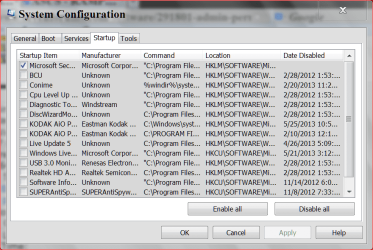
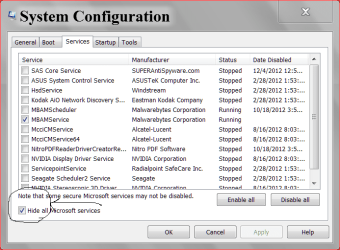
Something else that would be helpful. When you computer will let you do it.

msconfig start up5 29 2013.PNG

services msconfig.PNG

Your temps is the first concern. You don't want to make a toaster out of your computer.

Another tutorial by Brink to help you post.

http://www.sevenforums.com/tutorials/9733-screenshots-files-upload-post-seven-forums.html
 

My Computer My Computer

Computer type
PC/Desktop
Computer Manufacturer/Model Number
Home made Desktop
OS
Windows 10 Pro. 64/ version 1709 Windows 7 Pro/64
CPU
Intel i7-6800K @ 4.3
Motherboard
ASUS X-99 Deluxe II
Memory
Corsair Platinum 16 gig @2400
Graphics Card(s)
EVGA GTX 1070 OC
Monitor(s) Displays
Asus 27" LED LCD/VE278Q
Screen Resolution
1920-1080 or 1280-720 HDMI
Hard Drives
INTEL SSD 730-240 Gb Sata 3.0/
PSU
EVGA Platium 1200W
Case
Phanteks Luxe Tempered Glass 8 fans/ one radiator
Cooling
XSPC/ Water Cooled CPU
Keyboard
Das 4 Professional
Mouse
Logitech M705/MX Anywhere 2-S
Internet Speed
100 mbits
Antivirus
Microsoft Security Essentials/ Malwarebytes Premium 3.0/ SAS
Browser
I.E. 11 default/Firefox/ ISP Time Warner Cable/Spectrum
Other Info
LG BluRay Burner/
Sound system-KLipsch-THX/
Icy Dock ssd Hot Swap bays.
That looks Ok to me. Give the hardware a good clean and check the CPU cooler carefully.
 

My Computer My Computer

Computer type
PC/Desktop
Computer Manufacturer/Model Number
Golden Mk. I.4
OS
Windows 10 Pro x64 ; Xubuntu x64
CPU
Intel i7 860 @ 2.80 GHz O/C'ed to 4.0GHz
Motherboard
Gigabyte P55A-UD3R Rev.1. Award BIOS F13
Memory
16GB Corsair Vengance DDR3 @ 661 MHz Dual Channel (9-9-9-24)
Graphics Card(s)
EVGA NVidia GTX 560 1024MB
Sound Card
Realtek Integrated
Monitor(s) Displays
Dual Samsung SyncMaster 2494HS
Screen Resolution
1920*1080 and 1920*1080
Hard Drives
1*Samsung 840 EVO 120GB SSD;
1*OCZ Vertex 2 60GB SSD;
2*Samsung F3 SpinPoint 1TB in RAID0;
1*Samsung F1 SpinPoint 1TB;
2*Western Digital 1TB External USB 3.0
1*Western Digital 500GB External USB 3.0
1*Seagate 500GB External USB 2.0
PSU
Thermaltake ToughPower QFan 750W
Case
Thermaltake Element S VK60001W2Z
Cooling
Corsair H60 Water Cooling, 2*230mm and 2*80mm case fans
Keyboard
Logitech G110
Mouse
Logitech MX518
Can we have a screenshot of the resource manager to see whats taking up so much CPU power?
 

My Computer My Computer

Computer type
Laptop
Computer Manufacturer/Model Number
Packard Bell
OS
Windows 7 Home Premium 64Bit
CPU
AMD A6-3420M 1.5GHZ OC - 2.0GHZ
Memory
4GB DDR3 1600MHZ
Graphics Card(s)
AMD RADEON 6520G+AMD RADEON HD7470M 1GB DDR3
Screen Resolution
1366x768
Hard Drives
500GB SATA
Internet Speed
18Mb Unlimited
Antivirus
AVAST!
Browser
MOZILLA FIREFOX
Back
Top