
100 gb Partition LOST after SHRINKING win 7

rovshanst

New member
Local time
12:50 PM
Messages
5
Location
AZerbaijan
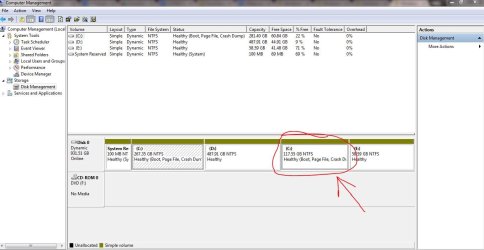
hi everyone. wanted install windows 8 and make dual boot on my machine. before my c: volume was 267 gb the D: volume was 605gb and E: volume was 59gb. so i began shrinking. on c partiton i had less free space so i thought i could shrink volume d and i did it. new unallocated partition was nearly 117 gb. i created it as a new volume and then i faced thatwin 8 cannot install there i had to shring the volume c:. with 3rd party application i resized c partition by adding the new 117 gb volume into it. everything was fine and my c disk was 384 gb after resizing it. then i decided to shrink the volume c: to make a new partition on that drive to install windows 8. i ran disk mgmt toolof windows and shrunk c: . but after a while an error message appeared it closed. and that 117gb free space now lost on my pc. but it seems on diskmgmt connected to my c volume. im adding a screenshot so u could see it. now my c volume shows total 281 gb not 384 gb. and i want to get that partition back how i can do it. i have done my backup but i think there may be a way without reinstalling windows and without deleting c: partition. please i need it immediately.
 

Attachments
  • scr.JPG
    scr.JPG
    83.4 KB · Views: 10

My Computer My Computer

Computer type
Laptop
Computer Manufacturer/Model Number
Acer
OS
Windows 7 Ultimate x64
CPU
Core I7
Memory
8 gb
Graphics Card(s)
gt 640m 2gb
Hard Drives
1tb
The following operations can be performed only on basic disks:
  • Create and delete primary and extended partitions.
  • Create and delete logical drives within an extended partition.
  • Format a partition and mark it as active.
The following operations can be performed only on dynamic disks:
  • Create and delete simple, spanned, striped, mirrored, and RAID-5 volumes.
  • Extend a simple or spanned volume.
  • Remove a mirror from a mirrored volume or break the mirrored volume into two volumes.
  • Repair mirrored or RAID-5 volumes.
  • Reactivate a missing or offline disk.
 

My Computer My Computer

Computer type
Laptop
Computer Manufacturer/Model Number
HP 17-ak0xx, dv7 3173nr
OS
Win7 Home Premium x64 W10Pro&Home
CPU
A12 9720p 4+8 TurionII M520
Motherboard
HP 3839
Memory
6GB 8GB
Graphics Card(s)
R7
Monitor(s) Displays
24" sa550
Screen Resolution
1600x900 1920x1080
Mouse
Logitechx2
Internet Speed
120Mb/s down 12up
HOw?

how can i format that partition or split it from c:? see the image pls. im talking abt the 2nd c: partition which is 117.5 gb
 

My Computer My Computer

Computer type
Laptop
Computer Manufacturer/Model Number
Acer
OS
Windows 7 Ultimate x64
CPU
Core I7
Memory
8 gb
Graphics Card(s)
gt 640m 2gb
Hard Drives
1tb
a third party partitioning software may be able to get it back like you had it, but in the future, change it from Dynamic to Basic before making changes... :o
 

My Computer My Computer

Computer type
Laptop
Computer Manufacturer/Model Number
HP 17-ak0xx, dv7 3173nr
OS
Win7 Home Premium x64 W10Pro&Home
CPU
A12 9720p 4+8 TurionII M520
Motherboard
HP 3839
Memory
6GB 8GB
Graphics Card(s)
R7
Monitor(s) Displays
24" sa550
Screen Resolution
1600x900 1920x1080
Mouse
Logitechx2
Internet Speed
120Mb/s down 12up
just tell me how which software? how to dooo i want it back
 

My Computer My Computer

Computer type
Laptop
Computer Manufacturer/Model Number
Acer
OS
Windows 7 Ultimate x64
CPU
Core I7
Memory
8 gb
Graphics Card(s)
gt 640m 2gb
Hard Drives
1tb
https://onedrive.live.com/?cid=b0a22789320e3247&id=B0A22789320E3247!215

get pw422 from the above link. It's Partition Wizard 4.22. Burn it to a disk and boot from the disk. It can convert dynamic to basic, but you should back up your data before using it. You should never have accepted dynamic disks. They are a pain.

You have a mess and may have to reinstall. I'm not an expert with Partition Wizard, but it's probably your best choice that doesn't involve a complete reinstall.
 

My Computer My Computer

Computer type
PC/Desktop
Computer Manufacturer/Model Number
Ignatz Special; 4 speed manual gearbox; factory air conditioning; one of one
OS
Windows 7 Home Premium SP1, 64-bit
CPU
Intel Skylake i5-6600K, not overclocked
Motherboard
AsRock Z170M Extreme 4, micro ATX
Memory
8 GB HyperX DDR4-2666 (2 x 4 GB)
Graphics Card(s)
none; graphics are integrated on CPU
Sound Card
onboard: Realtek ALC1150; external: USB Behringer UF0-202
Monitor(s) Displays
Dell S2340M 23 inch IPS
Screen Resolution
1600 x 900
Hard Drives
System: Crucial MX100 series SSD, 128 GB;
Data: Samsung Spinpoint 103SJ, 1 TB;
Backup: WD Caviar Green WD30EZRX-00D8PB0, 3 TB
PSU
Rosewill SilentNight 500 watt fanless, semi-modular
Case
Antec Solo II
Cooling
Noctua NH-U12S; Noctua F12 intake, Noctua S12A exhaust
Keyboard
Microsoft 200 6JH-00001 USB
Mouse
Dell or Microsoft optical wired; USB
Antivirus
Microsoft Security Essentials and Malwarebytes Premium
Browser
Pale Moon
Other Info
All fans PWM; speeds at idle: CPU circa 500 rpm; intake circa 600 rpm; exhaust circa 600 rpm; CPU temps 27 idle and 47 C load in a warm room (27 C/81 F) when running Intel Extreme Tuning Utility stress test.
will it split them? i want split secont 117gb c volume from the fisrt one. i joined them using windows diskmgmt but now need split them. the 117gb is empty
 

My Computer My Computer

Computer type
Laptop
Computer Manufacturer/Model Number
Acer
OS
Windows 7 Ultimate x64
CPU
Core I7
Memory
8 gb
Graphics Card(s)
gt 640m 2gb
Hard Drives
1tb
Windows doesn't like 5 basic partitions, which is why your partitions are dynamic, not basic. You need to get back to basic.

So you need to get rid of at least one partition. I'd think about moving whatever is on E to D, temporarily. Then delete E.

If you get that far, you may be able to combine both of those C partitions back into a single C, with all as "basic".

You want to end up with System Reserved and no more than 3 other partitions, all basic.

Back up your data.
 

My Computer My Computer

Computer type
PC/Desktop
Computer Manufacturer/Model Number
Ignatz Special; 4 speed manual gearbox; factory air conditioning; one of one
OS
Windows 7 Home Premium SP1, 64-bit
CPU
Intel Skylake i5-6600K, not overclocked
Motherboard
AsRock Z170M Extreme 4, micro ATX
Memory
8 GB HyperX DDR4-2666 (2 x 4 GB)
Graphics Card(s)
none; graphics are integrated on CPU
Sound Card
onboard: Realtek ALC1150; external: USB Behringer UF0-202
Monitor(s) Displays
Dell S2340M 23 inch IPS
Screen Resolution
1600 x 900
Hard Drives
System: Crucial MX100 series SSD, 128 GB;
Data: Samsung Spinpoint 103SJ, 1 TB;
Backup: WD Caviar Green WD30EZRX-00D8PB0, 3 TB
PSU
Rosewill SilentNight 500 watt fanless, semi-modular
Case
Antec Solo II
Cooling
Noctua NH-U12S; Noctua F12 intake, Noctua S12A exhaust
Keyboard
Microsoft 200 6JH-00001 USB
Mouse
Dell or Microsoft optical wired; USB
Antivirus
Microsoft Security Essentials and Malwarebytes Premium
Browser
Pale Moon
Other Info
All fans PWM; speeds at idle: CPU circa 500 rpm; intake circa 600 rpm; exhaust circa 600 rpm; CPU temps 27 idle and 47 C load in a warm room (27 C/81 F) when running Intel Extreme Tuning Utility stress test.
So the 117GB partition is new and totally empty? Is so, delete that partition so you have 4 partitions afterwards. Then convert the dynamic disk to a basic disk using Partition Wizard 4.2 (link provided in previous posts). Mark "system reserved" ACTIVE. Post disk management screenshot afterwards.

Of all was successfull.... convert D to logical, convert E to logical.
 
Last edited:

My Computer My Computer

Computer type
Laptop
Computer Manufacturer/Model Number
ACER ASPIRE 5742G
OS
Microsoft Windows 7 Home Premium 64-bits 7601 Multiprocessor Free Service Pack 1
CPU
Intel(R) Core(TM) i3 CPU M 370 @ 2.40GHz
Motherboard
Acer Aspire 5742G
Memory
4,00 GB
Graphics Card(s)
ATI Mobility Radeon HD 5400 Series
Sound Card
(1) AMD High Definition Audio Device (2) Realtek High Defi
Screen Resolution
1366 x 768 x 32 bits (4294967296 colors) @ 60 Hz
Hard Drives
WDC WD5000BEVT-22ZAT0
well i can delete disk e. if i delete it will be unallocated yes? then what ad that unallocated space to c:?

Kaktussoft, i cant delete that 117gb partition coz it is named as disk c so im afraid if format it the original c may be deleted thats why first i wanna make as a seperate disk actually i need this
 

My Computer My Computer

Computer type
Laptop
Computer Manufacturer/Model Number
Acer
OS
Windows 7 Ultimate x64
CPU
Core I7
Memory
8 gb
Graphics Card(s)
gt 640m 2gb
Hard Drives
1tb
well i can delete disk e. if i delete it will be unallocated yes? then what ad that unallocated space to c:?

Kaktussoft, i cant delete that 117gb partition coz it is named as disk c so im afraid if format it the original c may be deleted thats why first i wanna make as a seperate disk actually i need this

If you delete E, that space will become unallocated. Leave it unallocated for now.

At that point you will have 4 partitions shown in Disk Management, not the current 5.

At that point, you may be able to convert from dynamic to basic. If that is successful, you may show all of C as a single unit, not split. You would have C, D, and system reserved, all "basic", no dynamic.
 

My Computer My Computer

Computer type
PC/Desktop
Computer Manufacturer/Model Number
Ignatz Special; 4 speed manual gearbox; factory air conditioning; one of one
OS
Windows 7 Home Premium SP1, 64-bit
CPU
Intel Skylake i5-6600K, not overclocked
Motherboard
AsRock Z170M Extreme 4, micro ATX
Memory
8 GB HyperX DDR4-2666 (2 x 4 GB)
Graphics Card(s)
none; graphics are integrated on CPU
Sound Card
onboard: Realtek ALC1150; external: USB Behringer UF0-202
Monitor(s) Displays
Dell S2340M 23 inch IPS
Screen Resolution
1600 x 900
Hard Drives
System: Crucial MX100 series SSD, 128 GB;
Data: Samsung Spinpoint 103SJ, 1 TB;
Backup: WD Caviar Green WD30EZRX-00D8PB0, 3 TB
PSU
Rosewill SilentNight 500 watt fanless, semi-modular
Case
Antec Solo II
Cooling
Noctua NH-U12S; Noctua F12 intake, Noctua S12A exhaust
Keyboard
Microsoft 200 6JH-00001 USB
Mouse
Dell or Microsoft optical wired; USB
Antivirus
Microsoft Security Essentials and Malwarebytes Premium
Browser
Pale Moon
Other Info
All fans PWM; speeds at idle: CPU circa 500 rpm; intake circa 600 rpm; exhaust circa 600 rpm; CPU temps 27 idle and 47 C load in a warm room (27 C/81 F) when running Intel Extreme Tuning Utility stress test.
First you have delete 1 partition so only 4 are on drive. Then convert to basic with PW4.2. Mark "system reserved" ACTIVE after converting to BASIC drive ... otherwise system won't boot!!
 
Last edited:

My Computer My Computer

Computer type
Laptop
Computer Manufacturer/Model Number
ACER ASPIRE 5742G
OS
Microsoft Windows 7 Home Premium 64-bits 7601 Multiprocessor Free Service Pack 1
CPU
Intel(R) Core(TM) i3 CPU M 370 @ 2.40GHz
Motherboard
Acer Aspire 5742G
Memory
4,00 GB
Graphics Card(s)
ATI Mobility Radeon HD 5400 Series
Sound Card
(1) AMD High Definition Audio Device (2) Realtek High Defi
Screen Resolution
1366 x 768 x 32 bits (4294967296 colors) @ 60 Hz
Hard Drives
WDC WD5000BEVT-22ZAT0

My Computer My Computer

Computer type
PC/Desktop
Computer Manufacturer/Model Number
Skylake Special #666
OS
Windows 10 Pro x64
CPU
Intel Core i7 6700K
Motherboard
Asus Sabertooth Z170 Mark 1
Memory
GSkill TridentZ RGB 16GB 3600 16-16-16-36
Graphics Card(s)
EVGA GTX 980 Ti SC x2
Sound Card
Realtek High Definition
Monitor(s) Displays
AOC G2460PG
Screen Resolution
1920 x 1080 144Hz
Hard Drives
Samsung 860 Pro 256GB, Seagate Barracuda 4TB x2
PSU
EVGA 1000 P2, EVGA White Custom Braided Cables
Case
Corsair Vengeance C70 Gunmetal Black
Cooling
Corsair H100i v2, Corsair ML120 x2, Thermal Grizzly Kryonaut
Keyboard
Logitech G910 Orion Spectrum
Mouse
Logitech G700s
Internet Speed
Verizon Fios Quantum Gateway 75/75
Antivirus
Windows Defender, Malwarebytes Free 3.8.3
Browser
Chrome
Other Info
Corsair SP120 x4, LG Blu-ray Drive, Durabrand HT-395 100 Watt Dolby Digital Amp, Corsair H2100 Wireless 7.1 Headset
To review, the problem is that you converted your HD to Dynamic which is only meant to be used to span a partition across multiple HD's. Apparently you didn't see the warning message.

The solution to solve this non-destructively is to boot free Partition Wizard CD version 4.2 which is the last one which offers this as a free feature: pw422.zip ISO - Windows Live.

Download the ISO, rightclick to burn it to CD using Windows Image Burner, or use ImgBurn.

Boot CD. You will need to delete the extra partition(s) you created which tipped it to convert to Dynamic before it will convert back to Basic.

Then follow these video steps: How to convert dynamic disk to basic disk with Partition Wizard?

If Win7 will not start and you confirm it's been converted successfully, then confirm that the 100mb System Reserved partition (preferred if you have it) or C is Set Active partition - Partition Wizard Video Help, then run Startup Repair - Run up to 3 Separate Times.

After conversion if you want help adding a partition post back a screenshot of your maximized Disk Mgmt drive map with listings, using the Snipping Tool in Start Menu, attached using paper clip in Reply Box.
 
Back
Top