100% GPU usage spikes freeze entire system- nVidia GeForce GTX670M

jrh072

New member
Local time
12:26 PM
Messages
6
The issue:

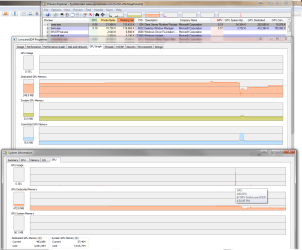
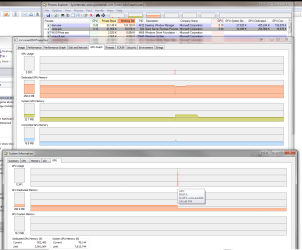
At times the GPU will spike to 100% and freeze the entire system, usually preceeded by the mouse "dragging" or slowing down and stopping. If I do not quickly stop using the mouse after the slowdown begins, the entire system will usually freeze and cannot be recovered without power cycling the PC. :shock: If I stop using the mouse in time, the system will recover to normal after a few seconds. (if playing sound or music when the slowdown starts, the sound is caught in a loop until the spike ends). This occurs often with nothing more than Outlook and a browser window open, more often with several applications running as is usually the state I work in, although not related to games or anything that heavily taxes my system. The offending process is usually csrss.exe (usually when running my ArcMap application), chrome.exe or firefox.exe (usually the only browsers I use) and occasionally dwm.exe. The firefox.exe process pic attached was just after resuming after suspend, which triggers the issue at times as well (although the browser related issue most often happens while actually browsing).

I have caught this pattern several times in the Process Explorer (see pics):
  1. GPU usage spiking to 98%-100% (with preceding usage only around 1%)
  2. The offending process appears to only be "using" 50%-70% of GPU during the spike
  3. At the same time or just following the usage spike, there is a sudden drop in GPU dedicated memory.

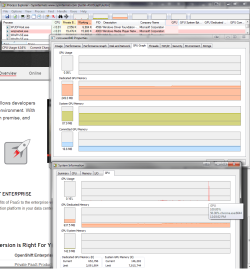
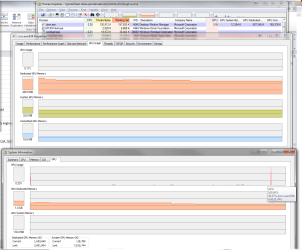
A couple of times I have been lucky and have had the offending process detail window open in the process explorer (see pics), both times reflecting:

  1. GPU usage spike (but not the full amount of the total GPU spike)
  2. Committed GPU memory spiking (sometimes right after a drop, while staying consistent just prior and just after the event)
  3. A sudden drop and recovery of dedicated GPU memory
  4. A sharp drop immediately followed by an extended rise (plateau) of system GPU memory.

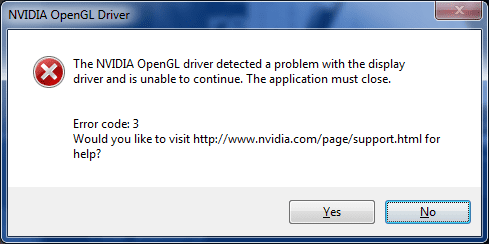
In case it is related, at times when I am using ArcMap and/or Google Earth (both used extensively), the display driver crashes via an OpenGL issue (see pic).

FYI, I typically run many applications including 3D maps in one display, 2D in another without any issues whatsoever, and have never had an issue running programs that really tax my system (like 3d games).

I have had this issue for the entire year (2013) that I've had this laptop. :mad: I catch it happening 3+ times/week but as long as I let go of the mouse it usually returns to normal after a few seconds. Troubleshooting has included memory & hard drive testing, updating the BIOS, confirming no temperature issues, complete uninstalling & reinstallation of several updated nVidia drivers, ran driver verifier (no non-microsoft drivers listed). FYI, before determining that the GPU was the culprit, I had this issue in the general discussion forum in a detailed post, http://www.sevenforums.com/general-...-freezing-after-mouse-slows-down-no-bsod.html, to date 330 views and no replies, guess it stumped everyone! nVidia will not provide support as this is an OEM installed display adapter; ASUS support is terrible, regardless of my pleas to escalate to nVidia (or a real support engineer) they just reply with "do a complete system restore" or "RMA your computer". As the evidence seems to indicate an issue with the GPU/video driver, I'm turning to the forum hoping someone may be able to shed some light and perhaps provide better means to flesh out the issue with the GPU/video driver without going to the lengths of a full system restore or laptop replacement. Speccy system info dump also attached.

Thanks ahead for any assistance! Merry Christmas & Happy New Year! :party:


Justin
 

Attachments

  • SpeccySystemInfo_122313.txt
    SpeccySystemInfo_122313.txt
    294.7 KB · Views: 2
  • PC freeze firefox.exe.png
    PC freeze firefox.exe.png
    61.6 KB · Views: 2
  • PC freeze csrss.exe.png
    PC freeze csrss.exe.png
    65.6 KB · Views: 1
  • PC freeze chrome.exe.png
    PC freeze chrome.exe.png
    61.6 KB · Views: 1
  • PC freeze dwm.exe.png
    PC freeze dwm.exe.png
    66.9 KB · Views: 1
  • nVidia OpenGL Driver Error.png
    nVidia OpenGL Driver Error.png
    10 KB · Views: 32

My Computer My Computer

At a glance

Windows 7 x64Intel Core i7-3610QM @ 2.3 GHz16GB 204-Pin DDR3 SO-DIMMnVidia GeForce GTX670M- 3GB
Computer type
Laptop
Computer Manufacturer/Model Number
Asus G75VW-DS73-3D
OS
Windows 7 x64
CPU
Intel Core i7-3610QM @ 2.3 GHz
Motherboard
ASUS
Memory
16GB 204-Pin DDR3 SO-DIMM
Graphics Card(s)
nVidia GeForce GTX670M- 3GB
Monitor(s) Displays
Dual external displays, ASUS VG278HR 27", Dell 3007 WFP 30"
Screen Resolution
ASUS- 1920 x 1080, Dell 2560 x 1600
Hard Drives
240GB SSD primary
1TB secondary HDD
Keyboard
Microsoft Wireless Keyboard 6000 v3
Mouse
Microsoft Wireless Mobile Mouse 6000
Internet Speed
cable, 30 dn 5 up
Antivirus
avast
how much actual ram does your laptop have? It appears there might not be enough available to run the graphics chip.
 

My Computer My Computer

At a glance

Windows 7 ultimate 64-bitIntel I7 2600K 3.4ghzCorsair 16gb ddr3 1600mhzNvidia Geforce gt 430
Computer type
PC/Desktop
Computer Manufacturer/Model Number
custom built
OS
Windows 7 ultimate 64-bit
CPU
Intel I7 2600K 3.4ghz
Motherboard
Asus Evo P8P67
Memory
Corsair 16gb ddr3 1600mhz
Graphics Card(s)
Nvidia Geforce gt 430
Sound Card
Sound Blaster Titanium x-fi pci express
Monitor(s) Displays
Dell E198WFP
Hard Drives
1 western digital 2TB drive.
PSU
Antec 1200 watt
Case
Inwin Dragon Rider
Cooling
6 case supplied cooling fans
Keyboard
logitech mk700
Mouse
logitech m705
Internet Speed
25-50mbps download; 10mbps upload(i think)
Antivirus
avg free 2014
Browser
mozilla firefox
Other Info
Also have a pretty bad speaker setup which is a klipsch promedia 5.1 surround speaker setup with huge subwoofer and lg blu ray player/writer. Also a hp officejet pro 8600 plus wireless all in one and a logitech s7500 webcam.
The issue:

At times the GPU will spike to 100% and freeze the entire system, usually preceeded by the mouse "dragging" or slowing down and stopping. If I do not quickly stop using the mouse after the slowdown begins, the entire system will usually freeze and cannot be recovered without power cycling the PC. :shock: If I stop using the mouse in time, the system will recover to normal after a few seconds. (if playing sound or music when the slowdown starts, the sound is caught in a loop until the spike ends). This occurs often with nothing more than Outlook and a browser window open, more often with several applications running as is usually the state I work in, although not related to games or anything that heavily taxes my system. The offending process is usually csrss.exe (usually when running my ArcMap application), chrome.exe or firefox.exe (usually the only browsers I use) and occasionally dwm.exe. The firefox.exe process pic attached was just after resuming after suspend, which triggers the issue at times as well (although the browser related issue most often happens while actually browsing).

I have caught this pattern several times in the Process Explorer (see pics):

  1. GPU usage spiking to 98%-100% (with preceding usage only around 1%)
  2. The offending process appears to only be "using" 50%-70% of GPU during the spike
  3. At the same time or just following the usage spike, there is a sudden drop in GPU dedicated memory.
A couple of times I have been lucky and have had the offending process detail window open in the process explorer (see pics), both times reflecting:

  1. GPU usage spike (but not the full amount of the total GPU spike)
  2. Committed GPU memory spiking (sometimes right after a drop, while staying consistent just prior and just after the event)
  3. A sudden drop and recovery of dedicated GPU memory
  4. A sharp drop immediately followed by an extended rise (plateau) of system GPU memory.
In case it is related, at times when I am using ArcMap and/or Google Earth (both used extensively), the display driver crashes via an OpenGL issue (see pic).

FYI, I typically run many applications including 3D maps in one display, 2D in another without any issues whatsoever, and have never had an issue running programs that really tax my system (like 3d games).

I have had this issue for the entire year (2013) that I've had this laptop. :mad: I catch it happening 3+ times/week but as long as I let go of the mouse it usually returns to normal after a few seconds. Troubleshooting has included memory & hard drive testing, updating the BIOS, confirming no temperature issues, complete uninstalling & reinstallation of several updated nVidia drivers, ran driver verifier (no non-microsoft drivers listed). FYI, before determining that the GPU was the culprit, I had this issue in the general discussion forum in a detailed post, http://www.sevenforums.com/general-...-freezing-after-mouse-slows-down-no-bsod.html, to date 330 views and no replies, guess it stumped everyone! nVidia will not provide support as this is an OEM installed display adapter; ASUS support is terrible, regardless of my pleas to escalate to nVidia (or a real support engineer) they just reply with "do a complete system restore" or "RMA your computer". As the evidence seems to indicate an issue with the GPU/video driver, I'm turning to the forum hoping someone may be able to shed some light and perhaps provide better means to flesh out the issue with the GPU/video driver without going to the lengths of a full system restore or laptop replacement. Speccy system info dump also attached.

Thanks ahead for any assistance! Merry Christmas & Happy New Year! :party:


Justin

Hi,

What version driver do you have?? If it's 320 or 330 series uninstall via Control panel, reboot, let the standard VGA adapter install, reboot again and try the stable 314.22 WHQL.
When you finish uninstalling the current driver, also delete any Nvidia folders and if you are familiar with regedit delete all Nvidia remnant keys. REBOOT again.
Upon installation of the new driver, open FF or IE and under Advanced menu, try the option "Use software rendering instead of GPU renedering".
Nvidia drivers do not work properly with Chrome and some of them with FF.
I have 314.22 installed and not a single issue with IE 11.
I tried the 331.65 and 331.82, personally modified the installer in order to allow it to install on my laptop, but they are not good, many random TDR's.
Hopefully things will get better when the future driver will be released.
Hope this helps,

Regards,
 

My Computer My Computer

At a glance

Windows 7 x64 Home Premium
Computer type
Laptop
Computer Manufacturer/Model Number
Sony Vaio
OS
Windows 7 x64 Home Premium
how much actual ram does your laptop have? It appears there might not be enough available to run the graphics chip.

Thanks for the suggestion, but memory is definitely not the issue. The display adapter has 3GB and the laptop 16 GB.
 

My Computer My Computer

At a glance

Windows 7 x64Intel Core i7-3610QM @ 2.3 GHz16GB 204-Pin DDR3 SO-DIMMnVidia GeForce GTX670M- 3GB
Computer type
Laptop
Computer Manufacturer/Model Number
Asus G75VW-DS73-3D
OS
Windows 7 x64
CPU
Intel Core i7-3610QM @ 2.3 GHz
Motherboard
ASUS
Memory
16GB 204-Pin DDR3 SO-DIMM
Graphics Card(s)
nVidia GeForce GTX670M- 3GB
Monitor(s) Displays
Dual external displays, ASUS VG278HR 27", Dell 3007 WFP 30"
Screen Resolution
ASUS- 1920 x 1080, Dell 2560 x 1600
Hard Drives
240GB SSD primary
1TB secondary HDD
Keyboard
Microsoft Wireless Keyboard 6000 v3
Mouse
Microsoft Wireless Mobile Mouse 6000
Internet Speed
cable, 30 dn 5 up
Antivirus
avast
Hi,

What version driver do you have?? If it's 320 or 330 series uninstall via Control panel, reboot, let the standard VGA adapter install, reboot again and try the stable 314.22 WHQL.
When you finish uninstalling the current driver, also delete any Nvidia folders and if you are familiar with regedit delete all Nvidia remnant keys. REBOOT again.
Upon installation of the new driver, open FF or IE and under Advanced menu, try the option "Use software rendering instead of GPU renedering".
Nvidia drivers do not work properly with Chrome and some of them with FF.
I have 314.22 installed and not a single issue with IE 11.
I tried the 331.65 and 331.82, personally modified the installer in order to allow it to install on my laptop, but they are not good, many random TDR's.
Hopefully things will get better when the future driver will be released.
Hope this helps,

Regards,

Thanks for the tips, my version is currently 331.82 (latest). So why do you recommend 314.22? I thought any driver released as non-beta was stable? It would be nice to have the latest possible, but going through the gymnastics of complete uninstalling & reinstalling with several versions doesn't appeal, are you aware of some nVidia tricks that may help knowing how to determine the best stable release at a given time? I will definitely try your suggestions & report back.

Cheers,

Justin
 

My Computer My Computer

At a glance

Windows 7 x64Intel Core i7-3610QM @ 2.3 GHz16GB 204-Pin DDR3 SO-DIMMnVidia GeForce GTX670M- 3GB
Computer type
Laptop
Computer Manufacturer/Model Number
Asus G75VW-DS73-3D
OS
Windows 7 x64
CPU
Intel Core i7-3610QM @ 2.3 GHz
Motherboard
ASUS
Memory
16GB 204-Pin DDR3 SO-DIMM
Graphics Card(s)
nVidia GeForce GTX670M- 3GB
Monitor(s) Displays
Dual external displays, ASUS VG278HR 27", Dell 3007 WFP 30"
Screen Resolution
ASUS- 1920 x 1080, Dell 2560 x 1600
Hard Drives
240GB SSD primary
1TB secondary HDD
Keyboard
Microsoft Wireless Keyboard 6000 v3
Mouse
Microsoft Wireless Mobile Mouse 6000
Internet Speed
cable, 30 dn 5 up
Antivirus
avast
Hi,

What version driver do you have?? If it's 320 or 330 series uninstall via Control panel, reboot, let the standard VGA adapter install, reboot again and try the stable 314.22 WHQL.
When you finish uninstalling the current driver, also delete any Nvidia folders and if you are familiar with regedit delete all Nvidia remnant keys. REBOOT again.
Upon installation of the new driver, open FF or IE and under Advanced menu, try the option "Use software rendering instead of GPU renedering".
Nvidia drivers do not work properly with Chrome and some of them with FF.
I have 314.22 installed and not a single issue with IE 11.
I tried the 331.65 and 331.82, personally modified the installer in order to allow it to install on my laptop, but they are not good, many random TDR's.
Hopefully things will get better when the future driver will be released.
Hope this helps,

Regards,

Thanks for the tips, my version is currently 331.82 (latest). So why do you recommend 314.22? I thought any driver released as non-beta was stable? It would be nice to have the latest possible, but going through the gymnastics of complete uninstalling & reinstalling with several versions doesn't appeal, are you aware of some nVidia tricks that may help knowing how to determine the best stable release at a given time? I will definitely try your suggestions & report back.

Cheers,

Justin

Hi,

Please check:
https://forums.geforce.com/default/...ay-driver-feedback-thread-released-11-19-13-/

and you will see how many problems there are after 314.22 driver. (especially with Fermi cards Nvidia 300/400 8000 & 9000 series and also with many 600 & 700 series.
As I said, I already tried 33X.XX series drivers and fortunately not the 32X.XX series as they gave overvoltage issues to many users.
Use also HW Monitor from CPUID.com to monitor voltages & temperatures of the GPU.
It is very important to properly uninstall the previous driver before installing a different version.
I recommend 314.22 WHQL, very stable.
If you go ahead and install it, choose Custom-Advanced then uncheck 3D Vision if you do not have a 3D pc and Nvidia update. Check also the "Perform a clean installation" option.
Let me know how it went.
Hope this helps,

Kind regards,
 
Last edited:

My Computer My Computer

At a glance

Windows 7 x64 Home Premium
Computer type
Laptop
Computer Manufacturer/Model Number
Sony Vaio
OS
Windows 7 x64 Home Premium
Hi,

What version driver do you have?? If it's 320 or 330 series uninstall via Control panel, reboot, let the standard VGA adapter install, reboot again and try the stable 314.22 WHQL.
When you finish uninstalling the current driver, also delete any Nvidia folders and if you are familiar with regedit delete all Nvidia remnant keys. REBOOT again.
Upon installation of the new driver, open FF or IE and under Advanced menu, try the option "Use software rendering instead of GPU renedering".
Nvidia drivers do not work properly with Chrome and some of them with FF.
I have 314.22 installed and not a single issue with IE 11.
I tried the 331.65 and 331.82, personally modified the installer in order to allow it to install on my laptop, but they are not good, many random TDR's.
Hopefully things will get better when the future driver will be released.
Hope this helps,

Regards,

Thanks for the tips, my version is currently 331.82 (latest). So why do you recommend 314.22? I thought any driver released as non-beta was stable? It would be nice to have the latest possible, but going through the gymnastics of complete uninstalling & reinstalling with several versions doesn't appeal, are you aware of some nVidia tricks that may help knowing how to determine the best stable release at a given time? I will definitely try your suggestions & report back.

Cheers,

Justin

No; not every driver that is released in beta is stable. A beta form driver means its still in the testing stages and hasnt become a final version yet; therefore the beta driver can still have "bugs" in them until the developers come out with a final version that should have the kinks worked out. Therefore it is best to avoid installing them so they dont cause problems.
 
Last edited:

My Computer My Computer

At a glance

Windows 7 ultimate 64-bitIntel I7 2600K 3.4ghzCorsair 16gb ddr3 1600mhzNvidia Geforce gt 430
Computer type
PC/Desktop
Computer Manufacturer/Model Number
custom built
OS
Windows 7 ultimate 64-bit
CPU
Intel I7 2600K 3.4ghz
Motherboard
Asus Evo P8P67
Memory
Corsair 16gb ddr3 1600mhz
Graphics Card(s)
Nvidia Geforce gt 430
Sound Card
Sound Blaster Titanium x-fi pci express
Monitor(s) Displays
Dell E198WFP
Hard Drives
1 western digital 2TB drive.
PSU
Antec 1200 watt
Case
Inwin Dragon Rider
Cooling
6 case supplied cooling fans
Keyboard
logitech mk700
Mouse
logitech m705
Internet Speed
25-50mbps download; 10mbps upload(i think)
Antivirus
avg free 2014
Browser
mozilla firefox
Other Info
Also have a pretty bad speaker setup which is a klipsch promedia 5.1 surround speaker setup with huge subwoofer and lg blu ray player/writer. Also a hp officejet pro 8600 plus wireless all in one and a logitech s7500 webcam.
Hi,

What version driver do you have?? If it's 320 or 330 series uninstall via Control panel, reboot, let the standard VGA adapter install, reboot again and try the stable 314.22 WHQL.
When you finish uninstalling the current driver, also delete any Nvidia folders and if you are familiar with regedit delete all Nvidia remnant keys. REBOOT again.
Upon installation of the new driver, open FF or IE and under Advanced menu, try the option "Use software rendering instead of GPU renedering".
Nvidia drivers do not work properly with Chrome and some of them with FF.
I have 314.22 installed and not a single issue with IE 11.
I tried the 331.65 and 331.82, personally modified the installer in order to allow it to install on my laptop, but they are not good, many random TDR's.
Hopefully things will get better when the future driver will be released.
Hope this helps,

Regards,

Thanks for the tips, my version is currently 331.82 (latest). So why do you recommend 314.22? I thought any driver released as non-beta was stable? It would be nice to have the latest possible, but going through the gymnastics of complete uninstalling & reinstalling with several versions doesn't appeal, are you aware of some nVidia tricks that may help knowing how to determine the best stable release at a given time? I will definitely try your suggestions & report back.

Cheers,

Justin

No; not every driver that is released in beta is stable. A beta from driver means its still in the testing stages and hasnt become a final version yet; therefore the beta driver can still have "bugs" in them until the developers come out with a final version that should have the kinks worked out. Therefore it is best to avoid installing them so they dont cause problems.

Hi,

User mentionned non-beta NOT beta.
Also, any beta driver can pass the WHQL certification.
In other words, a beta is a driver minus WHQL but if it was submitted by Nvidia to Microsoft it could easily pass the tests.
These words are taken as from the Nvidia forum moderator.

Best regards & Merry Christmas.
 

My Computer My Computer

At a glance

Windows 7 x64 Home Premium
Computer type
Laptop
Computer Manufacturer/Model Number
Sony Vaio
OS
Windows 7 x64 Home Premium
Thanks for the tips, my version is currently 331.82 (latest). So why do you recommend 314.22? I thought any driver released as non-beta was stable? It would be nice to have the latest possible, but going through the gymnastics of complete uninstalling & reinstalling with several versions doesn't appeal, are you aware of some nVidia tricks that may help knowing how to determine the best stable release at a given time? I will definitely try your suggestions & report back.

Cheers,

Justin

No; not every driver that is released in beta is stable. A beta from driver means its still in the testing stages and hasnt become a final version yet; therefore the beta driver can still have "bugs" in them until the developers come out with a final version that should have the kinks worked out. Therefore it is best to avoid installing them so they dont cause problems.

Hi,

User mentionned non-beta NOT beta.
Also, any beta driver can pass the WHQL certification.
In other words, a beta is a driver minus WHQL but if it was submitted by Nvidia to Microsoft it could easily pass the tests.
These words are taken as from the Nvidia forum moderator.

Best regards & Merry Christmas.

Thanks again-

I'm on the road for the week and will not be able to troubleshoot much until I return. I really should have started in the nVidia forum, not sure why I didn't check there first :shock: I'll update this post with any results and will likely start a new thread there. Happy Holidays.

:party:
 

My Computer My Computer

At a glance

Windows 7 x64Intel Core i7-3610QM @ 2.3 GHz16GB 204-Pin DDR3 SO-DIMMnVidia GeForce GTX670M- 3GB
Computer type
Laptop
Computer Manufacturer/Model Number
Asus G75VW-DS73-3D
OS
Windows 7 x64
CPU
Intel Core i7-3610QM @ 2.3 GHz
Motherboard
ASUS
Memory
16GB 204-Pin DDR3 SO-DIMM
Graphics Card(s)
nVidia GeForce GTX670M- 3GB
Monitor(s) Displays
Dual external displays, ASUS VG278HR 27", Dell 3007 WFP 30"
Screen Resolution
ASUS- 1920 x 1080, Dell 2560 x 1600
Hard Drives
240GB SSD primary
1TB secondary HDD
Keyboard
Microsoft Wireless Keyboard 6000 v3
Mouse
Microsoft Wireless Mobile Mouse 6000
Internet Speed
cable, 30 dn 5 up
Antivirus
avast
Back
Top