
100 Mb Boot Partition

IcarusII

New member
Power User
Local time
9:26 AM
Messages
108
Hi guys,

Just a quick question i hope. About 2 years ago or so (maybee less I lose track) I came here for advice in setting up this computer im on in the first place. Greg and Barefootkid were particularly helpful to me (so thanks guys).

There was a lot of chatter between Greg and Barefoot kid about the 100Mb boot partition and a few posts ive read recently seem to indicate you dont need it anymore if your not running ultimate.

My current setup is thus (and hasnt changed since all the advice). Note i never did get around to using the unallocated space lol:
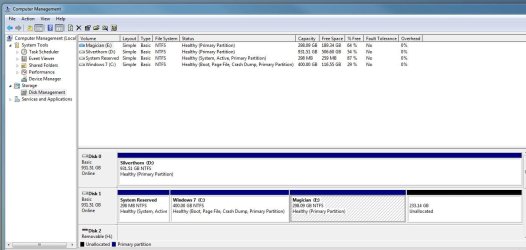
Current Disk Mgmt 060312.JPG

So whats the latest thinking on the 100Mb and as ill be doing a clean install tomorrow on brand new hardware I would like to get it right first time so I can image off a nice happy install.

OS will being going onto a 128Gb SSD and i pretty much wont have anything else on it

Ta guys
 

My Computer

Computer Manufacturer/Model Number
Manufacturer: Me
OS
W7 Home Prem, Vista home Prem
CPU
Intel E8600 3.3GHz dual core
Motherboard
Asus (need to find model)
Memory
4 Gb
Graphics Card(s)
Nvidia - GForce GTX 280 - 1Gb
Sound Card
Xonar Dx 5.1
Monitor(s) Displays
Hazro flatscreen
Screen Resolution
1920 x 1200
Hard Drives
1 x Samsung Spinpoint F1 300 gb
1 x Samsung Spinpoint F1 1 Tb
1 x Samsung Spinpoint F3 1 Tb
PSU
Later
Case
Infiniti Midi tower
Cooling
later
Keyboard
Logitech G11
Mouse
Logitech G9 Laser
Internet Speed
3mb/s - awful
Other Info
I built this three years ago. It was very fast at the time. Now it's about average but still runs any game I throw at it at max detail.

Currently
My opinion about it now is that I wouldn't waste any time taking steps to avoid it, especially if you use WIn7 backup imaging. Some other imaging apps may have trouble with it - you should know by now how it works with yours.

Easiest way to avoid it with your config is to power down to unplug Disk0 to plug in the SSD, use Disk Mgmt to Create and format one large partition. Then power down to unplug Disk1 for booted Install to SSD alone: Clean Install Windows 7

Others may want to share their experiences.
 
It's easily avoided using Diskpart early in the installation. Make your partitions with Diskpart, rather than letting the installation disk make the partitions a bit later on.

It doesn't really matter for most users if you keep it or not. As I recall, it's needed for Bitlocker if you happen to need that capability.

If you keep the System Reserved partition, it would have to be imaged if you use an imaging program to back up your system.

I chose to avoid it in order to keep all system files on a single partition and because keeping it offends my sense of order, being somewhat obsessive/compulsive.
 

My Computer

Computer type
PC/Desktop
Computer Manufacturer/Model Number
Ignatz Special; 4 speed manual gearbox; factory air conditioning; one of one
OS
Windows 7 Home Premium SP1, 64-bit
CPU
Intel Skylake i5-6600K, not overclocked
Motherboard
AsRock Z170M Extreme 4, micro ATX
Memory
8 GB HyperX DDR4-2666 (2 x 4 GB)
Graphics Card(s)
none; graphics are integrated on CPU
Sound Card
onboard: Realtek ALC1150; external: USB Behringer UF0-202
Monitor(s) Displays
Dell S2340M 23 inch IPS
Screen Resolution
1600 x 900
Hard Drives
System: Crucial MX100 series SSD, 128 GB;
Data: Samsung Spinpoint 103SJ, 1 TB;
Backup: WD Caviar Green WD30EZRX-00D8PB0, 3 TB
PSU
Rosewill SilentNight 500 watt fanless, semi-modular
Case
Antec Solo II
Cooling
Noctua NH-U12S; Noctua F12 intake, Noctua S12A exhaust
Keyboard
Microsoft 200 6JH-00001 USB
Mouse
Dell or Microsoft optical wired; USB
Antivirus
Microsoft Security Essentials and Malwarebytes Premium
Browser
Pale Moon
Other Info
All fans PWM; speeds at idle: CPU circa 500 rpm; intake circa 600 rpm; exhaust circa 600 rpm; CPU temps 27 idle and 47 C load in a warm room (27 C/81 F) when running Intel Extreme Tuning Utility stress test.
I think this is my issue too. It annoys me that it created this 100Mb boot partition without actually asking you if you want it. Then I have to remember to image it.

Oh the horror!

So I will do my best, when im installing into may new machine later today (if the damn thing actually POST's) to follow the diskpart instructions to end up with no 100 Mb partition.

Wish me luck

Matt
 

My Computer

Computer Manufacturer/Model Number
Manufacturer: Me
OS
W7 Home Prem, Vista home Prem
CPU
Intel E8600 3.3GHz dual core
Motherboard
Asus (need to find model)
Memory
4 Gb
Graphics Card(s)
Nvidia - GForce GTX 280 - 1Gb
Sound Card
Xonar Dx 5.1
Monitor(s) Displays
Hazro flatscreen
Screen Resolution
1920 x 1200
Hard Drives
1 x Samsung Spinpoint F1 300 gb
1 x Samsung Spinpoint F1 1 Tb
1 x Samsung Spinpoint F3 1 Tb
PSU
Later
Case
Infiniti Midi tower
Cooling
later
Keyboard
Logitech G11
Mouse
Logitech G9 Laser
Internet Speed
3mb/s - awful
Other Info
I built this three years ago. It was very fast at the time. Now it's about average but still runs any game I throw at it at max detail.

Currently
I think this is my issue too. It annoys me that it created this 100Mb boot partition without actually asking you if you want it. Then I have to remember to image it.

Oh the horror!

So I will do my best, when im installing into may new machine later today (if the damn thing actually POST's) to follow the diskpart instructions to end up with no 100 Mb partition.

Wish me luck

Matt

It will be included in the image process if you use windows to make your images. I use the Partiton Wizard Bootable CD ( recommended by Greg ) to mark the install partition active, and it does not create the system reserve partition. Everything goes on the C: drive
 

My Computer

Computer type
PC/Desktop
Computer Manufacturer/Model Number
Skylake Special #666
OS
Windows 10 Pro x64
CPU
Intel Core i7 6700K
Motherboard
Asus Sabertooth Z170 Mark 1
Memory
GSkill TridentZ RGB 16GB 3600 16-16-16-36
Graphics Card(s)
EVGA GTX 980 Ti SC x2
Sound Card
Realtek High Definition
Monitor(s) Displays
AOC G2460PG
Screen Resolution
1920 x 1080 144Hz
Hard Drives
Samsung 860 Pro 256GB, Seagate Barracuda 4TB x2
PSU
EVGA 1000 P2, EVGA White Custom Braided Cables
Case
Corsair Vengeance C70 Gunmetal Black
Cooling
Corsair H100i v2, Corsair ML120 x2, Thermal Grizzly Kryonaut
Keyboard
Logitech G910 Orion Spectrum
Mouse
Logitech G700s
Internet Speed
Verizon Fios Quantum Gateway 75/75
Antivirus
Windows Defender, Malwarebytes Free 3.8.3
Browser
Chrome
Other Info
Corsair SP120 x4, LG Blu-ray Drive, Durabrand HT-395 100 Watt Dolby Digital Amp, Corsair H2100 Wireless 7.1 Headset
You should unplug the DISK0 data drive to install, and should have SSD in DISK0 slot anyway.

So plug SSD into Disk0, boot into Windows on Disk1 and format the SSD in Disk Management.

Then when ready to boot installer to install to SSD, first unplug the Win7 HD on DISK1.

After install you can plug back in the HD to access it's data, or boot it using one-time BIOS Boot Menu key.

Why do you ignore these easy steps to avoid 100mb given earlier?
 
Greg,

Im not ignoring anything - I havent done anything yet! Im still builind my new system as I had to leave the house unexpectedly so im way behind.

My current intention is to get the new system to post with its new mobo, cpu, gpu and the SSD. At least i should be able to get to bios and have a look round if it posts. Ive never seen the new style bios before shipping with the mobo i have (Asus P8Z68-V Gen3)

Once posted I intend to install W7 straight onto the SSD. I have no other HDD's to plug in right now. They are in the machine im typing from and I want access to forums incase things go haywire.

1) I dont use windows backup imaging. I didnt think Windows HP 64bit could do disc images?

2) I used to use Macrium Reflect (but when life got busy i totally got out the habbit of regular imaging). I currently have a trial of Acronis too. Most folks here seem to find Macrium reflect just great tho right?

3) Given use of Macrium, i would prefer that i can just image one partition and thats that. So ideally would not want the 100Mb partition around.

That all said, from the advice above (which im honestly not ignoring) i cant go into windows to format and partition the SSD (because i dont have a HDD with windows on it in the new machine). So i need to format the SSD before i install W7 to it using another utility? i think. My understanding is that this is the Discpart utility by inserting the windows CD - going to repair and then the command prompt?

Is there another option aside from using diskpart?

Im sorry if ive got the wrong end of the stick here Greg. Im trying to pick this up as fast as I can.

Matt
 

My Computer

Computer Manufacturer/Model Number
Manufacturer: Me
OS
W7 Home Prem, Vista home Prem
CPU
Intel E8600 3.3GHz dual core
Motherboard
Asus (need to find model)
Memory
4 Gb
Graphics Card(s)
Nvidia - GForce GTX 280 - 1Gb
Sound Card
Xonar Dx 5.1
Monitor(s) Displays
Hazro flatscreen
Screen Resolution
1920 x 1200
Hard Drives
1 x Samsung Spinpoint F1 300 gb
1 x Samsung Spinpoint F1 1 Tb
1 x Samsung Spinpoint F3 1 Tb
PSU
Later
Case
Infiniti Midi tower
Cooling
later
Keyboard
Logitech G11
Mouse
Logitech G9 Laser
Internet Speed
3mb/s - awful
Other Info
I built this three years ago. It was very fast at the time. Now it's about average but still runs any game I throw at it at max detail.

Currently
You access Diskpart by booting from the Windows disk and then hitting Shift F10 at the screen where you are asked for your language preference. That will drop you into a command prompt. You then enter the appropriate commands into the command prompt.

When you exit Diskpart, you are dropped right back into the Windows installation.

When you then come to the partition choice section, you direct the Windows installation to the partition you just made in Diskpart.

Windows Home Premium 64 bit DOES include imaging, but it is a bit cranky and non-intuitive. That's why many here use Macrium instead.
 

My Computer

Computer type
PC/Desktop
Computer Manufacturer/Model Number
Ignatz Special; 4 speed manual gearbox; factory air conditioning; one of one
OS
Windows 7 Home Premium SP1, 64-bit
CPU
Intel Skylake i5-6600K, not overclocked
Motherboard
AsRock Z170M Extreme 4, micro ATX
Memory
8 GB HyperX DDR4-2666 (2 x 4 GB)
Graphics Card(s)
none; graphics are integrated on CPU
Sound Card
onboard: Realtek ALC1150; external: USB Behringer UF0-202
Monitor(s) Displays
Dell S2340M 23 inch IPS
Screen Resolution
1600 x 900
Hard Drives
System: Crucial MX100 series SSD, 128 GB;
Data: Samsung Spinpoint 103SJ, 1 TB;
Backup: WD Caviar Green WD30EZRX-00D8PB0, 3 TB
PSU
Rosewill SilentNight 500 watt fanless, semi-modular
Case
Antec Solo II
Cooling
Noctua NH-U12S; Noctua F12 intake, Noctua S12A exhaust
Keyboard
Microsoft 200 6JH-00001 USB
Mouse
Dell or Microsoft optical wired; USB
Antivirus
Microsoft Security Essentials and Malwarebytes Premium
Browser
Pale Moon
Other Info
All fans PWM; speeds at idle: CPU circa 500 rpm; intake circa 600 rpm; exhaust circa 600 rpm; CPU temps 27 idle and 47 C load in a warm room (27 C/81 F) when running Intel Extreme Tuning Utility stress test.
OK now I understand your screenshot posted earlier isn't relevant. Sorry.

Of the two mentioned I would use Acronis which always works for me. But you could also use Win7 backup imaging which is built into all versions of Win7 except Starter and uses the Win7 DVD or Repair CD for reimaging. Backup Complete Computer - Create an Image Backup
 
Greg,

Im really sorry. Now I understand your confusion with my screen snip. Your right - thats not the system im building - thats the one I have. My bad.

Thanks for all the advice.

Interesting that you suggest acronis over macrium. Any particular reasons?
 

My Computer

Computer Manufacturer/Model Number
Manufacturer: Me
OS
W7 Home Prem, Vista home Prem
CPU
Intel E8600 3.3GHz dual core
Motherboard
Asus (need to find model)
Memory
4 Gb
Graphics Card(s)
Nvidia - GForce GTX 280 - 1Gb
Sound Card
Xonar Dx 5.1
Monitor(s) Displays
Hazro flatscreen
Screen Resolution
1920 x 1200
Hard Drives
1 x Samsung Spinpoint F1 300 gb
1 x Samsung Spinpoint F1 1 Tb
1 x Samsung Spinpoint F3 1 Tb
PSU
Later
Case
Infiniti Midi tower
Cooling
later
Keyboard
Logitech G11
Mouse
Logitech G9 Laser
Internet Speed
3mb/s - awful
Other Info
I built this three years ago. It was very fast at the time. Now it's about average but still runs any game I throw at it at max detail.

Currently
Why you guys keep messing with that 100mb MSR partition is beyond me, Macrium, Acronis, Paragon etc handle it without issues, so no real reason to not allowing windows to create it while on setup.
 

My Computer

Computer type
PC/Desktop
OS
Microsoft Windows 10 Professional / Windows 7 Professional
CPU
Intel i5-3570
Motherboard
Lenovo Mahobay
Memory
16GB DDR3
Graphics Card(s)
AMD Radeon HD 7850 2GB
Sound Card
(1) Realtek HD Audio (2) AMD HD Audio
Monitor(s) Displays
LG LS192WS
Screen Resolution
1440 x 900 @ 32bit color
Hard Drives
(1) SUV300S37A/120G (2) ST3500413AS SATA Disk Device AHCI mode enabled.
PSU
Corsair HX620
Case
Thermaltake V4 Black Edition
Cooling
Cooler Master Hyper 212 + Artic Silver 5 on CPU/GPU
Keyboard
Dell SK-8115
Mouse
Razer Copperhead with MAPED mat (awesome!)
Internet Speed
100 Mbps up/down
Browser
Chrome
OldMX: So for an easy(er) life you are suggesting I just let windows 7 create the MBR partition during installation on a new HDD. I understand that.

The bit im far less certain of is what i need to do therefore when I amage my drive and then when I want to restore it. Im trying not to be spoon fed so having read some tutorials is this summary correct:

I can set acronis or macrium to image 2 partitions at once: my os partition and my 100mb MBR partition. Whenever i do an image it copies them both. I agree that 100mb is nothing to be concernd over. I dont yet know how to do this in either programme but im sure ill figure it out.

in the event that the OS needs a reinstall (virus, just gone mad, corrupted, i want to revert to an earlier point in time) i only need to re-image the OS partition becasue its fair to say that the 100mb MBR partition dosnt change from one month to the next?

In the event of a full HDD fail, and i have to buy a new one (which will inevitably be bigger - but potentially of a different manufacturer) i would just boot with the recovery DVD and then create the 100mb MBR partition and then the os partition.

Do i have the general gist or has my reading confused me further?

Matt
 

My Computer

Computer Manufacturer/Model Number
Manufacturer: Me
OS
W7 Home Prem, Vista home Prem
CPU
Intel E8600 3.3GHz dual core
Motherboard
Asus (need to find model)
Memory
4 Gb
Graphics Card(s)
Nvidia - GForce GTX 280 - 1Gb
Sound Card
Xonar Dx 5.1
Monitor(s) Displays
Hazro flatscreen
Screen Resolution
1920 x 1200
Hard Drives
1 x Samsung Spinpoint F1 300 gb
1 x Samsung Spinpoint F1 1 Tb
1 x Samsung Spinpoint F3 1 Tb
PSU
Later
Case
Infiniti Midi tower
Cooling
later
Keyboard
Logitech G11
Mouse
Logitech G9 Laser
Internet Speed
3mb/s - awful
Other Info
I built this three years ago. It was very fast at the time. Now it's about average but still runs any game I throw at it at max detail.

Currently
Yes bro, I understand your concerns, but theres nothing to worry about.

Lets say, you have a single disk computer, with a MSR, and 2 partitions (100mb, c:\ and d:\), in Macrium, you simply select to backup partitions required for windows to work, in this case, the MSR and the first primary a.k.a. c:\, if something goes wrong, boot off the macrium rescue disk and just select restore your backup, and the utility will restore just the 2 partitions previously backed up, your d:\ partition will remain intact.

Its even better if you have multiple disks, like me, i have 2 drives, one for msr and c:\ and a secondary drive just for d:\, in macrium, the backup contains the msr and c:\ and is stored on a folder on my d:\ drive.
 

My Computer

Computer type
PC/Desktop
OS
Microsoft Windows 10 Professional / Windows 7 Professional
CPU
Intel i5-3570
Motherboard
Lenovo Mahobay
Memory
16GB DDR3
Graphics Card(s)
AMD Radeon HD 7850 2GB
Sound Card
(1) Realtek HD Audio (2) AMD HD Audio
Monitor(s) Displays
LG LS192WS
Screen Resolution
1440 x 900 @ 32bit color
Hard Drives
(1) SUV300S37A/120G (2) ST3500413AS SATA Disk Device AHCI mode enabled.
PSU
Corsair HX620
Case
Thermaltake V4 Black Edition
Cooling
Cooler Master Hyper 212 + Artic Silver 5 on CPU/GPU
Keyboard
Dell SK-8115
Mouse
Razer Copperhead with MAPED mat (awesome!)
Internet Speed
100 Mbps up/down
Browser
Chrome
Very helpful thanks.

Whilst waiting for your response I happened upon an amazingly simple little tutorial by WHS which shows how to move the 100Mb partition into C:\ using easy BCD.

i might do my clean install.....then image as it is and then have a play with both options and i can practice restoring at the same time!

Thanks guys
 

My Computer

Computer Manufacturer/Model Number
Manufacturer: Me
OS
W7 Home Prem, Vista home Prem
CPU
Intel E8600 3.3GHz dual core
Motherboard
Asus (need to find model)
Memory
4 Gb
Graphics Card(s)
Nvidia - GForce GTX 280 - 1Gb
Sound Card
Xonar Dx 5.1
Monitor(s) Displays
Hazro flatscreen
Screen Resolution
1920 x 1200
Hard Drives
1 x Samsung Spinpoint F1 300 gb
1 x Samsung Spinpoint F1 1 Tb
1 x Samsung Spinpoint F3 1 Tb
PSU
Later
Case
Infiniti Midi tower
Cooling
later
Keyboard
Logitech G11
Mouse
Logitech G9 Laser
Internet Speed
3mb/s - awful
Other Info
I built this three years ago. It was very fast at the time. Now it's about average but still runs any game I throw at it at max detail.

Currently
Back
Top