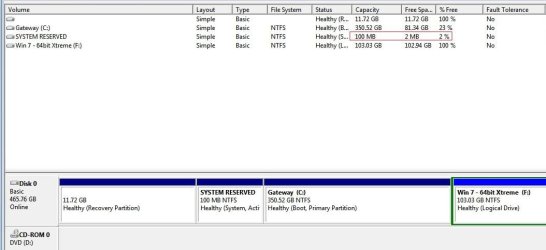
Solved 100 MB Partition

bigmck

Very Senior Member
Guru
Gold Member
VIP
Local time
7:15 PM
Messages
4,745
Location
Houston, Texas
I have read on here about the 100 MB partition for the MBR. I don't have one. Things seem fine. What is the partition for and do I need to worry about it? Thanks
 

My Computer

Computer type
PC/Desktop
Computer Manufacturer/Model Number
Custom Build
OS
Windows 7 Home Premium 32-Bit - Build 7600 SP1
CPU
Intel Core i3-2120 3.30Ghz
Motherboard
Asus P8Z68-V LX Intel Z68 Socket H2 ATX
Memory
Kingston 4 GB DDR3 1333 mhz
Graphics Card(s)
AMD Radeon HD6670
Sound Card
Sound Blaster Audigy SE 24-Bit
Monitor(s) Displays
Asus VE228
Screen Resolution
1440 X 900
Hard Drives
OCZ Vertex 3 120 GB Sata 3 SSD ==
Kingston SH103/S3 120 G Hyper X 120 GB SSD ==
Western Digital 500 GB Caviar Green 7200 RPM ==
PSU
Corsair CX600M == 600 Watt
Case
NZXT Apollo - Silver with Clear Side Panel
Cooling
Three 120 mm Fans
Keyboard
Microsoft Natural 4000
Mouse
Microsoft Custom Optical 3000
Internet Speed
AT&T Fiber Optic Wireless Network
Antivirus
Microsoft Security Essentials
Browser
Chrome
Other Info
120 mm Blue LED Fan -- Three Blue LED Lazer Light Sticks
The 100 mb partition, when present contains files required for win7 to boot. Its created only when win7 is installed on a disk with unallocated disk space (no partition or volume been defined yet). Its labeled as System Reserved with NTFS file system, and System, Active, Primary partition attribute with no drive letter in Disk Management.

When the 100 mb partition is not created, the boot files sit on the OS partition itself. So, nothing to worry about.
 

My Computer

Computer Manufacturer/Model Number
Too many to describe...
OS
Windows 7 x64 pro/ Windows 7 x86 Pro/ XP SP3 x86
Hello.


If you did have a desire to create it for whatever reason (I'm not suggesting you do) here is a very reliable method out-lined in this tutorial at the link below; the second tutorial is also an excellent option, though I still have some work to finish that one to an acceptable out-come for XP.

System Reserved : Create for Dual Boot

System Reserved : Create Using Disk Management


This second tutorial is now complete.


.
 
Last edited:

My Computer

Computer Manufacturer/Model Number
* BFK Customs *
OS
W 7 64-bit Ultimate
CPU
Intel Q9550 Yorkfield
Motherboard
ASUS P5Q Pro
Memory
8GB Dominator 8500C5D
Graphics Card(s)
ATI : XFX 5870
Sound Card
Realtek HD Audio 7-1
Monitor(s) Displays
1x 47" LCD HDMI & 3x 26" LCD HDMI
Screen Resolution
1920x1080P & 1920x1200
Hard Drives
1x 80GB Intel X25-M G2 SSD : 1x 500GB & 1x 640GB WD Caviar Black(s)
PSU
Corsair 620HX
Case
Cooler Master RC-690
Cooling
Tuniq Tower 120, 2x 140mm and 3x 120mm case fans
Keyboard
Microsoft 500
Mouse
Razer Diamondback 3G
Internet Speed
14 Mb/s
Other Info
1x Koutech 3Gb/s SATA HDD Hot Swap Rack
Thanks guys for your help. I am a little paranoid these days. I feel like anything could go wrong since a few days ago my water pipe broke in the front yard. :(
 

My Computer

Computer type
PC/Desktop
Computer Manufacturer/Model Number
Custom Build
OS
Windows 7 Home Premium 32-Bit - Build 7600 SP1
CPU
Intel Core i3-2120 3.30Ghz
Motherboard
Asus P8Z68-V LX Intel Z68 Socket H2 ATX
Memory
Kingston 4 GB DDR3 1333 mhz
Graphics Card(s)
AMD Radeon HD6670
Sound Card
Sound Blaster Audigy SE 24-Bit
Monitor(s) Displays
Asus VE228
Screen Resolution
1440 X 900
Hard Drives
OCZ Vertex 3 120 GB Sata 3 SSD ==
Kingston SH103/S3 120 G Hyper X 120 GB SSD ==
Western Digital 500 GB Caviar Green 7200 RPM ==
PSU
Corsair CX600M == 600 Watt
Case
NZXT Apollo - Silver with Clear Side Panel
Cooling
Three 120 mm Fans
Keyboard
Microsoft Natural 4000
Mouse
Microsoft Custom Optical 3000
Internet Speed
AT&T Fiber Optic Wireless Network
Antivirus
Microsoft Security Essentials
Browser
Chrome
Other Info
120 mm Blue LED Fan -- Three Blue LED Lazer Light Sticks
Thanks guys for your help. I am a little paranoid these days. I feel like anything could go wrong since a few days ago my water pipe broke in the front yard. :(


That's the hard way to water-cool the PC isn't it?
 

My Computer

Computer Manufacturer/Model Number
* BFK Customs *
OS
W 7 64-bit Ultimate
CPU
Intel Q9550 Yorkfield
Motherboard
ASUS P5Q Pro
Memory
8GB Dominator 8500C5D
Graphics Card(s)
ATI : XFX 5870
Sound Card
Realtek HD Audio 7-1
Monitor(s) Displays
1x 47" LCD HDMI & 3x 26" LCD HDMI
Screen Resolution
1920x1080P & 1920x1200
Hard Drives
1x 80GB Intel X25-M G2 SSD : 1x 500GB & 1x 640GB WD Caviar Black(s)
PSU
Corsair 620HX
Case
Cooler Master RC-690
Cooling
Tuniq Tower 120, 2x 140mm and 3x 120mm case fans
Keyboard
Microsoft 500
Mouse
Razer Diamondback 3G
Internet Speed
14 Mb/s
Other Info
1x Koutech 3Gb/s SATA HDD Hot Swap Rack
If you can spare the 100mb then I'd install to wiped HD (which is a cleaner slate anyway) to get the SysReserved partition - if for no other reason than that it places the Repair My Computer (WinRe) console on the F8 Advanced boot Tools menu. You can repair your laptop in a coffee shop or while traveling without having to have the disk.

Wipe HD: http://www.sevenforums.com/tutorials/91339-ssd-hdd-optimize-windows-reinstallation.html
Install screenshots: http://www.sevenforums.com/tutorials/1649-clean-install-windows-7-a.html
WinRe options: http://www.sevenforums.com/tutorials/668-system-recovery-options.html
 
Last edited:
If you can spare the 100mb, then I'd install to wiped HD, which is a cleaner slate anyway, to get the SysReserved partition - if for no other reason than that it places the Repair My Computer (WinRe) console on the F8 Advanced boot Tools menu. You can repair your laptop in a coffee shop or while traveling without having to have the disk.

thanks for that greg - i was thinking about deleting mine, but i may well keep it now, especially on my netbook.
 

My Computer

Computer Manufacturer/Model Number
mickey megabyte 1234
OS
ultimate 64 sp1
CPU
i5 2500K [email protected]
Motherboard
MSI P67A-GD53
Memory
8 gigs GSkill Ripjaws 1600
Graphics Card(s)
amd hd6950
Sound Card
creative x-fi gamer
Monitor(s) Displays
samsung 24"
Screen Resolution
1920x1080
Hard Drives
ocz vertex 2e 60 gig, samsung f3 1tb, buffalo 2tb ext
PSU
antec 550
Case
antec three hundred
Cooling
i'm a cooling fan
Keyboard
saitek eclipse ii
Mouse
logitech g3
Internet Speed
about 4 Mbps
Other Info
i love win7
Here's some other info on the SysResv I wrote for one of the other tutorials but I didn't use it after all.


   Note

  • It adds a link to the WinRe (Windows Recovery Environment) that is seen when the advanced boot options are accessed through the use of the F8 hot-key during system startup that can be used to recover from startup errors if a Windows installation / recovery disk is not available for use.
  • The partition is suggested for use with Windows Backup and Restore to function correctly, we're now seeing issues if not enough space is available for WB & R to use and creating a larger (than the default 100MB) SysResv partition may solve these issues.
  • It is used by Windows 7 BitLocker to store encryption information and will be created by the BitLocker program if it does not exist.
  • It creates a single location for the Windows BCD store that the system boot files are kept in, in a dual / multi boot situation and makes removing one of the installed Windows Operating Systems (OS) in a dual/multi boot very easy to accomplish if the need arises.
 

My Computer

Computer Manufacturer/Model Number
* BFK Customs *
OS
W 7 64-bit Ultimate
CPU
Intel Q9550 Yorkfield
Motherboard
ASUS P5Q Pro
Memory
8GB Dominator 8500C5D
Graphics Card(s)
ATI : XFX 5870
Sound Card
Realtek HD Audio 7-1
Monitor(s) Displays
1x 47" LCD HDMI & 3x 26" LCD HDMI
Screen Resolution
1920x1080P & 1920x1200
Hard Drives
1x 80GB Intel X25-M G2 SSD : 1x 500GB & 1x 640GB WD Caviar Black(s)
PSU
Corsair 620HX
Case
Cooler Master RC-690
Cooling
Tuniq Tower 120, 2x 140mm and 3x 120mm case fans
Keyboard
Microsoft 500
Mouse
Razer Diamondback 3G
Internet Speed
14 Mb/s
Other Info
1x Koutech 3Gb/s SATA HDD Hot Swap Rack
If I was going to go to all the trouble of a clean install to get the "System Reserved" partition I'd use the method out-lined in Step Two #3 of this tutorial to make it 200MB instead to lessen the chances of it being too small like the issues THIS guy was having when he wanted to add a second OS for a dual boot setup.

SSD / HDD : Optimize for Windows Reinstallation


We're starting to see a lot of these similar issues with the default SysResv being too small; not to mention the uses listed in the Note in my post above.
click to enlarge
TooSmall.JPG


My Computer

Computer Manufacturer/Model Number
* BFK Customs *
OS
W 7 64-bit Ultimate
CPU
Intel Q9550 Yorkfield
Motherboard
ASUS P5Q Pro
Memory
8GB Dominator 8500C5D
Graphics Card(s)
ATI : XFX 5870
Sound Card
Realtek HD Audio 7-1
Monitor(s) Displays
1x 47" LCD HDMI & 3x 26" LCD HDMI
Screen Resolution
1920x1080P & 1920x1200
Hard Drives
1x 80GB Intel X25-M G2 SSD : 1x 500GB & 1x 640GB WD Caviar Black(s)
PSU
Corsair 620HX
Case
Cooler Master RC-690
Cooling
Tuniq Tower 120, 2x 140mm and 3x 120mm case fans
Keyboard
Microsoft 500
Mouse
Razer Diamondback 3G
Internet Speed
14 Mb/s
Other Info
1x Koutech 3Gb/s SATA HDD Hot Swap Rack
I have read on here about the 100 MB partition for the MBR. I don't have one. Things seem fine. What is the partition for and do I need to worry about it? Thanks
I've just about given up arguing the MBR point living on the 100Mb sys reserved partition. I don't understand why people dig their heals in on this. It is the first physical 512 bytes of the HDD. If you can show me that the MBR is on the 100MB partition please show me.
I'm only aware of the WinRe living in 2 places
(1) Under a system folder called "Recovery" (c:\Recovery) on your Boot, OS partition which is separate when you have the 100MB sys res partition.
(2) On the System repair disk, or Install disks.

The 100MB partition contains it's boot sector (PBR), boot manager, BCD store, a memtest utility and a system volume information folder.
The 100MB partition may play some role in recognising the F8 key stroke (??) but I bet it uses the WinRe under the system recovery folder. Remember WinRe is greater than 160MB itself.
 

My Computer

Computer type
PC/Desktop
Computer Manufacturer/Model Number
Own build
OS
Windows 7x64 Home Premium SP1
CPU
Intel i7 2600k
Motherboard
ASUS P8Z68 Deluxe
Memory
G.Skill Ripjaws (DDR3-1600) 2x4GB
Graphics Card(s)
Nvidia GeForce GTS 450; Intel HD Graphics 3000(GT2+)
Monitor(s) Displays
Dell Ultrasharp IPS panel U2311H, Samsung SyncMaster P2350
Screen Resolution
1920x1080
Hard Drives
Samsung 850 Pro SSD 256GB, Samsung SSD 840 120GB, Seagates 1TB Barracuda ST31000528AS x2
PSU
Seasonic M12II 520W
Case
Lian Li Lancool PC-K60
Cooling
Case: 1x120mm, 3x140mm CPU: Hyper 212+
Keyboard
Logitech MK520 (wireless)
Mouse
Logitech MK520
Internet Speed
6-7 Mbps
Antivirus
Norton Security Premium, Malwarebytes on 2 (MSE on 3rd PC)
Browser
FireFox
Other Info
Audio: Logitech Z523 2.1
the plot thickens :confused:
 

My Computer

Computer Manufacturer/Model Number
mickey megabyte 1234
OS
ultimate 64 sp1
CPU
i5 2500K [email protected]
Motherboard
MSI P67A-GD53
Memory
8 gigs GSkill Ripjaws 1600
Graphics Card(s)
amd hd6950
Sound Card
creative x-fi gamer
Monitor(s) Displays
samsung 24"
Screen Resolution
1920x1080
Hard Drives
ocz vertex 2e 60 gig, samsung f3 1tb, buffalo 2tb ext
PSU
antec 550
Case
antec three hundred
Cooling
i'm a cooling fan
Keyboard
saitek eclipse ii
Mouse
logitech g3
Internet Speed
about 4 Mbps
Other Info
i love win7
I haven't explored just how SysReserved places WinRe on the F8 Advanced Boot Tools menu, only that it does.

Even on a Win7 factory install which customizes WinRe to contain Factory Recovery, there is always a SysReserved partition in the mix.

As for MBR, referring to it being "on" a certain partition is common shorthand around here for "System Active." It is simply too complicated to explain otherwise.
 
I haven't explored just how SysReserved places WinRe on the F8 Advanced Boot Tools menu, only that it does. Even on a factory install which customizes WinRe in Win7 to contain Factory Recovery, there is always a 100mb SysReserved partition in the mix.

As for MBR, referring to it being on a certain partition is common shorthand around here for "System Active." It is simply too complicated to explain otherwise, although the story of how the El Torito sector got its name is pretty cool.
Greg,
you know I bite easily...... It's not complicated.
What I know about the El Torito sector was a bunch of software engineers over a class of red figuring out how to get a CD to boot.
 

My Computer

Computer type
PC/Desktop
Computer Manufacturer/Model Number
Own build
OS
Windows 7x64 Home Premium SP1
CPU
Intel i7 2600k
Motherboard
ASUS P8Z68 Deluxe
Memory
G.Skill Ripjaws (DDR3-1600) 2x4GB
Graphics Card(s)
Nvidia GeForce GTS 450; Intel HD Graphics 3000(GT2+)
Monitor(s) Displays
Dell Ultrasharp IPS panel U2311H, Samsung SyncMaster P2350
Screen Resolution
1920x1080
Hard Drives
Samsung 850 Pro SSD 256GB, Samsung SSD 840 120GB, Seagates 1TB Barracuda ST31000528AS x2
PSU
Seasonic M12II 520W
Case
Lian Li Lancool PC-K60
Cooling
Case: 1x120mm, 3x140mm CPU: Hyper 212+
Keyboard
Logitech MK520 (wireless)
Mouse
Logitech MK520
Internet Speed
6-7 Mbps
Antivirus
Norton Security Premium, Malwarebytes on 2 (MSE on 3rd PC)
Browser
FireFox
Other Info
Audio: Logitech Z523 2.1
Mike - It really is both complicated and confusing to try to explain, far more than I wish to quote correctly when helping a dozen people a day resolve complicated boot problems. Perhaps it is enough that we fix more of these here than all the other forums (including MS's own) put together.

I like that story about how the boot sector was sketched out on a cocktail napkin at the El Torito restaurant in Silicon Valley. I imagine going there for lunch and seeing it framed on the wall.
 
gregrocker, I only wanted to let you know that I am one of those people who refuses to have the 100MB partition. I have had three different win 7 machines with the System Reserved that caused me all kinds of grief. For some reason, the system reserved would fill up and therefore I could not do a system image or backup in control panel.

Microsoft has known that it has been a problem for numerous people but has not done anything to correct it. According to MSFT, you have to have a minimum of 40MB free space in sys res. in order to do a backup through control panel. They told me that control panel uses sys res to build a temp folder to store info for the sys image. when it gets a certain amt, it then transfers it to your backup location. but, if you do not have the 40MB backup will fail by telling you there is not sufficient space in your backup location! The correct reason is there is not sufficient space in the system reserve. I have never had a problem without the 100 MB partition. I will not deny that the sys res. has its advantages, but the disadvantages it causes me, far outweighs them.

I am not an MVP or anything close, but I have investigated this issue to the end, and am very familiar with what is happening. I know many who like it and want it and that is fine for them, just not for me.

FWIW, I am only angry with microsoft. They have known of this problem for over two years that I know of. It should be very simple for them to solve. But, they have made no attempt to try a fix. To an average person like me, the price they charge for the OS and their finicky rules about how many machines I can put it on ( for something I Bought) and them not fixing a problem that they are aware of, is inexcusable. Just my opinion.
 

My Computers

System One System Two

  • Computer type
    PC/Desktop
    Computer Manufacturer/Model Number
    ALWAYS UNDER CONSTRUCTION
    OS
    Windows 11 Pro
    CPU
    Ryzen 9 5900X
    Motherboard
    Asus X570 Crosshair Viii Hero
    Memory
    32GB G Skill DDR4-3600
    Graphics Card(s)
    EVGA RTX 3080 FTW 3 Ultra
    Sound Card
    On Board/Sennheiser PC37X Headset
    Monitor(s) Displays
    3 X Asus 27"
    Screen Resolution
    2560x1440
    Hard Drives
    2 X 1 TB NVME drives
    PSU
    EVGA 850
    Case
    Phanteks Eclipse P400A
    Cooling
    EVGA 280 AIO
    Keyboard
    Logitech G510s/ Logitech G13
    Mouse
    Logitech G502
    Internet Speed
    24/1
    Antivirus
    ESET/MBAM Pro/SAS Pro
    Browser
    Chrome/ Firefox/ Edge
  • Computer type
    Laptop
    System Manufacturer/Model Number
    Dell 16 Plus
    OS
    Windows 11 Pro
    CPU
    Intel Ultra 9 288V
    Memory
    32 GB LPDDR5X 8533
    Monitor(s) Displays
    16" Mini-LED HDR600 Touch 90 Hz
    Screen Resolution
    2560X1600
    Hard Drives
    1 TB NVME

My Computer

Computer Manufacturer/Model Number
HP, Dell, Gateway, Toshiba - 4 laptops and 2 desktops
OS
Vista, Windows7, Mint Mate, Zorin, Windows 8
CPU
from 1.6GHz Duo to i7
Monitor(s) Displays
2x HP w2207
Hard Drives
5x HDD, 7x SSD, 12x Externals
Keyboard
with trackball - no mices
Mouse
Trackball mice
Internet Speed
DSL 6000
essenbe - I am familar with your issue as we deal with it here regularly. Perhaps SysReserved was written to during factory install or Dual Boot, or has been given a letter which lets some program write to it. Did yours have a letter?

Just yesterday here a Dual Boot couldn't be established using SysReserved. Unlettered SysReserved was almost full so I had OP enlarge his 100mb to 200mb and it was able to update the boot files.

MS must know about this by now.
 
gregrocker, I can personally assure you that Microsoft is aware of the issue, as I have made such an issue with it I kept getting pushed up the ladder. They are quite aware of the issue and have done nothing to correct it. Mine did not have a letter. I can tell you my personal opinion on this issue. For some reason, by talking with others with the same pronlem one name kept popping up. Acronis. Acronis uses control panel( in fact takes over CP) for their backups. There are a few other image programs that use the 100MB partition to do their job. I think those are the culprit. I also believe from discussions that some AV programs do similar things. I guess that is their job, but it causes issues. The part I don't understand is I have helped people(with some of your tutorials here) to increase the size of the partition to as much as 350MB ( according to Microsoft I think 380 is the max). Whatever program was in there just grew with the increased size and you still could not do a system image.
 

My Computers

System One System Two

  • Computer type
    PC/Desktop
    Computer Manufacturer/Model Number
    ALWAYS UNDER CONSTRUCTION
    OS
    Windows 11 Pro
    CPU
    Ryzen 9 5900X
    Motherboard
    Asus X570 Crosshair Viii Hero
    Memory
    32GB G Skill DDR4-3600
    Graphics Card(s)
    EVGA RTX 3080 FTW 3 Ultra
    Sound Card
    On Board/Sennheiser PC37X Headset
    Monitor(s) Displays
    3 X Asus 27"
    Screen Resolution
    2560x1440
    Hard Drives
    2 X 1 TB NVME drives
    PSU
    EVGA 850
    Case
    Phanteks Eclipse P400A
    Cooling
    EVGA 280 AIO
    Keyboard
    Logitech G510s/ Logitech G13
    Mouse
    Logitech G502
    Internet Speed
    24/1
    Antivirus
    ESET/MBAM Pro/SAS Pro
    Browser
    Chrome/ Firefox/ Edge
  • Computer type
    Laptop
    System Manufacturer/Model Number
    Dell 16 Plus
    OS
    Windows 11 Pro
    CPU
    Intel Ultra 9 288V
    Memory
    32 GB LPDDR5X 8533
    Monitor(s) Displays
    16" Mini-LED HDR600 Touch 90 Hz
    Screen Resolution
    2560X1600
    Hard Drives
    1 TB NVME
Just yesterday here a Dual Boot couldn't be established using SysReserved. Unlettered SysReserved was almost full so I had OP enlarge his 100mb to 200mb and it was able to update the boot files.
A while ago it was at 200MBs. I wonder why the reduced the size.
 

My Computer

Computer Manufacturer/Model Number
HP, Dell, Gateway, Toshiba - 4 laptops and 2 desktops
OS
Vista, Windows7, Mint Mate, Zorin, Windows 8
CPU
from 1.6GHz Duo to i7
Monitor(s) Displays
2x HP w2207
Hard Drives
5x HDD, 7x SSD, 12x Externals
Keyboard
with trackball - no mices
Mouse
Trackball mice
Internet Speed
DSL 6000
I heard from someone on the forum that MS reduced it from 200MB because of people complaining who wanted to run small SSD drives. Who knows???

Mine bounces around a bit but hasn't caused problems. If it does I'll make it bigger or get rid of it (the proper way).
Why don't you look inside it to see what's using what? The only thing I can see that can vary substantially is the system volume information folder.
 

My Computer

Computer type
PC/Desktop
Computer Manufacturer/Model Number
Own build
OS
Windows 7x64 Home Premium SP1
CPU
Intel i7 2600k
Motherboard
ASUS P8Z68 Deluxe
Memory
G.Skill Ripjaws (DDR3-1600) 2x4GB
Graphics Card(s)
Nvidia GeForce GTS 450; Intel HD Graphics 3000(GT2+)
Monitor(s) Displays
Dell Ultrasharp IPS panel U2311H, Samsung SyncMaster P2350
Screen Resolution
1920x1080
Hard Drives
Samsung 850 Pro SSD 256GB, Samsung SSD 840 120GB, Seagates 1TB Barracuda ST31000528AS x2
PSU
Seasonic M12II 520W
Case
Lian Li Lancool PC-K60
Cooling
Case: 1x120mm, 3x140mm CPU: Hyper 212+
Keyboard
Logitech MK520 (wireless)
Mouse
Logitech MK520
Internet Speed
6-7 Mbps
Antivirus
Norton Security Premium, Malwarebytes on 2 (MSE on 3rd PC)
Browser
FireFox
Other Info
Audio: Logitech Z523 2.1
Back
Top