
100mb partition on non-system disk

ChesterNut

New member
Local time
12:13 PM
Messages
2
My current setup is Windows 7 Professional on a 64Gb SSD, and my data on a 1TB HDD; I wish to upgrade my data storage to RAID 5 (via Intel Matrix RAID).

Whilst examining my HDD before I make the change, I noticed that it had a system reserved partition of 100MB on it. After a lot of googling, I had determined that this is used for BitLocker and system recovery, and is not (in most cases) necesarily needed.

However I think that my situation may be different.

The complication is that the system reserved partition is marked as 'System' (as can be seen in the below screenshot), and it seems (from changing boot orders) that the OS actually bootstraps from the 1TB HDD (although it resides on the SSD entirely).

Clearly this is non-ideal (unnecessary coupling of data drive to system drive ect ect).

Does anyone have any experience with this, or know how I could safely migrate the System Reserved partition (or just the MBR, as I dont use bitlocker and have the windows install disks) to the SSD?

Thanks in advance for any replies.
 

Attachments
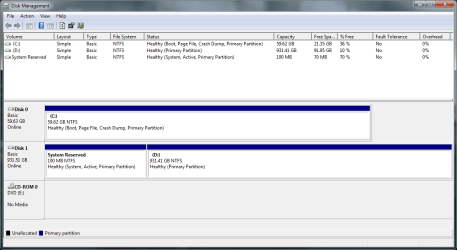
  • DiskManagement.PNG
    DiskManagement.PNG
    24.3 KB · Views: 236

My Computer

OS
Windows 7 Professional (x64)
CPU
i7 860
Motherboard
P7P55D-E
Hard Drives
64G G.Skill Falcon II
1TB WD Black
Temporarily unplug the data drive, boot the Win7 DVD Repair console or Repair CD, at first screen press Shift F10 to open a Command Line then use Diskpart to mark Win7 partition active: http://www.sevenforums.com/tutorials/71432-partition-mark-active.html
http://www.sevenforums.com/tutorials/2083-system-repair-disc-create.html

Now return to DVD/CD Recovery Tools list to run Startup Repair up to 3 separate times with reboots to write the System MBR to Win7. http://www.sevenforums.com/tutorials/681-startup-repair.html?ltr=S

Afterwards you can plug back in data drive to delete 100mb in Disk Mgmt, or use free Partition Wizard bootable CD to delete 100mb and Resize Data Partition into it. You can also use PW CD to Modify Win7 to active instead of Diskpart.
 
Thanks gregrocker, those steps worked like a charm. Time for my RAID array!
 

My Computer

OS
Windows 7 Professional (x64)
CPU
i7 860
Motherboard
P7P55D-E
Hard Drives
64G G.Skill Falcon II
1TB WD Black
Hi everyone,

Sorry to bring this back up, but this is actually the exact trouble that I'm having! I feel like this thread is so close to giving me the answer, which is why I didn't want to create a new one.
I have tried your fix, gregrocker, but unfortunately it doesn't work...yet! I'm sure there's a way to make things right.

Let me get more into the specifics. I bought a laptop with a 500GB HDD with Win7 factory-installed there. I later added a bootable mini-PCIe 64GB SSD drive.
After having added the SSD, I ran an install of Win 7 with both drives plugged in and deleted all partitions from them, before installing Win7 on the SSD. Installed and booted well, only problem is that the "System Reserved" partition appeared on the 500GB HDD. If I try unplugging the 500GB, Win7 won't boot...

When I ran your fix, gregrocker, I made SSD OS partition active, and after the 3 repairs it placed the system back on the SSD, and let it boot correctly. BUT, when I plugged the 500GB HDD back in, the "System Reserved" partition that was still in there couldn't be deleted, as it was in use and active: the system had in fact booted again from that damn partition!

What I tried so far:

-Installing with 500GB HDD unplugged, which worked to get the "System Reserved" partition on the SSD. The 500GB was completely empty, but when I plugged it back in, the system would still not boot anymore! I ran a repair from disc which got the "System Reserved" partition back on the 500GB...:mad:

-Format 500GB HDD with one big partition taking up all the space. In that case, unable to make the System Reserved partition, Win7 very intelligently chose to make the whole 465GB partition an active system partition without an assigned letter. Wow, Windows 7 is really good :p

-I also tried running this fix (fix number 3 was the closest). Didn't work...


I should specify that I run my disks in AHCI mode and that the 500GB HDD is on port 0, SSD being on port 3 (can't change that...).
Any answer would be greaty appreciated! Thanks in advance.
 
Last edited:

My Computer

Computer Manufacturer/Model Number
Dell Precision M4500
OS
Windows 7 64-bits
CPU
Intel Core i7 720QM
Memory
8GB DDR3 1333Mhz
Graphics Card(s)
Quadro FX 1800M
Monitor(s) Displays
FHD Screen
Hard Drives
500GB 7200rpm HDD
64GB SSD MiniCard
As the system will boot from the SSD when the 500GB is not present - you are almost there

If you have 2 active drives the system will boot from the drive with the lowest ID in this case the 500GB

if you use the partition Wizard disk as listed by Greg, to boot from, to remove the 100MB partition from the 500GB drive, it should then boot correctly though you may need to perform another start up repair to finalise the changes
 

My Computers

System One System Two

  • Computer type
    PC/Desktop
    Computer Manufacturer/Model Number
    ChillBlast - Custom to my design
    OS
    Windows 11 Pro x64 [Latest Release and Release Preview]
    CPU
    Ryzen 9 5950X, 3.8 - 5.2 MHz
    Motherboard
    Asus Prime X570-Pro
    Memory
    64GB [2 x 32GB] DDR4 3200MHz
    Graphics Card(s)
    4GB NVIDIA GEFORCE GTX 1650 Ti
    Sound Card
    On-board SPDIF to 5.1 System + HDMI [5.1 system]
    Monitor(s) Displays
    32" UHD 32 Bit HDR Monitor + 43" UHD 4K 32Bit HDR TV
    Screen Resolution
    2 x 3840 x 2160 @60Hz
    Hard Drives
    1TB M2 SSD OS, 500GB Fast Access SSD, 2 x 8TB Data + Various Externals from 1TB to 4TB, 10TB NAS
    PSU
    NZXT C750 80 PLUS Gold 750W Modular PSU
    Case
    Workstation Case [Matt Black]
    Cooling
    NZXT Kraken X63 280mm CPU Cooler +2x Quiet Case fans
    Keyboard
    Logitech Wireless MX Keys & K400 + others
    Mouse
    Logitech Wireless MX Master 3S
    Internet Speed
    920 MB Down 50 MB Up
    Antivirus
    BitDefender Total Security Pro
    Browser
    Chrome (always run latest Non-Beta)
    Other Info
    Also run ...
    Laptop - Quad 8GB - Windows 10 Pro x64
    Nexus 7 Android tablet x2
    Samsung 10.2" tablet
    Blackview TAB 8 4G Android Tablet c/w Keyboard
    Wacom Intuos Pro Medium Pen Pad
    Wacom Intuos Pro Small Pen Pad
    Wacom Expresskeys Remote
    Loopdeck+ Graphics Controller
    Shuttle Pro v2 Control
  • Computer type
    Laptop
    System Manufacturer/Model Number
    Dell XPS 17 10750H
    OS
    Windows 11 Pro x64 Latest RP
    CPU
    Intel I7 10750H 5.0GHz
    Motherboard
    Dell XPS
    Memory
    32GB [2x16GB] DDR4 2933 MHz
    Graphics Card(s)
    nVidia GTX1650Ti 4 GB GDDR6
    Sound Card
    Stock [Realtek] 4 Speaker
    Monitor(s) Displays
    17" IPS UHD+ Infinity Edge Touchscreen
    Screen Resolution
    3840 x 2400
    Hard Drives
    2TB M2 NVMe, 4TB External + various 500GB & 1TB External NVMe (also have access to spinner HDD from
    PSU
    Stock
    Case
    Stock XPS Aluminium & Carbon Fibre
    Cooling
    Stock - Active Fan Control
    Keyboard
    Backlit + Various Logitech
    Mouse
    Stock Track Pad + Logitech MX Trackball
    Internet Speed
    72 MB Down 18MB Up
    Browser
    Chrome
    Other Info
    Also run ...
    Laptop - Quad 8GB - Windows 10 Pro x64
    Nexus 7 Android tablet x2
    10.2" tablet
    Sony Z3 Android Smartphone
    Wacom Intuos Pro Medium Pen Pad
    Wacom Intuos Pro Small Pen Pad
    Wacom Expresskeys Remote
    Loopdeck+ Graphics Controller
    Shuttle Pro v2 Control Pad
    10TB NAS
Hello Rewstah, welcome to Seven Forums!


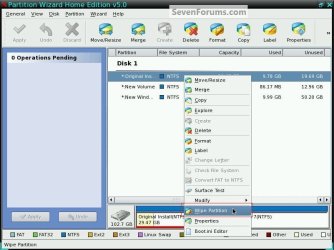
You could take it a step further and do a wipe to the 500GB while it is the only one connected, this will over-write all the data on the entire HDD and mark it as unallocated space; then do a clean install with only the SSD connected, that should solve it. The bootable CD will do that.

Partition Wizard : Use the Bootable CD


click to enlarge
Wipe.jpg
 

My Computer

Computer Manufacturer/Model Number
* BFK Customs *
OS
W 7 64-bit Ultimate
CPU
Intel Q9550 Yorkfield
Motherboard
ASUS P5Q Pro
Memory
8GB Dominator 8500C5D
Graphics Card(s)
ATI : XFX 5870
Sound Card
Realtek HD Audio 7-1
Monitor(s) Displays
1x 47" LCD HDMI & 3x 26" LCD HDMI
Screen Resolution
1920x1080P & 1920x1200
Hard Drives
1x 80GB Intel X25-M G2 SSD : 1x 500GB & 1x 640GB WD Caviar Black(s)
PSU
Corsair 620HX
Case
Cooler Master RC-690
Cooling
Tuniq Tower 120, 2x 140mm and 3x 120mm case fans
Keyboard
Microsoft 500
Mouse
Razer Diamondback 3G
Internet Speed
14 Mb/s
Other Info
1x Koutech 3Gb/s SATA HDD Hot Swap Rack
Oh man, thank you guys so much for these answers!
Actually, I just got it to work a couple hours ago. I have to admit, though, it was the result of some rather random fiddling with install and BIOS settings, which I still have to make sense of to remember it as a proper method. All seems clean and operational, though, so I won't tempt the devil by getting my hands back in it.
Still, you've been of tremendous help, since I will have to re-install from scratch in a couple months! Thank you so much for taking the time. I'm bookmarking this discussion for later reference.

Cheers,

Rewstah
 

My Computer

Computer Manufacturer/Model Number
Dell Precision M4500
OS
Windows 7 64-bits
CPU
Intel Core i7 720QM
Memory
8GB DDR3 1333Mhz
Graphics Card(s)
Quadro FX 1800M
Monitor(s) Displays
FHD Screen
Hard Drives
500GB 7200rpm HDD
64GB SSD MiniCard
Hello again, glad you got it sorted; thanks for the update.
 

My Computer

Computer Manufacturer/Model Number
* BFK Customs *
OS
W 7 64-bit Ultimate
CPU
Intel Q9550 Yorkfield
Motherboard
ASUS P5Q Pro
Memory
8GB Dominator 8500C5D
Graphics Card(s)
ATI : XFX 5870
Sound Card
Realtek HD Audio 7-1
Monitor(s) Displays
1x 47" LCD HDMI & 3x 26" LCD HDMI
Screen Resolution
1920x1080P & 1920x1200
Hard Drives
1x 80GB Intel X25-M G2 SSD : 1x 500GB & 1x 640GB WD Caviar Black(s)
PSU
Corsair 620HX
Case
Cooler Master RC-690
Cooling
Tuniq Tower 120, 2x 140mm and 3x 120mm case fans
Keyboard
Microsoft 500
Mouse
Razer Diamondback 3G
Internet Speed
14 Mb/s
Other Info
1x Koutech 3Gb/s SATA HDD Hot Swap Rack
Back
Top