
- Local time
- 1:03 PM
- Messages
- 269
So I had that partition in Windows 7 that is "reserved" so I followed the instructions in the tutorials on how to remove that 100MB reserve and how to repair the MB loader. Everything went per the tutorial.
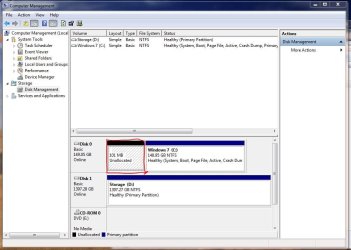
Only thing is when I go to Control Panel-->System and Security-->Administrative Tools-->Computer Management and then I look at the Disk Management, the 100MB is listed as unallocated. How can I get that 100MB back with the main part of the drive where the OS resides on?
Thanks
Only thing is when I go to Control Panel-->System and Security-->Administrative Tools-->Computer Management and then I look at the Disk Management, the 100MB is listed as unallocated. How can I get that 100MB back with the main part of the drive where the OS resides on?
Thanks
Attachments
My Computer
- Computer type
- PC/Desktop
- Computer Manufacturer/Model Number
- Home Built
- OS
- Windows 10 Pro 64-bit
- CPU
- Core I7-6700
- Motherboard
- Asus Maximus VIII Hero
- Memory
- 8GB Corsair Dominator
- Graphics Card(s)
- Asus STRIX GTX 980Ti
- Monitor(s) Displays
- Asus PG278Q, Dell U2410
- Screen Resolution
- 2560 x 1440, 1920 x 1200
- Hard Drives
- 1 x Samsung 950 Pro 512GB
1 x 1TB HGST
- PSU
- 750W Seasonic
- Case
- Antec 900 v3
- Cooling
- Stock
- Internet Speed
- Cable Internet


 Even on a 40 Gig SSD that's a paultry amount of space... On a TB drive it's literally a drop in the ocean