
Solved 102 MB Primary Partition bad for an SSD in Windows 7?

lister

New member
Power User
Local time
8:34 AM
Messages
259
Hi, can you please take a look at my screenshot? I am trying to optimize my SSD and I think that the 102 MB partition is causing me issues?

To check if my partitions are aligned correctly, I hit the Start menu and typed in msinfo32. Then Components > Storage > Disks. Looking for the SSD on the list and finding the "Partition Starting Offset" item - the number was NOT divisible by 4096 (that is, if dividing it by 4096 equals a whole number and not a decimal).

Apparently that means that your partition is NOT correctly aligned because it must be a whole number...

Any ideas how to correct this? THANKS
 

Attachments
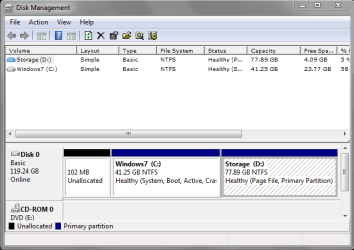
  • Capture.PNG
    Capture.PNG
    14.4 KB · Views: 102

My Computer My Computer

At a glance

Windows 7 Panasonic CF F9 (used to have CF F8)
Computer Manufacturer/Model Number
Panasonic Toughbook CF F9
OS
Windows 7 Panasonic CF F9 (used to have CF F8)
I think that the issue might have been that the SSD has not been correctly aligned owing to the Partition Starting Offset not being divisible by 4096? I read this here
 

My Computer My Computer

At a glance

Windows 7 Panasonic CF F9 (used to have CF F8)
Computer Manufacturer/Model Number
Panasonic Toughbook CF F9
OS
Windows 7 Panasonic CF F9 (used to have CF F8)
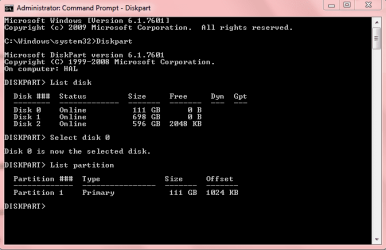
It has to be divisible by 4.

Below is how to check alignment from Cmd.


If you want to verify that the alignment is correct, you use these commands:

Diskpart
List disk
Select disk n
List partition

You should see a result like this:

Partition ### Type Size Offset

------------- ---------------- ------- -------
Partition 1 Primary 59 GB
1024 KB - but 64KB or any number divisible by 4 is also good. The offset has to be divisible by 4.


My Computer My Computer

At a glance

Windows7 Pro 64bit SP-1; Windows XP Pro 32bitIntel Core i7-870 Lynnfield 2.93GHz LGA 1156 ...8GB@1400MHz Crucial Ballistix DDR3-1600 4x2GBASUS ENGTX460 DirectCU/2DI/1GD5 1GB 256-bit G...
Computer Manufacturer/Model Number
Hopalong/ Godzilla
OS
Windows7 Pro 64bit SP-1; Windows XP Pro 32bit
CPU
Intel Core i7-870 Lynnfield 2.93GHz LGA 1156 95W Quad-Core
Motherboard
ASUS P7P55D-E PRO
Memory
8GB@1400MHz Crucial Ballistix DDR3-1600 4x2GB
Graphics Card(s)
ASUS ENGTX460 DirectCU/2DI/1GD5 1GB 256-bit GDDR5
Sound Card
VIA Onboard
Monitor(s) Displays
Asus VS248H-P 24"; Samsung SyncMaster 941BW 19"ws
Screen Resolution
1920x1080; 1440x900
Hard Drives
Samsung 830 120GB SSD
Intel 320 120GB SSD
Western Digital Caviar Black WD7501AALS 750GB 7200 RPM SATA 3.0Gb/s
Western Digital Caviar Black WD6401AALS 640GB 7200 RPM SATA 3.0Gb/s
PSU
COOLER MASTER Silent Pro RS850-AMBAJ3-US 850W Modular
Case
COOLER MASTER HAF 932 RC-932-KKN5-GP Black
Cooling
Scythe "Mugen-2 Rev.B" (2 ScytheKaze-Jyuni PWM fans)
Keyboard
Logitech K-320
Mouse
Kensington
Antivirus
Avast Inernet Suite
Browser
IE 9 ; Chrome
What number are you seeing as "partition starting offset"?? in msinfo.exe?

I have an ordinary SSD install and have 1,048,576 as a starting offset--which is evenly divisible by both 4 and 4096.

You can realign it with this tool:

Paragon Paragon Alignment Tool - Overview

or do a reinstall and use diskpart with a command such as "create partition primary align=1024".
 

My Computer My Computer

At a glance

Windows 7 Home Premium SP1, 64-bitIntel Skylake i5-6600K, not overclocked8 GB HyperX DDR4-2666 (2 x 4 GB)none; graphics are integrated on CPU
Computer type
PC/Desktop
Computer Manufacturer/Model Number
Ignatz Special; 4 speed manual gearbox; factory air conditioning; one of one
OS
Windows 7 Home Premium SP1, 64-bit
CPU
Intel Skylake i5-6600K, not overclocked
Motherboard
AsRock Z170M Extreme 4, micro ATX
Memory
8 GB HyperX DDR4-2666 (2 x 4 GB)
Graphics Card(s)
none; graphics are integrated on CPU
Sound Card
onboard: Realtek ALC1150; external: USB Behringer UF0-202
Monitor(s) Displays
Dell S2340M 23 inch IPS
Screen Resolution
1600 x 900
Hard Drives
System: Crucial MX100 series SSD, 128 GB;
Data: Samsung Spinpoint 103SJ, 1 TB;
Backup: WD Caviar Green WD30EZRX-00D8PB0, 3 TB
PSU
Rosewill SilentNight 500 watt fanless, semi-modular
Case
Antec Solo II
Cooling
Noctua NH-U12S; Noctua F12 intake, Noctua S12A exhaust
Keyboard
Microsoft 200 6JH-00001 USB
Mouse
Dell or Microsoft optical wired; USB
Antivirus
Microsoft Security Essentials and Malwarebytes Premium
Browser
Pale Moon
Other Info
All fans PWM; speeds at idle: CPU circa 500 rpm; intake circa 600 rpm; exhaust circa 600 rpm; CPU temps 27 idle and 47 C load in a warm room (27 C/81 F) when running Intel Extreme Tuning Utility stress test.
What number are you seeing as "partition starting offset"?? in msinfo.exe?
My partition offet is:

Partition 0: 101 MB (which divided by 4 = 25.25 so this is incorrect?)

Partition 1: 41 GIG (which by my calculations is:

1 GIG is that same as 1,073,741,824 bytes * 41 / 4 = 110,058,536,96 which seems correct?


I have an ordinary SSD install and have 1,048,576 as a starting offset--which is evenly divisible by both 4 and 4096.

You can realign it with this tool:

Paragon Paragon Alignment Tool - Overview

or do a reinstall and use diskpart with a command such as "create partition primary align=1024".

Maybe it is best to realign the 102 MB Partition - thing is that it doesn't really matter much to the operation of the machine - but I might as well get it to the best that it should be.....

You reckon my idea to realign PArition 0 will fix the overall "problem"?

Thanks
 

Attachments

  • offset.PNG
    offset.PNG
    9.2 KB · Views: 66

My Computer My Computer

At a glance

Windows 7 Panasonic CF F9 (used to have CF F8)
Computer Manufacturer/Model Number
Panasonic Toughbook CF F9
OS
Windows 7 Panasonic CF F9 (used to have CF F8)
Lister:

Are you the guy who has Windows installed in a logical partition inside an extended partition, along with the small "system reserved" as the boot partition?

I'm wondering if your alignment is off because you have used a logical/extended setup for a Windows install rather than the more traditional simple primary partition.
 

My Computer My Computer

At a glance

Windows 7 Home Premium SP1, 64-bitIntel Skylake i5-6600K, not overclocked8 GB HyperX DDR4-2666 (2 x 4 GB)none; graphics are integrated on CPU
Computer type
PC/Desktop
Computer Manufacturer/Model Number
Ignatz Special; 4 speed manual gearbox; factory air conditioning; one of one
OS
Windows 7 Home Premium SP1, 64-bit
CPU
Intel Skylake i5-6600K, not overclocked
Motherboard
AsRock Z170M Extreme 4, micro ATX
Memory
8 GB HyperX DDR4-2666 (2 x 4 GB)
Graphics Card(s)
none; graphics are integrated on CPU
Sound Card
onboard: Realtek ALC1150; external: USB Behringer UF0-202
Monitor(s) Displays
Dell S2340M 23 inch IPS
Screen Resolution
1600 x 900
Hard Drives
System: Crucial MX100 series SSD, 128 GB;
Data: Samsung Spinpoint 103SJ, 1 TB;
Backup: WD Caviar Green WD30EZRX-00D8PB0, 3 TB
PSU
Rosewill SilentNight 500 watt fanless, semi-modular
Case
Antec Solo II
Cooling
Noctua NH-U12S; Noctua F12 intake, Noctua S12A exhaust
Keyboard
Microsoft 200 6JH-00001 USB
Mouse
Dell or Microsoft optical wired; USB
Antivirus
Microsoft Security Essentials and Malwarebytes Premium
Browser
Pale Moon
Other Info
All fans PWM; speeds at idle: CPU circa 500 rpm; intake circa 600 rpm; exhaust circa 600 rpm; CPU temps 27 idle and 47 C load in a warm room (27 C/81 F) when running Intel Extreme Tuning Utility stress test.
To check the offset you need added Cmd command List partition as you will see in Snip below.

I have no partition so it is one continuous area. Offset is 1024KB.
You can check both of your partitions.

The first partition is usually 1024KB but some turn out at 2048 up to 8000 odd KB.
Mike
 

Attachments

  • Cmd offset.PNG
    Cmd offset.PNG
    11.8 KB · Views: 63

My Computer My Computer

At a glance

Windows7 Pro 64bit SP-1; Windows XP Pro 32bitIntel Core i7-870 Lynnfield 2.93GHz LGA 1156 ...8GB@1400MHz Crucial Ballistix DDR3-1600 4x2GBASUS ENGTX460 DirectCU/2DI/1GD5 1GB 256-bit G...
Computer Manufacturer/Model Number
Hopalong/ Godzilla
OS
Windows7 Pro 64bit SP-1; Windows XP Pro 32bit
CPU
Intel Core i7-870 Lynnfield 2.93GHz LGA 1156 95W Quad-Core
Motherboard
ASUS P7P55D-E PRO
Memory
8GB@1400MHz Crucial Ballistix DDR3-1600 4x2GB
Graphics Card(s)
ASUS ENGTX460 DirectCU/2DI/1GD5 1GB 256-bit GDDR5
Sound Card
VIA Onboard
Monitor(s) Displays
Asus VS248H-P 24"; Samsung SyncMaster 941BW 19"ws
Screen Resolution
1920x1080; 1440x900
Hard Drives
Samsung 830 120GB SSD
Intel 320 120GB SSD
Western Digital Caviar Black WD7501AALS 750GB 7200 RPM SATA 3.0Gb/s
Western Digital Caviar Black WD6401AALS 640GB 7200 RPM SATA 3.0Gb/s
PSU
COOLER MASTER Silent Pro RS850-AMBAJ3-US 850W Modular
Case
COOLER MASTER HAF 932 RC-932-KKN5-GP Black
Cooling
Scythe "Mugen-2 Rev.B" (2 ScytheKaze-Jyuni PWM fans)
Keyboard
Logitech K-320
Mouse
Kensington
Antivirus
Avast Inernet Suite
Browser
IE 9 ; Chrome
lister: Your alignment is fine. Don't worry about the unused 102MB space at the beginning of your drive or the partition sizes (in GB).

Your mistake lies in dividing an MB size (100 or 101 or 102MB) by a number meant for KB sizes. Remember that 100/101/102MB equals 102400/103424/104448KB which is evenly divisible by 4.

Similarly, dividing by 4096 is meant for byte sizes, for example 1,048,576 bytes (which is 1024KB or 1MB). (Also, one NTFS cluster = typically 4096 bytes or 8 sectors of 512 bytes each.)

Incidentally, there must once have been a 100MB system partition on your HD which was later removed. That would explain the 102MB unallocated space, because the system partition would have had a 1MB offset from the beginning of the disk, and a 1MB gap between itself and the following partition. (1MB + 100MB + 1MB = 102MB)
 

My Computer My Computer

At a glance

Windows 7 Professional SP1 32-bitIntel Core 2 Duo E6600 2.4GHz4GB DDR2-667 (4x1GB in dual-channel config)nVidia GeForce 9800 GT
Computer type
PC/Desktop
Computer Manufacturer/Model Number
Custom-built
OS
Windows 7 Professional SP1 32-bit
CPU
Intel Core 2 Duo E6600 2.4GHz
Motherboard
Asus PL5D2
Memory
4GB DDR2-667 (4x1GB in dual-channel config)
Graphics Card(s)
nVidia GeForce 9800 GT
Sound Card
Creative X-Fi XtremeMusic
Monitor(s) Displays
Acer P236H
Screen Resolution
1920x1200 (DVI)
Hard Drives
OCZ SSD Vertex Plus 60GB SATA (Firmware 3.55), 64MB cache
Hitachi HD321KJ SATA, 320GB, 7200rpm, 16MB cache
PSU
Antec TruePower 2.0
Case
Cooler Master Centurion
Cooling
Too many fans
Keyboard
Standard
Mouse
Microsoft wireless optical mouse
Internet Speed
AT&T U-verse (18mbit/sec)
Antivirus
Microsoft Security Essentials
Browser
Firefox
Other Info
Other devices:
Compaq CQ-60 laptop
Google Nexus 7 (2012) tablet
Nvidia SHIELD tablet (US/LTE)
Hardkernel ODROID-XU single-board computer (Samsung Exynos 5420)
the 102mb partition is a factory type drive, leave it alone so everything works right, i have one on my dell thats 100mb it for the fn buttons backround OS system, you can get a copy of ubuntu and make a cd boot with it / choose try out and see everything thats on it
 

My Computer My Computer

At a glance

windows 7 premium 64 bitAMD Athlon IIP360 Dual core 2.3ghz4GB PC3ATI Mobility Radeon HD 4250
Computer Manufacturer/Model Number
dell m5030
OS
windows 7 premium 64 bit
CPU
AMD Athlon IIP360 Dual core 2.3ghz
Memory
4GB PC3
Graphics Card(s)
ATI Mobility Radeon HD 4250
Monitor(s) Displays
15.6 inch
Hard Drives
120gb Patriot PYRO
THANKS everyone - really appreciate the advice and help. As Always.
 

My Computer My Computer

At a glance

Windows 7 Panasonic CF F9 (used to have CF F8)
Computer Manufacturer/Model Number
Panasonic Toughbook CF F9
OS
Windows 7 Panasonic CF F9 (used to have CF F8)
Back
Top