Solved 12GB RAM only 8GB usable

JFC15

New member
Local time
6:19 AM
Messages
29
I'm a newbie to posting in a forum, so I hope I give all the needed information.

Last weekend I transferred all my "parts" from one case to a new one. When I checked "System"... I noticed under Installed Memory (RAM) 12.0 GB (8.00 GB usable). I found and tried a couple ideas on the internet to try and fix this issue. I reseated the memory (no change). I tried only 6 GB at a time (all memory worked, but only with 6 GB at a time). I removed CPU and inspected pins on motherboard. As far as I could tell, none were bent. I found a little thermal paste on the edge/bottom of the CPU, so I cleaned it and the motherboard pins and reinstalled everything. I now had 12 GB of usable RAM.

I tried my first overclock yesterday and ran LinX (stable at 3.66 GHz). This morning when I was about to run Prime95, I went to "System" and again noticed under Installed Memory (RAM) 12.0 GB (8.00 GB usable). I went back into BIOS and switched back to Optimize Settings, but still only had 8 GB usable RAM.

I am quite frustrated right now. Any ideas on what I could possible do to get this working right would be greatly appreciated.
-----------------------------------
OK... this is a little strange, but I wanted to post it because SOMEONE has to know what's going on. I read in a forum about an issue like mine to go into msconfig and make sure under Boot tab and Advanced Options that Maximum Memory WAS NOT checked. WELL...mine was not checked, but I checked it to see what affect it would have on my issue. After a restart it changed to 12 GB (11.5 GB usable). I went back in and unchecked Maximum Memory and restarted and I now have 12 Gb of memory showing and able to be used. I'm going to reset the setting in BIOS for the overclock and see what happens. Anyone know why I'm having this issue??
-----------------------------------
I overclocked the computer back to 3.66GHz and experienced the loss of memory. I did exactly like I did in my previous post and am back to 12GB of usable RAM. I'm "assuming" it has to do with a bad setting... probably voltage, but I am stumped. Below are my overclocked settings. I am hoping someone will see this, find the problem, and help me out. If you look down on Channel C Standard and Advanced Timings... there are none.

Thanks everyone!


CPU Clock Ratio [19x]
CPU Frequency: 3.66GHz (193x19)


Advanced CPU Features [Press Enter]:
CPU Clock Ratio [19x]
CPU Frequency: 3.66GHz (193x19)
Intel(R) Turbo Boost Tech [Enabled]
CPU Cores Enabled [All]
CPU Multi-Threading [Enabled]
CPU Enhanced Halt (C1E) [Enabled]
C3/C6/C7 State Support [Disabled]
CPU Thermal Monitor [Enabled]
CPU EIST Function [Enabled]
Virtualization Technology [Enabled]
Bi-Directional PROCHOT [Enabled]
Virtualization Technology [Enabled]

QPI Link Ratio [Auto]
QPI Link Speed [6.94ghz]

Uncore & QPI Features [Press Enter]:
QPI Clock Ratio [Auto]
QPI Link Speed: 6.94ghz
Uncore Clock Ratio [x18]
Uncore Frequency 3474MHz
Isonchronous Frequency [Enabled]

Base Clock (BCLK) Control [Enabled]
BCLK Frequency (MHz) [193]

Advanced Clock Control [Press Enter]:
>>>>> Standard Clock Control
Base Clock (BCLK) Control [Enabled]
BCLK Frequency (MHz) [193]
PCI Express Frequency (MHz) [auto]
C.I.A.2 [Disabled]
>>>>> Advanced Clock Control
CPU Clock Drive [ 800mV]
PCI Express Clock Drive [ 900mV]
CPU Clock Skew [ 0ps]
IOH Clock Skew [ 0ps]

Performance Enhance [Standard]
Extreme Memory Profile (X.M.P.) [Profile1]
System Memory Multiplier (SPD) [8.0]
Memory Frequency (MHz) 1600 1544
DRAM Timing Selectable (SPD) [Auto]
Profile DDR Voltage 1.6V
Profile QPI Voltage 1.35V

Channel A
CAS Latency Time 9 [Auto]
tRCD 9 [Auto]
tRP 9 [Auto]
tRAS 24 [Auto]
Command Rate (CMD) 2 [Auto]

Channel B
CAS Latency Time 9 [Auto]
tRCD 9 [Auto]
tRP 9 [Auto]
tRAS 24 [Auto]
Command Rate (CMD) 2 [Auto]

Channel C
CAS Latency Time 9 [Auto]
tRCD - [Auto]
tRP - [Auto]
tRAS - [Auto]
Command Rate (CMD) - [Auto]

Advanced DRAM Features [Press Enter]:
Performance Enhance [Standard]
Extreme Memory Profile (X.M.P.) [Profile1]
System Memory Multiplier (SPD) [8.0]
Memory Frequency (MHz) 1600 1544
DRAM Timing Selectable (SPD) [Auto]
Profile DDR Voltage 1.6V
Profile QPI Voltage 1.35V
x Channel Interleaving 6 Auto
x Rank Interleaving 4 Auto

>>>>> Channel A
Channel A Timing Settings [Press Enter]:

>>>>> Channel A Standard Timing Control
x CAS Latency Time 9 Auto
tRCD 9 Auto
tRP 9 Auto
tRAS 24 Auto

>>>>> Channel A Advanced Timing Control
x tRC 41 Auto
x tRRD 6 Auto
x tWTR 6 Auto
x tWR 12 Auto
x tWTP 24 Auto
x tWL 8 Auto
x tRFC 88 Auto
x tRTP 6 Auto
x tFAW 30 Auto
x Command Rate (CMD) 2 Auto

>>>>> Channel A Misc Timing Control
x B2B CAS Delay - Auto
x Round Trip Latency 67 Auto

>>>>> Channel A
Channel A Turnaround Settings [Press Enter]:

>>>>> Channel A Writes Followed by Reads
x Different DIMMs 6 Auto
x Different Ranks 6 Auto
x On The Same Rank 9 Auto

>>>>> Channel A Reads Followed by Writes
x Different DIMMs 9 Auto
x Different Ranks 9 Auto
x On The Same Rank 9 Auto

>>>>> Channel A Reads Followed by Reads
x Different DIMMs 6 Auto
x Different Ranks 5 Auto
x On The Same Rank 1 Auto

>>>>> Channel A Writes Followed by Writes
x Different DIMMs 6 Auto
x Different Ranks 6 Auto
x On The Same Rank 1 Auto

>>>>> Channel B
Channel B Timing Settings [Press Enter]:

>>>>> Channel B Standard Timing Control
x CAS Latency Time 9 Auto
tRCD 9 Auto
tRP 9 Auto
tRAS 24 Auto

>>>>> Channel B Advanced Timing Control
x tRC 41 Auto
x tRRD 6 Auto
x tWTR 6 Auto
x tWR 12 Auto
x tWTP 24 Auto
x tWL 8 Auto
x tRFC 88 Auto
x tRTP 6 Auto
x tFAW 30 Auto
x Command Rate (CMD) 2 Auto

>>>>> Channel B Misc Timing Control
x B2B CAS Delay - Auto
x Round Trip Latency 70 Auto

>>>>> Channel B
Channel B Turnaround Settings [Press Enter]:

>>>>> Channel B Writes Followed by Reads
x Different DIMMs 6 Auto
x Different Ranks 6 Auto
x On The Same Rank 9 Auto

>>>>> Channel B Reads Followed by Writes
x Different DIMMs 9 Auto
x Different Ranks 9 Auto
x On The Same Rank 9 Auto

>>>>> Channel B Reads Followed by Reads
x Different DIMMs 6 Auto
x Different Ranks 5 Auto
x On The Same Rank 1 Auto

>>>>> Channel B Writes Followed by Writes
x Different DIMMs 6 Auto
x Different Ranks 6 Auto
x On The Same Rank 1 Auto

>>>>> Channel C
Channel C Timing Settings [Press Enter]:

>>>>> Channel C Standard Timing Control
x CAS Latency Time 9 Auto
tRCD - Auto
tRP - Auto
tRAS - Auto

>>>>> Channel C Advanced Timing Control
x tRC - Auto
x tRRD - Auto
x tWTR - Auto
x tWR - Auto
x tWTP - Auto
x tWL - Auto
x tRFC - Auto
x tRTP - Auto
x tFAW - Auto
x Command Rate (CMD) - Auto

>>>>> Channel C Misc Timing Control
x B2B CAS Delay - Auto
x Round Trip Latency 70 Auto

>>>>> Channel C
Channel C Turnaround Settings [Press Enter]:

>>>>> Channel C Writes Followed by Reads
x Different DIMMs 6 Auto
x Different Ranks 6 Auto
x On The Same Rank 9 Auto

>>>>> Channel C Reads Followed by Writes
x Different DIMMs 9 Auto
x Different Ranks 9 Auto
x On The Same Rank 9 Auto

>>>>> Channel B Reads Followed by Reads
x Different DIMMs 6 Auto
x Different Ranks 5 Auto
x On The Same Rank 1 Auto

>>>>> Channel B Writes Followed by Writes
x Different DIMMs 6 Auto
x Different Ranks 6 Auto
x On The Same Rank 1 Auto

Load Line Calibration [Disabled]
CPU Vcore 1.13125v [1.25000v]
QPI/VTT Voltage 1.175v [1.235v]
IOH Core 1.100v [1.240V]
DRAM Voltage 1.500v [1.600V]

Advanced Voltage Control [Press Enter]:
Load Line Calibration [Disabled]
CPU Vcore 1.13125v [1.25000v]
x Dynamic Vcore
QPI/VTT Voltage 1.175v [1.235v]
CPU PLL 1.800v [Auto]

>>> MCH/ICH
PCIE 1.500v [Auto]
QPI PLL 1.100v [Auto]
IOH Core 1.100v [1.240V]
ICH I/O 1.500v [Auto]
ICH Core 1.100v [Auto]

>>> DRAM
DRAM Voltage 1.500v [1.600V]
DRAM Termination 0.750v [Auto]
Ch-A Data VRef. 0.750v [Auto]
Ch-B Data VRef. 0.750v [Auto]
Ch-C Data VRef. 0.750v [Auto]
Ch-A Address VRef. 0.750v [Auto]
Ch-B Address VRef. 0.750v [Auto]
Ch-C Address VRef. 0.750v [Auto]


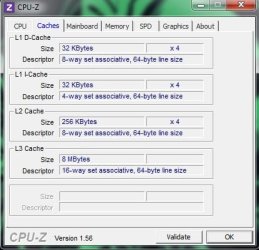
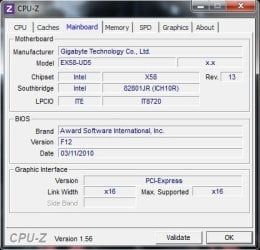
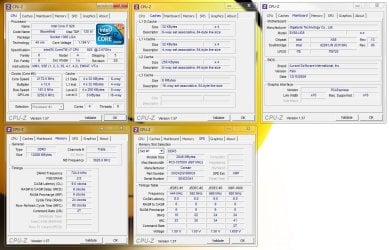
Here are the settings from CPU-Z when computer was overclocked.
 

Attachments
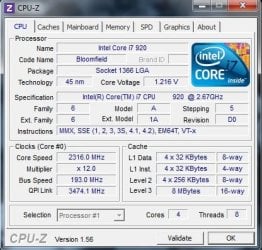
  • CPU-Z CPU.jpg
    CPU-Z CPU.jpg
    39.2 KB · Views: 89
  • CPU-Z Caches.jpg
    CPU-Z Caches.jpg
    29 KB · Views: 63
  • CPU-Z Mainboard.jpg
    CPU-Z Mainboard.jpg
    27.3 KB · Views: 67
  • CPU-Z Memory.jpg
    CPU-Z Memory.jpg
    33.8 KB · Views: 72
Last edited:

My Computer My Computer

Computer type
PC/Desktop
OS
Windows 7 Home Premium 64-bit
CPU
i7-2700K (overclocked to 4.6)
Motherboard
ASUS P8Z77-V DELUXE
Memory
G.SKILL Ripjaws X Series 16GB (4x4GB) DDR3 2133 (PC3 17000)
Graphics Card(s)
SAPPHIRE HD 7970 3GB GDDR5 OC with Boost
Monitor(s) Displays
Dell ST2410 24-Inch
Screen Resolution
1980x1080
Hard Drives
OCZ-VERTEX4 SCSI Disk Device (SSD) 512GB
Western Digital Caviar Black 1TB WD1002FAEX
(4) External Hitachi 2TB 7.2K HDS723020BLA642
PSU
CORSAIR Professional Series HX1050 1050W
Case
IN WIN Dragon Rider Black (10 - 120mm fans/1 - 140mm fan)
Cooling
Noctua NH-D14
Keyboard
Logitech Ultrathin Keyboard with Backlighting Y-UY95
Mouse
Lenovo Optical Mouse A6010

My Computer My Computer

Computer type
PC/Desktop
Computer Manufacturer/Model Number
Me
OS
Win 7 Ultimate x64
CPU
FX-8350 @ 4.6 GHz so far
Motherboard
Asus M5A97 EVO
Memory
ADATA XPG V1 Series Black 8GB DDR3 1600
Graphics Card(s)
Sapphire R9 270x Dual-X
Sound Card
Xonar DGX w/ Corsair Vengence 1300
Monitor(s) Displays
Acer S232HL Abid
Screen Resolution
1920x1080
Hard Drives
120 GB OCZ Vertex 3
500 GB Seagate 7200.12
PSU
Antec Earthwatts 650W Green
Case
Antec Three Hundred
Cooling
Cooler Master 212 EVO
Keyboard
Logitech G510
Mouse
Logitech G500s
Internet Speed
35000/3000
Thank you... I will read this and see what changes I can make.
 

My Computer My Computer

Computer type
PC/Desktop
OS
Windows 7 Home Premium 64-bit
CPU
i7-2700K (overclocked to 4.6)
Motherboard
ASUS P8Z77-V DELUXE
Memory
G.SKILL Ripjaws X Series 16GB (4x4GB) DDR3 2133 (PC3 17000)
Graphics Card(s)
SAPPHIRE HD 7970 3GB GDDR5 OC with Boost
Monitor(s) Displays
Dell ST2410 24-Inch
Screen Resolution
1980x1080
Hard Drives
OCZ-VERTEX4 SCSI Disk Device (SSD) 512GB
Western Digital Caviar Black 1TB WD1002FAEX
(4) External Hitachi 2TB 7.2K HDS723020BLA642
PSU
CORSAIR Professional Series HX1050 1050W
Case
IN WIN Dragon Rider Black (10 - 120mm fans/1 - 140mm fan)
Cooling
Noctua NH-D14
Keyboard
Logitech Ultrathin Keyboard with Backlighting Y-UY95
Mouse
Lenovo Optical Mouse A6010
Hi, JFC15

i see you ask the same Question on OC forum's ;)
stormy13 gave you a great link with alot of info.
so i will just add my 2 cents is all..

i did some searches for you of old posts for when i was in the 12GB/OC house.. and i remember that 12GB is kind of hard to get working with a OC @ it's rated speed. but it can been done..

there is a some stuff to keep in mind though. like windows versions can limit the amount of memory you have installed. (windows Home x64 ect limit is 8GB)
like 12gb(8gb usable) its reserving 4gb for hardware, you could test each stick one at a time first in all three white slots one at a time,it should boot with just one stick in any of the white slots. if not then that slot or module is faulty.

Memtest86+ ? give that a test...

Bent CPU pin, is some times the cause, & some Gigabyte bios have also been a issue with 12GB reading correct.. also XMP ain't the best option always to use with memory. try doing all manual.

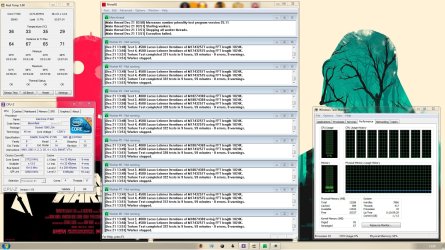
this is my bios settings as a template/guide. i have 3 bios templates i use, so this is my 3.8Ghz 12GB Rock Solid. my 4.2 is just for bragging /bench but still 29hr prime95 pass. ect haha. my ram is at 1440 with 3.8ghz. but still i see it all and am happy with what i use it for..

These are BSOD codes...
0X00000050 << Incorrect Memory Timing/Freq or Uncore Multi
0X00000124 << Incorrect QPI/Vtt Voltage (To Much/Not Enough)
0X00000101 << Not enough Vcore Voltage

CPU = Model Intel Core i7 920 D0 2.66GHz (Nehalem)
Motherboard = Gigabyte GA-EX58-UD5
BIOS Version = F9m
Ram = Corsair XMS3 12GB (6x2GB) (TR3X6G1600C8)

My MAX Prime95 Temps
3.4Ghz - 58c
3.8Ghz - 68c
4.2Ghz - 76c

Advanced CPU Features:
CPU Clock Ratio ................................ [20x]
Intel(R) Turbo Boost Tech .................. [Enabled]
CPU Cores Enabled ............................ [All]
CPU Multi Threading .......................... [Enabled]
CPU Enhanced Halt (C1E) ................... [Disabled]
C3/C6/C7 State Support .................... [Disabled]
CPU Thermal Monitor ......................... [Enabled]
CPU EIST Function ............................ [Enabled]
Virtualization Technology ................... [Enabled]
Bi-Directional PROCHOT ..................... [Enabled]


Uncore & QPI Features:
QPI Link Speed .............................. x36
Uncore Frequency .......................... [AUTO]
Isonchronous Frequency ..................[Enabled]


Standard Clock Control:
Base Clock (BCLK) Control ................ [Enabled]
BCLK Frequency (MHz) ..................... [181]
PCI Express Frequency (MHz) ........... [100]
C.I.A.2 [Disabled]

Advanced Clock Control:
CPU Clock Drive ..............................[800mV]
PCI Express Clock Drive ................... [900mV]
CPU Clock Skew ............................. [0ps]
IOH Clock Skew ............................. [0ps]


Advanced DRAM Features:
Performance Enhance ...................... [Standard]
Extreme Memory Profile (X.M.P) ......... [Disabled]
System Memory Multiplier (SPD) ........ [AUTO]
DRAM Timing Selectable (SPD) .......... [Manual]
##Channel A Standard Timing Control##
CAS Latency Time ......................9 - 9
tRCD .......................................9 - 9
tRP .........................................9 - 9
tRAS .......................................24 - 24
Command Rate (CMD) ................2

Advanced Voltage Control:

CPU
Load Line Calibration ................. [Disabled]
CPU Vcore ............................... 1.1150v - [1.2125] - ........
QPI/VTT Voltage 1.150v ............1.155v - 1.275 - ........
DRAM Voltage 1.500v .............. 1.5v - 1.55 - .......


CPU PLL 1.800v ....................... [AUTO]
MCH/ICH.............................. [AUTO]
PCIE 1.500v ...........................[AUTO]
QPI PLL 1.100v .......................[AUTO]
IOH Core 1.100v .....................[AUTO]
ICH I/O 1.500v .......................[AUTO]
ICH Core 1.1v ........................[AUTO]


here is some links..
http://www.techpowerup.com/forums/showthread.php?t=101832
http://forums.tweaktown.com/gigabyt...ant-get-all-12gb-up-1600mhz-only-1333mhz.html

http://forums.tweaktown.com/gigabyt...y-see-8gb-12gb-windows-7-ultimate-64-bit.html

http://www.techpowerup.com/forums/showthread.php?t=101832
 

Attachments

  • Untitled.jpg
    Untitled.jpg
    163.1 KB · Views: 228
  • 3.8Ghz 10hr prime95 pass.jpg
    3.8Ghz 10hr prime95 pass.jpg
    355.6 KB · Views: 133
Last edited:

My Computer My Computer

Computer Manufacturer/Model Number
Goonie Build 8 2010
OS
Windows 7 64bit Ultimate SP1, VMware Windows 7 64bit Ultimate SP1
CPU
Intel Core i7 920 @ 3.8 or 4.2 when i need it
Motherboard
Gigabyte GA-X58-UD5
Memory
Corsair XMS3 12GB DDR3 1600 1.5v
Graphics Card(s)
MSI GeForce GTX 560Ti OC Twin FrozR II
Sound Card
7.1 HD
Monitor(s) Displays
2x BenQ 24 LED 1080p + LG 50PK590 1080p
Screen Resolution
3840 x 1080p
Hard Drives
Intel X25-M 80GB OS/
Intel X25-M 160GB
Data Robotics Drobo V2 8TB
PSU
Corsair AX 750W ATX Modular
Case
Antec Fusion Remote Max
Cooling
Noctua NH D14
Keyboard
Logitech
Mouse
Logitech
Internet Speed
15Mbs Down 1.3Mbs Up
Other Info
Hauppauge HD PVR/
Pioneer 1017-k - 7.1 THX/
Xbox 360 250 Slim
SkyHD/LG 50PK590 TV
Windows Home can only handle 8Gb?? You're speaking of Home Basic, not Home Premium... right? Or is all Home versions the same in that aspect?? I really didn't see this issue until I switched cases... which might just be a coincidence. My new case (In Win Dragon) has several more fans than the Thermaltake V9 I was using. I do have a Scythe Kaze Master Pro 5.25 Fan Controller hooked up to (6) 120mm fans that I turn down when I'm not stressing the computer. The other (4) 120mm fans are on full power 100% of the time. I'm wondering if my power supply isn't powerful enough to handle everything I'm throwing at it.

Currently, until my memory issue is fixed, I'm on Optimized settings. Another viewer suggested I up my QPI/VTT Voltage to 1.35. I tried that and it seemed to help... but after checking back later on in the night, the issue was back. This morning when I turned the computer on, all was fine. I might just switch back to overclocked settings and work from there... maybe I'll give your settings a go since you state they're rock solid and our builds are pretty close. I'm running out of ideas... maybe some piece of equipment is about to go... maybe it's time to upgrade the power supply or do you think it's just a setting I need to figure out??

Thanks for your help... much appreciated.
 

My Computer My Computer

Computer type
PC/Desktop
OS
Windows 7 Home Premium 64-bit
CPU
i7-2700K (overclocked to 4.6)
Motherboard
ASUS P8Z77-V DELUXE
Memory
G.SKILL Ripjaws X Series 16GB (4x4GB) DDR3 2133 (PC3 17000)
Graphics Card(s)
SAPPHIRE HD 7970 3GB GDDR5 OC with Boost
Monitor(s) Displays
Dell ST2410 24-Inch
Screen Resolution
1980x1080
Hard Drives
OCZ-VERTEX4 SCSI Disk Device (SSD) 512GB
Western Digital Caviar Black 1TB WD1002FAEX
(4) External Hitachi 2TB 7.2K HDS723020BLA642
PSU
CORSAIR Professional Series HX1050 1050W
Case
IN WIN Dragon Rider Black (10 - 120mm fans/1 - 140mm fan)
Cooling
Noctua NH-D14
Keyboard
Logitech Ultrathin Keyboard with Backlighting Y-UY95
Mouse
Lenovo Optical Mouse A6010
Windows Home can only handle 8Gb?? You're speaking of Home Basic, not Home Premium... right?

Home premium is fine. You can rule that one out straight away.


Your PSU is also highly unlikely to be the cause.

That just leaves with the rest of the 'possible' issues :p
 

My Computer My Computer

Computer type
PC/Desktop
Computer Manufacturer/Model Number
Systems by SmartEyeball
OS
8 Pro x64
CPU
i7 3770K 4.6GHz
Motherboard
ASUS P8Z77 WS
Memory
16GB G.Skill Trident X 2666mhz
Graphics Card(s)
x2 EVGA 780 Ti Superclocked SLI
Sound Card
SB X-FI Surround 5.1 PRO USB / ATH-AD900 Headphones
Monitor(s) Displays
x3 Dell U2410 / 58" Samsung
Screen Resolution
5760*1200/ 1920*1200
Hard Drives
2x Intel 520 240GB (RAID 0) * 2x WD Caviar Blacks 2TB (RAID 0) * 2TB WD Caviar Black * Sony Optirac DVD
PSU
Silverstone Strider Evolution 1200W
Case
Thermaltake Level 10 GT Snow Edition
Cooling
Noctua NH-D14
Keyboard
Topre Realforce // Ducky Shine MX Black // Filco Ninja TKL
Mouse
Thermaltake Theron (Highly Recommended) + Razer Imperator
Antivirus
MSE
Browser
IE, FF, WaterFox
Other Info
GT Extreme V2 Sim Racing Cockpit + 40" LCD and K/B Mouse stand ▼
Fanatec CSR Elite Wheel + Clubsport V1 Pedals + CSR shifter/7G-H ▼Saitek X52 Pro ▼ TrackIR 5 Pro
Buttkicker v2 Seat Rumbler with Dedicated 5.1 and Sub Woofer attached to frame ▼
=
Bloody Big Grin
Yea Starter & Home basic..

Here are the upper RAM limits for the different editions of Windows 7:

  • Starter: 8GB
  • Home Basic: 8GB
  • Home Premium: 16GB
  • Professional: 192GB
  • Enterprise: 192GB
  • Ultimate: 192GB
Remember not all computers are the same even if it's the same hardware. so it is more of a guide then anything ;/

but if you ain't done so yet check the Task manager > Resource > Memory. see if there is Ram set aside for Hardware.. like this guy had. http://www.techpowerup.com/forums/attachment.php?attachmentid=27773&d=1250594509

Have you got a 12GB Kit or is it two 6GB kits? are they all the same model matched sticks? as that can sometimes have a effect on Ram to.

i think i got lucky as i got 2x 6GB kits none matched. 3 sticks are version 1.2 and other 3 are version1.3 but are the same make/model ect.

This issue is usually cause by a faulty dimm slot on the motherboard, or by a bent pin in the CPU socket. so i would check each stick in each slot (i know a pain) but to rule it out it could be worth the time. also have you run memtest86+? is the memory free of errors?

First- take 3 sticks of ram out, and just boot up with 6GB in tri-channel mode. See if you get all 6GB showing on boot and all 6gb usable in windows. If all 6GB works, then you know atleast those 3 slots are fine, and that will leave either 1 of the other 3 slots or a bent pin in the cpu socket.

Second- If you only get 4GB usable out of 6GB, then take all your sticks of memory out and try 1 stick, in Slot 1, Then move that stick to slot3, then slot 5. If it will boot with just 1 stick in any of those 3 slots, but when all 3 are in it is only 4GB usable, then your problem is the cpu socket. If it wont boot with one of those 3 sockets, but the will with the other 2, then you know that Dimm slot is faulty.

Third- Pull your CPU out and inspect the socket for any bent or missing pins, remount the CPU and try again. While there are no pins on the CPU, there are 1366 pins on the CPU socket side. The issue with missing system memory is a very common issue and is often resolved by simply removing and reinstalling the CPU. If one of those 1366 pins doesn't make quite the correct contact with the CPU, memory could be "missing". While the CPU is removed, check the socket for pins which are obviously damaged, dust, and foreign material. It is possible that you could get some Thermal Paste on the electrical contact side of the CPU which can also cause this issue. Having an aftermarket CPU heatsink or waterblock screwed down too tight can also cause this issue. there are many possible causes of this issue. Most causes relate to the CPU or the contact between the CPU and the motherboard.

just a Quote from some guy who posted this same problem.

"I am Seeing 12GB Ram and only 8GB usable in Windows 7 "Computer Properties"! (intermitent that BIOS would detect 8GB or 12GB).

In my case the problem was voltage / power supply output to all devices, I added a USB multi 2.5" reader to the system a couple days ago and after unpluging it PLUS tweaking BIOS, on reboot all 12 GB RAM is now usable."

"While I wasn't going to reply to this, I guess my response might help anybody else. I'd already looked around the threads provided but nothing really helped. Overall, the problem was that my CPU cooler heatsink was far too tight. Remounting the CPU cooler a few times to get the balance right fixed everything up. I wasn't aware that the CPU had such control over the RAM (again, demonstrating my lack of experience in this field)."

if i can find any more info for you i will post back later.
 
Last edited:

My Computer My Computer

Computer Manufacturer/Model Number
Goonie Build 8 2010
OS
Windows 7 64bit Ultimate SP1, VMware Windows 7 64bit Ultimate SP1
CPU
Intel Core i7 920 @ 3.8 or 4.2 when i need it
Motherboard
Gigabyte GA-X58-UD5
Memory
Corsair XMS3 12GB DDR3 1600 1.5v
Graphics Card(s)
MSI GeForce GTX 560Ti OC Twin FrozR II
Sound Card
7.1 HD
Monitor(s) Displays
2x BenQ 24 LED 1080p + LG 50PK590 1080p
Screen Resolution
3840 x 1080p
Hard Drives
Intel X25-M 80GB OS/
Intel X25-M 160GB
Data Robotics Drobo V2 8TB
PSU
Corsair AX 750W ATX Modular
Case
Antec Fusion Remote Max
Cooling
Noctua NH D14
Keyboard
Logitech
Mouse
Logitech
Internet Speed
15Mbs Down 1.3Mbs Up
Other Info
Hauppauge HD PVR/
Pioneer 1017-k - 7.1 THX/
Xbox 360 250 Slim
SkyHD/LG 50PK590 TV
OK... I did a lot of changes and checks today. I ran Memtest86 5 passes with no errors. I tried your settings and got the BSOD after 10 minutes with LinX. I made minor changes to your settings and got BSOD every time. I went back to my settings and raised the QPI/Vtt Voltage to 1.355. System still shows 12GB RAM (8GB usable). I checked Windows Task Manager and it shows only 8GB. I checked memory 3 sticks at a time (multiple changes in stick placement) and the computer picked up the whole 6GB every time. I'm thinking it either a bad setting or not a large enough power supply. I don't know... Well, back to work...
 

My Computer My Computer

Computer type
PC/Desktop
OS
Windows 7 Home Premium 64-bit
CPU
i7-2700K (overclocked to 4.6)
Motherboard
ASUS P8Z77-V DELUXE
Memory
G.SKILL Ripjaws X Series 16GB (4x4GB) DDR3 2133 (PC3 17000)
Graphics Card(s)
SAPPHIRE HD 7970 3GB GDDR5 OC with Boost
Monitor(s) Displays
Dell ST2410 24-Inch
Screen Resolution
1980x1080
Hard Drives
OCZ-VERTEX4 SCSI Disk Device (SSD) 512GB
Western Digital Caviar Black 1TB WD1002FAEX
(4) External Hitachi 2TB 7.2K HDS723020BLA642
PSU
CORSAIR Professional Series HX1050 1050W
Case
IN WIN Dragon Rider Black (10 - 120mm fans/1 - 140mm fan)
Cooling
Noctua NH-D14
Keyboard
Logitech Ultrathin Keyboard with Backlighting Y-UY95
Mouse
Lenovo Optical Mouse A6010
I cleared CMOS and started from scratch. I was able to get settings that work and lasted an 8 hour stress test from LinX without a problem. My temps did reach a high of 77C... then again, my house was 80F. The memory issue is gone (for now). I'm going to post my new settings below and in another forum to see if anyone can see anything that could be tightened up. Maybe a fresh set of eyes can see something I don't to make it a touch better.

Thanks everyone for all the advice.

[FONT=&quot]CPU Clock Ratio [21x]
CPU Frequency: 3.78GHz (180x21)
[/FONT]
[FONT=&quot]Advanced CPU Features [Press Enter]:[/FONT][FONT=&quot]
CPU Clock Ratio [21x][/FONT]
[FONT=&quot] CPU Frequency: 3.78GHz (180x21)
Intel(R) Turbo Boost Tech [Enabled]
CPU Cores Enabled [All]
CPU Multi-Threading [Enabled]
CPU Enhanced Halt (C1E) [Disabled]
C3/C6/C7 State Support [Enabled
CPU Thermal Monitor [Enabled]
CPU EIST Function [Enabled]
Virtualization Technology [Enabled]
Bi-Directional PROCHOT [Enabled]
[/FONT][FONT=&quot]Virtualization Technology [/FONT][FONT=&quot][Enabled][/FONT]

[FONT=&quot]QPI Link Ratio [x36]
QPI Link Speed [6.48GHz][/FONT]

[FONT=&quot]Uncore & QPI Features [Press Enter]:[/FONT][FONT=&quot]
QPI Clock Ratio [x36][/FONT]
[FONT=&quot] QPI Link Speed: 6.48GHz
Uncore Clock Ratio [x17][/FONT]
[FONT=&quot] Uncore Frequency 3060MHz
Isonchronous Frequency [Enabled][/FONT]

[FONT=&quot]Base Clock (BCLK) Control [Enabled]
BCLK Frequency (MHz) [180][/FONT]

[FONT=&quot]Advanced Clock Control [Press Enter]:[/FONT][FONT=&quot]
>>>>> Standard Clock Control
Base Clock (BCLK) Control [Enabled]
BCLK Frequency (MHz) [180]
PCI Express Frequency (MHz) [100]
C.I.A.2 [Disabled][/FONT]
[FONT=&quot]>>>>> Advanced Clock Control
CPU Clock Drive [ 800mV]
PCI Express Clock Drive [ 900mV]
CPU Clock Skew [ 0ps]
IOH Clock Skew [ 0ps][/FONT]

[FONT=&quot]Performance Enhance [Standard]
Extreme Memory Profile (X.M.P.) [Disable]
System Memory Multiplier (SPD) [8.0]
Memory Frequency (MHz) 1066 1440[/FONT]
[FONT=&quot]DRAM Timing Selectable (SPD) [Auto][/FONT]
[FONT=&quot] Profile DDR Voltage 1.5V[/FONT]
[FONT=&quot] Profile QPI Voltage 1.175V[/FONT]

[FONT=&quot]Channel A[/FONT][FONT=&quot]
CAS Latency Time 8 [Auto]
tRCD 8 [Auto]
tRP 8 [Auto]
tRAS 20 [Auto]
Command Rate (CMD) 2 [Auto] [/FONT]
[FONT=&quot]
Channel B
CAS Latency Time 8 [Auto]
tRCD 8 [Auto]
tRP 8 [Auto]
tRAS 20 [Auto]
Command Rate (CMD) 2 [Auto] [/FONT]
[FONT=&quot]
Channel C
CAS Latency Time 9 [Auto]
tRCD - [Auto]
tRP - [Auto]
tRAS - [Auto][/FONT]
[FONT=&quot]Command Rate (CMD) - [Auto] [/FONT]

[FONT=&quot]Advanced DRAM Features [Press Enter]:[/FONT]
[FONT=&quot]Performance Enhance [Standard]
Extreme Memory Profile (X.M.P.) [Disable]
System Memory Multiplier (SPD) [8.0]
Memory Frequency (MHz) 1066 1440[/FONT]
[FONT=&quot]DRAM Timing Selectable (SPD) [Auto][/FONT]
[FONT=&quot] Profile DDR Voltage 1.5V[/FONT]
[FONT=&quot] Profile QPI Voltage 1.175V[/FONT]
[FONT=&quot] x Channel Interleaving 6 Auto[/FONT]
[FONT=&quot] x Rank Interleaving 4 Auto[/FONT]

[FONT=&quot]>>>>> Channel A[/FONT]
[FONT=&quot]Channel A Timing Settings [Press Enter]:[/FONT]

[FONT=&quot]>>>>> Channel A Standard Timing Control
x CAS Latency Time 8 Auto
tRCD 8 Auto
tRP 8 Auto
tRAS 20 Auto[/FONT]

[FONT=&quot]>>>>> Channel A Advanced Timing Control[/FONT]
[FONT=&quot]x tRC 27 Auto[/FONT]
[FONT=&quot]x tRRD 4 Auto[/FONT]
[FONT=&quot]x tWTR 4 Auto[/FONT]
[FONT=&quot]x tWR 8 Auto[/FONT]
[FONT=&quot]x tWTP 19 Auto[/FONT]
[FONT=&quot]x tWL 7 Auto[/FONT]
[FONT=&quot]x tRFC 60 Auto[/FONT]
[FONT=&quot]x tRTP 4 Auto[/FONT]
[FONT=&quot]x tFAW 20 Auto[/FONT]
[FONT=&quot]x Command Rate (CMD) 2 Auto[/FONT]

[FONT=&quot]>>>>> Channel A Misc Timing Control[/FONT]
[FONT=&quot]x B2B CAS Delay - Auto[/FONT]
[FONT=&quot]x Round Trip Latency 67 Auto[/FONT]

[FONT=&quot]>>>>> Channel A[/FONT]
[FONT=&quot]Channel A Turnaround Settings [Press Enter]:[/FONT]

[FONT=&quot]>>>>> Channel A Writes Followed by Reads[/FONT]
[FONT=&quot]x Different DIMMs 6 Auto[/FONT]
[FONT=&quot]x Different Ranks 6 Auto[/FONT]
[FONT=&quot]x On The Same Rank 6 Auto[/FONT]

[FONT=&quot]>>>>> Channel A Reads Followed by Writes[/FONT]
[FONT=&quot]x Different DIMMs 8 Auto[/FONT]
[FONT=&quot]x Different Ranks 8 Auto[/FONT]
[FONT=&quot]x On The Same Rank 8 Auto[/FONT]

[FONT=&quot]>>>>> Channel A Reads Followed by Reads[/FONT]
[FONT=&quot]x Different DIMMs 6 Auto[/FONT]
[FONT=&quot]x Different Ranks 5 Auto[/FONT]
[FONT=&quot]x On The Same Rank 1 Auto[/FONT]

[FONT=&quot]>>>>> Channel A Writes Followed by Writes[/FONT]
[FONT=&quot]x Different DIMMs 6 Auto[/FONT]
[FONT=&quot]x Different Ranks 6 Auto[/FONT]
[FONT=&quot]x On The Same Rank 1 Auto[/FONT]

[FONT=&quot]>>>>> Channel B[/FONT]
[FONT=&quot]Channel B Timing Settings [Press Enter]:[/FONT]

[FONT=&quot]>>>>> Channel B Standard Timing Control
x CAS Latency Time 8 Auto
tRCD 8 Auto
tRP 8 Auto
tRAS 20 Auto[/FONT]

[FONT=&quot]>>>>> Channel B Advanced Timing Control[/FONT]
[FONT=&quot]x tRC 27 Auto[/FONT]
[FONT=&quot]x tRRD 4 Auto[/FONT]
[FONT=&quot]x tWTR 4 Auto[/FONT]
[FONT=&quot]x tWR 8 Auto[/FONT]
[FONT=&quot]x tWTP 19 Auto[/FONT]
[FONT=&quot]x tWL 7 Auto[/FONT]
[FONT=&quot]x tRFC 60 Auto[/FONT]
[FONT=&quot]x tRTP 4 Auto[/FONT]
[FONT=&quot]x tFAW 20 Auto[/FONT]
[FONT=&quot]x Command Rate (CMD) 2 Auto[/FONT]

[FONT=&quot]>>>>> Channel B Misc Timing Control[/FONT]
[FONT=&quot]x B2B CAS Delay - Auto[/FONT]
[FONT=&quot]x Round Trip Latency 69 Auto[/FONT]

[FONT=&quot]>>>>> Channel B[/FONT]
[FONT=&quot]Channel B Turnaround Settings [Press Enter]:[/FONT]

[FONT=&quot]>>>>> Channel B Writes Followed by Reads[/FONT]
[FONT=&quot]x Different DIMMs 6 Auto[/FONT]
[FONT=&quot]x Different Ranks 6 Auto[/FONT]
[FONT=&quot]x On The Same Rank 6 Auto[/FONT]

[FONT=&quot]>>>>> Channel B Reads Followed by Writes[/FONT]
[FONT=&quot]x Different DIMMs 8 Auto[/FONT]
[FONT=&quot]x Different Ranks 8 Auto[/FONT]
[FONT=&quot]x On The Same Rank 8 Auto[/FONT]

[FONT=&quot]>>>>> Channel B Reads Followed by Reads[/FONT]
[FONT=&quot]x Different DIMMs 6 Auto[/FONT]
[FONT=&quot]x Different Ranks 5 Auto[/FONT]
[FONT=&quot]x On The Same Rank 1 Auto[/FONT]

[FONT=&quot]>>>>> Channel B Writes Followed by Writes[/FONT]
[FONT=&quot]x Different DIMMs 6 Auto[/FONT]
[FONT=&quot]x Different Ranks 6 Auto[/FONT]
[FONT=&quot]x On The Same Rank 1 Auto[/FONT]

[FONT=&quot]>>>>> Channel C[/FONT]
[FONT=&quot]Channel C Timing Settings [Press Enter]:[/FONT]

[FONT=&quot]>>>>> Channel C Standard Timing Control
x CAS Latency Time 8 Auto
tRCD 8 Auto
tRP 8 Auto
tRAS 20 Auto[/FONT]

[FONT=&quot]>>>>> Channel C Advanced Timing Control[/FONT]
[FONT=&quot]x tRC 27 Auto[/FONT]
[FONT=&quot]x tRRD 4 Auto[/FONT]
[FONT=&quot]x tWTR 4 Auto[/FONT]
[FONT=&quot]x tWR 8 Auto[/FONT]
[FONT=&quot]x tWTP 19 Auto[/FONT]
[FONT=&quot]x tWL 7 Auto[/FONT]
[FONT=&quot]x tRFC 60 Auto[/FONT]
[FONT=&quot]x tRTP 4 Auto[/FONT]
[FONT=&quot]x tFAW 20 Auto[/FONT]
[FONT=&quot]x Command Rate (CMD) 2 Auto[/FONT]

[FONT=&quot]>>>>> Channel C Misc Timing Control[/FONT]
[FONT=&quot]x B2B CAS Delay - Auto[/FONT]
[FONT=&quot]x Round Trip Latency 70 Auto[/FONT]

[FONT=&quot]>>>>> Channel C[/FONT]
[FONT=&quot]Channel C Turnaround Settings [Press Enter]:[/FONT]

[FONT=&quot]>>>>> Channel C Writes Followed by Reads[/FONT]
[FONT=&quot]x Different DIMMs 6 Auto[/FONT]
[FONT=&quot]x Different Ranks 6 Auto[/FONT]
[FONT=&quot]x On The Same Rank 6 Auto[/FONT]

[FONT=&quot]>>>>> Channel C Reads Followed by Writes[/FONT]
[FONT=&quot]x Different DIMMs 8 Auto[/FONT]
[FONT=&quot]x Different Ranks 8 Auto[/FONT]
[FONT=&quot]x On The Same Rank 8 Auto[/FONT]

[FONT=&quot]>>>>> Channel C Reads Followed by Reads[/FONT]
[FONT=&quot]x Different DIMMs 6 Auto[/FONT]
[FONT=&quot]x Different Ranks 5 Auto[/FONT]
[FONT=&quot]x On The Same Rank 1 Auto[/FONT]

[FONT=&quot]>>>>> Channel C Writes Followed by Writes[/FONT]
[FONT=&quot]x Different DIMMs 6 Auto[/FONT]
[FONT=&quot]x Different Ranks 6 Auto[/FONT]
[FONT=&quot]x On The Same Rank 1 Auto[/FONT]

[FONT=&quot]Load Line Calibration [Disabled]
CPU Vcore 1.13125v [1.25000v]
QPI/VTT Voltage 1.175v [1.295v][/FONT]
[FONT=&quot]IOH Core 1.100v [Auto][/FONT]
[FONT=&quot]DRAM Voltage 1.500v [1.640V][/FONT]

[FONT=&quot]Advanced Voltage Control [Press Enter]:[/FONT][FONT=&quot]
Load Line Calibration [Disabled]
CPU Vcore 1.13125v [1.27500v]
x Dynamic Vcore (DVID) +0.00000V Auto[/FONT]
[FONT=&quot]QPI/VTT Voltage 1.175v [1.295v]
CPU PLL 1.800v [1.800V][/FONT]

[FONT=&quot]>>> MCH/ICH[/FONT]
[FONT=&quot]PCIE 1.500v [Auto]
QPI PLL 1.100v [Auto]
IOH Core 1.100v [Auto]
ICH I/O 1.500v [Auto]
ICH Core 1.100v [Auto][/FONT]

[FONT=&quot]>>> DRAM
DRAM Voltage 1.500v [1.640V]
DRAM Termination 0.750v [Auto]
Ch-A Data VRef. 0.750v [Auto]
Ch-B Data VRef. 0.750v [Auto]
Ch-C Data VRef. 0.750v [Auto]
Ch-A Address VRef. 0.750v [Auto]
Ch-B Address VRef. 0.750v [Auto]
Ch-C Address VRef. 0.750v [Auto][/FONT]
 

My Computer My Computer

Computer type
PC/Desktop
OS
Windows 7 Home Premium 64-bit
CPU
i7-2700K (overclocked to 4.6)
Motherboard
ASUS P8Z77-V DELUXE
Memory
G.SKILL Ripjaws X Series 16GB (4x4GB) DDR3 2133 (PC3 17000)
Graphics Card(s)
SAPPHIRE HD 7970 3GB GDDR5 OC with Boost
Monitor(s) Displays
Dell ST2410 24-Inch
Screen Resolution
1980x1080
Hard Drives
OCZ-VERTEX4 SCSI Disk Device (SSD) 512GB
Western Digital Caviar Black 1TB WD1002FAEX
(4) External Hitachi 2TB 7.2K HDS723020BLA642
PSU
CORSAIR Professional Series HX1050 1050W
Case
IN WIN Dragon Rider Black (10 - 120mm fans/1 - 140mm fan)
Cooling
Noctua NH-D14
Keyboard
Logitech Ultrathin Keyboard with Backlighting Y-UY95
Mouse
Lenovo Optical Mouse A6010
Now that it's working might want to leave it alone. This was done primarily using the the new i7-2600k but pretty much applies to any setup,

The Best Memory for Sandy Bridge | bit-tech.net

Basically comes down to unless all you do is sit and run benchmarks all day long, speed to a point and latency don't mean much.
 

My Computer My Computer

Computer type
PC/Desktop
Computer Manufacturer/Model Number
Me
OS
Win 7 Ultimate x64
CPU
FX-8350 @ 4.6 GHz so far
Motherboard
Asus M5A97 EVO
Memory
ADATA XPG V1 Series Black 8GB DDR3 1600
Graphics Card(s)
Sapphire R9 270x Dual-X
Sound Card
Xonar DGX w/ Corsair Vengence 1300
Monitor(s) Displays
Acer S232HL Abid
Screen Resolution
1920x1080
Hard Drives
120 GB OCZ Vertex 3
500 GB Seagate 7200.12
PSU
Antec Earthwatts 650W Green
Case
Antec Three Hundred
Cooling
Cooler Master 212 EVO
Keyboard
Logitech G510
Mouse
Logitech G500s
Internet Speed
35000/3000
I like to mess around with my computer... It's sort of a hobby of mine. I've learned most of my computer knowledge by reading, asking questions, and putting that information into play.
 

My Computer My Computer

Computer type
PC/Desktop
OS
Windows 7 Home Premium 64-bit
CPU
i7-2700K (overclocked to 4.6)
Motherboard
ASUS P8Z77-V DELUXE
Memory
G.SKILL Ripjaws X Series 16GB (4x4GB) DDR3 2133 (PC3 17000)
Graphics Card(s)
SAPPHIRE HD 7970 3GB GDDR5 OC with Boost
Monitor(s) Displays
Dell ST2410 24-Inch
Screen Resolution
1980x1080
Hard Drives
OCZ-VERTEX4 SCSI Disk Device (SSD) 512GB
Western Digital Caviar Black 1TB WD1002FAEX
(4) External Hitachi 2TB 7.2K HDS723020BLA642
PSU
CORSAIR Professional Series HX1050 1050W
Case
IN WIN Dragon Rider Black (10 - 120mm fans/1 - 140mm fan)
Cooling
Noctua NH-D14
Keyboard
Logitech Ultrathin Keyboard with Backlighting Y-UY95
Mouse
Lenovo Optical Mouse A6010
Back
Top