
1402 error during software install

WebFoot

New member
Local time
3:31 PM
Messages
16
I have what I think is several issues but will try and separate them out individually.

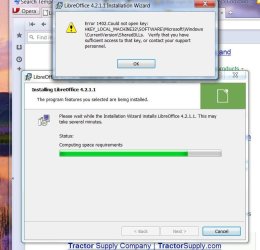
I use Libreoffice and went to update the app yesterday and ran into a problem I don't know how to resolve.

(See the attachment)

I get about 3/4 the way through the install and up pops a 1402 error message. Have noted there are a lot of 1402 problems but not sure if most of them apply. Most seem to apply to Office install/uninstall.

What I noted when I went into the registry, I can't find an entry for .......MACHINES32\ but I do find an entry for ....MACHINES\ along with the rest of the path.

Sure would like to get this resolved but don't know where to turn. Also wondering if this is a sign of install problems to come.

Have tried doing a restore to a point prior to a critical update earlier in the week. A day or two prior to that I did install an app without any problems.
 

Attachments
  • libreoffice install error.jpg
    libreoffice install error.jpg
    57.7 KB · Views: 0

My Computer

Computer type
PC/Desktop
Computer Manufacturer/Model Number
HP Z series workstation
OS
W7 Pro x64
CPU
i7
Memory
8GB
Graphics Card(s)
AMD FirePro V3900
Hard Drives
500G
560G
1T
Antivirus
Comodo
Try Revo Uninstaller Free to remove the old install completely. Use the most aggressive settings. Then try to reinstall.
 

My Computers

System One System Two

  • Computer type
    PC/Desktop
    Computer Manufacturer/Model Number
    HP Pavilion 6751c
    OS
    Win7, Win10, Win11
    Internet Speed
    100 Mbps
    Antivirus
    Norton 360
    Browser
    IE 11
  • Computer type
    PC/Desktop
    System Manufacturer/Model Number
    HP ENVY 750-514 & Dell XPS 8960
    OS
    Win7, Win10, Win11
    Antivirus
    Norton 360
While I have Revo Uninstaller I've not taken that path, yet. I'm not sure whether this approach will help. Looks to me like the problem is, the LO installer is looking for a key in the registry that doesn't exist. I don't see how uninstalling the LO version I now have will address the non-existant key issue.

There are NO HKEY_ LOCAL_MACHINE32\ entries in the registry. Trying to get help from a LO is quite difficult since member help is all done via e-mail.

If I'm all wet here, please educate me.
 

My Computer

Computer type
PC/Desktop
Computer Manufacturer/Model Number
HP Z series workstation
OS
W7 Pro x64
CPU
i7
Memory
8GB
Graphics Card(s)
AMD FirePro V3900
Hard Drives
500G
560G
1T
Antivirus
Comodo
Hello WebFoot,

If you have not already, see if right clicking on the installation file and clicking on Run as administrator will allow it to install.

Hope this helps, :)
Shawn
 

My Computer

Computer type
PC/Desktop
Computer Manufacturer/Model Number
Self built custom
OS
64-bit Windows 11 Pro for Workstations
CPU
Intel i7-8700K OC'd to 5 GHz
Motherboard
ASUS ROG Maximus XI Formula Z390
Memory
64 GB (4x16GB) G.SKILL TridentZ RGB DDR4 3600 MHz
Graphics Card(s)
ASUS ROG-STRIX-GTX1080TI-O11G-GAMING
Sound Card
Integrated
Monitor(s) Displays
2 x Samsung Odyssey G7 27"
Screen Resolution
2560x1440
Hard Drives
1TB Samsung 990 PRO M.2,
4TB Samsung 990 PRO PRO M.2,
TerraMaster F8 SSD Plus NAS
PSU
Seasonic Prime Titanium 850W
Case
Thermaltake Core P3
Cooling
Corsair Hydro H115i
Keyboard
Logitech wireless K800
Mouse
Logitech MX Master 4
Internet Speed
2 Gb/s Download and 100 Mb/s Upload
Antivirus
Malwarebyte Anti-Malware Premium
Browser
Google Chrome
Other Info
Logitech Z625 speaker system,
Logitech BRIO 4K Pro webcam,
HP Color LaserJet Pro MFP M477fdn,
APC SMART-UPS RT 1000 XL - SURT1000XLI,
Galaxy S23 Plus phone
Hello WebFoot,

If you have not already, see if right clicking on the installation file and clicking on Run as administrator will allow it to install.

Hope this helps, :)
Shawn

Had already thought of that but for some reason, run as administrator is not an option on the install file. Not sure why but I find it a little funny there is an option to repair for an app/version not yet installed.
 

My Computer

Computer type
PC/Desktop
Computer Manufacturer/Model Number
HP Z series workstation
OS
W7 Pro x64
CPU
i7
Memory
8GB
Graphics Card(s)
AMD FirePro V3900
Hard Drives
500G
560G
1T
Antivirus
Comodo

My Computer

Computer type
PC/Desktop
Computer Manufacturer/Model Number
Self built custom
OS
64-bit Windows 11 Pro for Workstations
CPU
Intel i7-8700K OC'd to 5 GHz
Motherboard
ASUS ROG Maximus XI Formula Z390
Memory
64 GB (4x16GB) G.SKILL TridentZ RGB DDR4 3600 MHz
Graphics Card(s)
ASUS ROG-STRIX-GTX1080TI-O11G-GAMING
Sound Card
Integrated
Monitor(s) Displays
2 x Samsung Odyssey G7 27"
Screen Resolution
2560x1440
Hard Drives
1TB Samsung 990 PRO M.2,
4TB Samsung 990 PRO PRO M.2,
TerraMaster F8 SSD Plus NAS
PSU
Seasonic Prime Titanium 850W
Case
Thermaltake Core P3
Cooling
Corsair Hydro H115i
Keyboard
Logitech wireless K800
Mouse
Logitech MX Master 4
Internet Speed
2 Gb/s Download and 100 Mb/s Upload
Antivirus
Malwarebyte Anti-Malware Premium
Browser
Google Chrome
Other Info
Logitech Z625 speaker system,
Logitech BRIO 4K Pro webcam,
HP Color LaserJet Pro MFP M477fdn,
APC SMART-UPS RT 1000 XL - SURT1000XLI,
Galaxy S23 Plus phone
This time of yr I have a LOT of things vying for my time and have not had the time to fully research/fix this problem. Upgrading to latest revision is not a top priority for me at this time.

Did find a thread on LibreOffice Forum that others have had this same problem. Have not had the time for fully pursue that thread and a possible fix.
 

My Computer

Computer type
PC/Desktop
Computer Manufacturer/Model Number
HP Z series workstation
OS
W7 Pro x64
CPU
i7
Memory
8GB
Graphics Card(s)
AMD FirePro V3900
Hard Drives
500G
560G
1T
Antivirus
Comodo
Back
Top