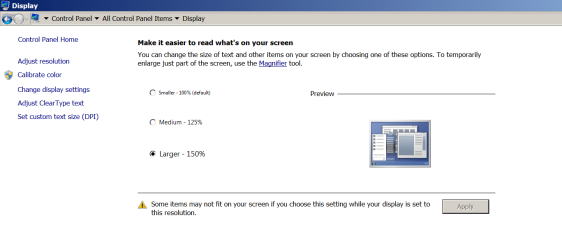
I have my Windows set to 150% zoom (otherwise it becomes hard to aim at the little buttons in order to click them) It's really nice to have the buttons really big in the list of options that come up when I press the Windows button on the left of Alt button.
But the problem is that it blows up Chrome and Adobe Reader so that it almost becomes unuseable.
Firefox and Internet Explorer is ok. Foxit Reader is ok.
Also, time to time the Chrome appears ok when I log in (not sure about Adobe Reader) but then when I sign out and log in again the overblownness appears again.
My Computer
At a glance
Windows 8AMD A8-4500M APU with Radeon(tm) HD Graphics4.00 GBAMD Radeon HD 7640G
Computer type
PC/Desktop
Computer Manufacturer/Model Number
HP
OS
Windows 8
CPU
AMD A8-4500M APU with Radeon(tm) HD Graphics
Motherboard
Hewlett-Packard 184B
Memory
4.00 GB
Graphics Card(s)
AMD Radeon HD 7640G
Sound Card
(1) AMD High Definition Audio Device (2) IDT High Definiti
My experience is that the 150% only really works if you are using a high resolution, say 1920x1080.
If your native resolution is much lower than that you are going to get bleed over ... text running outside of the buttons they are meant to label... stuff like that.
Have you tried just using large icons instead of blowing up all text and buttons?
right click the open space on your desktop and choose screen resolution from the context menu.
Given the nature of what you are describing my guess is you are in the 1280x1024 range.
I'm in 1600 x 900, and that doesn't explain why everything else is ok, and only Adobe Reader and Chrome is blown up. (There is no spills, it just is blownup as if I lessened the resolution)
My Computer
At a glance
Windows 8AMD A8-4500M APU with Radeon(tm) HD Graphics4.00 GBAMD Radeon HD 7640G
Computer type
PC/Desktop
Computer Manufacturer/Model Number
HP
OS
Windows 8
CPU
AMD A8-4500M APU with Radeon(tm) HD Graphics
Motherboard
Hewlett-Packard 184B
Memory
4.00 GB
Graphics Card(s)
AMD Radeon HD 7640G
Sound Card
(1) AMD High Definition Audio Device (2) IDT High Definiti
Well ctrl + mousewheel will solve any sizing issues inside of chrome. (if the buttons and menus themselves are affected, you'll have to go into the advanced options in chrome and tell it to ignore the system font/styles)
I'm not quite sure what to do about adobe I personally use foxit reader for pdf stuff.
Okay I must be misunderstanding what you've done, you have apparently not set large icons or used the normal text resizing feature shown here:
I guess the question is how exactly did you get 150%?
4 x 4GB DDR3-1600 Corsair Vengeance CMZ8GX3M2A1600C9B (16GB)
Graphics Card(s)
MSI GeForce GTX770 Gaming OC 2GB
Sound Card
Realtek High Definition on board solution (ALC 898)
Monitor(s) Displays
ViewSonic VA1912w Widescreen (VGA)
Screen Resolution
1440x900
Hard Drives
OCZ Agility 3 SSD 120GB SATA III x2 (RAID 0)
Samsung HD501LJ 500GB SATA II x2
Hitachi HDS721010CLA332 1TB SATA II
Iomega 1.5TB Ext USB 2.0
WD 2.0TB Ext USB 3.0
If 100% DPI setting isn't right for you then try setting DPI to 115-125% to see how that sizes things. I find that anything larger than that distorts things.
Once inside your browser you can adjust how it fits the screen as suggested earlier.