16Gb installed RAM (4Gb usable)

Absalom76

New member
Local time
11:18 PM
Messages
19
Hello all!
I noticed when poking around in my computer settings and hardware information, that my RAM is showing (16Gb), but only 4Gb are "usable". I have been looking all over creation to find out why, but to no avail. I am utilizing:

Windows 7 Ultimate 64-bit OS,
AMD Phenom II x6 1090T,
ASRock 970 Extreme3 mobo,
4 (4Gb) sticks of G.Skill Ripjaws DDR3 ram,
and a
NVIDIA GeForce GTX 460 graphics card

I have tried all sorts of things, from tweaking the volts a bit (which showed 8 Gb usable out of 16 installed and crashed the computer),
to putting one stick in the mobo at a time, and booting with each stick (this gave me 5 short beeps when trying to boot two of the sticks individually). As a side note, When I have all RAM in it shows all 4 in my bios and on my System Properties.

I now have the 2 sticks in (that didn't cause the 5-beep error) which is 8Gb, and it's only showing 4 Gb usable.

On another note, from time to time when booting, I get an error that says to, "reboot, and select a bootable device" even though the HDD has not been changed or manipulated in any way. If all of these things are able to be addressed through a tweaking of my bios, I can't seem to find an easy way to do it anywhere!

My apologies if I missed a thread that pertained to this issue, but I have a bit of a Frankenstein computer on my hands here and could use some advice!
Thank you in advance!

:D
 

My Computer

Computer type
PC/Desktop
Computer Manufacturer/Model Number
CUSTOM
OS
WINDOWS 7 ULTIMATE
CPU
AMD Phenom(tm) IIX6 1090T Processor 3.20 GHz
Motherboard
ASRock 970 Extreme3
Memory
4 4Gb sticks of DDR3-1333 G.Skill RipJaws
Graphics Card(s)
NVIDIA GeForce GTX 460
Hard Drives
640 Gb Western Digital Caviar Black
Antivirus
Kaspersky
Browser
Firefox
Hello and welcome Absalom mate try a memtest first up maybe you have some bad sticks or slots even .

You need to make a bootable disk then set the BIOS to boot from the optical and then let it run for at minimum of 8 passes unless you get errors straight away see http://www.sevenforums.com/tutorials/105647-ram-test-memtest86.html
 

My Computer

Computer type
PC/Desktop
Computer Manufacturer/Model Number
Own build (new) Desk1 / Asus ROG Win 7 / Desk2 1st build
OS
Desk1 7 Home Prem / Desk2 10 Pro / Main lap Asus ROG 10 Pro 2 laptop Toshiba 7 Pro Asus P2520 7 & 10
CPU
Desk1 i5 3750K / Laptop i7 GTX 860M / Desk2 i5 2500
Motherboard
Desk1 Asus P877-V / Desk2 Gigabyte H67 UD3H / Laptop ?
Memory
Desk1 8GB (1866) / Desk2 16GB (1333) / Laptop 8Gb DDR3
Graphics Card(s)
Desk 1& 2NVidia GTX 650 & Laptops on board Intel
Sound Card
Desk 1 & 2 -XONAR DG Realtek High Def audio Laptop
Monitor(s) Displays
Desk 1 Benq HD 2450 / Desk2 Philips 24" / Laptop 17.5"
Screen Resolution
1920x1080 D1 & D2 & Laptop 1
Hard Drives
Desk1 Samsung 120GB 830 SSD
Asus ROG 256GB 850 Pro SSD
Desk2 Samsung 840 256 SSD
Toshiba 120GB EVO
PSU
Desk 1 Corsair HX 1050/ Laptop ? / Desk 2 Corsair HX 650
Case
Desk 1 Cooler HAF XM ? Toshiba laptop / Desk2 Coolermaster
Cooling
Fans on all Desk1 -2 Desk2 - all Coolermasters 5 Laptop ?
Keyboard
Desk 1 MS Sidewinder X6 Desk 2 MS Sidewinder X 4
Mouse
Desk 1&2 - Gigabyte MS 900 gamer - laptop - Logitec wireless
Internet Speed
ADSL2+
Other Info
One other Desktop (tester) and spare Toshba laptop both with SSD's
Running Kaspersky 2016 ISS on all machines config'd identically
Logitec audio stereo systems on each machine (x3)
Canon MG5250MFC
Router/modem TP-Link running WPA2SK
But have you talked with ASRock about it ?
 

My Computer

Computer type
PC/Desktop
Computer Manufacturer/Model Number
Skylake Special #666
OS
Windows 10 Pro x64
CPU
Intel Core i7 6700K
Motherboard
Asus Sabertooth Z170 Mark 1
Memory
GSkill TridentZ RGB 16GB 3600 16-16-16-36
Graphics Card(s)
EVGA GTX 980 Ti SC x2
Sound Card
Realtek High Definition
Monitor(s) Displays
AOC G2460PG
Screen Resolution
1920 x 1080 144Hz
Hard Drives
Samsung 860 Pro 256GB, Seagate Barracuda 4TB x2
PSU
EVGA 1000 P2, EVGA White Custom Braided Cables
Case
Corsair Vengeance C70 Gunmetal Black
Cooling
Corsair H100i v2, Corsair ML120 x2, Thermal Grizzly Kryonaut
Keyboard
Logitech G910 Orion Spectrum
Mouse
Logitech G700s
Internet Speed
Verizon Fios Quantum Gateway 75/75
Antivirus
Windows Defender, Malwarebytes Free 3.8.3
Browser
Chrome
Other Info
Corsair SP120 x4, LG Blu-ray Drive, Durabrand HT-395 100 Watt Dolby Digital Amp, Corsair H2100 Wireless 7.1 Headset
I have not talked with ASRock about it. Right now, I have 8Gb inserted and 4Gb is usable. I have actually done a memory test with the Windows program that comes with my OS, and it didn't come up with anything. It even automatically ran check disc. Basically the "monster" runs, but not to full capacity. THANKS FOR THE REPLIES!
 

My Computer

Computer type
PC/Desktop
Computer Manufacturer/Model Number
CUSTOM
OS
WINDOWS 7 ULTIMATE
CPU
AMD Phenom(tm) IIX6 1090T Processor 3.20 GHz
Motherboard
ASRock 970 Extreme3
Memory
4 4Gb sticks of DDR3-1333 G.Skill RipJaws
Graphics Card(s)
NVIDIA GeForce GTX 460
Hard Drives
640 Gb Western Digital Caviar Black
Antivirus
Kaspersky
Browser
Firefox
Go into task manager/performance/resource monitor/memory all the memory should show up and tell you where it`s being used.
 

My Computer

Computer type
PC/Desktop
Computer Manufacturer/Model Number
Skylake Special #666
OS
Windows 10 Pro x64
CPU
Intel Core i7 6700K
Motherboard
Asus Sabertooth Z170 Mark 1
Memory
GSkill TridentZ RGB 16GB 3600 16-16-16-36
Graphics Card(s)
EVGA GTX 980 Ti SC x2
Sound Card
Realtek High Definition
Monitor(s) Displays
AOC G2460PG
Screen Resolution
1920 x 1080 144Hz
Hard Drives
Samsung 860 Pro 256GB, Seagate Barracuda 4TB x2
PSU
EVGA 1000 P2, EVGA White Custom Braided Cables
Case
Corsair Vengeance C70 Gunmetal Black
Cooling
Corsair H100i v2, Corsair ML120 x2, Thermal Grizzly Kryonaut
Keyboard
Logitech G910 Orion Spectrum
Mouse
Logitech G700s
Internet Speed
Verizon Fios Quantum Gateway 75/75
Antivirus
Windows Defender, Malwarebytes Free 3.8.3
Browser
Chrome
Other Info
Corsair SP120 x4, LG Blu-ray Drive, Durabrand HT-395 100 Watt Dolby Digital Amp, Corsair H2100 Wireless 7.1 Headset
Go into task manager/performance/resource monitor/memory all the memory should show up and tell you where it`s being used.

If I plug in all my sticks of RAM, all 16Gb show up, however only partial memory is "usable" (normally 4Gb) no matter how much I have plugged into the mobo
:)
 

My Computer

Computer type
PC/Desktop
Computer Manufacturer/Model Number
CUSTOM
OS
WINDOWS 7 ULTIMATE
CPU
AMD Phenom(tm) IIX6 1090T Processor 3.20 GHz
Motherboard
ASRock 970 Extreme3
Memory
4 4Gb sticks of DDR3-1333 G.Skill RipJaws
Graphics Card(s)
NVIDIA GeForce GTX 460
Hard Drives
640 Gb Western Digital Caviar Black
Antivirus
Kaspersky
Browser
Firefox
Did you do what I told you ?

Post a snip of it.
 

My Computer

Computer type
PC/Desktop
Computer Manufacturer/Model Number
Skylake Special #666
OS
Windows 10 Pro x64
CPU
Intel Core i7 6700K
Motherboard
Asus Sabertooth Z170 Mark 1
Memory
GSkill TridentZ RGB 16GB 3600 16-16-16-36
Graphics Card(s)
EVGA GTX 980 Ti SC x2
Sound Card
Realtek High Definition
Monitor(s) Displays
AOC G2460PG
Screen Resolution
1920 x 1080 144Hz
Hard Drives
Samsung 860 Pro 256GB, Seagate Barracuda 4TB x2
PSU
EVGA 1000 P2, EVGA White Custom Braided Cables
Case
Corsair Vengeance C70 Gunmetal Black
Cooling
Corsair H100i v2, Corsair ML120 x2, Thermal Grizzly Kryonaut
Keyboard
Logitech G910 Orion Spectrum
Mouse
Logitech G700s
Internet Speed
Verizon Fios Quantum Gateway 75/75
Antivirus
Windows Defender, Malwarebytes Free 3.8.3
Browser
Chrome
Other Info
Corsair SP120 x4, LG Blu-ray Drive, Durabrand HT-395 100 Watt Dolby Digital Amp, Corsair H2100 Wireless 7.1 Headset
Did you do what I told you ?

Post a snip of it.

I will be doing a memtest overnight as they request that you let it run that long. I will reply with my findings as soon as I have more info! thank you for the advice! I will keep you posted!
 

My Computer

Computer type
PC/Desktop
Computer Manufacturer/Model Number
CUSTOM
OS
WINDOWS 7 ULTIMATE
CPU
AMD Phenom(tm) IIX6 1090T Processor 3.20 GHz
Motherboard
ASRock 970 Extreme3
Memory
4 4Gb sticks of DDR3-1333 G.Skill RipJaws
Graphics Card(s)
NVIDIA GeForce GTX 460
Hard Drives
640 Gb Western Digital Caviar Black
Antivirus
Kaspersky
Browser
Firefox
A memory test will do nothing for your problem.

And who is THEY ?
 

My Computer

Computer type
PC/Desktop
Computer Manufacturer/Model Number
Skylake Special #666
OS
Windows 10 Pro x64
CPU
Intel Core i7 6700K
Motherboard
Asus Sabertooth Z170 Mark 1
Memory
GSkill TridentZ RGB 16GB 3600 16-16-16-36
Graphics Card(s)
EVGA GTX 980 Ti SC x2
Sound Card
Realtek High Definition
Monitor(s) Displays
AOC G2460PG
Screen Resolution
1920 x 1080 144Hz
Hard Drives
Samsung 860 Pro 256GB, Seagate Barracuda 4TB x2
PSU
EVGA 1000 P2, EVGA White Custom Braided Cables
Case
Corsair Vengeance C70 Gunmetal Black
Cooling
Corsair H100i v2, Corsair ML120 x2, Thermal Grizzly Kryonaut
Keyboard
Logitech G910 Orion Spectrum
Mouse
Logitech G700s
Internet Speed
Verizon Fios Quantum Gateway 75/75
Antivirus
Windows Defender, Malwarebytes Free 3.8.3
Browser
Chrome
Other Info
Corsair SP120 x4, LG Blu-ray Drive, Durabrand HT-395 100 Watt Dolby Digital Amp, Corsair H2100 Wireless 7.1 Headset
Hiyya AddRam I said at the beginning I think it was that the memtest should be run for at least 8 passes but stop if it showed errors straight away.

I don't know exactly who THEY are but suspect it might be in the tutorial but without reading through it again can't be sure.

I only advised that if only to rule out bad sticks or slots and then go from there.

Absalom mate are the sticks all the same - are they a set of four or two sets of two (matched sticks) or are they just a mixture of different numbered sticks (not all exactly the same numbers on each one of them) ?
 

My Computer

Computer type
PC/Desktop
Computer Manufacturer/Model Number
Own build (new) Desk1 / Asus ROG Win 7 / Desk2 1st build
OS
Desk1 7 Home Prem / Desk2 10 Pro / Main lap Asus ROG 10 Pro 2 laptop Toshiba 7 Pro Asus P2520 7 & 10
CPU
Desk1 i5 3750K / Laptop i7 GTX 860M / Desk2 i5 2500
Motherboard
Desk1 Asus P877-V / Desk2 Gigabyte H67 UD3H / Laptop ?
Memory
Desk1 8GB (1866) / Desk2 16GB (1333) / Laptop 8Gb DDR3
Graphics Card(s)
Desk 1& 2NVidia GTX 650 & Laptops on board Intel
Sound Card
Desk 1 & 2 -XONAR DG Realtek High Def audio Laptop
Monitor(s) Displays
Desk 1 Benq HD 2450 / Desk2 Philips 24" / Laptop 17.5"
Screen Resolution
1920x1080 D1 & D2 & Laptop 1
Hard Drives
Desk1 Samsung 120GB 830 SSD
Asus ROG 256GB 850 Pro SSD
Desk2 Samsung 840 256 SSD
Toshiba 120GB EVO
PSU
Desk 1 Corsair HX 1050/ Laptop ? / Desk 2 Corsair HX 650
Case
Desk 1 Cooler HAF XM ? Toshiba laptop / Desk2 Coolermaster
Cooling
Fans on all Desk1 -2 Desk2 - all Coolermasters 5 Laptop ?
Keyboard
Desk 1 MS Sidewinder X6 Desk 2 MS Sidewinder X 4
Mouse
Desk 1&2 - Gigabyte MS 900 gamer - laptop - Logitec wireless
Internet Speed
ADSL2+
Other Info
One other Desktop (tester) and spare Toshba laptop both with SSD's
Running Kaspersky 2016 ISS on all machines config'd identically
Logitec audio stereo systems on each machine (x3)
Canon MG5250MFC
Router/modem TP-Link running WPA2SK
"Absalom mate are the sticks all the same - are they a set of four or two sets of two (matched sticks) or are they just a mixture of different numbered sticks (not all exactly the same numbers on each one of them) ?"

My apologies for the slow responses! I still have yet to run the memtest to see if the sticks are good or the slots are ok. The sticks are all the same and came in 2 sets of 2. I have 4 4Gb RAM sticks.
 

My Computer

Computer type
PC/Desktop
Computer Manufacturer/Model Number
CUSTOM
OS
WINDOWS 7 ULTIMATE
CPU
AMD Phenom(tm) IIX6 1090T Processor 3.20 GHz
Motherboard
ASRock 970 Extreme3
Memory
4 4Gb sticks of DDR3-1333 G.Skill RipJaws
Graphics Card(s)
NVIDIA GeForce GTX 460
Hard Drives
640 Gb Western Digital Caviar Black
Antivirus
Kaspersky
Browser
Firefox
Addram, "they" refers to the people that offer the memtest program to see if the sticks are bad, or the slots are bad on the mobo. The link is in an above post by, ICit2lol.
 

My Computer

Computer type
PC/Desktop
Computer Manufacturer/Model Number
CUSTOM
OS
WINDOWS 7 ULTIMATE
CPU
AMD Phenom(tm) IIX6 1090T Processor 3.20 GHz
Motherboard
ASRock 970 Extreme3
Memory
4 4Gb sticks of DDR3-1333 G.Skill RipJaws
Graphics Card(s)
NVIDIA GeForce GTX 460
Hard Drives
640 Gb Western Digital Caviar Black
Antivirus
Kaspersky
Browser
Firefox
Still waiting for the pic of resource monitor.
 

My Computer

Computer type
PC/Desktop
Computer Manufacturer/Model Number
Skylake Special #666
OS
Windows 10 Pro x64
CPU
Intel Core i7 6700K
Motherboard
Asus Sabertooth Z170 Mark 1
Memory
GSkill TridentZ RGB 16GB 3600 16-16-16-36
Graphics Card(s)
EVGA GTX 980 Ti SC x2
Sound Card
Realtek High Definition
Monitor(s) Displays
AOC G2460PG
Screen Resolution
1920 x 1080 144Hz
Hard Drives
Samsung 860 Pro 256GB, Seagate Barracuda 4TB x2
PSU
EVGA 1000 P2, EVGA White Custom Braided Cables
Case
Corsair Vengeance C70 Gunmetal Black
Cooling
Corsair H100i v2, Corsair ML120 x2, Thermal Grizzly Kryonaut
Keyboard
Logitech G910 Orion Spectrum
Mouse
Logitech G700s
Internet Speed
Verizon Fios Quantum Gateway 75/75
Antivirus
Windows Defender, Malwarebytes Free 3.8.3
Browser
Chrome
Other Info
Corsair SP120 x4, LG Blu-ray Drive, Durabrand HT-395 100 Watt Dolby Digital Amp, Corsair H2100 Wireless 7.1 Headset
Arf Arf :D

Sometimes I don`t feel like typing out a 100 words for something so simple, my 1st reply told him everything he needed to know, but you take over.
 

My Computer

Computer type
PC/Desktop
Computer Manufacturer/Model Number
Skylake Special #666
OS
Windows 10 Pro x64
CPU
Intel Core i7 6700K
Motherboard
Asus Sabertooth Z170 Mark 1
Memory
GSkill TridentZ RGB 16GB 3600 16-16-16-36
Graphics Card(s)
EVGA GTX 980 Ti SC x2
Sound Card
Realtek High Definition
Monitor(s) Displays
AOC G2460PG
Screen Resolution
1920 x 1080 144Hz
Hard Drives
Samsung 860 Pro 256GB, Seagate Barracuda 4TB x2
PSU
EVGA 1000 P2, EVGA White Custom Braided Cables
Case
Corsair Vengeance C70 Gunmetal Black
Cooling
Corsair H100i v2, Corsair ML120 x2, Thermal Grizzly Kryonaut
Keyboard
Logitech G910 Orion Spectrum
Mouse
Logitech G700s
Internet Speed
Verizon Fios Quantum Gateway 75/75
Antivirus
Windows Defender, Malwarebytes Free 3.8.3
Browser
Chrome
Other Info
Corsair SP120 x4, LG Blu-ray Drive, Durabrand HT-395 100 Watt Dolby Digital Amp, Corsair H2100 Wireless 7.1 Headset
Now folks this not productive eh? we all make mistakes and I am the first to admit I make some pretty stupid ones and sometimes it can get a tad frustrating and again that gets us nowhere lets get back together and help this bloke out eh? :D
 

My Computer

Computer type
PC/Desktop
Computer Manufacturer/Model Number
Own build (new) Desk1 / Asus ROG Win 7 / Desk2 1st build
OS
Desk1 7 Home Prem / Desk2 10 Pro / Main lap Asus ROG 10 Pro 2 laptop Toshiba 7 Pro Asus P2520 7 & 10
CPU
Desk1 i5 3750K / Laptop i7 GTX 860M / Desk2 i5 2500
Motherboard
Desk1 Asus P877-V / Desk2 Gigabyte H67 UD3H / Laptop ?
Memory
Desk1 8GB (1866) / Desk2 16GB (1333) / Laptop 8Gb DDR3
Graphics Card(s)
Desk 1& 2NVidia GTX 650 & Laptops on board Intel
Sound Card
Desk 1 & 2 -XONAR DG Realtek High Def audio Laptop
Monitor(s) Displays
Desk 1 Benq HD 2450 / Desk2 Philips 24" / Laptop 17.5"
Screen Resolution
1920x1080 D1 & D2 & Laptop 1
Hard Drives
Desk1 Samsung 120GB 830 SSD
Asus ROG 256GB 850 Pro SSD
Desk2 Samsung 840 256 SSD
Toshiba 120GB EVO
PSU
Desk 1 Corsair HX 1050/ Laptop ? / Desk 2 Corsair HX 650
Case
Desk 1 Cooler HAF XM ? Toshiba laptop / Desk2 Coolermaster
Cooling
Fans on all Desk1 -2 Desk2 - all Coolermasters 5 Laptop ?
Keyboard
Desk 1 MS Sidewinder X6 Desk 2 MS Sidewinder X 4
Mouse
Desk 1&2 - Gigabyte MS 900 gamer - laptop - Logitec wireless
Internet Speed
ADSL2+
Other Info
One other Desktop (tester) and spare Toshba laptop both with SSD's
Running Kaspersky 2016 ISS on all machines config'd identically
Logitec audio stereo systems on each machine (x3)
Canon MG5250MFC
Router/modem TP-Link running WPA2SK
Actually AddRam, your first post was a question about, "whether I had spoken to ASRock about it". This did not help at all, and was an obvious attempt to be lazy and unhelpful. Nothing you have posted lends any credibility to anything you have to say so I would politely like you to not post anymore of your nonsense on this thread.
Also, if it is apparently so easy for you, I suggest that you take some time to work on your social skills because they are obviously lacking.

This is a troubleshooting thread which hopefully will help a lot of people with the same issue. This is not a thread for people to post their egos in an attempt to gain recognition.

With that being said, I have had some real life things come up, which could not wait and so I apologize for that. I am simply trying to troubleshoot the issue at hand.

I very much appreciate the assistance ICit2!
 
Last edited:

My Computer

Computer type
PC/Desktop
Computer Manufacturer/Model Number
CUSTOM
OS
WINDOWS 7 ULTIMATE
CPU
AMD Phenom(tm) IIX6 1090T Processor 3.20 GHz
Motherboard
ASRock 970 Extreme3
Memory
4 4Gb sticks of DDR3-1333 G.Skill RipJaws
Graphics Card(s)
NVIDIA GeForce GTX 460
Hard Drives
640 Gb Western Digital Caviar Black
Antivirus
Kaspersky
Browser
Firefox
I have not talked with ASRock about it. Right now, I have 8Gb inserted and 4Gb is usable. I have actually done a memory test with the Windows program that comes with my OS, and it didn't come up with anything. It even automatically ran check disc. Basically the "monster" runs, but not to full capacity. THANKS FOR THE REPLIES!

is it Ultimate 32 bit or Ultimate 64bit ?
 

My Computer

Computer type
PC/Desktop
Computer Manufacturer/Model Number
CoreI7-6700K MrFingerIII Special Builds
OS
Windows 10 Home Premium 64bit sp1
CPU
Intel I7-6700K @ 4.6 Ghz 1.344 volts everyday OC
Motherboard
Asrock Fatality K6 Z170 Socket 1151
Memory
32GB G-Skill TridentZ 3200mhz 16-18-18-38 DDR4
Graphics Card(s)
Sli Gigabyte Windforce GTX 980 G1
Sound Card
AC97 Creative Rage Tactic 3D Headphones Bluetooth
Monitor(s) Displays
27" Asus ROG Swift PG278Q G-Sync 48" Vizio Smart HD TV
Screen Resolution
2560x1440p 27"- 48" Currently Gaming at 2560x1440p Res 2K
Hard Drives
250GB Samsung Evo840SSD Seagate baracuda 500 GB WD Mybook 500Gb 1TB Seagate Barracuda
PSU
HX1050w Corsair Silver 80plus certified crosfire/sli
Case
Enthod Pro Full Tower
Cooling
Corsair H110i GT 280 mm High Performance WaterBlock
Keyboard
Logitech wireless keyboard
Mouse
Logitech wireless mouse
Internet Speed
Cox Cable 100+ mb
Antivirus
WebRoot Spysweeper with Antivirus
Browser
IE-10, Chrome, Opera
Other Info
My Other Rig is a AMD FX8320E @4.6Ghz 16GB Ballistic Sport Ram
Mobo Asrock Fatality 990FX 120GB OCZ SSD 1TB Seagate Barracuda Corsair H75 Cooling PSU Corsair CX750
GPU GTX Gigabyte 970G1
Thank you for your reply Solar!
It is Windows 7 Ultimate 64 bit
 

My Computer

Computer type
PC/Desktop
Computer Manufacturer/Model Number
CUSTOM
OS
WINDOWS 7 ULTIMATE
CPU
AMD Phenom(tm) IIX6 1090T Processor 3.20 GHz
Motherboard
ASRock 970 Extreme3
Memory
4 4Gb sticks of DDR3-1333 G.Skill RipJaws
Graphics Card(s)
NVIDIA GeForce GTX 460
Hard Drives
640 Gb Western Digital Caviar Black
Antivirus
Kaspersky
Browser
Firefox
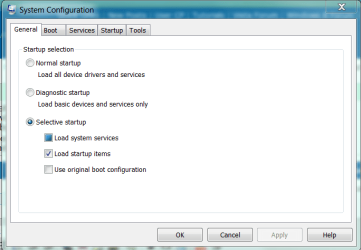
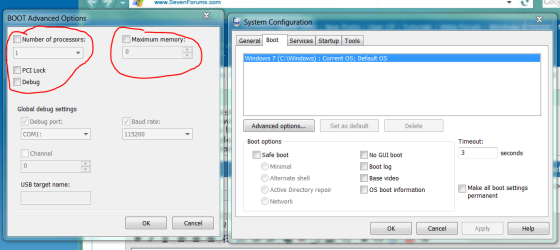
Click start menu type Msconfig right click to run as Admin

you should see these windows come up click boot and make sure none of your boxes there are checked make sure it says one cpu and not 6 if your running a hexcore make sure the ram is unchecked if not check it and raise the ram values

Normally it would be the other way around anyway hope this helps you out :geek:
 

Attachments

  • config.PNG
    config.PNG
    71.6 KB · Views: 6
  • config1.PNG
    config1.PNG
    160 KB · Views: 8

My Computer

Computer type
PC/Desktop
Computer Manufacturer/Model Number
CoreI7-6700K MrFingerIII Special Builds
OS
Windows 10 Home Premium 64bit sp1
CPU
Intel I7-6700K @ 4.6 Ghz 1.344 volts everyday OC
Motherboard
Asrock Fatality K6 Z170 Socket 1151
Memory
32GB G-Skill TridentZ 3200mhz 16-18-18-38 DDR4
Graphics Card(s)
Sli Gigabyte Windforce GTX 980 G1
Sound Card
AC97 Creative Rage Tactic 3D Headphones Bluetooth
Monitor(s) Displays
27" Asus ROG Swift PG278Q G-Sync 48" Vizio Smart HD TV
Screen Resolution
2560x1440p 27"- 48" Currently Gaming at 2560x1440p Res 2K
Hard Drives
250GB Samsung Evo840SSD Seagate baracuda 500 GB WD Mybook 500Gb 1TB Seagate Barracuda
PSU
HX1050w Corsair Silver 80plus certified crosfire/sli
Case
Enthod Pro Full Tower
Cooling
Corsair H110i GT 280 mm High Performance WaterBlock
Keyboard
Logitech wireless keyboard
Mouse
Logitech wireless mouse
Internet Speed
Cox Cable 100+ mb
Antivirus
WebRoot Spysweeper with Antivirus
Browser
IE-10, Chrome, Opera
Other Info
My Other Rig is a AMD FX8320E @4.6Ghz 16GB Ballistic Sport Ram
Mobo Asrock Fatality 990FX 120GB OCZ SSD 1TB Seagate Barracuda Corsair H75 Cooling PSU Corsair CX750
GPU GTX Gigabyte 970G1
both are unchecked and the way they "should be" :D
good question though!

and nice "pen tool" skillz btw, Solar! ;)
 

My Computer

Computer type
PC/Desktop
Computer Manufacturer/Model Number
CUSTOM
OS
WINDOWS 7 ULTIMATE
CPU
AMD Phenom(tm) IIX6 1090T Processor 3.20 GHz
Motherboard
ASRock 970 Extreme3
Memory
4 4Gb sticks of DDR3-1333 G.Skill RipJaws
Graphics Card(s)
NVIDIA GeForce GTX 460
Hard Drives
640 Gb Western Digital Caviar Black
Antivirus
Kaspersky
Browser
Firefox
Back
Top