187 GB Unknown File Cannot Delete

xodiak

New member
Local time
2:15 PM
Messages
4
Location
Joplin, MO
188 GB Unknown File Cannot Delete

Hello forum. I did do a quick search.

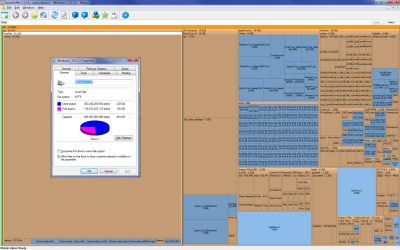
I have a 188 GB mystery file on a computer at work. Brand new computer, suddenly we are getting errors about how the 500 GB drive is nearly full. We were storing a lot of images. I back up the non-essential files to an external drive and investigate with windirstat. (see attachment)

Aside from hogging over 50% of the drive space, the only place this 'Unknown' file shows up is in windirstat. And the option to delete from windirstat is greyed out.

We'd really like to use this 50% of the drive and would appreciate any help. This is not my computer, so I'll put the specs below.

OS - Windows 7 Professional 64 bit
Version - 6.1.7600 Build 7600
Manufacturer - Lenovo
Model - 415D7U
Type - 64 bit
Processor -Intel Xeon E5507 @ 2.27 Ghz, 2261 Mhz, 4 Cores
Bios - Lenovo 60KT38AUS, 4/15/2010
SMBIOS - 2.6
RAM - 4 GB
HD - 500 GB
Graphics - NVIDIA Quadro 600 / 1 GB RAM
 

Attachments
  • ss.png
    ss.png
    119.4 KB · Views: 212
Last edited:

My Computer

Computer Manufacturer/Model Number
HP EliteBook 8540w
OS
Windows 7 Professional 64 bit
CPU
Intel Corei7 @ 1.73 GHz
Memory
8 GB
Graphics Card(s)
NVIDIA Quadro FX 880M
Sound Card
NVIDIA HD Audtio
Monitor(s) Displays
Notebook
Screen Resolution
1920x1080
Hard Drives
500 GB internal
500 GB USB
If it's brand new...run a factory restore on it.
 

My Computer

Computer Manufacturer/Model Number
Custom
OS
Windows 7 Ultimate RTM (Technet)
CPU
3.00 gigahertz Intel Core2 Duo E8400
Motherboard
ASUSTeK Computer INC. P5K/EPU Rev 1.xx
Memory
4GB
Graphics Card(s)
ATI Radeon X1950 Pro
Sound Card
Built in HD Audio
Monitor(s) Displays
22" Gateway LCD
Screen Resolution
1920 x 1200
Hard Drives
ST3160023A [Hard drive] (160.04 GB) -- drive 0, rev 8.01, ST3500630AS [Hard drive] (500.11 GB) -- drive 2, rev 3.AAK
ST3500630AS [Hard drive] (500.11 GB) -- drive 1, rev 3.AAK
Keyboard
Logitech G11
Mouse
Microsoft Wireless Laser Mouse 5000
Internet Speed
13.44 Mbps
I thought about that. Honestly, I'm trying to avoid that if at all possible. It just hours to get all the programs installed / configured. I'd love to have the 188 GB back but I'd almost rather put another 500 GB drive or use a USB drive than reinstall everything after a restore.
 

My Computer

Computer Manufacturer/Model Number
HP EliteBook 8540w
OS
Windows 7 Professional 64 bit
CPU
Intel Corei7 @ 1.73 GHz
Memory
8 GB
Graphics Card(s)
NVIDIA Quadro FX 880M
Sound Card
NVIDIA HD Audtio
Monitor(s) Displays
Notebook
Screen Resolution
1920x1080
Hard Drives
500 GB internal
500 GB USB

My Computers

System One System Two

  • Computer type
    PC/Desktop
    OS
    7 X64
    CPU
    i5 8400
    Motherboard
    gigabyte b365m ds3h
    Memory
    2x8gb 3200mhz
    Hard Drives
    various
    PSU
    pure power 11 400w cm
    Case
    Coolermaster
    Cooling
    cryorig m9i
  • Computer type
    PC/Desktop
    OS
    7x64
    CPU
    g5400
    Motherboard
    ga b365m ds3h
    Memory
    8gb ddr4 2400
    PSU
    xfx pro 450w
I'll give that Paragon Resource Kit a shot on Monday. I can't do it remotely. Hopefully it will be able to recognize that stupid file.
 

My Computer

Computer Manufacturer/Model Number
HP EliteBook 8540w
OS
Windows 7 Professional 64 bit
CPU
Intel Corei7 @ 1.73 GHz
Memory
8 GB
Graphics Card(s)
NVIDIA Quadro FX 880M
Sound Card
NVIDIA HD Audtio
Monitor(s) Displays
Notebook
Screen Resolution
1920x1080
Hard Drives
500 GB internal
500 GB USB
187 GB is pretty big, but could it be the recovery data in case you need to use the factory restore option?
 

My Computer

Computer Manufacturer/Model Number
Self
OS
Main - Windows 7 Pro SP1 64-Bit; 2nd - Windows Server 2008 R2
CPU
Main - Core i7 2600K; 2nd - Core i7 920
Motherboard
Main - Asus P8Z68-V Pro/Gen3; 2nd - Gigabyte GA-EX58-UDR3
Memory
Main - 16GB Corsair Vengeance; 2nd - 12GB Corsair Vengeance
Graphics Card(s)
Main - XFX Radeon 6870 1GB; 2nd - XFX Radeon 4870 1GB
Sound Card
Both: Onboard Realtek Azalia
Monitor(s) Displays
Main - Hann 25" + I-INC 25" + Acer 23"; 2nd - Upgrading Soon
Screen Resolution
Main - 1920x1080 (All Three Monitors); 2nd - Upgrading Soon
Hard Drives
Main - (1) Crucial M4 128GB (Boot)
Main - (1) Seagate 2TB 64MB Cache (Data)
Main - (1) Seagate 2TB 64MB Cache (Data Backup)
2nd - (1) Intel X25-M SSD 80GB (Boot)
2nd - (3) Seagate 1TB 32MB Cache (Data Backup)
2nd - (1) Seagate 320GB (Because)
PSU
Main - OCZ 600W Modular; 2nd - OCZ 600W
Case
Main - Thermaltake Element G; 2nd - NZXT something or other
Cooling
Main - Corsair H80; 2nd - Prolimatech Megahalems
Keyboard
Main - Razer Reclusa; 2nd - Old MS Keyboard
Mouse
Main - Logitech MX Revolution; 2nd - Old MS Mouse
Internet Speed
20Mbps Time-Warner Cable

My Computer

OS
Win7U 64 RTM
CPU
Q9550
Motherboard
GA-EP45-UD3R
Memory
8GB Gskill
Graphics Card(s)
ASUS|EAH4850/HTDI/1GD3/A
Sound Card
xfi Plat
Monitor(s) Displays
Dell 2405fpw
Screen Resolution
1920x1200
Hard Drives
Seagate & WD sata Drives
PSU
Antec
Case
Antec
Keyboard
MS Natural Ergonomic 4000
Mouse
Logitech MX610 USB Cordless
Most of the extension is missing in the picture, but it's labeled "Microsoft Office Access Dat...".

My guess is it's a big .mdb file:

MDB: file extension mdb - Open .mdb files

Got any big database usage?
 

My Computer

Computer Manufacturer/Model Number
Self
OS
Main - Windows 7 Pro SP1 64-Bit; 2nd - Windows Server 2008 R2
CPU
Main - Core i7 2600K; 2nd - Core i7 920
Motherboard
Main - Asus P8Z68-V Pro/Gen3; 2nd - Gigabyte GA-EX58-UDR3
Memory
Main - 16GB Corsair Vengeance; 2nd - 12GB Corsair Vengeance
Graphics Card(s)
Main - XFX Radeon 6870 1GB; 2nd - XFX Radeon 4870 1GB
Sound Card
Both: Onboard Realtek Azalia
Monitor(s) Displays
Main - Hann 25" + I-INC 25" + Acer 23"; 2nd - Upgrading Soon
Screen Resolution
Main - 1920x1080 (All Three Monitors); 2nd - Upgrading Soon
Hard Drives
Main - (1) Crucial M4 128GB (Boot)
Main - (1) Seagate 2TB 64MB Cache (Data)
Main - (1) Seagate 2TB 64MB Cache (Data Backup)
2nd - (1) Intel X25-M SSD 80GB (Boot)
2nd - (3) Seagate 1TB 32MB Cache (Data Backup)
2nd - (1) Seagate 320GB (Because)
PSU
Main - OCZ 600W Modular; 2nd - OCZ 600W
Case
Main - Thermaltake Element G; 2nd - NZXT something or other
Cooling
Main - Corsair H80; 2nd - Prolimatech Megahalems
Keyboard
Main - Razer Reclusa; 2nd - Old MS Keyboard
Mouse
Main - Logitech MX Revolution; 2nd - Old MS Mouse
Internet Speed
20Mbps Time-Warner Cable

My Computer

Computer type
PC/Desktop
OS
Windows 10 Home x64
CPU
INTEL Core i5-750 Quad-Core 3.37GHz
Motherboard
ASUS P7P55D
Memory
HyperX Fury Black Series 8GB (2 x 4GB) 1866Mhz
Graphics Card(s)
EVGA GeForce GTX 750 Superclocked 1GB 128-Bit GDDR5
Monitor(s) Displays
LG 32MA68HY 32" IPS
Screen Resolution
1920 x 1080
Hard Drives
Samsung 840 Evo 120GB, SEAGATE 500GB Barracuda® 7200.12, SATA 3 Gb/s, 7200 RPM, 16MB cache
PSU
ANTEC TruePower New TP-550, 80 PLUS, 550W
Case
ANTEC Three Hundred Illusion
Cooling
COOLER MASTER Hyper 212 Plus, 4 x 120mm 1 x 140mm Noctua's
Internet Speed
85 + Mbps
Antivirus
Avast
Browser
Vivaldi
Thanks guys.

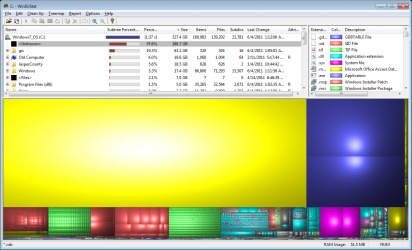
The recovery is on a separate partition. And I've shown hidden files. I've searched local c:\ for files larger than 100GB and nothing. The only place it shows up is windirstat (as unknown space) And used space on the drive properties.

That's what I thought (about the access database) When I click on thet yellow block on the right in windirstat, all the access databases highlight (but not the 188 GB block). Besides, I don't know if it's possible for an MDB to reach 188 GB in size. I guess if it were corrupt or something.

I just tried the rescue kit free and it did not show anything that size to be deleted.

And I just ran SpaceSniffer and it doesn't recognize that drive space being used.

Well... I'm getting closer to restore... Or a second drive.
 

Attachments

  • sniffer_and_drive_props.png
    sniffer_and_drive_props.png
    79.8 KB · Views: 127

My Computer

Computer Manufacturer/Model Number
HP EliteBook 8540w
OS
Windows 7 Professional 64 bit
CPU
Intel Corei7 @ 1.73 GHz
Memory
8 GB
Graphics Card(s)
NVIDIA Quadro FX 880M
Sound Card
NVIDIA HD Audtio
Monitor(s) Displays
Notebook
Screen Resolution
1920x1080
Hard Drives
500 GB internal
500 GB USB
Hi Xodiak and welcome to the Forum. Before doing a full restore, you may try running CHKDSK on the drive. It's possible that the drive has some cross linked data on it. Just a thought.
Regards
JohnnyA
 

My Computer

Computer Manufacturer/Model Number
Toshiba C650
OS
Windows Home Premium 64bit
CPU
T61-- 2.0ghz
Motherboard
Toshiba
Memory
4 GB
Graphics Card(s)
On board
Sound Card
On board
Monitor(s) Displays
15.6"
Hard Drives
500 GB
You could also boot to a Linux live CD to see if it can be read and/or deleted:

Download | Ubuntu
 

My Computer

OS
Win7U 64 RTM
CPU
Q9550
Motherboard
GA-EP45-UD3R
Memory
8GB Gskill
Graphics Card(s)
ASUS|EAH4850/HTDI/1GD3/A
Sound Card
xfi Plat
Monitor(s) Displays
Dell 2405fpw
Screen Resolution
1920x1200
Hard Drives
Seagate & WD sata Drives
PSU
Antec
Case
Antec
Keyboard
MS Natural Ergonomic 4000
Mouse
Logitech MX610 USB Cordless
I had this problem and it was too many restore points. They built up over time. Easy to fix - go to Control Panel, System, System Protection, highlight C drive, Configure, then move the slider to reduce max usage. If you have another backup system in place, you can turn off protection for other data drives.
 

My Computer

OS
Win 7 Home 64
Back
Top