1920 x 1080 resolution in Windows 7 x64 not working

Birch

New member
Local time
2:48 PM
Messages
7
I've searched for all other similar issues but they are not relative to this one.


I installed Windows 7 x64 on my new pc. It has an i7 930 and an Gigabyte ATI HD5670, and I'm using and LED-TV LG monitor (23'', E2350V). My problem is that the monitor's maximum resolution is 1920 x 1080, and when I visit settings the maximum I can set is 1600 x 1200. I went to the Catalyst Center and set the maximum value to 1920 x 1080 but nothing happened. I installed all new drivers (the drivers for the monitor don't work with Windows 7 x64 but LG says it's plug and play and no drivers are needed).


I also connect the monitor with a VGA cable, cause the case has a weird configuration and all my HDMI cables are too big. Is that why? Please help.
 

My Computer My Computer

At a glance

Windows 7 Ultimate x64i7 930 @2.8 GHzOZC 10666 6GBGigabyte ATI HD5670
OS
Windows 7 Ultimate x64
CPU
i7 930 @2.8 GHz
Motherboard
Asrock Deluxe 3 x58
Memory
OZC 10666 6GB
Graphics Card(s)
Gigabyte ATI HD5670
Sound Card
On-board
Monitor(s) Displays
LG E2350V
Screen Resolution
1920x1080
Hard Drives
WD 640GB
WD 1TB
WD 500GB
PSU
Thermaltake 850W
Case
NZXT Gamma
Cooling
3 Nexus Fans
Internet Speed
24mb/s
Maybe the HDMI being to large is the problem. Never heard of that one before.
My monitor came with both types cables so I can choose how I want it set up.
Running 1920 x 1080 settings now.
 

My Computer My Computer

At a glance

Windows 7 Home Premium 64bitIntel(R)Core(TM)2 quad [email protected] 2.39GHz6GB DDR2 6400GeForce 8500/512MB
Computer Manufacturer/Model Number
HP M9077c
OS
Windows 7 Home Premium 64bit
CPU
Intel(R)Core(TM)2 quad [email protected] 2.39GHz
Motherboard
ASUSeK
Memory
6GB DDR2 6400
Graphics Card(s)
GeForce 8500/512MB
Sound Card
Realtek High Def Audio
Monitor(s) Displays
HP w2408 LCD 24" widescreen
Screen Resolution
1920x1200
Cooling
6 pack of Bud
Keyboard
MS wireless Inteli
Mouse
MS wireless Inteli
Use the DVI cable that came with the monitor; not the hdmi or vga.
 

My Computer My Computer

At a glance

7 Ultimate x64i5-2500k8GB G.Skill Ripjaws X F3-12800CL7D-8GBXH 1866...EVGA GTX 570 SC
OS
7 Ultimate x64
CPU
i5-2500k
Motherboard
Asus P8P67 Pro
Memory
8GB G.Skill Ripjaws X F3-12800CL7D-8GBXH 1866MHz 8-9-8-24
Graphics Card(s)
EVGA GTX 570 SC
Sound Card
X-Fi Titanium Fatality
Monitor(s) Displays
Samsung S27A550H 27" LED
Screen Resolution
1920x1080
Hard Drives
OCZ Vertex 3 120GB.
1TB Samsung F3.
2TB Samsung F4.
PSU
PC Power & Cooling Silencer 760
Case
Lian Li Lancool K62
Cooling
Thermalright Venomous X Black/Scythe S-Flex/Shin-Etsu X23
Keyboard
MS Natural Elite 4000 Ergonomic
Mouse
Logitech G500
Internet Speed
6MB/768
Other Info
Logitech Z-5500 505 watts.
D-Link DGL-4500.
Tripp-Lite Smart Pro 1500.
What does it say in Device Manager for Monitor?
 

My Computer My Computer

At a glance

Main - Windows 7 Pro SP1 64-Bit; 2nd - Window...Main - Core i7 2600K; 2nd - Core i7 920Main - 16GB Corsair Vengeance; 2nd - 12GB Cor...Main - XFX Radeon 6870 1GB; 2nd - XFX Radeon ...
Computer Manufacturer/Model Number
Self
OS
Main - Windows 7 Pro SP1 64-Bit; 2nd - Windows Server 2008 R2
CPU
Main - Core i7 2600K; 2nd - Core i7 920
Motherboard
Main - Asus P8Z68-V Pro/Gen3; 2nd - Gigabyte GA-EX58-UDR3
Memory
Main - 16GB Corsair Vengeance; 2nd - 12GB Corsair Vengeance
Graphics Card(s)
Main - XFX Radeon 6870 1GB; 2nd - XFX Radeon 4870 1GB
Sound Card
Both: Onboard Realtek Azalia
Monitor(s) Displays
Main - Hann 25" + I-INC 25" + Acer 23"; 2nd - Upgrading Soon
Screen Resolution
Main - 1920x1080 (All Three Monitors); 2nd - Upgrading Soon
Hard Drives
Main - (1) Crucial M4 128GB (Boot)
Main - (1) Seagate 2TB 64MB Cache (Data)
Main - (1) Seagate 2TB 64MB Cache (Data Backup)
2nd - (1) Intel X25-M SSD 80GB (Boot)
2nd - (3) Seagate 1TB 32MB Cache (Data Backup)
2nd - (1) Seagate 320GB (Because)
PSU
Main - OCZ 600W Modular; 2nd - OCZ 600W
Case
Main - Thermaltake Element G; 2nd - NZXT something or other
Cooling
Main - Corsair H80; 2nd - Prolimatech Megahalems
Keyboard
Main - Razer Reclusa; 2nd - Old MS Keyboard
Mouse
Main - Logitech MX Revolution; 2nd - Old MS Mouse
Internet Speed
20Mbps Time-Warner Cable
Maybe the HDMI being to large is the problem. Never heard of that one before.
My monitor came with both types cables so I can choose how I want it set up.
Running 1920 x 1080 settings now.

So if I use HDMI the 1080p option will show up? :confused:

Fumz, I will try I want to use FullHD so I want 1080p...

profdlp, it's name is Generic non-PNP Monitor.
 

My Computer My Computer

At a glance

Windows 7 Ultimate x64i7 930 @2.8 GHzOZC 10666 6GBGigabyte ATI HD5670
OS
Windows 7 Ultimate x64
CPU
i7 930 @2.8 GHz
Motherboard
Asrock Deluxe 3 x58
Memory
OZC 10666 6GB
Graphics Card(s)
Gigabyte ATI HD5670
Sound Card
On-board
Monitor(s) Displays
LG E2350V
Screen Resolution
1920x1080
Hard Drives
WD 640GB
WD 1TB
WD 500GB
PSU
Thermaltake 850W
Case
NZXT Gamma
Cooling
3 Nexus Fans
Internet Speed
24mb/s
Maybe the HDMI being to large is the problem. Never heard of that one before.
My monitor came with both types cables so I can choose how I want it set up.
Running 1920 x 1080 settings now.

So if I use HDMI the 1080p option will show up? :confused:

Fumz, I will try I want to use FullHD so I want 1080p...

profdlp, it's name is Generic non-PNP Monitor.
Perhaps you'd better explain what you mean when you say your HDMI cables are, "too big?" HDMI is a standard; all HDMI cables are the same size. They're never, "too big" or "too small".

Secondly, the only difference between an HDMI cable and a DVI cable is that HDMI also carries the audio signal. Since your monitor doesn't have speakers, you don't need to use an HDMI cable, which is why I said to use the DVI. Odd things happen. Guys have posted that HDMI cables going to their monitor produced odd, and random "bad stuff". Switching to the DVI cleared it up. I have no idea why, only a few untested theories.... but... give it a shot anyway.
 

My Computer My Computer

At a glance

7 Ultimate x64i5-2500k8GB G.Skill Ripjaws X F3-12800CL7D-8GBXH 1866...EVGA GTX 570 SC
OS
7 Ultimate x64
CPU
i5-2500k
Motherboard
Asus P8P67 Pro
Memory
8GB G.Skill Ripjaws X F3-12800CL7D-8GBXH 1866MHz 8-9-8-24
Graphics Card(s)
EVGA GTX 570 SC
Sound Card
X-Fi Titanium Fatality
Monitor(s) Displays
Samsung S27A550H 27" LED
Screen Resolution
1920x1080
Hard Drives
OCZ Vertex 3 120GB.
1TB Samsung F3.
2TB Samsung F4.
PSU
PC Power & Cooling Silencer 760
Case
Lian Li Lancool K62
Cooling
Thermalright Venomous X Black/Scythe S-Flex/Shin-Etsu X23
Keyboard
MS Natural Elite 4000 Ergonomic
Mouse
Logitech G500
Internet Speed
6MB/768
Other Info
Logitech Z-5500 505 watts.
D-Link DGL-4500.
Tripp-Lite Smart Pro 1500.
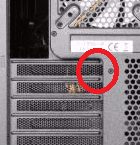
In the back of the case where PCI cards are installed the case has a weird side that goes over the pci and my hdmi cable (not the connectors, the plastic) doesn't fit (not in the output, but the case doesn't allow it to plug) . Anyway I will try DVI if it is the same. Thanks.
 

My Computer My Computer

At a glance

Windows 7 Ultimate x64i7 930 @2.8 GHzOZC 10666 6GBGigabyte ATI HD5670
OS
Windows 7 Ultimate x64
CPU
i7 930 @2.8 GHz
Motherboard
Asrock Deluxe 3 x58
Memory
OZC 10666 6GB
Graphics Card(s)
Gigabyte ATI HD5670
Sound Card
On-board
Monitor(s) Displays
LG E2350V
Screen Resolution
1920x1080
Hard Drives
WD 640GB
WD 1TB
WD 500GB
PSU
Thermaltake 850W
Case
NZXT Gamma
Cooling
3 Nexus Fans
Internet Speed
24mb/s

My Computer My Computer

At a glance

7 Ultimate x64i5-2500k8GB G.Skill Ripjaws X F3-12800CL7D-8GBXH 1866...EVGA GTX 570 SC
OS
7 Ultimate x64
CPU
i5-2500k
Motherboard
Asus P8P67 Pro
Memory
8GB G.Skill Ripjaws X F3-12800CL7D-8GBXH 1866MHz 8-9-8-24
Graphics Card(s)
EVGA GTX 570 SC
Sound Card
X-Fi Titanium Fatality
Monitor(s) Displays
Samsung S27A550H 27" LED
Screen Resolution
1920x1080
Hard Drives
OCZ Vertex 3 120GB.
1TB Samsung F3.
2TB Samsung F4.
PSU
PC Power & Cooling Silencer 760
Case
Lian Li Lancool K62
Cooling
Thermalright Venomous X Black/Scythe S-Flex/Shin-Etsu X23
Keyboard
MS Natural Elite 4000 Ergonomic
Mouse
Logitech G500
Internet Speed
6MB/768
Other Info
Logitech Z-5500 505 watts.
D-Link DGL-4500.
Tripp-Lite Smart Pro 1500.
Thanks a lot! I didn't know about the DVI, but I guess everyday you learn something new.

And to solve your puzzle, this is where the hdmi output is. If you could see it from an angle you would understand. I don't mind, though, if I ever need to connect an HDMI I will scratch the plastic with a razor, haha.

Thanks a lot for your help!
 

Attachments

  • nzxt case.png
    nzxt case.png
    10.6 KB · Views: 4,053

My Computer My Computer

At a glance

Windows 7 Ultimate x64i7 930 @2.8 GHzOZC 10666 6GBGigabyte ATI HD5670
OS
Windows 7 Ultimate x64
CPU
i7 930 @2.8 GHz
Motherboard
Asrock Deluxe 3 x58
Memory
OZC 10666 6GB
Graphics Card(s)
Gigabyte ATI HD5670
Sound Card
On-board
Monitor(s) Displays
LG E2350V
Screen Resolution
1920x1080
Hard Drives
WD 640GB
WD 1TB
WD 500GB
PSU
Thermaltake 850W
Case
NZXT Gamma
Cooling
3 Nexus Fans
Internet Speed
24mb/s
What should I do when I have the same problem but on laptop and it doesn't have a DVI exit? Just VGA and HDMI and I use VGA cable.
 

My Computer My Computer

At a glance

windows 7 enterprise 64bit
OS
windows 7 enterprise 64bit
I've searched for all other similar issues but they are not relative to this one.


I installed Windows 7 x64 on my new pc. It has an i7 930 and an Gigabyte ATI HD5670, and I'm using and LED-TV LG monitor (23'', E2350V). My problem is that the monitor's maximum resolution is 1920 x 1080, and when I visit settings the maximum I can set is 1600 x 1200. I went to the Catalyst Center and set the maximum value to 1920 x 1080 but nothing happened. I installed all new drivers (the drivers for the monitor don't work with Windows 7 x64 but LG says it's plug and play and no drivers are needed).


I also connect the monitor with a VGA cable, cause the case has a weird configuration and all my HDMI cables are too big. Is that why? Please help.
I use 15 meters hdmi cable with no problems.

Your Gigabyte ATI HD5670 have hdmi,so use hdmi cable, gpu-hdmi+monitor-hdmi for the best quality 1920x1080p.

If your monitor doesnt have hdmi then use a vga to hdmi adaptor or hdmi to vga cable.
 

My Computer My Computer

At a glance

Windows 7 Ultimate 64bit SP1Intel Core 2 Quad Q66002X2GB DDR2 PC6400 800MHZ DUAL CHANNELXFX RADEON HD 6850 1GB GDDR5
Computer Manufacturer/Model Number
Custom Built by me.
OS
Windows 7 Ultimate 64bit SP1
CPU
Intel Core 2 Quad Q6600
Motherboard
Gigabyte GA-X38-DS4
Memory
2X2GB DDR2 PC6400 800MHZ DUAL CHANNEL
Graphics Card(s)
XFX RADEON HD 6850 1GB GDDR5
Sound Card
2/4/5.1/7.1-channel Realtek High Definition
Monitor(s) Displays
Samsung LE40A656F1 1080p 100Hz LCD HD TV 50,000:1
Screen Resolution
1366x768 in Desktop,1920x1080p in gaming and video
Hard Drives
C:\WD VelociRaptor 150 GB,10,000 RPM
E:\WESTERN DIGITAL WD15EADS 1.5TB CAVIAR GREEN SATA2 F:\WESTERN DIGITAL WD15EADS 1.5TB CAVIAR GREEN SATA2
PSU
THERMALTAKE W0229 TOUGHPOWER XT 750W
Case
A-Case Twin Engine BB
Cooling
3 x thermaltake smart case fan II + 1 arctic cooling fan
Keyboard
Wireless Logitech LX710
Mouse
Logitech Wireless Gaming Mouse G700
Internet Speed
ADSL 12000 plus
Other Info
Mouse Logitech G700,with 13 buttons who needs keyboard in RPG?

D:\Sony high speed sata Dvd Rewriter
Logitech Cordless Rumblepad 2
I've searched for all other similar issues but they are not relative to this one.


I installed Windows 7 x64 on my new pc. It has an i7 930 and an Gigabyte ATI HD5670, and I'm using and LED-TV LG monitor (23'', E2350V). My problem is that the monitor's maximum resolution is 1920 x 1080, and when I visit settings the maximum I can set is 1600 x 1200. I went to the Catalyst Center and set the maximum value to 1920 x 1080 but nothing happened. I installed all new drivers (the drivers for the monitor don't work with Windows 7 x64 but LG says it's plug and play and no drivers are needed).


I also connect the monitor with a VGA cable, cause the case has a weird configuration and all my HDMI cables are too big. Is that why? Please help.

DK if youve already solved your problem... however, ATI is probably my favorite graphics card, and i know from experience the the LATEST DRIVERS must be installed completely. if you still cant do it, open the driver and CCC (catalyst control center) install, and do a "repair". once done, go to ccc and go to "desktops and displays/Add-Remove displays) and scan. it should have automaticaly detected ur monitors if you see anything at all. but sometimes it is mixing up which is your main monitor, but displays on the monitor you want (hard to enplane... but not the point) i tested this on the AMD Vision drivers/CCC V.11.0.8. as of this date, the newest drivers (try to stay up to date with amd's drivers... avid gamer or not). if you hadent have solved your HDMI problem by now i hope this post has helped!
 

My Computer My Computer

At a glance

windows 7 ProfessionalIntel I7 4790k16gb DDR3 1600mhzDual GTX 780 ASUS
Computer type
PC/Desktop
Computer Manufacturer/Model Number
Custom Build
OS
windows 7 Professional
CPU
Intel I7 4790k
Motherboard
ASUS Hero VII
Memory
16gb DDR3 1600mhz
Graphics Card(s)
Dual GTX 780 ASUS
Monitor(s) Displays
2x HP 2331
Screen Resolution
1080p
Hard Drives
750gb Hitachi 7200rpm
500gb Crucial SSD
PSU
Corsair 800g
Case
NZXT Phantom
Cooling
fan
Keyboard
Razer Deathstalker
Mouse
Razer Ouroboros
Internet Speed
70mbps
Antivirus
MSE + M-Bam
Browser
Chrome
Hi mate, got an LG W2363D myself, and was using HDMI cable. Read instructions and realized i had a DVI-D cable included ( i thought it was d-sub....didn't look and put it in the drawer ) I noticed i could only get 60hz instead of 120hz. Plugged DVI-D cable in and hey 120hz. The picture was even better @60hz with the DVI-D than HDMI so its worth a try. Hope this helps SNOD33
 

My Computer My Computer

At a glance

Windows 7 ULTIMATE x64INTEL I7 2600k @4.0 GHzADATA 8 Gb XMGamer @ 1600GIGABYTE GTX 560 Ti OC @900
Computer Manufacturer/Model Number
SNODS BUILD
OS
Windows 7 ULTIMATE x64
CPU
INTEL I7 2600k @4.0 GHz
Motherboard
ASROCK Z77 Extreme4
Memory
ADATA 8 Gb XMGamer @ 1600
Graphics Card(s)
GIGABYTE GTX 560 Ti OC @900
Sound Card
REALTEK HD
Monitor(s) Displays
LG W2363D DVI-D CABLE
Screen Resolution
1920x1080 @120 Hz
Hard Drives
2x OCZ Agility 3 60Gb RAID0 OS
2x WD VELOCIRAPTOR 80Gb RAID0
SEAGATE 250 Gb
Hitachi HDP725050GLA360 SATA 500Gb
PSU
OCZ ZT 750 Watt
Case
NZXT Beta EVO Black
Cooling
COOLIT ECO
Keyboard
EMPREX USB Chicklet
Mouse
Cyber Sniper
Internet Speed
60 Meg Fiber
Back
Top