
1935 Error

woodart

New member
Local time
9:46 PM
Messages
44
I have run into a problem I can't seem to sort. When attempting to install TurboCad 17.1, I encountered an error that stopped and rolled back the installation. I encountered the same error when trying to install Adobe Acrobat. I have attached a grab of the actual error and the data from the event viewer.

So far, I have tried reinstalling the msxml.msi file from a clean boot with no success. I uninstalled and reinstalled .net Framework 4.0.30319 but the verifier tells me it is not present (I've also attached the log).

I'm pretty much at the end of ideas and would very much appreciate a rescue!
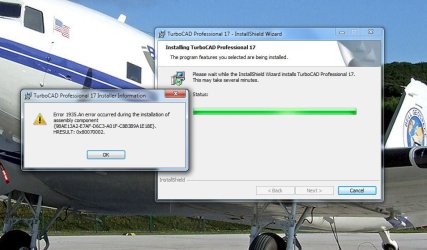
Error.jpg

View attachment Event Viewer.txt

View attachment setupverifier_main_10-15-10_17.59.34.txt
 

My Computer

Computer type
PC/Desktop
Computer Manufacturer/Model Number
Custom Build
OS
Windows 7 Professional 64-bit
CPU
i7 4820K
Motherboard
Asus Rampage IV Extreme
Memory
16GB GSkill Ripjaws X 2400 (4x4)
Graphics Card(s)
EVGA GTX 780 Superclocked ACX Cooler
Sound Card
SoundBlaster Zx
Monitor(s) Displays
ASUS VS248H-P 24" LED x3
Screen Resolution
1920 x 1080
Hard Drives
(2) Hitachi 320GB in RAID-0
1WD Caviar Blue 500GB
1WD Caviar Black 1TB
PSU
Ultra 1000W
Case
Coolermaster HAF 932
Cooling
Liquid
Internet Speed
20+mbps
Antivirus
Avast
TurboCAD Forums - Index

I'm not trying to put you off but did you try the Turbo Cad forum? Above link.
They would probably be the best place to start.

Posting here and there might help.
Mike
 

My Computer

Computer Manufacturer/Model Number
Hopalong/ Godzilla
OS
Windows7 Pro 64bit SP-1; Windows XP Pro 32bit
CPU
Intel Core i7-870 Lynnfield 2.93GHz LGA 1156 95W Quad-Core
Motherboard
ASUS P7P55D-E PRO
Memory
8GB@1400MHz Crucial Ballistix DDR3-1600 4x2GB
Graphics Card(s)
ASUS ENGTX460 DirectCU/2DI/1GD5 1GB 256-bit GDDR5
Sound Card
VIA Onboard
Monitor(s) Displays
Asus VS248H-P 24"; Samsung SyncMaster 941BW 19"ws
Screen Resolution
1920x1080; 1440x900
Hard Drives
Samsung 830 120GB SSD
Intel 320 120GB SSD
Western Digital Caviar Black WD7501AALS 750GB 7200 RPM SATA 3.0Gb/s
Western Digital Caviar Black WD6401AALS 640GB 7200 RPM SATA 3.0Gb/s
PSU
COOLER MASTER Silent Pro RS850-AMBAJ3-US 850W Modular
Case
COOLER MASTER HAF 932 RC-932-KKN5-GP Black
Cooling
Scythe "Mugen-2 Rev.B" (2 ScytheKaze-Jyuni PWM fans)
Keyboard
Logitech K-320
Mouse
Kensington
Antivirus
Avast Inernet Suite
Browser
IE 9 ; Chrome
Three days ago (along with another Win7 forum) and no replies.
 

My Computer

Computer type
PC/Desktop
Computer Manufacturer/Model Number
Custom Build
OS
Windows 7 Professional 64-bit
CPU
i7 4820K
Motherboard
Asus Rampage IV Extreme
Memory
16GB GSkill Ripjaws X 2400 (4x4)
Graphics Card(s)
EVGA GTX 780 Superclocked ACX Cooler
Sound Card
SoundBlaster Zx
Monitor(s) Displays
ASUS VS248H-P 24" LED x3
Screen Resolution
1920 x 1080
Hard Drives
(2) Hitachi 320GB in RAID-0
1WD Caviar Blue 500GB
1WD Caviar Black 1TB
PSU
Ultra 1000W
Case
Coolermaster HAF 932
Cooling
Liquid
Internet Speed
20+mbps
Antivirus
Avast
Well I have no suggestions but I'll see if I can get some others to help.

Mike

Posted for some more experienced assistance. If no response this evening check back in the morning and I'll try again in the morning also.
I will follow up.
 

My Computer

Computer Manufacturer/Model Number
Hopalong/ Godzilla
OS
Windows7 Pro 64bit SP-1; Windows XP Pro 32bit
CPU
Intel Core i7-870 Lynnfield 2.93GHz LGA 1156 95W Quad-Core
Motherboard
ASUS P7P55D-E PRO
Memory
8GB@1400MHz Crucial Ballistix DDR3-1600 4x2GB
Graphics Card(s)
ASUS ENGTX460 DirectCU/2DI/1GD5 1GB 256-bit GDDR5
Sound Card
VIA Onboard
Monitor(s) Displays
Asus VS248H-P 24"; Samsung SyncMaster 941BW 19"ws
Screen Resolution
1920x1080; 1440x900
Hard Drives
Samsung 830 120GB SSD
Intel 320 120GB SSD
Western Digital Caviar Black WD7501AALS 750GB 7200 RPM SATA 3.0Gb/s
Western Digital Caviar Black WD6401AALS 640GB 7200 RPM SATA 3.0Gb/s
PSU
COOLER MASTER Silent Pro RS850-AMBAJ3-US 850W Modular
Case
COOLER MASTER HAF 932 RC-932-KKN5-GP Black
Cooling
Scythe "Mugen-2 Rev.B" (2 ScytheKaze-Jyuni PWM fans)
Keyboard
Logitech K-320
Mouse
Kensington
Antivirus
Avast Inernet Suite
Browser
IE 9 ; Chrome

My Computer

Computer Manufacturer/Model Number
Toshiba Satellite S875D-S7239 laptop
OS
MS Windows 7 Ultimate SP1 64-bit
CPU
AMD A10-4600M
Motherboard
AMD Pumori (Socket FT1)
Memory
6.00 GB Dual-Channel DDR3 @ 798MHz (11-11-12-28)
Graphics Card(s)
AMD Radeon HD 7660G
Sound Card
High Definition Audio Device
Monitor(s) Displays
Generic PnP Monitor (1600x900@60Hz)
Screen Resolution
1600x900@60Hz
Hard Drives
SSD 119GB Corsair CSSD-V128GB2 ATA Device
Keyboard
Standard PS/2 Keyboard
Mouse
HP Wireless Optical Mobile Mouse Model FHA-3410
Internet Speed
What the local pub, local coffee shop offers.
Other Info
Optical Drive:MATSHITA BD-CMB UJ160B ATA Device


Also have an Asus ha1002xp netbook with Win 7 Ultimate installed.
Hi,

From the verifier log
Code:
[FONT=lucida console][10/15/10,17:59:39] Launching process 'Netfx40TestApplication.exe' now
[10/15/10,17:59:39] Process successfully launched. Waiting 300 seconds for it to complete.
[10/15/10,17:59:39] ****ERROR**** Process 'Netfx40TestApplication.exe' exited with return code -2146232576
[10/15/10,17:59:39] ****ERROR**** Verification failed for product .NET Framework 4 Client[/FONT]
I have .NET 4 on this system and no Netfx40TestApplication.exe - so I assume this is part of TurboCAD (or another 3rd Party verifier?)

In that case it appears the problem is with the .NET install. This is strange as earlier in the log it listed that most of the expected components of .NET 4 were present.

Try another .NET test - if you can run this installer (ie; get as far as being able to choose the install directory) without errors then .NET 4 is working - Download details: Microsoft Windows SDK for Windows 7 and .NET Framework 4
 

My Computer

OS
Windows 7 x64, Windows XP SP3, Fedora

My Computer

Computer type
PC/Desktop
Computer Manufacturer/Model Number
Custom Build
OS
Windows 7 Professional 64-bit
CPU
i7 4820K
Motherboard
Asus Rampage IV Extreme
Memory
16GB GSkill Ripjaws X 2400 (4x4)
Graphics Card(s)
EVGA GTX 780 Superclocked ACX Cooler
Sound Card
SoundBlaster Zx
Monitor(s) Displays
ASUS VS248H-P 24" LED x3
Screen Resolution
1920 x 1080
Hard Drives
(2) Hitachi 320GB in RAID-0
1WD Caviar Blue 500GB
1WD Caviar Black 1TB
PSU
Ultra 1000W
Case
Coolermaster HAF 932
Cooling
Liquid
Internet Speed
20+mbps
Antivirus
Avast
Hi,

From the verifier log
Code:
[FONT=lucida console][10/15/10,17:59:39] Launching process 'Netfx40TestApplication.exe' now
[10/15/10,17:59:39] Process successfully launched. Waiting 300 seconds for it to complete.
[10/15/10,17:59:39] ****ERROR**** Process 'Netfx40TestApplication.exe' exited with return code -2146232576
[10/15/10,17:59:39] ****ERROR**** Verification failed for product .NET Framework 4 Client[/FONT]
I have .NET 4 on this system and no Netfx40TestApplication.exe - so I assume this is part of TurboCAD (or another 3rd Party verifier?)

In that case it appears the problem is with the .NET install. This is strange as earlier in the log it listed that most of the expected components of .NET 4 were present.

Try another .NET test - if you can run this installer (ie; get as far as being able to choose the install directory) without errors then .NET 4 is working - Download details: Microsoft Windows SDK for Windows 7 and .NET Framework 4

It was run from "netfx_setupverifier".

I just tried the SDK install but it failed as well (see attached log)
 

Attachments

My Computer

Computer type
PC/Desktop
Computer Manufacturer/Model Number
Custom Build
OS
Windows 7 Professional 64-bit
CPU
i7 4820K
Motherboard
Asus Rampage IV Extreme
Memory
16GB GSkill Ripjaws X 2400 (4x4)
Graphics Card(s)
EVGA GTX 780 Superclocked ACX Cooler
Sound Card
SoundBlaster Zx
Monitor(s) Displays
ASUS VS248H-P 24" LED x3
Screen Resolution
1920 x 1080
Hard Drives
(2) Hitachi 320GB in RAID-0
1WD Caviar Blue 500GB
1WD Caviar Black 1TB
PSU
Ultra 1000W
Case
Coolermaster HAF 932
Cooling
Liquid
Internet Speed
20+mbps
Antivirus
Avast

My Computer

Computer Manufacturer/Model Number
Toshiba Satellite S875D-S7239 laptop
OS
MS Windows 7 Ultimate SP1 64-bit
CPU
AMD A10-4600M
Motherboard
AMD Pumori (Socket FT1)
Memory
6.00 GB Dual-Channel DDR3 @ 798MHz (11-11-12-28)
Graphics Card(s)
AMD Radeon HD 7660G
Sound Card
High Definition Audio Device
Monitor(s) Displays
Generic PnP Monitor (1600x900@60Hz)
Screen Resolution
1600x900@60Hz
Hard Drives
SSD 119GB Corsair CSSD-V128GB2 ATA Device
Keyboard
Standard PS/2 Keyboard
Mouse
HP Wireless Optical Mobile Mouse Model FHA-3410
Internet Speed
What the local pub, local coffee shop offers.
Other Info
Optical Drive:MATSHITA BD-CMB UJ160B ATA Device


Also have an Asus ha1002xp netbook with Win 7 Ultimate installed.

My Computer

Computer type
PC/Desktop
Computer Manufacturer/Model Number
Custom Build
OS
Windows 7 Professional 64-bit
CPU
i7 4820K
Motherboard
Asus Rampage IV Extreme
Memory
16GB GSkill Ripjaws X 2400 (4x4)
Graphics Card(s)
EVGA GTX 780 Superclocked ACX Cooler
Sound Card
SoundBlaster Zx
Monitor(s) Displays
ASUS VS248H-P 24" LED x3
Screen Resolution
1920 x 1080
Hard Drives
(2) Hitachi 320GB in RAID-0
1WD Caviar Blue 500GB
1WD Caviar Black 1TB
PSU
Ultra 1000W
Case
Coolermaster HAF 932
Cooling
Liquid
Internet Speed
20+mbps
Antivirus
Avast
I agree 100% - definitely .NET-related.
Code:
[10/15/10,17:59:39] ***WARNING*** File C:\Windows\Microsoft.NET\Framework\sbscmp20_mscorlib.dll is not installed on the system
[10/15/10,17:59:39] ***WARNING*** File C:\Windows\Microsoft.NET\Framework\v4.0.30319\WPF\wpftxt_v0400.dll is not installed on the system
[10/15/10,17:59:39] ***WARNING*** File C:\Windows\Microsoft.NET\Framework64\v4.0.30319\WPF\WPFFontCache_v0400.exe is not installed on the system
[10/15/10,17:59:39] ***WARNING*** File C:\Windows\Microsoft.NET\Framework64\v4.0.30319\WPF\wpftxt_v0400.dll is not installed on the system

Are you sure that .NET successfully installed? Any error messages?

Please follow the instructions here and run tasks #2 and 9: System Information Collection - Windows Live
 

My Computer

Computer Manufacturer/Model Number
Custom built
OS
XP x86, Vista x86, Windows 7 x64, Ubuntu 9.10
CPU
Intel Quad Core Q9550
Motherboard
NVIDIA nForce 790i Ultra
Memory
4 GB DDR3
Graphics Card(s)
NVIDIA GeForce 8800 Ultra
Hard Drives
64 GB Corsair Torqx SSD
1 TB HDD
160 GB HDD
PSU
Ultra X3 1000W
Case
CS-El Diablo
The installer finished, saying that it had been successfully installed and there were no error messages. I've attached the logs from the System Information Collection.
 

Attachments

My Computer

Computer type
PC/Desktop
Computer Manufacturer/Model Number
Custom Build
OS
Windows 7 Professional 64-bit
CPU
i7 4820K
Motherboard
Asus Rampage IV Extreme
Memory
16GB GSkill Ripjaws X 2400 (4x4)
Graphics Card(s)
EVGA GTX 780 Superclocked ACX Cooler
Sound Card
SoundBlaster Zx
Monitor(s) Displays
ASUS VS248H-P 24" LED x3
Screen Resolution
1920 x 1080
Hard Drives
(2) Hitachi 320GB in RAID-0
1WD Caviar Blue 500GB
1WD Caviar Black 1TB
PSU
Ultra 1000W
Case
Coolermaster HAF 932
Cooling
Liquid
Internet Speed
20+mbps
Antivirus
Avast
I'm glad I asked for the files! This error shows up hundreds of times:
Code:
Event[385]:
  Log Name: System
  Source: Service Control Manager
  Date: 2010-10-16T09:18:35.873
  Event ID: 7000
  Task: N/A
  Level: Error
  Opcode: N/A
  Keyword: Classic
  User: N/A
  User Name: N/A
  Computer: Quadzilla
  Description: 
The TrustedInstaller service failed to start due to the following error: 
The system cannot find the file specified.

TrustedInstaller is of course used by Windows to install programs. If it's not functioning properly, nothing will install correctly. Click Start>type services>right-click>Run as administrator, then check the service called WindowsInstaller. What is it's Startup Type?
 

My Computer

Computer Manufacturer/Model Number
Custom built
OS
XP x86, Vista x86, Windows 7 x64, Ubuntu 9.10
CPU
Intel Quad Core Q9550
Motherboard
NVIDIA nForce 790i Ultra
Memory
4 GB DDR3
Graphics Card(s)
NVIDIA GeForce 8800 Ultra
Hard Drives
64 GB Corsair Torqx SSD
1 TB HDD
160 GB HDD
PSU
Ultra X3 1000W
Case
CS-El Diablo
Sorry for disappearing for a few days. It wasn't enough my computer was messed up, I had to and get a case of the seasonal crud to keep me down as well!

Anyway, I found that other things were starting to unravel such as strange behavior in some programs and finally, my networking stopped recognizing other machines on the network.

Since it looked like a system wide problem was occurring, I went ahead and did a repair/upgrade reinstall of Windows today and all is back to norm again. It took a fair bit of time but was probably a lot faster than trying to chase down whatever was running amok.

Thanks for the time and help... Much appreciated!

Tony
 

My Computer

Computer type
PC/Desktop
Computer Manufacturer/Model Number
Custom Build
OS
Windows 7 Professional 64-bit
CPU
i7 4820K
Motherboard
Asus Rampage IV Extreme
Memory
16GB GSkill Ripjaws X 2400 (4x4)
Graphics Card(s)
EVGA GTX 780 Superclocked ACX Cooler
Sound Card
SoundBlaster Zx
Monitor(s) Displays
ASUS VS248H-P 24" LED x3
Screen Resolution
1920 x 1080
Hard Drives
(2) Hitachi 320GB in RAID-0
1WD Caviar Blue 500GB
1WD Caviar Black 1TB
PSU
Ultra 1000W
Case
Coolermaster HAF 932
Cooling
Liquid
Internet Speed
20+mbps
Antivirus
Avast
Glad to know you fixed it. Thanks for posting back.
 

My Computer

OS
Windows 7 x64, Windows XP SP3, Fedora
****ERROR**** Process 'Netfx40TestApplication.exe' exited with return code -2146232576
****ERROR**** Verification failed for product .NET Framework 4 Client

Unfortunately, the only fix so far on the net about this error code is to basically format/reinstall windows. In most cases a simple repair/restore wasn't good enough either. So while there is a way to resolve the problem, its not really a fix since it requires reinstalling windows itself. This is ridiculous and I'm seeing a lot of people with this issue as I search for solutions but no official word on the bug as a known issue. If anyone else has a fix that doesn't require reinstalling windows please post if you stop by here.
 

My Computer

OS
Windows 7 64 bit Ultimate
I am having the same problems with these missing files. I managed to find the first missing file, but the others elude me. I can't believe I have to reinstall windows for this...

Win7 Home Premium 64

argh and curses
 

My Computer

OS
Win 7
Back
Top