2 Control Panels?

CtrlAltDel

New member
Member
Local time
6:40 PM
Messages
42
Location
Birmingham, Alabama, USA
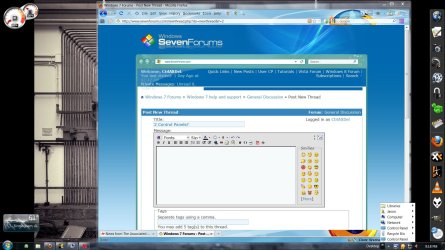
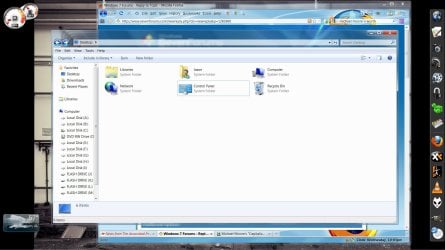
On the desktop toolbar popup at the bottom right of the screen in the taskbar, you can see that two control panels are listed.

Image file is included with post to show you what I am babbling about.

One is a popout menu and one is just a regular link.

Does anyone know why there are 2 of them listed here and how to get rid of one.

It's causing no problems but, it's just the principal of the thing. :D
 

Attachments

  • Clipboard01.jpg
    Clipboard01.jpg
    213.3 KB · Views: 67
Last edited:

My Computer

Computer Manufacturer/Model Number
Dell 537s
OS
Windows 7 (Home Premium) x64
CPU
Pentium(R) Dual-Core CPU E5300 @ 2.60GHz
Motherboard
Dell OU880P v.AO1
Memory
4.00 GB DDR2 (PC2-6400) @ 400MHz (DDR2 800)
Graphics Card(s)
Intel(R) G41 Express Chipset
Sound Card
Realtek High Definition Audio
Monitor(s) Displays
Dell ST2210 22'' HD
Screen Resolution
1920x1080
Hard Drives
Seagate Barracuda 500GB
Internet Speed
20Mbps
if you cant just right click on it and remove it try going into your task bar options and seeing if there is a way to remove it from there
 

My Computer

OS
Windows 7 Home Premium
That's the Desktop toolbar. Do you actually have two Control Panel icons on your desktop?
 

My Computer

Computer type
PC/Desktop
Computer Manufacturer/Model Number
Lenovo IdeaCenter 450
OS
Windows 10 Pro X64
CPU
Intel Quad Core i7-4770 @ 3.4Ghz
Memory
16.0GB PC3-12800 DDR3 SDRAM 1600 MHz
Graphics Card(s)
Intel Integrated HD Graphics
Sound Card
Realtek HD Audio
Monitor(s) Displays
HP 22" LCD
Screen Resolution
1680 x 1050
Hard Drives
250GB Samsung EVO SATA-3 SSD
2TB Seagate ST2000DM001 SATA-2
1.5TB Seagate ST3150041AS SATA
Keyboard
Dell USB
Mouse
Lenovo USB
Internet Speed
Cable via Road Runner 3MB Upload, 30MB Download
Antivirus
Windows Defender, MBAM Pro, MBAE
Browser
Seamonkey
Other Info
UEFI/GPT
PLDS DVD-RW DH16AERSH
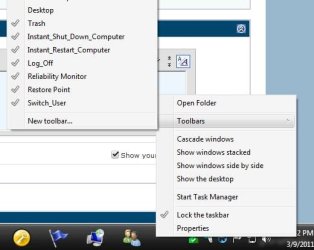
Right click on an empty spot on the taskbar, slide up to toolbars, uncheck one of the control panels.

Did you put both of them there? Or something like the Godmode shortcut?
 

Attachments

  • Capture.JPG
    Capture.JPG
    32.3 KB · Views: 10

My Computer

Computer type
PC/Desktop
Computer Manufacturer/Model Number
Self Built
OS
Win 10 Pro x64
CPU
Intel I5-2500K @3.3GHz
Motherboard
Asrock P67 Extreme4
Memory
16GB G.Skill Ripjaws X (4x4GB)
Graphics Card(s)
EVGA GeForce 750 Ti SC 2GB
Sound Card
ASUS Xonar DG 5.1 Channels 24-bit 96KHz PCI Interface Sound
Monitor(s) Displays
auria eq2367
Screen Resolution
1920 x 1080
Hard Drives
250GB Samsung 850 EVO SSD
1TB WD Blue
1TB Hitachi
PSU
SeaSonic X 650W 80 Plus Gold
Case
Corsair Obsidian 750D
Cooling
Corsair H60, Three 140mm case fans
Keyboard
Logitech Wireless Keyboard K520
Mouse
Logitech Wireless Mouse M310
Internet Speed
Wave Broadband ~ 100 dn 5 up
Antivirus
Windows Defender, Malwarebytes Premium
Browser
Edge, IE11, Chrome
Other Info
Laptop specs: HP g7-1365dx /
CPU: AMD A6-3420M APU with Radeon(tm) HD Graphics /
RAM: Crucial 8Gb (2x4Gb) /
SSD: Crucial M4-CT128M4SSD2 ATA Device/ FW 000F /
GFX: AMD Radeon HD 6520G /
OS: Windows 10 Pro x64
if you cant just right click on it and remove it try going into your task bar options and seeing if there is a way to remove it from there

I have right clicked it and deleted it once and it reappears seconds later. Just tried it again as I was writing this reply and it reappeared immediately.

I can go into Taskbar Properties/Start Menu/Customize and select "Don't Display this Item" for Control Panel and there is no effect. Both instances of Control Panel are still listed there in the Desktop popup menu.

Doing the above does remove the Control Panel from the Start Menu but, I like having it there.
 

My Computer

Computer Manufacturer/Model Number
Dell 537s
OS
Windows 7 (Home Premium) x64
CPU
Pentium(R) Dual-Core CPU E5300 @ 2.60GHz
Motherboard
Dell OU880P v.AO1
Memory
4.00 GB DDR2 (PC2-6400) @ 400MHz (DDR2 800)
Graphics Card(s)
Intel(R) G41 Express Chipset
Sound Card
Realtek High Definition Audio
Monitor(s) Displays
Dell ST2210 22'' HD
Screen Resolution
1920x1080
Hard Drives
Seagate Barracuda 500GB
Internet Speed
20Mbps
Right click on an empty spot on the taskbar, slide up to toolbars, uncheck one of the control panels.

Did you put both of them there? Or something like the Godmode shortcut?

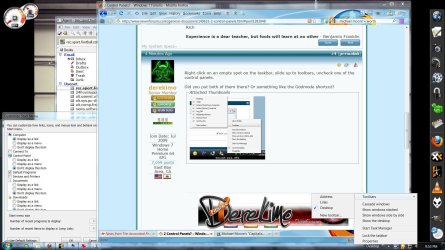
I'm not using GodMode and I don't have an option to uncheck a Control Panel button.
 

Attachments

  • Clipboard02.jpg
    Clipboard02.jpg
    236.4 KB · Views: 15

My Computer

Computer Manufacturer/Model Number
Dell 537s
OS
Windows 7 (Home Premium) x64
CPU
Pentium(R) Dual-Core CPU E5300 @ 2.60GHz
Motherboard
Dell OU880P v.AO1
Memory
4.00 GB DDR2 (PC2-6400) @ 400MHz (DDR2 800)
Graphics Card(s)
Intel(R) G41 Express Chipset
Sound Card
Realtek High Definition Audio
Monitor(s) Displays
Dell ST2210 22'' HD
Screen Resolution
1920x1080
Hard Drives
Seagate Barracuda 500GB
Internet Speed
20Mbps
That's the Desktop toolbar. Do you actually have two Control Panel icons on your desktop?

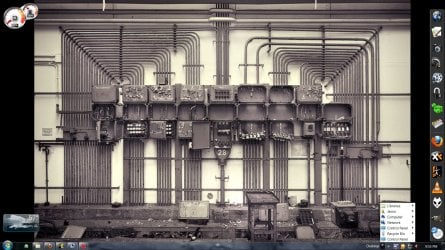
I have no icons on my desktop.
 

Attachments

  • Clipboard03.jpg
    Clipboard03.jpg
    285.9 KB · Views: 13

My Computer

Computer Manufacturer/Model Number
Dell 537s
OS
Windows 7 (Home Premium) x64
CPU
Pentium(R) Dual-Core CPU E5300 @ 2.60GHz
Motherboard
Dell OU880P v.AO1
Memory
4.00 GB DDR2 (PC2-6400) @ 400MHz (DDR2 800)
Graphics Card(s)
Intel(R) G41 Express Chipset
Sound Card
Realtek High Definition Audio
Monitor(s) Displays
Dell ST2210 22'' HD
Screen Resolution
1920x1080
Hard Drives
Seagate Barracuda 500GB
Internet Speed
20Mbps

Attachments

  • Capture.JPG
    Capture.JPG
    96.5 KB · Views: 15

My Computer

Computer type
PC/Desktop
Computer Manufacturer/Model Number
Self Built
OS
Win 10 Pro x64
CPU
Intel I5-2500K @3.3GHz
Motherboard
Asrock P67 Extreme4
Memory
16GB G.Skill Ripjaws X (4x4GB)
Graphics Card(s)
EVGA GeForce 750 Ti SC 2GB
Sound Card
ASUS Xonar DG 5.1 Channels 24-bit 96KHz PCI Interface Sound
Monitor(s) Displays
auria eq2367
Screen Resolution
1920 x 1080
Hard Drives
250GB Samsung 850 EVO SSD
1TB WD Blue
1TB Hitachi
PSU
SeaSonic X 650W 80 Plus Gold
Case
Corsair Obsidian 750D
Cooling
Corsair H60, Three 140mm case fans
Keyboard
Logitech Wireless Keyboard K520
Mouse
Logitech Wireless Mouse M310
Internet Speed
Wave Broadband ~ 100 dn 5 up
Antivirus
Windows Defender, Malwarebytes Premium
Browser
Edge, IE11, Chrome
Other Info
Laptop specs: HP g7-1365dx /
CPU: AMD A6-3420M APU with Radeon(tm) HD Graphics /
RAM: Crucial 8Gb (2x4Gb) /
SSD: Crucial M4-CT128M4SSD2 ATA Device/ FW 000F /
GFX: AMD Radeon HD 6520G /
OS: Windows 10 Pro x64
I have right clicked on the Control Panel button within the Desktop Menu in the Task Bar and deleted it and it reappears.

The only option available by right clicking the Task Bar and going to Properties/STart Menu/Customize is an option to remove it from the Start Menu.
 

My Computer

Computer Manufacturer/Model Number
Dell 537s
OS
Windows 7 (Home Premium) x64
CPU
Pentium(R) Dual-Core CPU E5300 @ 2.60GHz
Motherboard
Dell OU880P v.AO1
Memory
4.00 GB DDR2 (PC2-6400) @ 400MHz (DDR2 800)
Graphics Card(s)
Intel(R) G41 Express Chipset
Sound Card
Realtek High Definition Audio
Monitor(s) Displays
Dell ST2210 22'' HD
Screen Resolution
1920x1080
Hard Drives
Seagate Barracuda 500GB
Internet Speed
20Mbps
I have right clicked on the Control Panel button within the Desktop Menu in the Task Bar and deleted it and it reappears.

The only option available by right clicking the Task Bar and going to Properties/STart Menu/Customize is an option to remove it from the Start Menu.

That's the start menu, I was talking about a toolbar, but all you have for a toolbar is desktop, so if there are two control panels in your desktop in explorer they will show up.
 

My Computer

Computer type
PC/Desktop
Computer Manufacturer/Model Number
Self Built
OS
Win 10 Pro x64
CPU
Intel I5-2500K @3.3GHz
Motherboard
Asrock P67 Extreme4
Memory
16GB G.Skill Ripjaws X (4x4GB)
Graphics Card(s)
EVGA GeForce 750 Ti SC 2GB
Sound Card
ASUS Xonar DG 5.1 Channels 24-bit 96KHz PCI Interface Sound
Monitor(s) Displays
auria eq2367
Screen Resolution
1920 x 1080
Hard Drives
250GB Samsung 850 EVO SSD
1TB WD Blue
1TB Hitachi
PSU
SeaSonic X 650W 80 Plus Gold
Case
Corsair Obsidian 750D
Cooling
Corsair H60, Three 140mm case fans
Keyboard
Logitech Wireless Keyboard K520
Mouse
Logitech Wireless Mouse M310
Internet Speed
Wave Broadband ~ 100 dn 5 up
Antivirus
Windows Defender, Malwarebytes Premium
Browser
Edge, IE11, Chrome
Other Info
Laptop specs: HP g7-1365dx /
CPU: AMD A6-3420M APU with Radeon(tm) HD Graphics /
RAM: Crucial 8Gb (2x4Gb) /
SSD: Crucial M4-CT128M4SSD2 ATA Device/ FW 000F /
GFX: AMD Radeon HD 6520G /
OS: Windows 10 Pro x64

Attachments

  • Clipboard04.jpg
    Clipboard04.jpg
    175.9 KB · Views: 4

My Computer

Computer Manufacturer/Model Number
Dell 537s
OS
Windows 7 (Home Premium) x64
CPU
Pentium(R) Dual-Core CPU E5300 @ 2.60GHz
Motherboard
Dell OU880P v.AO1
Memory
4.00 GB DDR2 (PC2-6400) @ 400MHz (DDR2 800)
Graphics Card(s)
Intel(R) G41 Express Chipset
Sound Card
Realtek High Definition Audio
Monitor(s) Displays
Dell ST2210 22'' HD
Screen Resolution
1920x1080
Hard Drives
Seagate Barracuda 500GB
Internet Speed
20Mbps
I have that too, I just put desktop on mine and one takes you right to the control panel and the other expands to let you choose what part of the control panel you want.
 

Attachments

  • Capture.JPG
    Capture.JPG
    58.1 KB · Views: 11

My Computer

Computer type
PC/Desktop
Computer Manufacturer/Model Number
Self Built
OS
Win 10 Pro x64
CPU
Intel I5-2500K @3.3GHz
Motherboard
Asrock P67 Extreme4
Memory
16GB G.Skill Ripjaws X (4x4GB)
Graphics Card(s)
EVGA GeForce 750 Ti SC 2GB
Sound Card
ASUS Xonar DG 5.1 Channels 24-bit 96KHz PCI Interface Sound
Monitor(s) Displays
auria eq2367
Screen Resolution
1920 x 1080
Hard Drives
250GB Samsung 850 EVO SSD
1TB WD Blue
1TB Hitachi
PSU
SeaSonic X 650W 80 Plus Gold
Case
Corsair Obsidian 750D
Cooling
Corsair H60, Three 140mm case fans
Keyboard
Logitech Wireless Keyboard K520
Mouse
Logitech Wireless Mouse M310
Internet Speed
Wave Broadband ~ 100 dn 5 up
Antivirus
Windows Defender, Malwarebytes Premium
Browser
Edge, IE11, Chrome
Other Info
Laptop specs: HP g7-1365dx /
CPU: AMD A6-3420M APU with Radeon(tm) HD Graphics /
RAM: Crucial 8Gb (2x4Gb) /
SSD: Crucial M4-CT128M4SSD2 ATA Device/ FW 000F /
GFX: AMD Radeon HD 6520G /
OS: Windows 10 Pro x64
I have that too, I just put desktop on mine and one takes you right to the control panel and the other expands to let you choose what part of the control panel you want.

Okay, so it's nothing I have mucked up on my box then. If you have it too, it must just be standard.

Thank you, Derekimo.
 

My Computer

Computer Manufacturer/Model Number
Dell 537s
OS
Windows 7 (Home Premium) x64
CPU
Pentium(R) Dual-Core CPU E5300 @ 2.60GHz
Motherboard
Dell OU880P v.AO1
Memory
4.00 GB DDR2 (PC2-6400) @ 400MHz (DDR2 800)
Graphics Card(s)
Intel(R) G41 Express Chipset
Sound Card
Realtek High Definition Audio
Monitor(s) Displays
Dell ST2210 22'' HD
Screen Resolution
1920x1080
Hard Drives
Seagate Barracuda 500GB
Internet Speed
20Mbps
I have that too, I just put desktop on mine and one takes you right to the control panel and the other expands to let you choose what part of the control panel you want.

Okay, so it's nothing I have mucked up on my box then. If you have it too, it must just be standard.

Thank you, Derekimo.

You're welcome, we all learned something on this one. ;)
 

My Computer

Computer type
PC/Desktop
Computer Manufacturer/Model Number
Self Built
OS
Win 10 Pro x64
CPU
Intel I5-2500K @3.3GHz
Motherboard
Asrock P67 Extreme4
Memory
16GB G.Skill Ripjaws X (4x4GB)
Graphics Card(s)
EVGA GeForce 750 Ti SC 2GB
Sound Card
ASUS Xonar DG 5.1 Channels 24-bit 96KHz PCI Interface Sound
Monitor(s) Displays
auria eq2367
Screen Resolution
1920 x 1080
Hard Drives
250GB Samsung 850 EVO SSD
1TB WD Blue
1TB Hitachi
PSU
SeaSonic X 650W 80 Plus Gold
Case
Corsair Obsidian 750D
Cooling
Corsair H60, Three 140mm case fans
Keyboard
Logitech Wireless Keyboard K520
Mouse
Logitech Wireless Mouse M310
Internet Speed
Wave Broadband ~ 100 dn 5 up
Antivirus
Windows Defender, Malwarebytes Premium
Browser
Edge, IE11, Chrome
Other Info
Laptop specs: HP g7-1365dx /
CPU: AMD A6-3420M APU with Radeon(tm) HD Graphics /
RAM: Crucial 8Gb (2x4Gb) /
SSD: Crucial M4-CT128M4SSD2 ATA Device/ FW 000F /
GFX: AMD Radeon HD 6520G /
OS: Windows 10 Pro x64
Back
Top