2 cores stuck at low clock frequency?

SingularityRS

New member
Local time
2:23 AM
Messages
12
Hey,

I recently got a new "budget gaming PC" as a gift for my birthday, however, have noticed some issues with it. I'm testing to see if this PC is faulty.

Specs:

AMD Athlon 860K @ 3.7GHz (4 CPUs)
8GB 1600MHz RAM
1tb 7200RPM hard drive
Nvidia GTX 750 Ti 2gb (MSI
OS: Windows 7 ultimate 64-bit SP1
Motherboard: Gigabyte F2A68HM-HD2

According to Speccy and some other programs: two of my cores are stuck at 1.7GHz (Cores 2 and 3) whereas core 0 and 1 are at their normal clock speed (3.7GHz). These cores don't rise above 1.7GHz even if I throw stuff at them via task manager "set affinity" feature.

I've disabled as many power saving options in BIOs as I possibly can and have made sure I'm on high performance power plan. Still no luck.

I'd like to add: When I check frequencies in BIOs, they're all at 3.7GHz.

Minimum/maximum processor state options from the power plan options have vanished, too.
 

My Computer My Computer

Computer type
PC/Desktop
Computer Manufacturer/Model Number
Acer
OS
Windows 7 Home Premium 64-bit SP1
CPU
AMD Athlon x4 II 645 processor @ 3.1GHz (4 CPUS)
Motherboard
Acer Aspire X3450
Memory
6GB Dual-Channel DDR3 @ 668MHz
Graphics Card(s)
ATI Radeon HD 4250 graphics
Hard Drives
1863GB Western Digital WDC WD20 EARS-22MVWB0 SATA Disk Device (SATA)
Antivirus
Microsoft Security Essentials/Malwarebytes
Browser
Chrome 64-bit
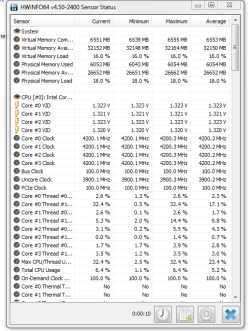
Use HWinfo and click sensors at the top of it and then your core clocks there. I suggest the portable zip version. HWiNFO, HWiNFO32/64 - Download
 

Attachments

  • sensors.PNG
    sensors.PNG
    17.6 KB · Views: 10

My Computer My Computer

Computer type
PC/Desktop
Computer Manufacturer/Model Number
Custom
OS
10 Pro x64
CPU
Ryzen 9 3900X
Motherboard
Asrock x370 Tachi
Memory
64GB(4x16GB) DDR4
Graphics Card(s)
EVGA 1080ti FTW3
Sound Card
ASUS Xonar Essence STX (V4 Bursons), ODAC rev B, NFB-11, O2
Monitor(s) Displays
3xASUS PB278Q/R, Optoma HD142X
Screen Resolution
3x1440p, 1080p
Hard Drives
512GB 850 EVO(OS, Programs)
4TB (Movies)
3TB (Downloads)
3TB (Programs)
1TB HDD (Games)
2x6TB R1 (videos)
PSU
AX760
Case
Fractal Define R5
Cooling
NH-D15S
Keyboard
Massdrop Ctrl with Box Navy's
Mouse
G903, Alioth XXL Mat
Internet Speed
280/40
Antivirus
MBAM, ESET
Browser
Canary 64 Bit
Other Info
I also own a Thinkpad P50 Xeon 4K, X220T, X1C5
Reports the same clock speeds as what other monitoring softwares are saying (core 2 and 3 being at 1.7GHz while cores 0 and 1 at 3.7GHz)
 

My Computer My Computer

Computer type
PC/Desktop
Computer Manufacturer/Model Number
Acer
OS
Windows 7 Home Premium 64-bit SP1
CPU
AMD Athlon x4 II 645 processor @ 3.1GHz (4 CPUS)
Motherboard
Acer Aspire X3450
Memory
6GB Dual-Channel DDR3 @ 668MHz
Graphics Card(s)
ATI Radeon HD 4250 graphics
Hard Drives
1863GB Western Digital WDC WD20 EARS-22MVWB0 SATA Disk Device (SATA)
Antivirus
Microsoft Security Essentials/Malwarebytes
Browser
Chrome 64-bit

My Computer My Computer

Computer type
PC/Desktop
Computer Manufacturer/Model Number
Custom
OS
10 Pro x64
CPU
Ryzen 9 3900X
Motherboard
Asrock x370 Tachi
Memory
64GB(4x16GB) DDR4
Graphics Card(s)
EVGA 1080ti FTW3
Sound Card
ASUS Xonar Essence STX (V4 Bursons), ODAC rev B, NFB-11, O2
Monitor(s) Displays
3xASUS PB278Q/R, Optoma HD142X
Screen Resolution
3x1440p, 1080p
Hard Drives
512GB 850 EVO(OS, Programs)
4TB (Movies)
3TB (Downloads)
3TB (Programs)
1TB HDD (Games)
2x6TB R1 (videos)
PSU
AX760
Case
Fractal Define R5
Cooling
NH-D15S
Keyboard
Massdrop Ctrl with Box Navy's
Mouse
G903, Alioth XXL Mat
Internet Speed
280/40
Antivirus
MBAM, ESET
Browser
Canary 64 Bit
Other Info
I also own a Thinkpad P50 Xeon 4K, X220T, X1C5
There was a "CPU clock control" option which is on "automatic"

Turbo was off, so I turned it on with everything within the turbo options set to "auto" - still no change.
 

My Computer My Computer

Computer type
PC/Desktop
Computer Manufacturer/Model Number
Acer
OS
Windows 7 Home Premium 64-bit SP1
CPU
AMD Athlon x4 II 645 processor @ 3.1GHz (4 CPUS)
Motherboard
Acer Aspire X3450
Memory
6GB Dual-Channel DDR3 @ 668MHz
Graphics Card(s)
ATI Radeon HD 4250 graphics
Hard Drives
1863GB Western Digital WDC WD20 EARS-22MVWB0 SATA Disk Device (SATA)
Antivirus
Microsoft Security Essentials/Malwarebytes
Browser
Chrome 64-bit
There was a "CPU clock control" option which is on "automatic"

Turbo was off, so I turned it on with everything within the turbo options set to "auto" - still no change.

I would clear your cmos as it sounds like your bios settings are not taking correctly everywhere I look it seems to have to do with turbo. Try changing it more than once in between reboots for it to stick also what bios version do you have atm?
 

My Computer My Computer

Computer type
PC/Desktop
Computer Manufacturer/Model Number
Custom
OS
10 Pro x64
CPU
Ryzen 9 3900X
Motherboard
Asrock x370 Tachi
Memory
64GB(4x16GB) DDR4
Graphics Card(s)
EVGA 1080ti FTW3
Sound Card
ASUS Xonar Essence STX (V4 Bursons), ODAC rev B, NFB-11, O2
Monitor(s) Displays
3xASUS PB278Q/R, Optoma HD142X
Screen Resolution
3x1440p, 1080p
Hard Drives
512GB 850 EVO(OS, Programs)
4TB (Movies)
3TB (Downloads)
3TB (Programs)
1TB HDD (Games)
2x6TB R1 (videos)
PSU
AX760
Case
Fractal Define R5
Cooling
NH-D15S
Keyboard
Massdrop Ctrl with Box Navy's
Mouse
G903, Alioth XXL Mat
Internet Speed
280/40
Antivirus
MBAM, ESET
Browser
Canary 64 Bit
Other Info
I also own a Thinkpad P50 Xeon 4K, X220T, X1C5
Alright, so I just enabled every power setting I could find (leaving turbo enabled). Then rebooted, now all cores are at 4GHz.

I guess something just got stuck?
 

My Computer My Computer

Computer type
PC/Desktop
Computer Manufacturer/Model Number
Acer
OS
Windows 7 Home Premium 64-bit SP1
CPU
AMD Athlon x4 II 645 processor @ 3.1GHz (4 CPUS)
Motherboard
Acer Aspire X3450
Memory
6GB Dual-Channel DDR3 @ 668MHz
Graphics Card(s)
ATI Radeon HD 4250 graphics
Hard Drives
1863GB Western Digital WDC WD20 EARS-22MVWB0 SATA Disk Device (SATA)
Antivirus
Microsoft Security Essentials/Malwarebytes
Browser
Chrome 64-bit
Alright, so I just enabled every power setting I could find (leaving turbo enabled). Then rebooted, now all cores are at 4GHz.

I guess something just got stuck?

Yeah some times to have to give it swift kick in the pants to make settings stay lol. Do some testing and make sure it doesn't throttle back.
 

My Computer My Computer

Computer type
PC/Desktop
Computer Manufacturer/Model Number
Custom
OS
10 Pro x64
CPU
Ryzen 9 3900X
Motherboard
Asrock x370 Tachi
Memory
64GB(4x16GB) DDR4
Graphics Card(s)
EVGA 1080ti FTW3
Sound Card
ASUS Xonar Essence STX (V4 Bursons), ODAC rev B, NFB-11, O2
Monitor(s) Displays
3xASUS PB278Q/R, Optoma HD142X
Screen Resolution
3x1440p, 1080p
Hard Drives
512GB 850 EVO(OS, Programs)
4TB (Movies)
3TB (Downloads)
3TB (Programs)
1TB HDD (Games)
2x6TB R1 (videos)
PSU
AX760
Case
Fractal Define R5
Cooling
NH-D15S
Keyboard
Massdrop Ctrl with Box Navy's
Mouse
G903, Alioth XXL Mat
Internet Speed
280/40
Antivirus
MBAM, ESET
Browser
Canary 64 Bit
Other Info
I also own a Thinkpad P50 Xeon 4K, X220T, X1C5
Minimum/maximum processor state options have also returned. They vanished before. So far, it hasn't throttled back.
 

My Computer My Computer

Computer type
PC/Desktop
Computer Manufacturer/Model Number
Acer
OS
Windows 7 Home Premium 64-bit SP1
CPU
AMD Athlon x4 II 645 processor @ 3.1GHz (4 CPUS)
Motherboard
Acer Aspire X3450
Memory
6GB Dual-Channel DDR3 @ 668MHz
Graphics Card(s)
ATI Radeon HD 4250 graphics
Hard Drives
1863GB Western Digital WDC WD20 EARS-22MVWB0 SATA Disk Device (SATA)
Antivirus
Microsoft Security Essentials/Malwarebytes
Browser
Chrome 64-bit

My Computer My Computer

Computer type
PC/Desktop
Computer Manufacturer/Model Number
Custom
OS
10 Pro x64
CPU
Ryzen 9 3900X
Motherboard
Asrock x370 Tachi
Memory
64GB(4x16GB) DDR4
Graphics Card(s)
EVGA 1080ti FTW3
Sound Card
ASUS Xonar Essence STX (V4 Bursons), ODAC rev B, NFB-11, O2
Monitor(s) Displays
3xASUS PB278Q/R, Optoma HD142X
Screen Resolution
3x1440p, 1080p
Hard Drives
512GB 850 EVO(OS, Programs)
4TB (Movies)
3TB (Downloads)
3TB (Programs)
1TB HDD (Games)
2x6TB R1 (videos)
PSU
AX760
Case
Fractal Define R5
Cooling
NH-D15S
Keyboard
Massdrop Ctrl with Box Navy's
Mouse
G903, Alioth XXL Mat
Internet Speed
280/40
Antivirus
MBAM, ESET
Browser
Canary 64 Bit
Other Info
I also own a Thinkpad P50 Xeon 4K, X220T, X1C5
Starting to throttle now :S
 

My Computer My Computer

Computer type
PC/Desktop
Computer Manufacturer/Model Number
Acer
OS
Windows 7 Home Premium 64-bit SP1
CPU
AMD Athlon x4 II 645 processor @ 3.1GHz (4 CPUS)
Motherboard
Acer Aspire X3450
Memory
6GB Dual-Channel DDR3 @ 668MHz
Graphics Card(s)
ATI Radeon HD 4250 graphics
Hard Drives
1863GB Western Digital WDC WD20 EARS-22MVWB0 SATA Disk Device (SATA)
Antivirus
Microsoft Security Essentials/Malwarebytes
Browser
Chrome 64-bit
Closed the game I was playing and the throttling stopped, went back to 4GHz..
 

My Computer My Computer

Computer type
PC/Desktop
Computer Manufacturer/Model Number
Acer
OS
Windows 7 Home Premium 64-bit SP1
CPU
AMD Athlon x4 II 645 processor @ 3.1GHz (4 CPUS)
Motherboard
Acer Aspire X3450
Memory
6GB Dual-Channel DDR3 @ 668MHz
Graphics Card(s)
ATI Radeon HD 4250 graphics
Hard Drives
1863GB Western Digital WDC WD20 EARS-22MVWB0 SATA Disk Device (SATA)
Antivirus
Microsoft Security Essentials/Malwarebytes
Browser
Chrome 64-bit
Disabled turbo and it's at 3.7GHz atm - hasn't throttled with the game I play yet.

AMD overdrive reports thermal margin readings of around 27c - is this OK?

Also cooler is an Artic Alpine GT 64 Rev.2
 

My Computer My Computer

Computer type
PC/Desktop
Computer Manufacturer/Model Number
Acer
OS
Windows 7 Home Premium 64-bit SP1
CPU
AMD Athlon x4 II 645 processor @ 3.1GHz (4 CPUS)
Motherboard
Acer Aspire X3450
Memory
6GB Dual-Channel DDR3 @ 668MHz
Graphics Card(s)
ATI Radeon HD 4250 graphics
Hard Drives
1863GB Western Digital WDC WD20 EARS-22MVWB0 SATA Disk Device (SATA)
Antivirus
Microsoft Security Essentials/Malwarebytes
Browser
Chrome 64-bit
Disabled turbo and it's at 3.7GHz atm - hasn't throttled with the game I play yet.

AMD overdrive reports thermal margin readings of around 27c - is this OK?

Also cooler is an Artic Alpine GT 64 Rev.2

As in it idles at 27c? That's pretty cold if that's the case.
 

My Computer My Computer

Computer type
PC/Desktop
Computer Manufacturer/Model Number
Custom
OS
10 Pro x64
CPU
Ryzen 9 3900X
Motherboard
Asrock x370 Tachi
Memory
64GB(4x16GB) DDR4
Graphics Card(s)
EVGA 1080ti FTW3
Sound Card
ASUS Xonar Essence STX (V4 Bursons), ODAC rev B, NFB-11, O2
Monitor(s) Displays
3xASUS PB278Q/R, Optoma HD142X
Screen Resolution
3x1440p, 1080p
Hard Drives
512GB 850 EVO(OS, Programs)
4TB (Movies)
3TB (Downloads)
3TB (Programs)
1TB HDD (Games)
2x6TB R1 (videos)
PSU
AX760
Case
Fractal Define R5
Cooling
NH-D15S
Keyboard
Massdrop Ctrl with Box Navy's
Mouse
G903, Alioth XXL Mat
Internet Speed
280/40
Antivirus
MBAM, ESET
Browser
Canary 64 Bit
Other Info
I also own a Thinkpad P50 Xeon 4K, X220T, X1C5
Noticed that clock speeds throttle down to 1.7GHz on max CPU load (100% on all cores). I tried a sony vegas render attempt and clock speeds are occasionally throttling down to 1.7GHz then up again.

Is there a way to stop this?
 

My Computer My Computer

Computer type
PC/Desktop
Computer Manufacturer/Model Number
Acer
OS
Windows 7 Home Premium 64-bit SP1
CPU
AMD Athlon x4 II 645 processor @ 3.1GHz (4 CPUS)
Motherboard
Acer Aspire X3450
Memory
6GB Dual-Channel DDR3 @ 668MHz
Graphics Card(s)
ATI Radeon HD 4250 graphics
Hard Drives
1863GB Western Digital WDC WD20 EARS-22MVWB0 SATA Disk Device (SATA)
Antivirus
Microsoft Security Essentials/Malwarebytes
Browser
Chrome 64-bit
Back
Top