
2 drive letters for same DVD drive

jimdot

New member
Power User
Local time
1:31 AM
Messages
35
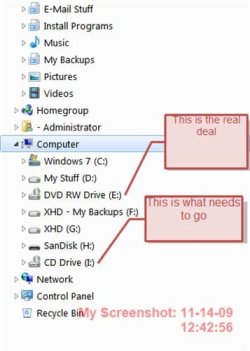
I have 2 different drive letters showing up for the same & only DVD drive in my system. Big question is why and how do I get rid of the 2nd drive

I did use Administrative tools\disk management to change the drive letter of my DVD drive & then this started showing up.

I have tried assigning the drive letter back to what it originally was and that didn't help either. One thing I have just narrowed down though. When the system boot up and I look at things with Windows Explorer evreything looks normal. Only 1 dvd drive is listed in my folder tree just as you would expect. I can put a DVD/CD in the drive & look at it's content. So far, So good, no extra drive showing up yet. Now as soon as I right click on that drive, lets say look to at it's properies, Bingo!!! Up pops the other drive letter. You can't actually use that "new" drive either. Even with media in the drive if you try to use it by clicking on it, it tells you to insert a disk even though there's a disk in the drive.

I have tried using Device manager to unisnstall, & reboot with with the same prevailing behavior.

I have tried powering off my machine, disconected the cables from the DVD drive, powered back up, powered back down, reconnected the cables & powered back up to let Win 7 rediscover the hardware to no avail. Win Explorer still report a 2nd drive letter as soon as I right click on the drive.

I'm running under Win 7 64bit with the latest Dopus 64bit installed

See the attached screen shot for further clarification.

Anybody got any ideas??

Thanks & have a great day!!
Jim
 

Attachments
  • ScreenShot001.jpg
    ScreenShot001.jpg
    22.7 KB · Views: 12

My Computer

OS
Windows 7 Professional 64Bit
I'm not certain how to get rid of it, but when in Disk Management, did you compare the location info for each drive on the General tab of Properties. That might confirmed whether in fact that both are the same drive. You might also get a clue going through the option in the dropdown menu on the Details tab. The only time that I have had anything like this happen to me before, was when I had installed a virtual drive.
 

My Computer

Computer Manufacturer/Model Number
DIY
OS
W7x64 Pro, SuSe 12.1/** W7 x64 Pro, XP MCE
CPU
Phenom II 1090T w/Noctua NH-D14 /**4400+ X2 w/CM Hyper TX 3
Motherboard
ASRock 890FX Deluxe 4/**A8N-SLI
Memory
2 x 2GB Patriot PGS34g1600LLKA/**4x1GB Corsair VS
Graphics Card(s)
EVGA GTX460 SC/**EVGA 8800GTS
Sound Card
Asus Xonar D2X/**Xonar D1
Monitor(s) Displays
Acer X233H, Dell E152FPc /**LG M237-WD
Screen Resolution
1920x1080 & 1024x768/**1980x1080
Hard Drives
WDC 2TB, 1.5TB, 1TB, 500GB,Seagate 500GB , Maxtor 80GB /**500GB Seagate & WDC 1TB Black
PSU
CM RS600 w/ APC BX1000G/**Antec 500 TP w/ APC BX1000
Case
HAF922/**Antec 1040IIB
Cooling
3x200mm, 1x140 and 1x120mm/**5x80mm fans
Keyboard
Logitech Media USB/**Saitek Eclipse
Mouse
Cordless Trackman Wheel/**Ditto
Internet Speed
3.3Mbps
Other Info
SB 560 5.1 w/ Sennheiser RS140/**Creative T20 speakers, Dvico FusionHDTV7 Gold RT, Cisco E3000, HP 5510V AIO, Linksys E3000, Belkin F5U237 hub and **F5D8055 adapter
(** = 2nd rig)
Just do a system restore to before it occurred - system restore continually adds system restore points so find one before you changed the drive letter - better still as this may not work, go into disk management and rescan (under actions) your drives - also if you right click on the area where it says cdrom 0 or 1 see what options are available - you might be better off trying to delete the new named drive if you cant get rid of the old named one. As Seikermaster said you might find something in disk management.

Another solution that you might work is to use the repair utility on the W7 dvd rom if the dvd drive will still work.

A lesson to be learnt - you should always use backup - its really good in W7 - and then you can restore your system - maybe system restore will work - its worth a try before using the W7 repair utility, if easier methods fail.

Something else I just thought of is to scan your system files - you might be able to find a replacement on the W7 dvd :
start -> cmd (run as admin) SFC /scannow
that checks to see if you have any corrupt system files
 

My Computer

OS
XP, Vista, W7 64bit Home Premium
CPU
Intel Core Duo 6850 3.0 ghz @ 3.7 ghz
Motherboard
Asus P5E
Memory
4GB Corsair DDR 2 PC-6400
Graphics Card(s)
Ati 4870 1ghz
Sound Card
Supreme FX 11
Monitor(s) Displays
View Sonic VX1962wm
Screen Resolution
1680 X1050
Hard Drives
3 Seagate Sata Drives 160gb 250gb 500gb
PSU
Thermaltake 600 watt
Case
NZXT Alpha
Cooling
3X120cm Fans
Keyboard
Microsoft Digital Media Pro Keyboard
Mouse
Microsoft Wheel Mouse Optical
Internet Speed
1.5Mb to 8Mb/384k
I want to thank all of you for your time & input about this problem. I have resolved it now. I have an Iso burn program installed called PowerIso. In it's options there is an option about mounting x# of virtual drives and it was set to 1. I disabled the option entirely & the problem went away. I don't exactly understand what virtual drives are for or how to use them or what the advantages are but diabiling the option worked.

If anyone cares to take the time to explain "Virtual Drive" to me I'm all ears & always wanting to learn.

Thanks again & have a great day!!!

Jim
 

My Computer

OS
Windows 7 Professional 64Bit
Last edited:

My Computer

Computer Manufacturer/Model Number
Self Built
OS
Windows 7 ultimate 64 bit / XP Home sp3
CPU
intel Core 2 Duo E8400 3.0ghz
Motherboard
Asus P5ND bios 1401
Memory
8 gigs 1066 OCZ Fata1ty
Graphics Card(s)
EVGA GTX 580 Call of Duty Black Ops Edition
Sound Card
Creative Soundblaster Audigy 2zs
Monitor(s) Displays
Asus 24in LCD's 2MS X2
Screen Resolution
1920x1080p @60Hz
Hard Drives
WD Caviar 500 Black/ WD Caviar 200 Blue
PSU
OCZ 700W GameXtreme
Case
NZXT Apollo
Cooling
Corsair H50 CPU/120mm x3 /60mm x2 /Corsair Dominator Ram
Keyboard
Logitech Bluetooth Wireless MX5000
Mouse
Logitech Bluetooth Wireless MX1000
Internet Speed
Download 19.83 Upload 0.97
Other Info
Logitech Z2300 Speakers/ Bose Noise Cancelling Headphones/Avermedia PCI-e Hybrid TV Bravo/Epson NX415 all in one/ 4 Port Powered USB Hub/ LG 10x Bluray Burner /TSST Corp DVDRW External
Thanks. I read the Wikipedia article. That helped
 

My Computer

OS
Windows 7 Professional 64Bit
Back
Top