2 Hard Drives, Win 7/ Linux, Sys Res Part. has System(screenshot inc.)

whiskyrock

New member
Local time
12:48 PM
Messages
10
Howdy,

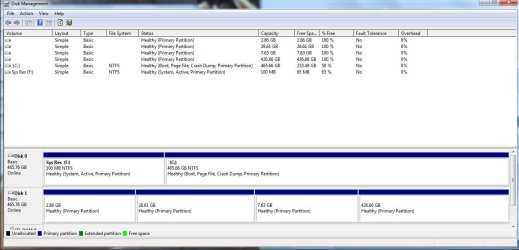
So I have 2 hard drives on my Asus G74sx. I noticed yesterday that the drive I usually use for storage is te faster one of the 2 (C: (windows 7) is on a Western Digital 5400 rpm, and D: (storage) is on a Seagate 7200 rpm. So I clone the 2 drives. After some troubleshooting, I decide to install Linux on my 5400 rpm drive, and win 7 on the 7200 rpm drive. After some more troubleshooting, I can successfully boot to either HD/OS from the Grub at startup. So, when I'm at the grub menu, I have the usual Linux options, but, 2 Windows 7 options. So in a nutshell, I succesfully made my Seagate (which was used for storage) as my C:. But it seems that my sys res partition and my C: have swapped some stuff(screenshot included). Shouldn't "system" be on C: and "crash dump" be on the Sys Res? Thanks a bunch... this stuff is all new to me but having fun :-D
partitions.jpg

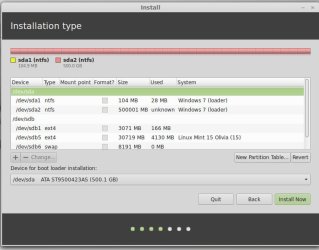
Also, at the grub menu startup, the two Windows options look like this:

Windows 7 (Loader) (on /dev/sda1)
Windows 7 (Loader) (on /dev/sda2)
 
Last edited:

My Computer My Computer

At a glance

Windows 7 Professional 64 bitCore i712GNvidia Geforce GTX 560m 3G
Computer type
Laptop
Computer Manufacturer/Model Number
Asus G74SX
OS
Windows 7 Professional 64 bit
CPU
Core i7
Memory
12G
Graphics Card(s)
Nvidia Geforce GTX 560m 3G
Hard Drives
Win 7 - Seagate - 7200
Linux - Western Digital - 5400
Antivirus
Avast
Browser
Chrome
System Reserved appears to be booting C ("System" flag), but the Active flag should correctly be on System Reserved and not C.

This is complicated unnecessarily by using GRUB when you have each OS on a different HD which should be booted via the BIOS.

I would unplug Linux, move Active flag to System reserved and make sure Win7 can boot on its own. If not run Startup Repair - Run up to 3 Separate Times .

Then plug back in Linux HD, uninstall GRUB, boot Linux using the one-time BIOS Boot Menu key when needed. If this isn't satisfactory set up your Dual Boot according to these tutorials:
Dual Boot - Windows 7 and Linux - Windows 7 Forums
Dual boot Ubuntu-Win7
 
Howdy gregrocker and thanks for your reply :-D

So ya, I kept reading and researching yesterday and that eventually led me to installing Easy BCD and then going to:
- BCD Backup/Repair
- BCD Management Options
- Re-create/repair boot files
And then hitting Perform Action.

Everything worked fine as it brought me to the Windows boot manager at startup and gave me 1 Windows 7 option and one Linux Mint option. They both boot up fine, no issues. That said, opting for the Linux option brings me into GRUB and I still had those 2 Windows options. I'm kinda cool with it but not really, haha.

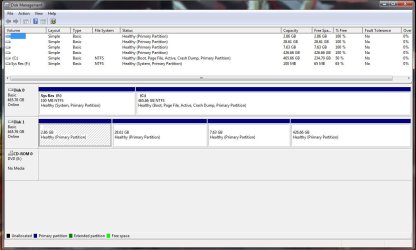
Now, that did move some stuff around the partitions (i.e. Disk Management). As I just read your thread, I marked my Sys Res as Active and now I have this:

partitions2.jpg

So, if I'm not mistaken, this is how it should look right? I also did a restart after marking the sys res as active and it brought me straight to Win 7. Cool stuff again i think (as I'll be going into my Linux HD through BIOS, which I'm super cool with). Now, I had dual booted Win7/Linux successfully a couple of months ago and eventually decided to remove the Lnux partition. To fix the bootloader, I went into the Command Prompt via a Live Windows 7 cd, entered bootrec.exe /fixmbr. This seemed to fix everything. Would doing this be good enough this time around to remove GRUB or should I follow every step that you suggested in your reply? Thanks alot man, really appreciate the help :-D
 
Last edited:

My Computer My Computer

At a glance

Windows 7 Professional 64 bitCore i712GNvidia Geforce GTX 560m 3G
Computer type
Laptop
Computer Manufacturer/Model Number
Asus G74SX
OS
Windows 7 Professional 64 bit
CPU
Core i7
Memory
12G
Graphics Card(s)
Nvidia Geforce GTX 560m 3G
Hard Drives
Win 7 - Seagate - 7200
Linux - Western Digital - 5400
Antivirus
Avast
Browser
Chrome
Did you uninstall GRUB since it isn't needed if you're setting up a Windows Boot Menu? The steps are in the two links I provided.

The Disk Mgmt config looks correct for Win7.

You shouldn't need to do more with this config than delete the Linux when ready, but if necessary to repair Win7 you'd make sure System Reserved is marked Active then run Startup Repair - Run up to 3 Separate Times

Mark Partition Active
 
Nope, I haven't uninstalled GRUB yet myself. Although, I can't boot the second hard drive (Linux) from the BIOS (I'm booted in a Linux Mint live cd as we're speaking). Added a screenshot of the partitions as seen though Mint. Glad to hear the windows side of things look right. Thx dude...

partitions3.jpg
 

My Computer My Computer

At a glance

Windows 7 Professional 64 bitCore i712GNvidia Geforce GTX 560m 3G
Computer type
Laptop
Computer Manufacturer/Model Number
Asus G74SX
OS
Windows 7 Professional 64 bit
CPU
Core i7
Memory
12G
Graphics Card(s)
Nvidia Geforce GTX 560m 3G
Hard Drives
Win 7 - Seagate - 7200
Linux - Western Digital - 5400
Antivirus
Avast
Browser
Chrome
Just saw your edited reply, going to look through those links, thanks, see ya in a few hopefully, haha
 

My Computer My Computer

At a glance

Windows 7 Professional 64 bitCore i712GNvidia Geforce GTX 560m 3G
Computer type
Laptop
Computer Manufacturer/Model Number
Asus G74SX
OS
Windows 7 Professional 64 bit
CPU
Core i7
Memory
12G
Graphics Card(s)
Nvidia Geforce GTX 560m 3G
Hard Drives
Win 7 - Seagate - 7200
Linux - Western Digital - 5400
Antivirus
Avast
Browser
Chrome
and ya, is it normal that sda1 (which is sys res) and sda2 ( which is c: ) both have Windows 7 (loader) under system. I would think that this would be the cause of having two Win 7 options in grub...
 
Last edited:

My Computer My Computer

At a glance

Windows 7 Professional 64 bitCore i712GNvidia Geforce GTX 560m 3G
Computer type
Laptop
Computer Manufacturer/Model Number
Asus G74SX
OS
Windows 7 Professional 64 bit
CPU
Core i7
Memory
12G
Graphics Card(s)
Nvidia Geforce GTX 560m 3G
Hard Drives
Win 7 - Seagate - 7200
Linux - Western Digital - 5400
Antivirus
Avast
Browser
Chrome
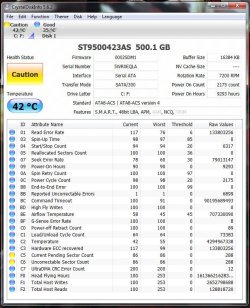
when in Rome... installed CrystalDiskInfo and noticed that the Health Status is at "caution" and that the Current Pending Sector Count and Uncorrectable Sector Count are the problems. I read up on it and it could be worrysome. I'm wondering if it would have anything to do with the 2 Windows 7 (Loader) under System in the above screenshots...
 

My Computer My Computer

At a glance

Windows 7 Professional 64 bitCore i712GNvidia Geforce GTX 560m 3G
Computer type
Laptop
Computer Manufacturer/Model Number
Asus G74SX
OS
Windows 7 Professional 64 bit
CPU
Core i7
Memory
12G
Graphics Card(s)
Nvidia Geforce GTX 560m 3G
Hard Drives
Win 7 - Seagate - 7200
Linux - Western Digital - 5400
Antivirus
Avast
Browser
Chrome
disk_health.jpg
 

My Computer My Computer

At a glance

Windows 7 Professional 64 bitCore i712GNvidia Geforce GTX 560m 3G
Computer type
Laptop
Computer Manufacturer/Model Number
Asus G74SX
OS
Windows 7 Professional 64 bit
CPU
Core i7
Memory
12G
Graphics Card(s)
Nvidia Geforce GTX 560m 3G
Hard Drives
Win 7 - Seagate - 7200
Linux - Western Digital - 5400
Antivirus
Avast
Browser
Chrome
The HD SMART status is enough of a concern I'd confirm the HD condition booting Seagate Seatools extended CD scan, with the other HD unplugged. If it's Seagate you can test it too.

This coupled with a full Disk Check should give you the HD condition of both the surface and file system.

The two Linux links I provided should help you set up the Dual Boot correctly if you can't boot the Linux HD from BIOS which is cleanest.
 
Good stuff man, working on it as soon as this reply is done, thx a bunch
 

My Computer My Computer

At a glance

Windows 7 Professional 64 bitCore i712GNvidia Geforce GTX 560m 3G
Computer type
Laptop
Computer Manufacturer/Model Number
Asus G74SX
OS
Windows 7 Professional 64 bit
CPU
Core i7
Memory
12G
Graphics Card(s)
Nvidia Geforce GTX 560m 3G
Hard Drives
Win 7 - Seagate - 7200
Linux - Western Digital - 5400
Antivirus
Avast
Browser
Chrome
Back
Top